
1. ആമുഖം
Welcome to the DOOGEE Note 56 user manual. This guide provides essential information to help you set up, operate, and maintain your new smartphone. The DOOGEE Note 56 is an unlocked Android 16 smartphone featuring a powerful Octa-Core processor, a large 6150mAh battery, and a vibrant 6.56-inch 90Hz HD+ display. It is designed for efficient daily use, photography, and connectivity.
2. ബോക്സിൽ എന്താണുള്ളത്?
Your DOOGEE Note 56 package includes the following items:
- 1 x DOOGEE Note 56 Cell Phone
- 1 x പാക്കിംഗ് ബോക്സ്
- 1 x ഉപയോക്തൃ മാനുവൽ
- 1 x Protective Film (Pre-applied)
- 1 x SIM Card Pin
- 1 x Type-C Port Cable
- 1 x ചാർജർ
- 1 x വാറൻ്റി കാർഡ്
- 1 x TPU Protective Case
3. ഡിവൈസ് ഓവർview
Familiarize yourself with the physical components and design of your DOOGEE Note 56.
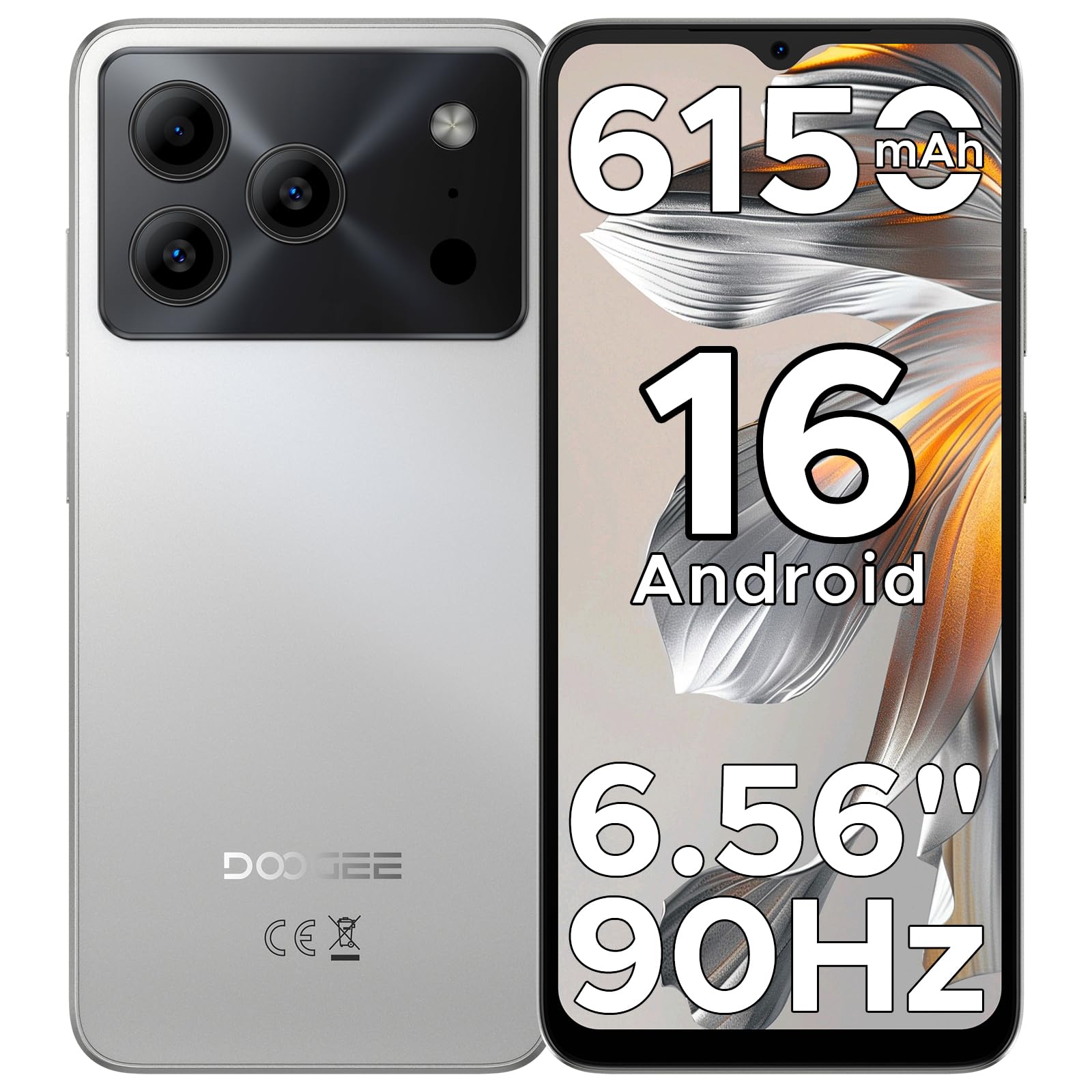
Image: The DOOGEE Note 56 smartphone, showcasing its slim design and key features such as the 8.45mm ultra-slim body, 6150mAh Silicon-Carbon Battery, Up-To-Date Android 16, 6.56" 90Hz Display, AI Scene Recognition, Instant Face Unlock, and 3.5mm Headphone Jack.

ചിത്രം: ഒരു ക്ലോസ്-അപ്പ് view of the DOOGEE Note 56 highlighting its ultra-slim 8.45mm profile and lightweight 195g design, emphasizing its pocket-friendly and refined appearance.
Physical Buttons and Ports:
- പവർ ബട്ടൺ: വശത്ത് സ്ഥിതിചെയ്യുന്നു, ഉപകരണം ഓൺ/ഓഫ് ചെയ്യുന്നതിനോ സ്ക്രീൻ ഉണർത്തുന്നതിനോ ഉറങ്ങുന്നതിനോ ഉപയോഗിക്കുന്നു.
- വോളിയം ബട്ടണുകൾ: മീഡിയയും കോൾ വോളിയവും ക്രമീകരിക്കാൻ ഉപയോഗിക്കുന്ന വശത്ത് സ്ഥിതിചെയ്യുന്നു.
- യുഎസ്ബി ടൈപ്പ്-സി പോർട്ട്: താഴെയായി സ്ഥിതിചെയ്യുന്നു, ചാർജ് ചെയ്യുന്നതിനും ഡാറ്റ കൈമാറ്റത്തിനും ഉപയോഗിക്കുന്നു.
- 3.5 എംഎം ഹെഡ്ഫോൺ ജാക്ക്: വയർഡ് ഹെഡ്ഫോണുകൾ ബന്ധിപ്പിക്കുന്നതിന് മുകളിൽ സ്ഥിതിചെയ്യുന്നു.
- സിം/ടിഎഫ് കാർഡ് സ്ലോട്ട്: Located on the side, for inserting SIM cards and a TF (microSD) card.
4. സജ്ജീകരണം
4.1. Inserting SIM and TF Cards
- Locate the SIM/TF card slot on the side of your phone.
- Insert the provided SIM eject tool into the small hole next to the slot to open the tray.
- Place your Nano-SIM card(s) and/or TF card into the tray according to the diagram on the tray.
- ഫോണിന്റെ ബോഡിയുമായി ഫ്ലഷ് ആകുന്നതുവരെ ട്രേ ശ്രദ്ധാപൂർവ്വം സ്ലോട്ടിലേക്ക് തിരികെ തള്ളുക.
4.2. പ്രാരംഭ പവർ ഓണും സജ്ജീകരണവും
- Press and hold the Power button until the DOOGEE logo appears.
- നിങ്ങളുടെ ഭാഷ തിരഞ്ഞെടുക്കുന്നതിനും, വൈഫൈയിലേക്ക് കണക്റ്റുചെയ്യുന്നതിനും, നിങ്ങളുടെ Google അക്കൗണ്ട് സജ്ജീകരിക്കുന്നതിനും ഓൺ-സ്ക്രീൻ നിർദ്ദേശങ്ങൾ പാലിക്കുക.
- Configure security settings, including Face Unlock, for quick and secure access.
5. പ്രവർത്തന നിർദ്ദേശങ്ങൾ
5.1. ആൻഡ്രോയിഡ് 16 ഓപ്പറേറ്റിംഗ് സിസ്റ്റം
Your DOOGEE Note 56 runs on the latest Android 16 OS, offering an intuitive and secure user experience. Navigate through apps, customize your home screen, and access various features with ease.

Image: A visual representation of the Android 16 operating system interface on the DOOGEE Note 56, showing various app icons and system settings.
5.2. ഫെയ്സ് അൺലോക്ക്
For convenient and secure unlocking, your device supports Face Unlock. To set it up:
- പോകുക ക്രമീകരണങ്ങൾ > സുരക്ഷ > ഫേസ് അൺലോക്ക്.
- നിങ്ങളുടെ മുഖം രജിസ്റ്റർ ചെയ്യുന്നതിന് ഓൺ-സ്ക്രീൻ നിർദ്ദേശങ്ങൾ പാലിക്കുക.
- Ensure good lighting conditions during registration for optimal performance.

Image: A user demonstrating the Instant Face Unlock feature on the DOOGEE Note 56, highlighting its quick and secure access capabilities.
5.3. ജെമിനി AI സംയോജനം
The DOOGEE Note 56 integrates Gemini AI features, enhancing your device's intelligence and responsiveness. This includes smart body sensing, dual system mode, super clipboard, memory expansion, screen optimization, and customizable screen colors.
Video: This video demonstrates how to utilize and upgrade Gemini AI features on a DOOGEE smartphone, showcasing its capabilities within the Android 16 operating system.
6. ക്യാമറ സവിശേഷതകൾ
Capture memorable moments with the DOOGEE Note 56's advanced camera system.
6.1. Rear Camera (8MP)
The 8MP main camera delivers clear, natural photos. Features include:
- HDR: വെല്ലുവിളി നിറഞ്ഞ ലൈറ്റിംഗിൽ സന്തുലിതമായ എക്സ്പോഷറിനായി ഡൈനാമിക് റേഞ്ച് മെച്ചപ്പെടുത്തുന്നു.
- പ്രോ മോഡ്: Offers manual control over camera settings.
- രാത്രി മോഡ്: കുറഞ്ഞ വെളിച്ചത്തിൽ ഫോട്ടോ നിലവാരം മെച്ചപ്പെടുത്തുന്നു.
- AI രംഗ തിരിച്ചറിയൽ: Automatically detects 12 scenes and optimizes settings for stunning shots.
- പോർട്രെയിറ്റ് മോഡ്: പ്രൊഫഷണലായി തോന്നിക്കുന്ന പോർട്രെയ്റ്റുകൾക്ക് ഒരു ഡെപ്ത്-ഓഫ്-ഫീൽഡ് ഇഫക്റ്റ് സൃഷ്ടിക്കുന്നു.
- സ്മൈൽ ക്യാപ്ചർ: ഒരു പുഞ്ചിരി കണ്ടെത്തുമ്പോൾ യാന്ത്രികമായി ഒരു ഫോട്ടോ എടുക്കുന്നു.
- Panoramas: Capture wide-angle scenic views.
- Burst Shots: വേഗത്തിൽ ഒന്നിനുപുറകെ ഒന്നായി ഒന്നിലധികം ഫോട്ടോകൾ എടുക്കുക.
- Fun Filters: നിങ്ങളുടെ ഫോട്ടോകളിൽ ക്രിയേറ്റീവ് ഫിൽട്ടറുകൾ പ്രയോഗിക്കുക.

Image: An illustration of the DOOGEE Note 56's camera capabilities, including AI Scene Recognition icons and various sample photos taken with the 8MP main camera and 5MP front camera.
6.2. Front Camera (5MP)
The 5MP front camera is perfect for selfies and video calls, featuring Beauty Mode and Portrait Effect for bright and natural results.
7. കണക്റ്റിവിറ്റി
Stay connected with a range of network and wireless options.
- 4G Dual SIM: ഫ്ലെക്സിബിൾ നെറ്റ്വർക്ക് ഉപയോഗത്തിനായി രണ്ട് സിം കാർഡുകൾ പിന്തുണയ്ക്കുന്നു.
- വൈഫൈ: ഇന്റർനെറ്റ് ആക്സസ്സിനായി വയർലെസ് നെറ്റ്വർക്കുകളിലേക്ക് കണക്റ്റുചെയ്യുക.
- ബ്ലൂടൂത്ത് 4.2: വയർലെസ് ആക്സസറികളുമായി ബന്ധിപ്പിക്കുന്നതിന്.
- ജിപിഎസ്: നാവിഗേഷൻ, ലൊക്കേഷൻ സേവനങ്ങൾക്കായി.
- എഫ്എം റേഡിയോ: നിങ്ങളുടെ പ്രിയപ്പെട്ട റേഡിയോ സ്റ്റേഷനുകൾ ആസ്വദിക്കൂ.
7.1. Supported Network Bands:
- GSM: B2/3/5/8
- WCDMA: B1/2/4/5/8
- TDD: ബി 38/40/41
- FDD: B1/2/3/4/5/7/8/18/19/20/25/26/28A/28B/66
- പിന്തുണ: എഡ്ജ്/ജിപിആർഎസ്
8. ബാറ്ററി മാനേജ്മെന്റ്
The DOOGEE Note 56 is equipped with a large 6150mAh Silicon-Carbon battery for extended usage.

ചിത്രം: ഒരു ആന്തരികം view of the DOOGEE Note 56 highlighting its 6150mAh Silicon-Carbon Battery, emphasizing its longer lifespan, unmatched durability, 1000 charge cycles, 4 years durable battery, 20% smaller size, and 5W reverse charging capability.
Video: This video highlights the 6150mAh Silicon-Carbon Battery of the DOOGEE Note 56, showcasing its capacity and efficiency.
8.1. OTG റിവേഴ്സ് ചാർജിംഗ്
The device supports OTG (On-The-Go) reverse charging, allowing you to use your Note 56 to charge other compatible devices.
8.2. Tips for Extending Battery Life:
- സ്ക്രീൻ തെളിച്ചം താഴ്ന്ന നിലയിലേക്ക് ക്രമീകരിക്കുക.
- ഉപയോഗത്തിലില്ലാത്തപ്പോൾ വൈഫൈ, ബ്ലൂടൂത്ത്, ജിപിഎസ് എന്നിവ ഓഫാക്കുക.
- പശ്ചാത്തല ആപ്ലിക്കേഷനുകൾ അടയ്ക്കുക.
- ക്രമീകരണങ്ങളിൽ ബാറ്ററി സേവർ മോഡ് പ്രവർത്തനക്ഷമമാക്കുക.

Image: This image illustrates various usage scenarios for the DOOGEE Note 56, demonstrating its extended battery life for web browsing (7 hours), music playing (49.5 hours), video watching (14 hours), and calling (28 hours).
9. സംഭരണവും പ്രകടനവും
The DOOGEE Note 56 is powered by a UNISOC SC9863A Octa-Core processor, ensuring smooth performance for applications and daily tasks.
- റാം: 24GB (virtual RAM expansion, 8GB physical RAM).
- ആന്തരിക സംഭരണം: 64 ജിബി.
- വികസിപ്പിക്കാവുന്ന സംഭരണം: Supports up to 2TB via TF (microSD) card (TF card needs to be purchased separately).

Image: A visual representation of the DOOGEE Note 56's internal memory and storage, showing 64GB ROM and 24GB RAM (3GB+21GB virtual expansion), emphasizing smooth multitasking and ampലെ സ്പേസ്.
10. ഡിസ്പ്ലേ
Experience immersive visuals on the 6.56-inch HD+ 90Hz IPS waterdrop screen.
- വലിപ്പം: 6.56 ഇഞ്ച്
- റെസലൂഷൻ: 720 x 1612 പിക്സലുകൾ
- പുതുക്കൽ നിരക്ക്: 90Hz
- വീക്ഷണ അനുപാതം: 20:9
- PPI: 269

Image: The DOOGEE Note 56 display showcasing its 6.56-inch HD+ screen with a 90Hz refresh rate, designed for smooth viewing and social media interaction.
11. പരിപാലനവും പരിചരണവും
To ensure the longevity and optimal performance of your DOOGEE Note 56, follow these care guidelines:
- ഉയർന്ന താപനില, നേരിട്ടുള്ള സൂര്യപ്രകാശം അല്ലെങ്കിൽ അമിതമായ ഈർപ്പം എന്നിവയിൽ ഫോൺ തുറന്നുകാട്ടുന്നത് ഒഴിവാക്കുക.
- അംഗീകൃത ചാർജറുകളും കേബിളുകളും മാത്രം ഉപയോഗിക്കുക.
- മൃദുവായ, ലിന്റ് രഹിത തുണി ഉപയോഗിച്ച് സ്ക്രീനും ബോഡിയും വൃത്തിയാക്കുക.
- Utilize the provided TPU protective case and pre-applied protective film to guard against scratches and minor impacts.
12. പ്രശ്നപരിഹാരം
If you encounter issues with your DOOGEE Note 56, try the following basic troubleshooting steps:
- ഉപകരണം ഓണാക്കുന്നില്ല: ബാറ്ററി ചാർജ്ജ് ചെയ്തിട്ടുണ്ടെന്ന് ഉറപ്പാക്കുക. ചാർജർ കണക്റ്റ് ചെയ്ത് വീണ്ടും പവർ ചെയ്യാൻ ശ്രമിക്കുന്നതിന് മുമ്പ് കുറച്ച് മിനിറ്റ് കാത്തിരിക്കുക.
- സ്ക്രീൻ പ്രതികരിക്കുന്നില്ല: പവർ ബട്ടൺ ഏകദേശം 10-15 സെക്കൻഡ് അമർത്തിപ്പിടിച്ചുകൊണ്ട് ഉപകരണം പുനരാരംഭിക്കുക.
- നെറ്റ്വർക്ക് പ്രശ്നങ്ങൾ: Check if your SIM card is properly inserted. Verify network settings and ensure you have an active plan with your carrier.
- ആപ്പ് ക്രാഷുകൾ: Clear the cache of the problematic app or reinstall it. Ensure your device's software is up to date.
For more complex issues, refer to the official DOOGEE support webസൈറ്റ് അല്ലെങ്കിൽ ഉപഭോക്തൃ സേവനവുമായി ബന്ധപ്പെടുക.
13 സ്പെസിഫിക്കേഷനുകൾ
| ഫീച്ചർ | വിശദാംശങ്ങൾ |
|---|---|
| മോഡലിൻ്റെ പേര് | കുറിപ്പ് 56 |
| ഓപ്പറേറ്റിംഗ് സിസ്റ്റം | ആൻഡ്രോയിഡ് 16 |
| പ്രോസസ്സർ | UNISOC SC9863A Octa-Core (1.6 GHz CPU Speed) |
| റാം | 24 ജിബി (8 ജിബി ഫിസിക്കൽ + 16 ജിബി വെർച്വൽ) |
| ആന്തരിക സംഭരണം | 64 ജിബി |
| വികസിപ്പിക്കാവുന്ന സംഭരണം | TF കാർഡ് വഴി 2 TB വരെ |
| ഡിസ്പ്ലേ വലിപ്പം | 6.56 ഇഞ്ച് |
| ഡിസ്പ്ലേ റെസല്യൂഷൻ | 720 x 1612 (എച്ച്ഡി+) |
| പുതുക്കിയ നിരക്ക് | 90 Hz |
| പിൻ ക്യാമറ | 8 എം.പി |
| മുൻ ക്യാമറ | 5 എം.പി |
| ബാറ്ററി ശേഷി | 6150 മില്ലിamp മണിക്കൂർ (ലി-പോ) |
| കണക്റ്റിവിറ്റി | 4G Dual SIM, Wi-Fi, Bluetooth 4.2, GPS, FM Radio, USB Type-C |
| ഓഡിയോ ജാക്ക് | 3.5 മി.മീ |
| അളവുകൾ | 6.45 x 2.98 x 0.33 ഇഞ്ച് |
| ഇനത്തിൻ്റെ ഭാരം | 6.9 ഔൺസ് (195 ഗ്രാം) |
| പ്രത്യേക സവിശേഷതകൾ | Dual SIM, Expandable Memory, Supports USB OTG, Face Unlock |
14. വാറൻ്റിയും പിന്തുണയും
Your DOOGEE Note 56 comes with a warranty. Please refer to the included Warranty Card in your product package for detailed information on warranty terms, conditions, and duration.
For technical support, service, or further inquiries, please visit the official DOOGEE website or contact their customer service channels. Keep your purchase receipt and warranty card handy for any claims.