
1. ആമുഖം
The WatchGuard Firebox T185 is a high-performance tabletop firewall designed to provide enterprise-grade security for branch offices and retail environments. This device handles demanding traffic loads and offers flexible connectivity options, including SFP+ fiber, 2.5Gb, and 1Gb Ethernet ports. It integrates advanced threat protection, VPN support, and SD-WAN capabilities to ensure secure and efficient network operations.
2 സുരക്ഷാ വിവരങ്ങൾ
- ഉപകരണം പ്രവർത്തിപ്പിക്കുന്നതിന് മുമ്പ് എല്ലാ നിർദ്ദേശങ്ങളും വായിക്കുക.
- വൈദ്യുതാഘാതം തടയാൻ ശരിയായ ഗ്രൗണ്ടിംഗ് ഉറപ്പാക്കുക.
- ഈർപ്പം അല്ലെങ്കിൽ അങ്ങേയറ്റത്തെ താപനിലയിലേക്ക് ഉപകരണം തുറന്നുകാട്ടരുത്.
- ഉപകരണത്തിനൊപ്പം നൽകിയിരിക്കുന്ന പവർ സപ്ലൈ മാത്രം ഉപയോഗിക്കുക.
- ഉപകരണം തുറക്കരുത് casing; യോഗ്യതയുള്ള ഉദ്യോഗസ്ഥരെ സർവീസ് ചെയ്യാൻ റഫർ ചെയ്യുക.
- Secure the device physically using the Kensington Lock slot to prevent theft.
3. പാക്കേജ് ഉള്ളടക്കം
പാക്കേജിൽ എല്ലാ ഇനങ്ങളും ഉണ്ടെന്ന് ഉറപ്പാക്കുക:
- WatchGuard Firebox T185 Appliance
- പവർ അഡാപ്റ്റർ
- ഇഥർനെറ്റ് കേബിൾ
- ദ്രുത ആരംഭ ഗൈഡ്
4. ഫിസിക്കൽ ഓവർview
Familiarize yourself with the ports, indicators, and features of your Firebox T185.

This image displays the WatchGuard Firebox T185, highlighting its front and rear panels. The front panel features LED indicators for status and mode. The rear panel includes a DC power input, two USB 3.2 ports, one O/WAN 1/LAN port, four 1 Gbps LAN ports (ports 2-5), two 2.5 Gbps PoE ports (ports 6-7), one 10 Gbps SFP+ port, a reset button, and a power switch. A Kensington lock slot is also visible.

The WatchGuard Firebox T185 is shown held in a hand, illustrating its compact tabletop form factor suitable for various environments.

എ വിശദമായി view of the rear panel of the Firebox T185, showing the power input, USB ports, 1GbE LAN ports, 2.5GbE PoE ports, and the SFP+ port.
LED സൂചകങ്ങൾ
മുൻവശത്തെ പാനൽ LED-കൾ സ്റ്റാറ്റസ് വിവരങ്ങൾ നൽകുന്നു:
- സ്റ്റാറ്റസ് LED: ഉപകരണത്തിന്റെ പ്രവർത്തന നില സൂചിപ്പിക്കുന്നു.
- എൽഇഡി ശ്രദ്ധിക്കുക: Alerts to system warnings or errors.
- മോഡ് LED: നിലവിലെ ഓപ്പറേറ്റിംഗ് മോഡ് കാണിക്കുന്നു.
- പോർട്ട് LED-കൾ: Indicate link status and activity for each network port.
5. പ്രാരംഭ സജ്ജീകരണം
- ഉപകരണം അൺപാക്ക് ചെയ്യുക: Carefully remove the Firebox T185 and all accessories from the packaging.
- നെറ്റ്വർക്ക് കേബിളുകൾ ബന്ധിപ്പിക്കുക:
- Connect your internet source (modem or upstream router) to the O/WAN 1/LAN തുറമുഖം.
- Connect your internal network devices (switches, computers) to the LAN ports (2-5). For higher speeds, use the 2.5 Gbps PoE ports (6-7) അല്ലെങ്കിൽ SFP+ പോർട്ട് ആവശ്യാനുസരണം.
- പവർ ബന്ധിപ്പിക്കുക: Plug the power adapter into the device's power input and then into a power outlet. Turn on the power switch.
- പവർ ഓൺ: The device will power on automatically. Observe the LED indicators for boot-up status.
- പ്രാരംഭ കോൺഫിഗറേഷൻ: ഉപകരണത്തിലേക്ക് പ്രവേശിക്കുക web interface or use WatchGuard Cloud for initial configuration. Refer to the Quick Start Guide for default IP addresses and login credentials.
ഈ വീഡിയോയിൽ ഒരു ഉൽപ്പന്നം നൽകിയിരിക്കുന്നു, അത്view of the WatchGuard Firebox T185, demonstrating its features and potential deployment scenarios. It highlights the device's physical aspects and connectivity options.
6. പ്രവർത്തന നിർദ്ദേശങ്ങൾ
Once configured, the Firebox T185 operates continuously to protect your network. Management is typically performed through the WatchGuard Cloud platform or a local web ഇൻ്റർഫേസ്.
- നിരീക്ഷണം: Regularly check the device status through the WatchGuard Cloud dashboard or local interface for alerts and performance metrics.
- ഫേംവെയർ അപ്ഡേറ്റുകൾ: Keep the device firmware updated to ensure the latest security patches and features. Follow WatchGuard's official update procedures.
- VPN കണക്ഷനുകൾ: Utilize the VPN features for secure remote access or site-to-site connectivity as configured.
- എസ്ഡി-വാൻ: Leverage SD-WAN capabilities for optimized traffic routing and network resilience.
7. പരിപാലനം
- പതിവ് വൃത്തിയാക്കൽ: Keep the device free from dust. Use a soft, dry cloth to clean the exterior. Do not use liquid cleaners.
- വെൻ്റിലേഷൻ: Ensure adequate airflow around the device to prevent overheating. Do not block ventilation openings.
- ഫേംവെയർ മാനേജ്മെന്റ്: Periodically check for and apply firmware updates as recommended by WatchGuard.
- കോൺഫിഗറേഷൻ ബാക്കപ്പ്: Regularly back up your device configuration to prevent data loss in case of an issue.
8. പ്രശ്നപരിഹാരം
- ശക്തിയില്ല:
- Check the power cable connection and ensure the power outlet is functional. Verify the power switch is in the 'On' position.
- നെറ്റ്വർക്ക് കണക്റ്റിവിറ്റി ഇല്ല:
- Verify all Ethernet cables are securely connected. Check the status of the port LEDs. Ensure your internet service is active. Review network configuration settings.
- മന്ദഗതിയിലുള്ള പ്രകടനം:
- Check network traffic and resource utilization through the management interface. Ensure firmware is up-to-date. Consider reviewing security policies for potential bottlenecks.
- ഉപകരണം അമിതമായി ചൂടാക്കൽ:
- Ensure the device is placed in a well-ventilated area. Clear any dust from the ventilation openings.
9 സാങ്കേതിക സവിശേഷതകൾ
| ഫീച്ചർ | മൂല്യം |
|---|---|
| IPS Throughput (full scan) | 2.40 ജിബിപിഎസ് |
| Firewall Throughput (IMIX) | 7.90 ജിബിപിഎസ് |
| VPN Throughput (IMIX) | 1.14 ജിബിപിഎസ് |
| HTTPS (IPS enabled, full scan) | 1.00 ജിബിപിഎസ് |
| നെറ്റ്വർക്ക് ഇൻ്റർഫേസുകൾ | 4 x 1 GbE, 4 x 2.5 GbE, 1 x SFP/SFP+ |
| I/O ഇൻ്റർഫേസുകൾ | 1 Serial/2 USB-A 3.2 |
| മോഡലിൻ്റെ പേര് | വാച്ച്ഗാർഡ് ഫയർബോക്സ് T185 |
| പ്രത്യേക ഫീച്ചർ | UTM, VPN Support, Integrated SD-WAN |
| ശുപാർശ ചെയ്യുന്ന ഉപയോഗങ്ങൾ | ബിസിനസ്സ് |
| കണക്റ്റിവിറ്റി ടെക്നോളജി | ഇതർനെറ്റ്, SFP+ |
| ഇനത്തിൻ്റെ ഭാരം | 6.8 പൗണ്ട് |
| ഓപ്പറേറ്റിംഗ് സിസ്റ്റം | ഫയർവെയർ |
| Data Transfer Rate (UTM) | സെക്കൻഡിൽ 1830 മെഗാബൈറ്റുകൾ |
| Maximum Upstream Data Transfer Rate | സെക്കൻഡിൽ 1830 മെഗാബൈറ്റുകൾ |
| ലാൻ പോർട്ട് ബാൻഡ്വിഡ്ത്ത് | 2500 Mbps |
| Modem Compatible | ഇല്ല |
| കവറേജ് | Software and emergency support |
| യു.പി.സി | 654522437150 |
| നിർമ്മാതാവ് | വാച്ച് ഗാർഡ് |
| നിർമ്മാതാവിൻ്റെ ഭാഗം നമ്പർ | WGT185000+WGT1850063 |

This image displays a table detailing key performance specifications for the WatchGuard Firebox T185, including IPS, Firewall, VPN, and HTTPS throughputs, as well as network and I/O interfaces.
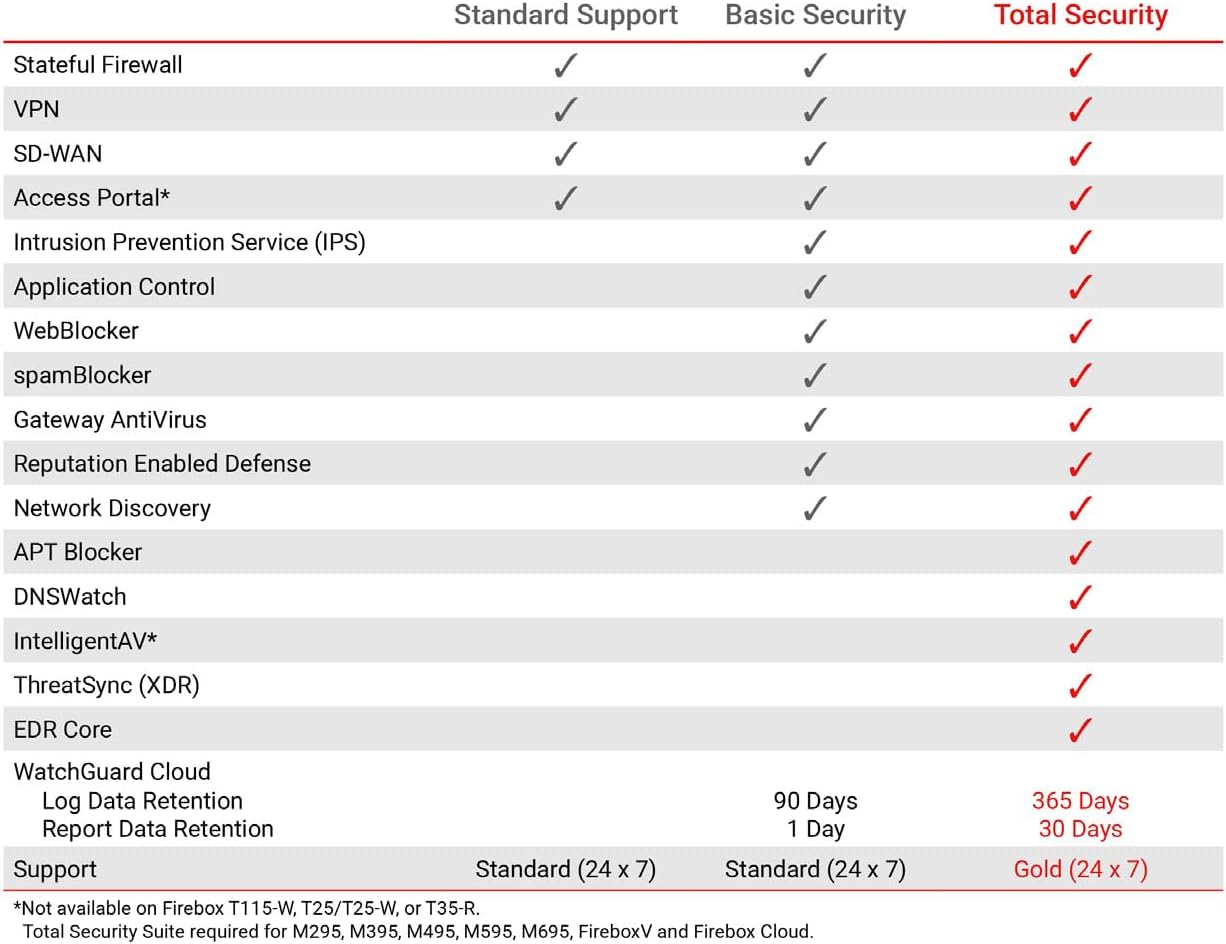
This table compares the security features included with Standard Support, Basic Security Suite, and Total Security Suite for the WatchGuard Firebox T185, showing which features are enabled for each option.
10. വാറൻ്റിയും പിന്തുണയും
The WatchGuard Firebox T185 comes with a 3-year Standard Support license (WGT185003).
- സ്റ്റാൻഡേർഡ് പിന്തുണ: Provides software updates and 24x7 emergency technical assistance, along with business-hours support for routine inquiries.
- സംരക്ഷണ പദ്ധതികൾ: Additional protection plans may be available, such as a 4-Year Protection Plan or a Complete Protect monthly plan. Refer to your purchase documentation for details.
- നിർമ്മാതാവിൻ്റെ പിന്തുണ: കൂടുതൽ സഹായത്തിന്, ഉദ്യോഗസ്ഥനെ സന്ദർശിക്കുക WatchGuard support webസൈറ്റ് അല്ലെങ്കിൽ അവരുടെ ഉപഭോക്തൃ സേവനവുമായി ബന്ധപ്പെടുക.