
1. ആമുഖം
This manual provides detailed instructions for the safe and effective use of your jeeber VB816 PRO 1080P WiFi Baby Monitor. Please read this manual thoroughly before operating the device and retain it for future reference. The monitor offers dual control via a 4-inch IPS screen and a smartphone application, featuring pan-tilt-zoom capabilities, HD night vision, motion and cry detection, temperature sensing, and lullabies to assist in monitoring your baby.
2. പാക്കേജ് ഉള്ളടക്കം
അൺബോക്സിംഗ് ചെയ്യുമ്പോൾ എല്ലാ ഇനങ്ങളും ഉണ്ടെന്ന് ഉറപ്പാക്കുക:
- 1 × Camera Unit
- 1 × Display Unit (Monitor)
- 2 × Power Adapters
- 1 × ഉപയോക്തൃ മാനുവൽ
3. ഉൽപ്പന്നം കഴിഞ്ഞുview
The jeeber VB816 PRO baby monitor system consists of a camera unit and a parent display unit. The camera provides a 1080P video feed with pan, tilt, and zoom functions, while the display unit offers a 4-inch IPS screen for real-time viewing. The system also supports smartphone app integration for remote monitoring.

Image: The jeeber VB816 PRO baby monitor system, showing the camera unit, the 4-inch IPS display unit, and a smartphone displaying the app interface.
4. സജ്ജീകരണ നിർദ്ദേശങ്ങൾ
4.1 പ്രാരംഭ പവർ-അപ്പും കണക്ഷനും
- ക്യാമറ പവർ ചെയ്യുക: Plug the power adapter into a power outlet and connect it to the Type-C port on the camera. Manually turn on the camera using its power button until the blue indicator light illuminates.
- Power the Display Unit: Press and hold the power button on the display unit for at least 3 seconds to turn it on.
- യാന്ത്രിക ജോടിയാക്കൽ: The camera is pre-registered and paired with your monitor. It will automatically connect after being plugged in and turned on.
Video: Quick Start Guide for JEEBER VB816PRO. This video demonstrates the initial setup process, including powering on the camera and monitor, and the automatic pairing sequence.
4.2 Smartphone App Pairing
To use the smartphone app for monitoring:
- Download and open the "FeelBaby" app on your smartphone.
- Follow the in-app instructions to add a new device. Ensure Bluetooth is enabled on your phone.
- The camera only supports 2.4GHz Wi-Fi connections. Select your 2.4GHz Wi-Fi network during the pairing process.
- Once successfully added, you can view the camera feed and control its functions via the app.

Image: A split image showing a user monitoring the baby via the display unit at home and another user monitoring via the smartphone app outdoors, illustrating dual control options.
4.3 Adding Multiple Cameras
The system supports connecting up to four cameras. To add an additional camera:
- On the display unit, press the മെനു / ശരി ബട്ടൺ.
- നാവിഗേറ്റ് ചെയ്യുക ക്യാമറ → ക്യാമറ ചേർക്കുക → ക്യാമറ 2 (or the next available camera slot).
- അമർത്തുക OK.
- ഷോർട്ട് അമർത്തുക ജോടി കീ on your baby unit (camera).
- The display will show "Register Successful" once paired.
To switch between multiple cameras, long press the left and right buttons on the display unit.

Image: A diagram illustrating the connection of up to four cameras to a single display unit, with cycling views to monitor different areas simultaneously.
5. പ്രവർത്തന നിർദ്ദേശങ്ങൾ
5.1 പാൻ-ടിൽറ്റ്-സൂം (PTZ) നിയന്ത്രണം
The camera offers 340° pan, 70° tilt, and 3x digital zoom for comprehensive room coverage.
- Via Display Unit: അമർത്തുക Switch PTZ button (often labeled with a camera icon or arrows) to activate PTZ control. Use the directional arrows (Up, Down, Left, Right) to adjust the camera's view. അമർത്തുക OK to confirm or exit PTZ mode.
- Via Smartphone App: Use the on-screen joystick or swipe gestures within the FeelBaby app to control the camera's movement.
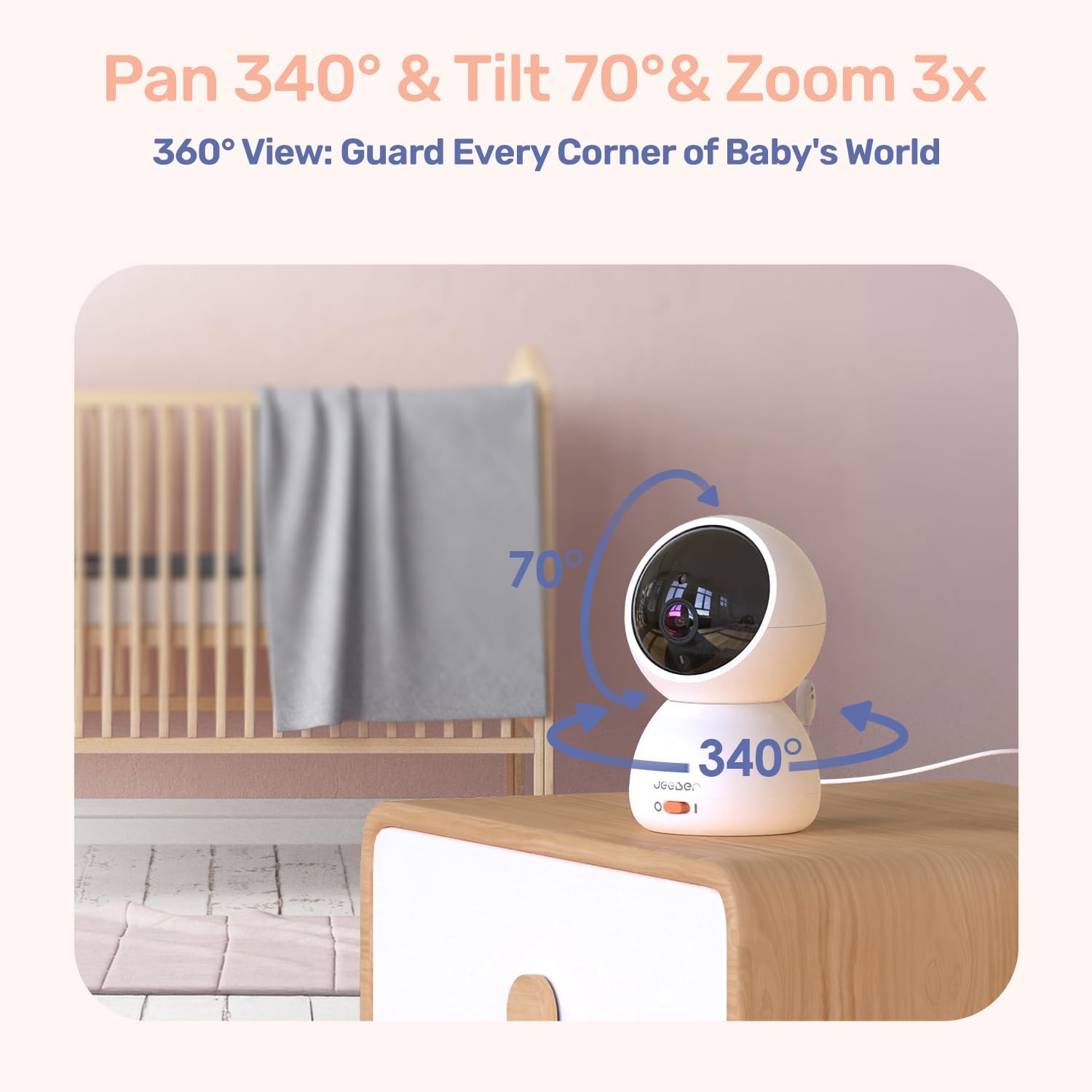
Image: The baby monitor camera illustrating its 340-degree pan and 70-degree tilt range, providing a 360-degree view മുറിയുടെ.
5.2 നൈറ്റ് വിഷൻ
The camera features 940nm non-visible infrared light for clear night vision up to 8 meters, ensuring monitoring without disturbing your baby with visible red light.

Image: A baby sleeping peacefully in a crib, with the monitor displaying a clear night vision image. Icons for two-way talk, temperature detection, and lullabies are visible.
5.3 ടു-വേ ടോക്ക്
Use the two-way talk feature to soothe your baby remotely. Press and hold the microphone button on the display unit or use the corresponding icon in the app to speak through the camera's speaker.
5.4 ലാലേട്ടൻ
The monitor includes pre-set lullabies to help your baby fall asleep. Access the lullaby function through the display unit's menu or the smartphone app.
5.5 VOX (Sound Detection)
The VOX feature activates the display unit's screen and sends alerts to your phone when it detects sound, such as your baby crying. This conserves battery life by keeping the screen off during quiet periods.

Image: A person working on a laptop, with the baby monitor displaying a sleeping baby. Lightning bolt icons indicate the monitor's auto-wake feature via VOX sound detection.
5.6 മോഷൻ ഡിറ്റക്ഷൻ
Receive instant alerts on your phone when motion is detected in the camera's view. This feature helps you stay informed of your baby's movements.

Image: A baby standing in a crib, with a smartphone displaying a notification for 'Baby Motion Detection Alarm', indicating the motion detection feature.
5.7 താപനില നിരീക്ഷണം
The monitor provides real-time room temperature readings to ensure a comfortable environment for your baby. Alerts can be set for temperature deviations.

Image: A close-up of the baby monitor camera with an external temperature sensor, displaying a room temperature reading of 26.3°C.
5.8 Virtual Safety Fence
Set up custom alert zones (virtual safety fences) within the app. You will receive instant alerts if your baby moves outside these designated safe areas.

Image: A baby crawling inside a playpen, with a green dashed line indicating a virtual safety fence. A smartphone displays a 'Baby Virtual Fence Alarm' notification.
5.9 പങ്കിടൽ ആക്സസ്
The camera feed can be shared with up to 8 users through the smartphone app, allowing multiple family members to monitor the baby.

Image: A smartphone displaying a live feed of a baby in a crib, surrounded by smaller icons representing multiple users, indicating the ability to share access.
6. പരിപാലനം
- വൃത്തിയാക്കൽ: Use a soft, dry cloth to clean the camera lens and display screen. Do not use liquid cleaners or aerosols.
- പ്ലേസ്മെൻ്റ്: Ensure the camera is placed on a stable surface or securely wall-mounted, away from direct sunlight, heat sources, and moisture.
- ബാറ്ററി കെയർ: The display unit has a built-in battery. For optimal battery life, avoid extreme temperatures and fully charge the unit before first use.
7. പ്രശ്നപരിഹാരം
- ചിത്രം/ശബ്ദം ഇല്ല:
- Ensure both the camera and display unit are powered on and properly connected to their power adapters.
- Check if the camera and monitor are within range.
- Re-pair the camera and monitor if necessary (refer to Section 4.3 for adding cameras).
- മോശം ചിത്ര നിലവാരം:
- ക്യാമറ ലെൻസ് വൃത്തിയുള്ളതാണെന്ന് ഉറപ്പാക്കുക.
- Check for obstructions between the camera and monitor.
- Verify strong Wi-Fi signal if using the app.
- ആപ്പ് കണക്ഷൻ പ്രശ്നങ്ങൾ:
- Confirm your Wi-Fi network is 2.4GHz.
- Ensure your phone's Bluetooth is on during pairing.
- ആപ്പും ക്യാമറയും പുനരാരംഭിക്കുക.
- ഹ്രസ്വ ബാറ്ററി ലൈഫ്:
- Reduce screen brightness on the display unit.
- Utilize VOX mode to conserve power.
- ബാറ്ററി പൂർണ്ണമായി ചാർജ് ചെയ്തിട്ടുണ്ടെന്ന് ഉറപ്പാക്കുക.
8 സ്പെസിഫിക്കേഷനുകൾ
| ഫീച്ചർ | സ്പെസിഫിക്കേഷൻ |
|---|---|
| മോഡലിൻ്റെ പേര് | VB816 PRO |
| വീഡിയോ ക്യാപ്ചർ റെസല്യൂഷൻ | 1080p |
| ഡിസ്പ്ലേ സ്ക്രീൻ വലിപ്പം | 4 ഇഞ്ച് ഐ.പി.എസ് |
| പാൻ/ടിൽറ്റ് ശ്രേണി | 340° Pan / 70° Tilt |
| നൈറ്റ് വിഷൻ റേഞ്ച് | 8 മീറ്റർ |
| കണക്റ്റിവിറ്റി പ്രോട്ടോക്കോൾ | 2.4GHz FHSS, Wi-Fi |
| പവർ ഉറവിടം | Battery Powered (Display), AC Powered (Camera) |
| Battery Life (Display) | Up to 14 hours (continuous screen use) |
| മെറ്റീരിയൽ | അക്രിലോണിട്രൈൽ ബ്യൂട്ടാഡീൻ സ്റ്റൈറൈൻ (എബിഎസ്) |
| ഇനത്തിന്റെ അളവുകൾ (L x W x H) | 5.5 x 4.3 x 2.7 ഇഞ്ച് |
| ഇനത്തിൻ്റെ ഭാരം | 1.34 പൗണ്ട് |
9 സുരക്ഷാ വിവരങ്ങൾ
- എല്ലാ ഘടകങ്ങളും കുട്ടികൾക്ക് ലഭ്യമാകാതെ സൂക്ഷിക്കുക.
- Do not place the camera or cords within 3 feet of the crib or playpen to prevent strangulation hazards.
- നൽകിയിരിക്കുന്ന പവർ അഡാപ്റ്ററുകൾ മാത്രം ഉപയോഗിക്കുക.
- വെള്ളം അല്ലെങ്കിൽ ഈർപ്പം ഉപകരണം തുറന്നുകാട്ടരുത്.
- ഈ ഉൽപ്പന്നം ഇൻഡോർ ഉപയോഗത്തിന് മാത്രമുള്ളതാണ്.
- The monitor is a tool to assist you in monitoring your baby and should not replace direct adult supervision.
10. വാറൻ്റിയും പിന്തുണയും
Your jeeber VB816 PRO Baby Monitor comes with a 2-year warranty. We also offer a 90-day free return and exchange policy. For any inquiries or assistance, please contact our professional English customer service. We provide 24/7 rapid support.

Image: Four icons illustrating customer support features: 24/7 Rapid Support, 90-day Returns, 2-year After-sales, and Professional English Customer Service.