
1. ആമുഖം
Thank you for choosing the Jesebang S75 Wireless Earbuds. These earbuds are designed to provide a high-quality audio experience with advanced features such as Bluetooth 5.4 connectivity, Environmental Noise Cancellation (ENC) for clear calls, IPX7 waterproofing, and a secure over-ear hook design, making them ideal for sports and active lifestyles. This manual provides detailed instructions for setup, operation, and maintenance to ensure optimal performance and longevity of your device.
2. ബോക്സിൽ എന്താണുള്ളത്?
എല്ലാ ഇനങ്ങളും ഉണ്ടെന്ന് ഉറപ്പാക്കാൻ പാക്കേജ് ഉള്ളടക്കങ്ങൾ പരിശോധിക്കുക:
- S75 Wireless Earbuds (2 units)
- Portable Charging Case (1 unit)
- USB-C ചാർജിംഗ് കേബിൾ (1 യൂണിറ്റ്)
- Silicone Earplugs (S / M / L sizes, 3 pairs)
- ഉപയോക്തൃ മാനുവൽ (ഈ പ്രമാണം)

Image: Contents of the Jesebang S75 Wireless Earbuds package.
3. സജ്ജീകരണം
3.1 ഇയർബഡുകളും കേസും ചാർജ് ചെയ്യുന്നു
Before first use, fully charge the earbuds and the charging case. The charging case features a dual LED digital display to show the battery levels of both the case and individual earbuds.
- Connect the provided USB-C charging cable to the charging port on the case and to a USB power source.
- The LED display on the charging case will illuminate to indicate charging status. The numbers will increase as the case charges, and the earbud battery indicators will show their charging progress.
- Once fully charged, the display will show '100' for the case and full battery icons for the earbuds. A full charge typically takes approximately 2 hours.

Image: Charging the S75 Earbuds and Case with LED display.
3.2 നിങ്ങളുടെ ഉപകരണവുമായി ജോടിയാക്കൽ
The S75 earbuds feature one-step auto-pairing for convenience.
- പ്രാരംഭ ജോടിയാക്കൽ: ചാർജിംഗ് കേസ് തുറക്കുക. ഇയർബഡുകൾ സ്വയമേവ ഓണാകുകയും ജോടിയാക്കൽ മോഡിലേക്ക് പ്രവേശിക്കുകയും ചെയ്യും.
- നിങ്ങളുടെ ഉപകരണത്തിൽ (സ്മാർട്ട്ഫോൺ, ടാബ്ലെറ്റ് മുതലായവ), ബ്ലൂടൂത്ത് പ്രവർത്തനക്ഷമമാക്കി ലഭ്യമായ ഉപകരണങ്ങൾക്കായി തിരയുക.
- Select "S75" from the list of found devices to connect. You will hear a voice prompt confirming the connection.
- യാന്ത്രിക പുനഃസംയോജനം: After the first successful pairing, the earbuds will automatically reconnect to the last paired device when you open the charging case.

Image: One-step auto-pairing process for Jesebang S75 Earbuds.
വീഡിയോ: ഒരു ഓവർview of the Jesebang S75 Wireless Earbuds, demonstrating features like battery life, Bluetooth 5.4, sound quality, ENC, IPX7 waterproofing, ergonomic earhooks, and smart touch control. This video illustrates the product's key functionalities and design.
4. ഇയർബഡുകൾ പ്രവർത്തിപ്പിക്കൽ
4.1 ഇയർബഡുകൾ ധരിക്കൽ
The S75 earbuds are designed with soft, elastic earhooks for a secure and comfortable fit, especially during physical activity.
- Choose the silicone earplugs (S, M, L) that best fit your ear canal for optimal sound and comfort.
- നിങ്ങളുടെ ഇയർ കനാലിലേക്ക് ഇയർബഡ് മൃദുവായി തിരുകുക.
- Adjust the earhook to rest securely over and behind your ear. Ensure a snug fit to prevent movement during exercise.

Image: Proper wearing of Jesebang S75 Earbuds with earhooks.
4.2 സ്മാർട്ട് ടച്ച് നിയന്ത്രണങ്ങൾ
The S75 earbuds feature highly sensitive touch sensors for easy control of music, calls, and voice assistant functions.
| ആക്ഷൻ | ഫംഗ്ഷൻ |
|---|---|
| One Click (L/R) | സംഗീതം പ്ലേ ചെയ്യുക/താൽക്കാലികമായി നിർത്തുക |
| Short Tap (L/R) | ഉത്തരം / കോൾ അവസാനിപ്പിക്കുക |
| Long Tap (L/R) | കോൾ നിരസിക്കുക |
| One Click Tap R | വോളിയം കൂട്ടുക |
| One Click Tap L | വോളിയം ഡൗൺ |
| ലോംഗ് ടാപ്പ് 2s എൽ | മുമ്പത്തെ ട്രാക്ക് |
| ലോംഗ് ടാപ്പ് 2s ആർ | അടുത്ത ട്രാക്ക് |
| Triple Click (L/R) | വോയ്സ് അസിസ്റ്റൻ്റ് സജീവമാക്കുക |
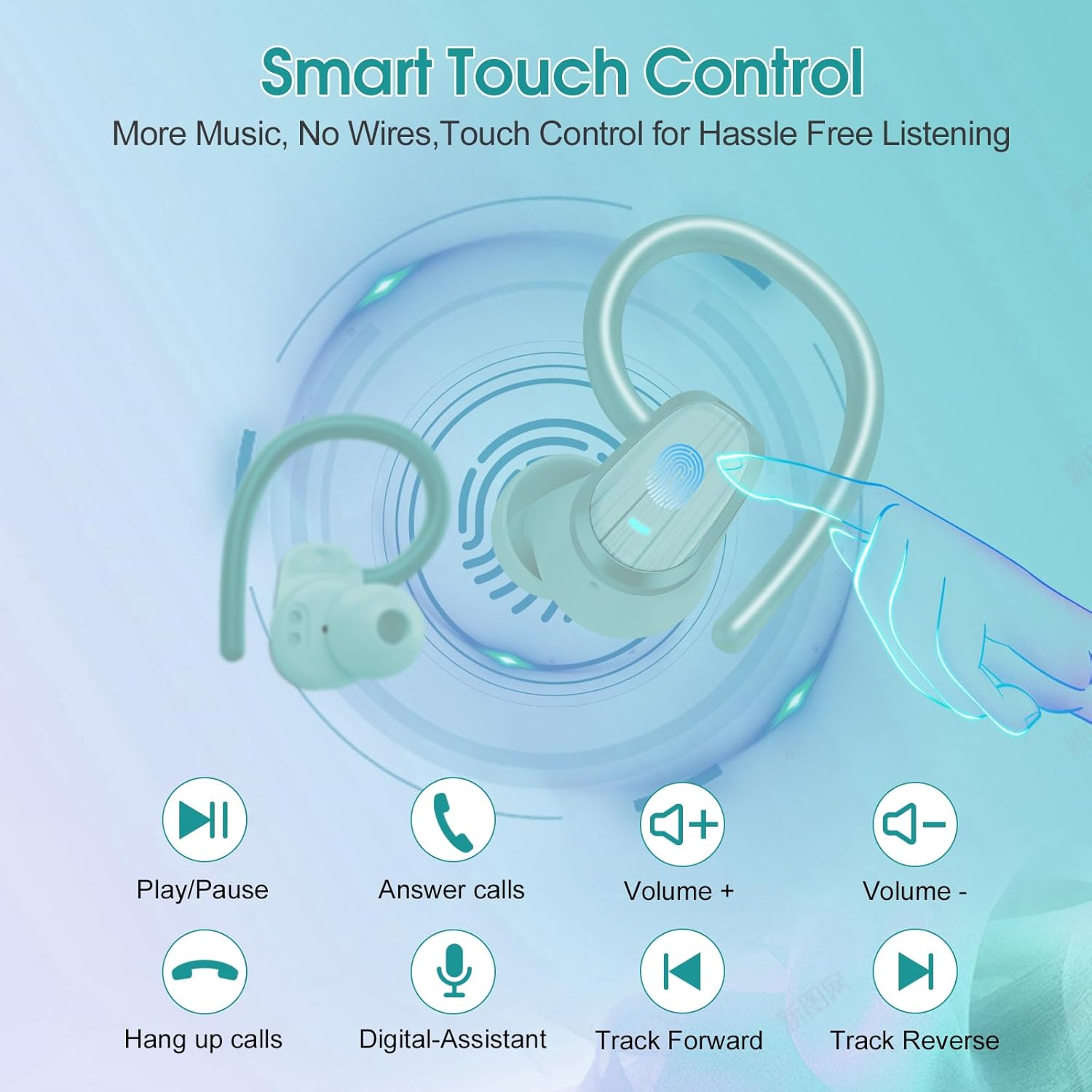
Image: Smart Touch Control functions on the S75 Earbuds.
5. പരിപാലനം
5.1 വാട്ടർപ്രൂഫിംഗ് (IPX7)
The S75 earbuds are rated IPX7 waterproof, meaning they can withstand immersion in water up to 1 meter for 30 minutes. This makes them suitable for workouts, running, and protection against sweat and rain.
- Do not intentionally submerge the earbuds for extended periods or in depths greater than specified.
- കേടുപാടുകൾ തടയാൻ ചാർജിംഗ് പോർട്ട് വരണ്ടതാണെന്ന് ഉറപ്പാക്കുക.
5.2 വൃത്തിയാക്കൽ
പതിവായി വൃത്തിയാക്കുന്നത് ശബ്ദ നിലവാരവും ശുചിത്വവും നിലനിർത്താൻ സഹായിക്കുന്നു.
- ഇയർബഡുകളും ചാർജിംഗ് കെയ്സും തുടയ്ക്കാൻ മൃദുവായതും ഉണങ്ങിയതും ലിന്റ് രഹിതവുമായ ഒരു തുണി ഉപയോഗിക്കുക.
- Remove the silicone earplugs and clean them with mild soap and water. Ensure they are completely dry before reattaching.
- ഉരച്ചിലുകൾ ഉള്ള വസ്തുക്കൾ, മദ്യം, കെമിക്കൽ ക്ലീനറുകൾ എന്നിവ ഉപയോഗിക്കുന്നത് ഒഴിവാക്കുക.
6. പ്രശ്നപരിഹാരം
If you encounter any issues with your Jesebang S75 earbuds, please refer to the following common solutions:
| പ്രശ്നം | പരിഹാരം |
|---|---|
| ഇയർബഡുകൾ ജോടിയാക്കുന്നില്ല | Ensure earbuds are charged. Turn off and on your device's Bluetooth. Forget "S75" in your device's Bluetooth settings and re-pair. |
| ഒരു ഇയർബഡ് മാത്രമേ പ്രവർത്തിക്കൂ | Place both earbuds back in the charging case, close the lid, wait a few seconds, then open the lid again. This should reset the connection between them. |
| കുറഞ്ഞ ശബ്ദം അല്ലെങ്കിൽ മോശം ശബ്ദ നിലവാരം | Adjust volume on both your device and earbuds. Ensure earplugs are correctly sized and seated in your ear canal. Clean any debris from the earbud speakers. |
| ചാർജിംഗ് കേസ് ചാർജുചെയ്യുന്നില്ല | USB-C കേബിളും പവർ അഡാപ്റ്ററും പരിശോധിക്കുക. ചാർജിംഗ് പോർട്ട് വൃത്തിയുള്ളതും അവശിഷ്ടങ്ങൾ ഇല്ലാത്തതുമാണെന്ന് ഉറപ്പാക്കുക. |
| ഇയർബഡുകൾ ചാർജ് ചെയ്യുന്നില്ല, എന്തെങ്കിലും കാരണത്താൽ | Ensure the charging contacts on both the earbuds and the case are clean and dry. Verify the charging case itself has sufficient battery. |
7 സ്പെസിഫിക്കേഷനുകൾ
Key technical specifications for the Jesebang S75 Wireless Earbuds:
- മോഡലിൻ്റെ പേര്: എസ് 75
- കണക്റ്റിവിറ്റി ടെക്നോളജി: വയർലെസ് (ബ്ലൂടൂത്ത്)
- ബ്ലൂടൂത്ത് പതിപ്പ്: 5.4
- ബ്ലൂടൂത്ത് ശ്രേണി: 15 മീറ്റർ
- ഓഡിയോ ഡ്രൈവർ തരം: ഡൈനാമിക് ഡ്രൈവർ
- ഓഡിയോ ഡ്രൈവർ വലിപ്പം: 14.2 മില്ലിമീറ്റർ
- ജല പ്രതിരോധ നില: IPX7 വാട്ടർപ്രൂഫ്
- ചെവി സ്ഥാപിക്കൽ: ചെവിക്ക് മുകളിൽ
- ഫോം ഘടകം: ചെവിയിൽ
- ബാറ്ററി ലൈഫ് (ഇയർബഡുകൾ): 10 മണിക്കൂർ വരെ (ഒറ്റ ചാർജ്)
- ആകെ പ്ലേടൈം (ചാർജിംഗ് കേസിനൊപ്പം): 50 മണിക്കൂർ വരെ
- ചാർജിംഗ് സമയം: Approximately 2 hours (for full charge)
- ഇനത്തിൻ്റെ ഭാരം: 3.17 ഔൺസ്
- നിർമ്മാതാവ്: Dongguan Huien Electronic Technology Co., Ltd
8. വാറൻ്റിയും പിന്തുണയും
Your Jesebang S75 Wireless Earbuds come with a standard return policy of 30 days from the date of purchase for refunds or replacements, as per Amazon's policy. For specific warranty details beyond this period, please refer to the information provided by the manufacturer or contact Jesebang customer support directly.
For further assistance, technical support, or inquiries, please visit the official Jesebang store on Amazon or contact their customer service channels.
ഓൺലൈൻ സ്റ്റോർ: Jesebang Store