
ആമുഖം
Welcome to the DOOGEE V Max Play 5G Rugged Smartphone user manual. This device is engineered for durability and high performance, featuring a built-in 100-lumen projector, a massive 20500mAh battery, and a powerful 200MP AI camera system. Designed to withstand challenging environments, the V Max Play is IP68/IP69K and MIL-STD-810H certified, ensuring reliability wherever your adventures take you. This manual will guide you through the setup, operation, and maintenance of your new smartphone.
ബോക്സിൽ എന്താണുള്ളത്
Upon unboxing your DOOGEE V Max Play, you should find the following items:
- 1x DOOGEE V Max Play Rugged Phone
- 1x ചാർജിംഗ് കേബിൾ
- 1x Charger (45W Fast Charger)
- 1x Silk Screen Printing Protective Film (Pre-applied)
- 1x ടെമ്പർഡ് ഗ്ലാസ് സ്ക്രീൻ പ്രൊട്ടക്ടർ
- 1x ഉപയോക്തൃ മാനുവൽ
- 1x വാറൻ്റി കാർഡ്
- 1x പാക്കേജ് ബോക്സ്
- 1x Portable Storage Box
- 1x Phone Back Clip
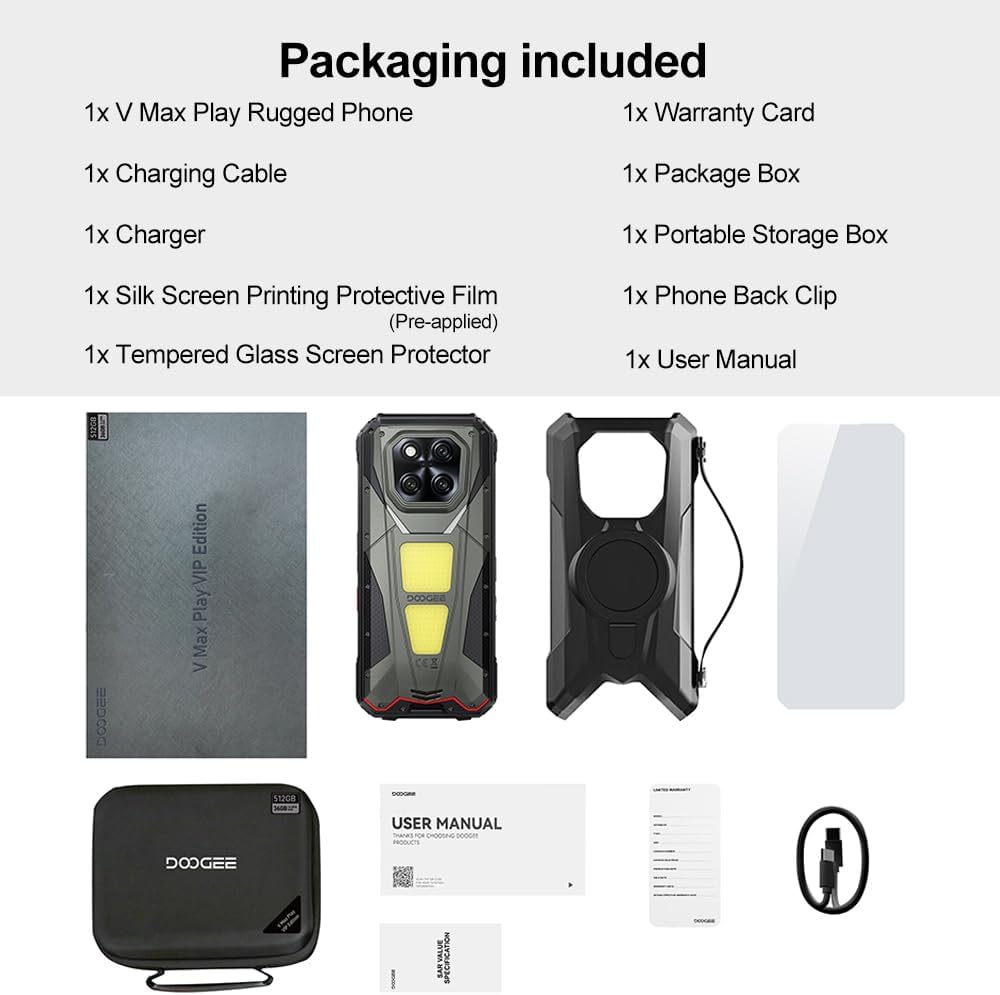
Image: Contents of the DOOGEE V Max Play retail box, including the phone, charger, cables, and documentation.
ഉപകരണം കഴിഞ്ഞുview
Familiarize yourself with the physical features and components of your DOOGEE V Max Play smartphone.

ചിത്രം: കഴിഞ്ഞുview of the DOOGEE V Max Play highlighting the projector, mega battery, main camera, dual camping lights, loud speaker, and waterdrop display.
ഫിസിക്കൽ ബട്ടണുകളും പോർട്ടുകളും
- പവർ ബട്ടൺ/ഫിംഗർപ്രിന്റ് സെൻസർ: Located on the side, used to power on/off the device and for biometric authentication.
- വോളിയം ബട്ടണുകൾ: മീഡിയയും കോൾ വോളിയവും ക്രമീകരിക്കുക.
- ഇഷ്ടാനുസൃതമാക്കാവുന്ന പ്രവർത്തന ബട്ടൺ: A programmable button for quick access to various functions (e.g., flashlight, camera, SOS).
- യുഎസ്ബി-സി പോർട്ട്: For charging and data transfer, protected by a waterproof cover.
- സിം/എസ്ഡി കാർഡ് സ്ലോട്ട്: Supports dual 5G Nano-SIM cards and expandable storage up to 2TB.
സെക്കൻഡറി ഡിസ്പ്ലേ

Image: Close-up of the customizable secondary display on the rear of the DOOGEE V Max Play.
The DOOGEE V Max Play features a 1.32-inch customizable secondary display on its rear. This display can show time, battery status, music controls, notifications, and more. It offers various clock styles and widgets for personalized quick-glance information.
Built-in Projector
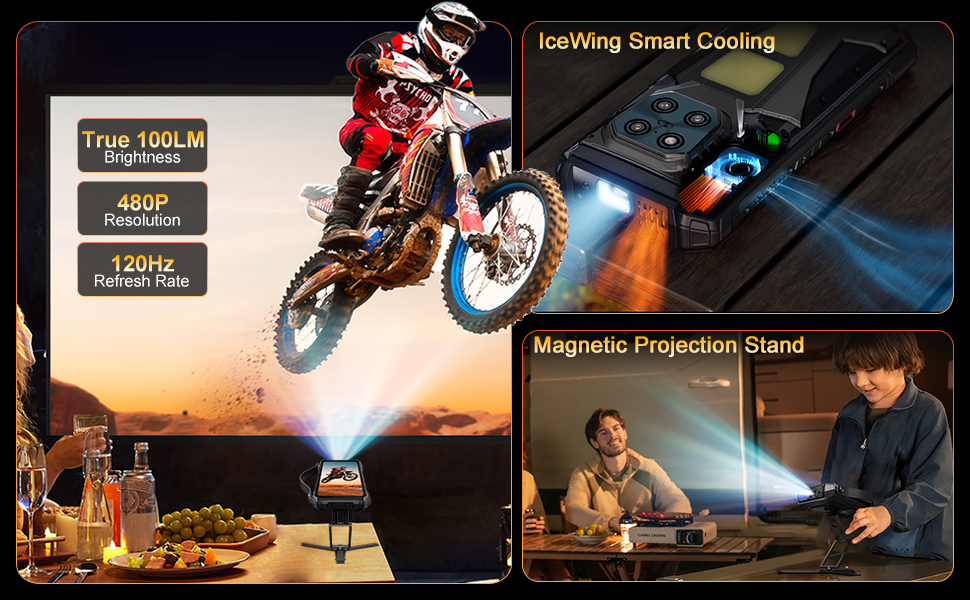
Image: The DOOGEE V Max Play's 100-lumen projector in action, showing projection features like autofocus and keystone correction.
Integrated into the device is a 100-lumen projector with a 60Hz refresh rate and 854x480 resolution. It supports autofocus and various projection adjustments for clear viewing.
ഡ്യുവൽ സിamping ലൈറ്റുകൾ

Image: The DOOGEE V Max Play's 1200LM dual camping lights illuminating a dark outdoor scene.
The phone features powerful 1200LM dual camping lights with multiple modes (Lighting, SOS, Flash) and brightness adjustments, capable of brightening up to 8 meters ahead.
സജ്ജമാക്കുക
1. പ്രാരംഭ പവർ ഓൺ
- Press and hold the Power Button on the side of the device until the DOOGEE logo appears.
- ഭാഷാ തിരഞ്ഞെടുപ്പ്, വൈ-ഫൈ കണക്ഷൻ, ഗൂഗിൾ അക്കൗണ്ട് സജ്ജീകരണം എന്നിവയുൾപ്പെടെയുള്ള പ്രാരംഭ സജ്ജീകരണം പൂർത്തിയാക്കാൻ ഓൺ-സ്ക്രീൻ നിർദ്ദേശങ്ങൾ പാലിക്കുക.
2. SIM Card & MicroSD Card Installation
- Locate the SIM/SD card slot on the side of the phone.
- സംരക്ഷണ കവർ ശ്രദ്ധാപൂർവ്വം തുറക്കുക.
- Insert your Nano-SIM card(s) and/or MicroSD card into the tray, ensuring correct orientation.
- Gently push the tray back into the slot and securely close the protective cover to maintain waterproof integrity.
3. Fingerprint & Face Unlock Setup
- നാവിഗേറ്റ് ചെയ്യുക ക്രമീകരണങ്ങൾ > സുരക്ഷയും സ്വകാര്യതയും > ഉപകരണം അൺലോക്ക് ചെയ്യുക.
- തിരഞ്ഞെടുക്കുക വിരലടയാളം or ഫേസ് അൺലോക്ക് and follow the on-screen instructions to register your fingerprint(s) or face data.
പ്രവർത്തന നിർദ്ദേശങ്ങൾ
1. അടിസ്ഥാന പ്രവർത്തനങ്ങൾ
- പവർ ഓൺ/ഓഫ്: Press and hold the Power Button. Select 'Power off' or 'Restart' from the menu.
- സ്ക്രീൻ ലോക്ക്/അൺലോക്ക്: Briefly press the Power Button to lock or unlock the screen.
- വോളിയം ക്രമീകരണം: Use the Volume Up/Down buttons to control audio levels.
2. Secondary Display Usage
To interact with the secondary display, simply swipe across its surface. You can customize its functions via Settings > MiniScreen.
- Clock Plate: Choose from various clock styles.
- വിജറ്റുകൾ: Access music controls, camera shortcuts, calendar, and notifications.
- അറിയിപ്പുകൾ: Incoming calls and messages will be displayed on the secondary screen.
3. Projector Function
Video: Demonstration of the DOOGEE V Max Play's 100-lumen projector in various usage scenarios, including outdoor entertainment and professional presentations.
The built-in projector allows you to share content on a larger screen. Access projector settings from the quick settings panel or a dedicated app.
- സജീവമാക്കൽ: Open the projector app or toggle from the quick settings.
- ഓട്ടോഫോക്കസ്: The projector automatically adjusts focus for a clear image.
- ക്രമീകരണങ്ങൾ: Use on-screen controls for vertical flip, keystone correction, and aspect ratio.
- ഗെയിമിംഗ്: Connect a game controller for an enhanced gaming experience with projected content.
4. സിamping ലൈറ്റുകൾ
വീഡിയോ: ഷോക്asing the DOOGEE V Max Play's camping lantern feature, demonstrating its brightness and utility in dark environments.
The 1200LM dual camping lights provide powerful illumination. Access controls from the quick settings panel or a dedicated app.
- മോഡുകൾ: Switch between Lighting, SOS, and Flash modes.
- തെളിച്ചം: Adjust the brightness level from 20% to 100%.
5. ക്യാമറ ഉപയോഗം

ചിത്രം: വിശദമായത് view of the DOOGEE V Max Play's camera setup, including the 200MP AI main camera, 20MP night vision, 8MP ultra-wide/macro, and 32MP front camera.
The DOOGEE V Max Play features a versatile camera system:
- 200MP AI പ്രധാന ക്യാമറ: For high-resolution photos with EIS stabilization.
- 20MP നൈറ്റ് വിഷൻ ക്യാമറ: Captures clear images in complete darkness.
- 8MP Ultra-Wide & Macro Camera: For expansive landscapes and detailed close-ups.
- 32MP മുൻ ക്യാമറ: For optimized selfies.
Open the Camera app and select your desired mode (Photo, Video, Night Vision, Macro, etc.).
6. Customizable Action Button
The customizable action button on the side of the device can be configured for various shortcuts. Go to Settings > Side Key Function to assign single-click, double-click, and long-press actions to functions like flashlight, screenshots, or opening specific applications.
മെയിൻ്റനൻസ്
Your DOOGEE V Max Play is built to be rugged, but proper maintenance ensures its longevity.
- വാട്ടർപ്രൂഫ്/ഡസ്റ്റ് പ്രൂഫ്: Ensure all port covers (USB-C, SIM/SD card slot) are securely closed before exposing the device to water or dust.
- വൃത്തിയാക്കൽ: ഒരു സോഫ്റ്റ് ഉപയോഗിക്കുക, ഡിamp cloth to clean the device. Avoid harsh chemicals.
- ഡ്രോപ്പ് റെസിസ്റ്റൻസ്: While designed to be drop-proof (MIL-STD-810H), extreme impacts can still cause damage. Handle with care.
- ബാറ്ററി കെയർ: Avoid extreme temperatures. Do not fully discharge the battery regularly. Use the provided 45W fast charger for optimal charging.
ട്രബിൾഷൂട്ടിംഗ്
നിങ്ങളുടെ ഉപകരണത്തിൽ പ്രശ്നങ്ങൾ നേരിടുകയാണെങ്കിൽ, ഇനിപ്പറയുന്ന പരിഹാരങ്ങൾ പരീക്ഷിക്കുക:
- ഉപകരണം ഓണാക്കുന്നില്ല: ബാറ്ററി ചാർജ് ചെയ്തിട്ടുണ്ടെന്ന് ഉറപ്പാക്കുക. ചാർജറുമായി ബന്ധിപ്പിച്ച് വീണ്ടും ശ്രമിക്കുക.
- സ്ക്രീൻ പ്രതികരിക്കുന്നില്ല: Restart the device by holding the Power Button.
- നെറ്റ്വർക്ക് പ്രശ്നങ്ങൾ: Check SIM card installation. Ensure mobile data is enabled and you have network coverage.
- Projector not working: Check projector settings. Ensure the lens is clean and there are no obstructions.
- ബാറ്ററി വേഗത്തിൽ തീർന്നു പോകുന്നു: Close unused apps. Reduce screen brightness. Check for background app activity.
സ്പെസിഫിക്കേഷനുകൾ
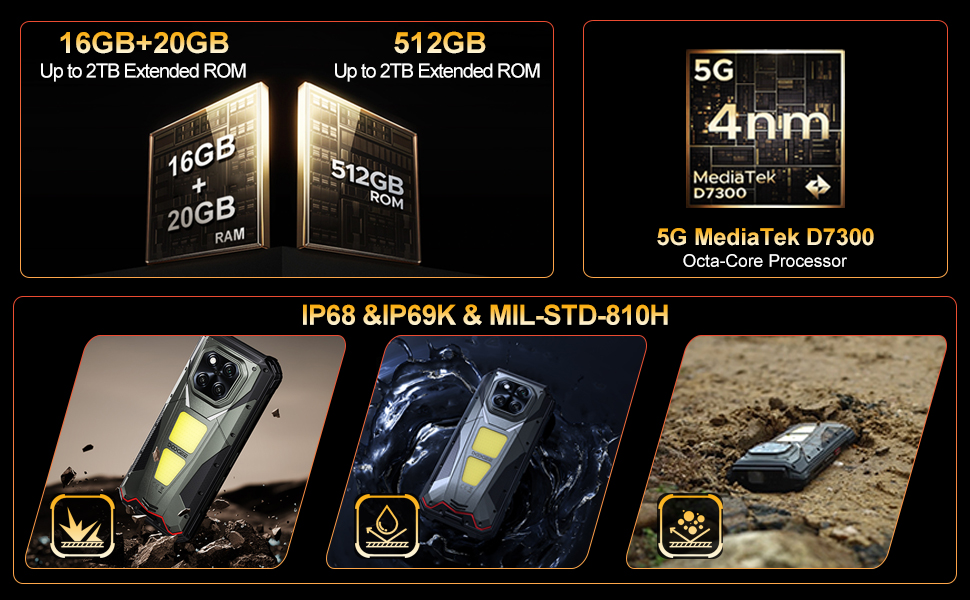
Image: The DOOGEE V Max Play running on Android 15 with Gemini AI integration.
| ഫീച്ചർ | സ്പെസിഫിക്കേഷൻ |
|---|---|
| മോഡലിൻ്റെ പേര് | DOOGEE V Max Play |
| ഓപ്പറേറ്റിംഗ് സിസ്റ്റം | ആൻഡ്രോയിഡ് 15 |
| പ്രോസസ്സർ | MediaTek Dimensity 7300 5G (4nm Octa-core, 2.5GHz) |
| റാം | 16GB Physical RAM + 20GB Virtual RAM (36GB Total) |
| സംഭരണം | 512GB ROM (Expandable up to 2TB) |
| പ്രദർശിപ്പിക്കുക | 6.78-inch FHD+ (1080x2460) 120Hz Refresh Rate, 500 nits brightness |
| പ്രൊജക്ടർ | 100 Lumens, 854x480 Resolution, 60Hz Refresh Rate |
| പിൻ ക്യാമറ | 200MP AI Main (EIS), 20MP Night Vision, 8MP Ultra-Wide/Macro |
| മുൻ ക്യാമറ | 32എംപി |
| ബാറ്ററി | 20500mAh, 45W Fast Charging, 10W Reverse OTG |
| ഈട് | IP68/IP69K, MIL-STD-810H |
| കണക്റ്റിവിറ്റി | Dual 5G SIM, Bluetooth 5.2, Wi-Fi 6, NFC (Google Pay), GPS/Beidou/GLONASS/Galileo |
| അളവുകൾ | 7.07 x 3.25 x 0.75 ഇഞ്ച് |
| ഭാരം | 1.18 പൗണ്ട് (536 ഗ്രാം) |
വാറൻ്റി & പിന്തുണ
Your DOOGEE V Max Play 5G Rugged Smartphone comes with a 24-month warranty. For any hardware or software issues, please contact our technical support team. We are committed to resolving your concerns promptly.
For further assistance, please visit the official DOOGEE webസൈറ്റ് സന്ദർശിക്കുക അല്ലെങ്കിൽ നിങ്ങളുടെ വാങ്ങൽ പ്ലാറ്റ്ഫോം വഴി ഉപഭോക്തൃ സേവനവുമായി ബന്ധപ്പെടുക.