
1. ആമുഖം
This manual provides instructions for the operation and maintenance of your LIGE FV26-F Smartwatch. Please read this manual carefully before using the device to ensure proper function and to maximize its features. The smartwatch is designed for women, featuring a round display, silver stainless steel band with diamond accents, and a silicone strap option.
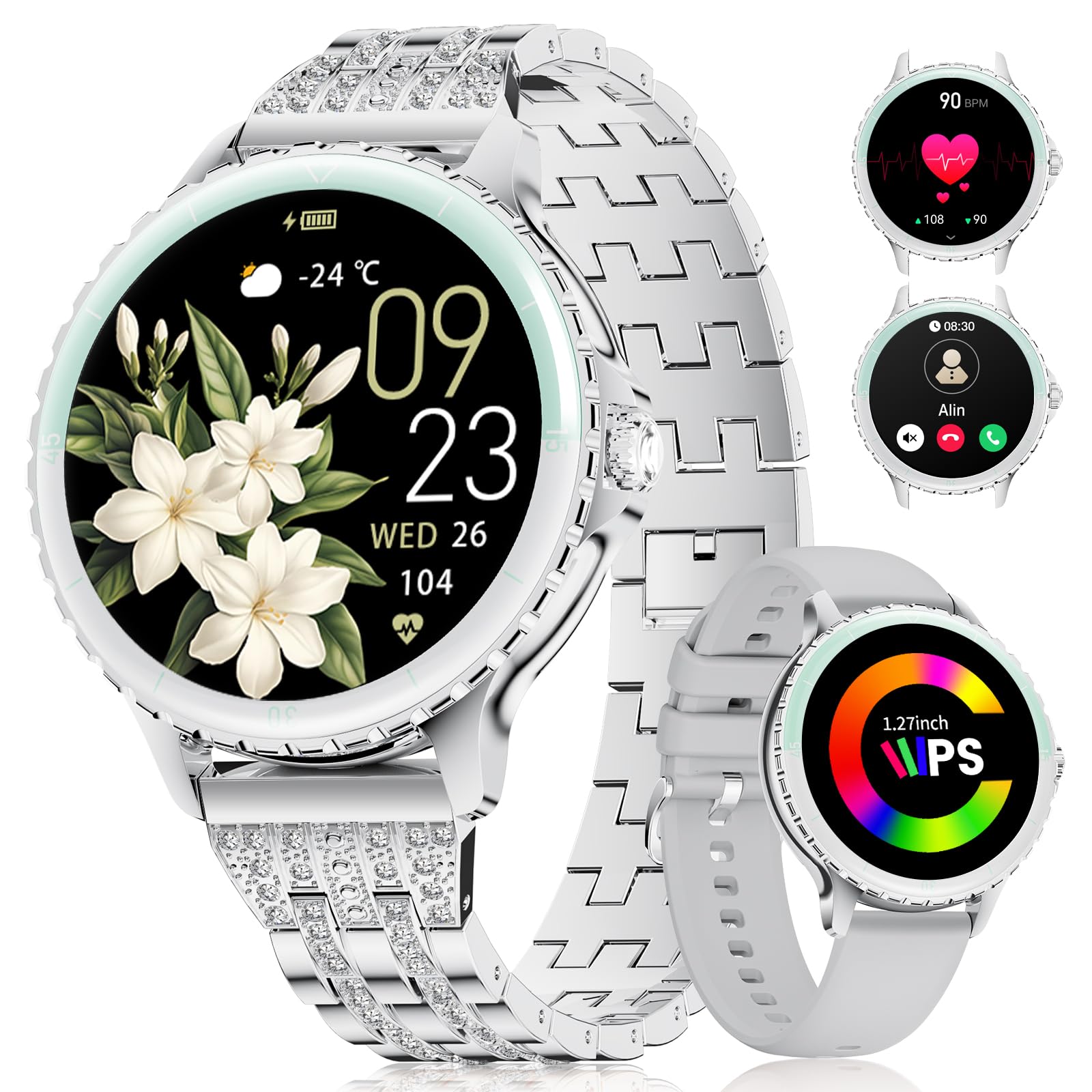
Image: LIGE FV26-F Smartwatch displaying its elegant design with both stainless steel and silicone strap options.
2. സജ്ജീകരണം
2.1 സ്മാർട്ട് വാച്ച് ചാർജ് ചെയ്യുന്നു
- സ്മാർട്ട് വാച്ചിന്റെ പിൻഭാഗത്തുള്ള ചാർജിംഗ് പോർട്ടിലേക്ക് ചാർജിംഗ് കേബിൾ ബന്ധിപ്പിക്കുക.
- കേബിളിന്റെ USB അറ്റം ഒരു സ്റ്റാൻഡേർഡ് USB പവർ അഡാപ്റ്ററിലേക്ക് (ഉൾപ്പെടുത്തിയിട്ടില്ല) അല്ലെങ്കിൽ ഒരു കമ്പ്യൂട്ടറിന്റെ USB പോർട്ടിലേക്ക് പ്ലഗ് ചെയ്യുക.
- Ensure the charging pins are properly aligned with the smartwatch's contacts.
- A charging indicator will appear on the screen. Allow approximately 2-3 hours for a full charge.
2.2 ആപ്പ് ഇൻസ്റ്റാളേഷനും ജോടിയാക്കലും
- ഡൗൺലോഡ് ചെയ്യുക FitcloudPro application from your smartphone's app store (Google Play Store for Android, Apple App Store for iOS).
- Ensure your smartphone meets the compatibility requirements: Android 6.0 or higher, or iOS 9.0 or higher.
- നിങ്ങളുടെ സ്മാർട്ട്ഫോണിൽ ബ്ലൂടൂത്ത് പ്രവർത്തനക്ഷമമാക്കുക.
- Open the FitcloudPro app and follow the on-screen instructions to create an account or log in.
- In the app, navigate to the device pairing section and search for your LIGE FV26-F smartwatch.
- Select your smartwatch from the list of available devices to initiate the pairing process. Confirm any pairing requests on both your phone and the smartwatch.
Once paired, the smartwatch will synchronize data with the app, and you can customize settings.
3. പ്രവർത്തന നിർദ്ദേശങ്ങൾ
3.1 അടിസ്ഥാന നാവിഗേഷൻ
- ടച്ച് സ്ക്രീൻ: മെനുകളിലൂടെയും സവിശേഷതകളിലൂടെയും നാവിഗേറ്റ് ചെയ്യാൻ ഇടത്തോട്ടോ വലത്തോട്ടോ മുകളിലേക്കോ താഴേക്കോ സ്വൈപ്പ് ചെയ്യുക. ഒരു ഓപ്ഷൻ തിരഞ്ഞെടുക്കാൻ ടാപ്പ് ചെയ്യുക.
- സൈഡ് ബട്ടൺ: Typically used to return to the home screen or to power on/off the device (long press).
3.2 ബ്ലൂടൂത്ത് കോളുകൾ
- After successful Bluetooth pairing, you can make and receive calls directly from your wrist.
- The smartwatch supports contact uploading from your phone and displays call history.
- Utilize the integrated AI voice assistant for hands-free control of your phone's calling functions.
3.3 തത്സമയ അറിയിപ്പുകൾ
- Receive alerts for incoming calls, messages, WhatsApp, and other application activities.
- The smartwatch will gently vibrate to notify you.
- Note for WhatsApp: To ensure WhatsApp notifications are received, set your WhatsApp notification settings on your phone to "Show comments - Always show." If your software is connected to a computer, the watch may not send messages.
3.4 ആരോഗ്യ നിരീക്ഷണം
- ഹൃദയമിടിപ്പ്: Continuous 24/7 heart rate measurement.
- SpO2: Blood oxygen saturation measurement (data for reference only).
- സ്ത്രീകളുടെ ആരോഗ്യം: Features include menstrual cycle prediction, pregnancy preparation mode, and pregnancy mode.
- ഉറക്ക നിരീക്ഷണം: Tracks and analyzes sleep patterns.
- ഉദാസീനമായ അലേർട്ട്: നിഷ്ക്രിയത്വ കാലയളവുകൾക്ക് ശേഷം നീങ്ങാൻ നിങ്ങളെ ഓർമ്മിപ്പിക്കുന്നു.
- ശ്വസന വ്യായാമങ്ങൾ: വിശ്രമത്തിനായി ഗൈഡഡ് ശ്വസന വ്യായാമങ്ങൾ.
3.5 സ്പോർട്സ് മോഡുകൾ
- The smartwatch supports over 100 sport modes.
- Ten built-in sports include yoga, cycling, running, and badminton.
- Use the "Sport Push" function in the FitcloudPro app to transfer additional sport modes to your watch.
- During workouts, the watch provides comprehensive data such as steps, training time, distance, calories burned, and heart rate (data for reference only).
3.6 Camera Remote and Music Control
- ക്യാമറ വിദൂര: ഫോട്ടോകൾ എടുക്കാൻ നിങ്ങളുടെ സ്മാർട്ട്ഫോണിന്റെ ക്യാമറ വിദൂരമായി നിയന്ത്രിക്കുക.
- സംഗീത നിയന്ത്രണം: നിങ്ങളുടെ കണക്റ്റുചെയ്ത സ്മാർട്ട്ഫോണിൽ സംഗീതം പ്ലേ ചെയ്യുക, താൽക്കാലികമായി നിർത്തുക, ട്രാക്കുകൾ ഒഴിവാക്കുക, വോളിയം ക്രമീകരിക്കുക.
ഇഷ്ടാനുസൃതമാക്കാവുന്ന 3.7 വാച്ച് ഫെയ്സുകൾ
- Personalize your smartwatch by setting photos from your phone (e.g., family, pets) as watch faces through the FitcloudPro app.
4. പരിപാലനം
- വൃത്തിയാക്കൽ: Wipe the smartwatch and straps regularly with a soft, dry cloth. Avoid harsh chemicals.
- ബാറ്ററി കെയർ: The 300 mAh battery provides approximately 3 to 5 days of usage depending on feature use. Charge the device before the battery is completely depleted to prolong its lifespan.
- സംഭരണം: സ്മാർട്ട് വാച്ച് ഉപയോഗത്തിലില്ലാത്തപ്പോൾ തണുത്തതും വരണ്ടതുമായ സ്ഥലത്ത് സൂക്ഷിക്കുക.
5. പ്രശ്നപരിഹാരം
- കണക്റ്റിവിറ്റി പ്രശ്നങ്ങൾ: If the smartwatch disconnects from your phone, ensure Bluetooth is enabled on both devices and that the FitcloudPro app is running in the background. Try restarting both the smartwatch and your phone.
- അറിയിപ്പുകൾ ലഭിച്ചിട്ടില്ല: Verify that app notifications are enabled in your phone's settings and within the FitcloudPro app. For WhatsApp, ensure the specific setting "Show comments - Always show" is active.
- കൃത്യമല്ലാത്ത ആരോഗ്യ ഡാറ്റ: Ensure the smartwatch is worn snugly on your wrist, but not too tight. Environmental factors and movement can affect sensor readings. Health data is for reference only and not for medical diagnosis.
- സ്ക്രീൻ പ്രതികരിക്കുന്നില്ല: Try restarting the smartwatch by long-pressing the side button. If the issue persists, ensure the device is charged.
6 സ്പെസിഫിക്കേഷനുകൾ
| ഫീച്ചർ | സ്പെസിഫിക്കേഷൻ |
|---|---|
| ബ്രാൻഡ് | ലൈഗ് |
| മോഡൽ നമ്പർ | FV26-F |
| നിറം | വെള്ളി |
| ഓപ്പറേറ്റിംഗ് സിസ്റ്റം | iOS, Android |
| സ്ക്രീൻ വലിപ്പം | 1.27 ഇഞ്ച് |
| ആകൃതി | വൃത്താകൃതി |
| കണക്റ്റിവിറ്റി ടെക്നോളജി | ബ്ലൂടൂത്ത് |
| വയർലെസ് കമ്മ്യൂണിക്കേഷൻ സ്റ്റാൻഡേർഡ് | ബ്ലൂടൂത്ത് |
| പ്രത്യേക സവിശേഷതകൾ | Phone Call, Voice Control, Email, Notification, Touchscreen |
| അനുയോജ്യമായ ഉപകരണങ്ങൾ | സ്മാർട്ട്ഫോൺ |
| ബാറ്ററി ശേഷി | 300 mAh |
| ബാറ്ററി കോമ്പോസിഷൻ | ലിഥിയം-പോളിമർ |
| റീചാർജ് ചെയ്യാവുന്ന ബാറ്ററി | അതെ |
| മെമ്മറി സ്റ്റോറേജ് കപ്പാസിറ്റി | 256 MB |
| ജിപിഎസ് | സ്മാർട്ട്ഫോൺ വഴി ജിപിഎസ് |
7. വാറൻ്റിയും പിന്തുണയും
Specific warranty information for the LIGE FV26-F Smartwatch is not provided in the product data. Please refer to the manufacturer's official webവിശദമായ വാറന്റി നിബന്ധനകൾക്കും വ്യവസ്ഥകൾക്കും നിങ്ങളുടെ വെബ്സൈറ്റിലോ നിങ്ങളുടെ വാങ്ങൽ കേന്ദ്രത്തിലോ ബന്ധപ്പെടുക.
For technical support, software updates, or further assistance, please consult the FitcloudPro application or visit the LIGE official support channels.