
1. ഉൽപ്പന്നം കഴിഞ്ഞുview
The FNIRSI 2C53T is a versatile 3-in-1 handheld device combining the functionalities of a dual-channel digital oscilloscope, a 4.5-digit 19999-count multimeter, and a DDS signal generator. This compact instrument is designed for professionals, students, and hobbyists requiring a portable solution for electronic testing and waveform analysis.
പ്രധാന സവിശേഷതകൾ:
- Dual-Channel Oscilloscope: 50 MHz analog bandwidth, 250 MSa/s real-time sampling rate, 1 Kpts record depth, automatic measurement functions, maximum input voltage of 400V, vertical sensitivity from 10 mV/div to 10 V/div. Supports waveform image storage and export.
- 4.5-Digit, 19999-Count Multimeter: Measures AC Voltage (0-750 V), DC Voltage (0-999.9 V), DC/AC Current (0-9.999 A), Resistance (0-19.99 MΩ), and Capacitance (0-99.99 mF). Includes continuity measurement.
- DDS Signal Generator: Generates 13 types of waveforms with a maximum output frequency of 50 kHz and a 1 Hz interval.
- Data Saving Function: One-click saving and screening of data. Connects to PC via Type-C for saved image upload. Allows comparison of reference and measured waveforms on the same screen.
- ശക്തമായ ഡിസൈൻ: Features an FPGA+MCU+ADC hardware architecture, integrated high-voltage protection module, 2.8-inch LCD display, and a built-in 3000 mAh lithium-ion battery providing up to 6 hours of standby time. Type-C interface supports 5V/1A charging.

Image 1.1: The FNIRSI 2C53T device showcasing its 3-in-1 capabilities as an oscilloscope, multimeter, and signal generator.
2 സുരക്ഷാ വിവരങ്ങൾ
Please read all safety information carefully before using the device to prevent electric shock, injury, or damage to the instrument. Keep this manual for future reference.
- Always use the correct input terminals, function, and range for measurements.
- വോളിയം പ്രയോഗിക്കരുത്tage or current that exceeds the maximum rated values specified for the device.
- ഓരോ ഉപയോഗത്തിനും മുമ്പ് ടെസ്റ്റ് ലീഡുകൾക്ക് കേടുപാടുകൾ ഉണ്ടോ എന്ന് പരിശോധിക്കുക. ഇൻസുലേഷന് കേടുപാടുകൾ സംഭവിച്ചാലോ അല്ലെങ്കിൽ വെറും ലോഹം തുറന്നുകിടക്കുന്നെങ്കിലോ ഉപയോഗിക്കരുത്.
- Do not operate the device in wet environments or with wet hands.
- Ensure the device is turned off and disconnected from any circuits before changing functions or connecting/disconnecting test leads.
- Refer to the specifications section for maximum input ratings for each function.
- Do not attempt to repair or modify the device. Refer servicing to qualified personnel.
3. ഉൽപ്പന്ന ഘടകങ്ങൾ
The FNIRSI 2C53T package typically includes the following items:
- FNIRSI 2C53T 3-in-1 Device
- ഓസിലോസ്കോപ്പ് പ്രോബ്സ് (x2)
- മൾട്ടിമീറ്റർ ടെസ്റ്റ് ലീഡുകൾ (ചുവപ്പും കറുപ്പും)
- ടൈപ്പ്-സി യുഎസ്ബി കേബിൾ
- ഉപയോക്തൃ മാനുവൽ (ഈ പ്രമാണം)
- Carrying Case (may vary by package)
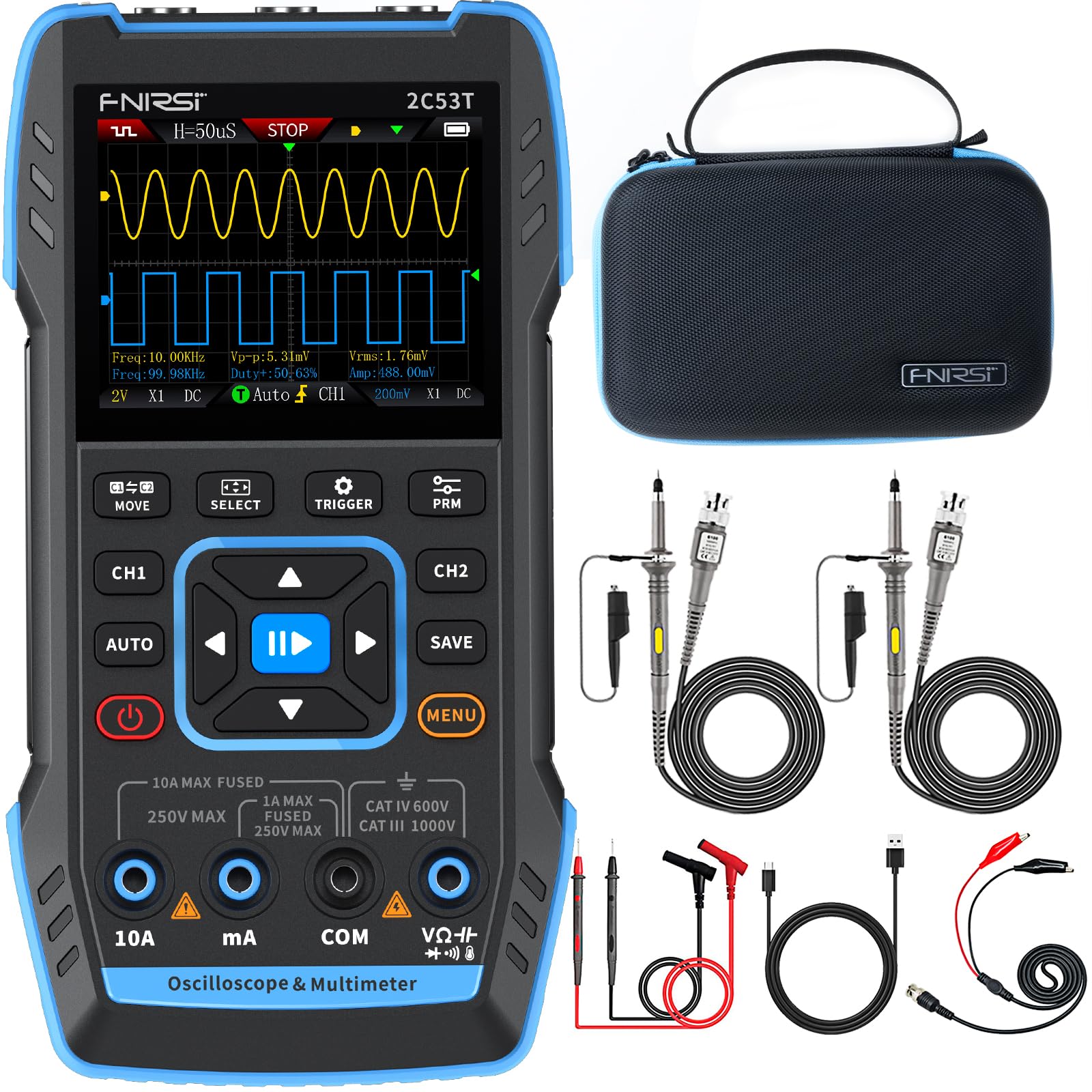
Image 3.1: The FNIRSI 2C53T device along with its standard accessories, including oscilloscope probes and multimeter test leads.
4. സജ്ജീകരണവും പ്രാരംഭ ഉപയോഗവും
4.1 ഉപകരണം ചാർജ് ചെയ്യുന്നു
Before first use, fully charge the internal lithium-ion battery. Connect the supplied Type-C USB cable to the device's Type-C port and to a 5V/1A USB power adapter (not included). The charging indicator on the screen will show the charging status.
4.2 പവർ ഓൺ/ഓഫ്
Press and hold the power button (usually marked with a power symbol) for a few seconds to turn the device ON or OFF.
4.3 Connecting Probes and Test Leads
The device features dedicated input ports for oscilloscope channels (CH1, CH2) and the signal generator (DDS), as well as multimeter input jacks (10A, mA, COM, VΩ+). Ensure correct connections for the desired function.

ചിത്രം 4.1: ക്ലോസ്-അപ്പ് view of the FNIRSI 2C53T's input ports, including CH1, CH2 for oscilloscope, and DDS for signal generator output.
5. പ്രവർത്തന നിർദ്ദേശങ്ങൾ
The FNIRSI 2C53T features a user-friendly interface with a central navigation pad and dedicated function buttons (MOVE, SELECT, TRIGGER, PRM, AUTO, SAVE, MENU, CH1, CH2).
5.1 ഓസിലോസ്കോപ്പ് മോഡ്
To enter Oscilloscope mode, ensure the device is powered on. The default screen often displays the oscilloscope interface. Use the CH1 and CH2 buttons to enable or disable channels.
- പാരാമീറ്ററുകൾ ക്രമീകരിക്കുന്നു: Use the navigation pad (up/down/left/right) to select and adjust parameters like vertical sensitivity (V/div), horizontal time base (s/div), and trigger level. The 'SELECT' button confirms selections.
- ട്രിഗർ ക്രമീകരണങ്ങൾ: Press the 'TRIGGER' button to access trigger settings, including trigger mode (Auto, Normal, Single), trigger type (Edge, Pulse, Video), and source.
- ഓട്ടോമാറ്റിക് അളവ്: Press 'AUTO' for automatic waveform scaling and measurement display.
- തരംഗരൂപ വിശകലനം: The device supports various analysis functions. Access these through the 'MENU' button or dedicated options. These include Math Operations, Cursor Functions for precise measurements, Infinite Afterglow for observing signal changes over time, X-Y Mode for phase relationship analysis, and FFT Spectrum for frequency domain analysis.
- തരംഗരൂപങ്ങൾ സംരക്ഷിക്കുന്നു: Press the 'SAVE' button to store the current waveform display. Saved images can be transferred to a PC via the Type-C connection.

Image 5.1: The FNIRSI 2C53T displaying various waveform analysis features, including Math Operations, Cursor Functions, Infinite Afterglow, and X-Y Mode.
5.2 മൾട്ടിമീറ്റർ മോഡ്
To switch to Multimeter mode, press the 'MENU' button and navigate to the Multimeter option, or use a dedicated button if available. Connect the test leads to the appropriate input jacks (COM and VΩ+ for voltage/resistance/capacitance, 10A or mA for current).
- വാല്യംtagഇ മെഷർമെന്റ് (എസി/ഡിസി): Select ACV or DCV. Connect test leads in parallel with the circuit or component.
- കറന്റ് അളവ് (എസി/ഡിസി): Select ACA or DCA. Connect test leads in series with the circuit. Ensure the correct current input jack (10A or mA) is used.
- പ്രതിരോധം അളക്കൽ: Select Ω. Connect test leads across the component when the circuit is de-energized.
- കപ്പാസിറ്റൻസ് അളക്കൽ: Select F. Connect test leads across the capacitor when the circuit is de-energized.
- തുടർച്ച പരിശോധന: Select the continuity symbol. The device will emit an audible beep if continuity is detected.

Image 5.2: The FNIRSI 2C53T displaying its multimeter interface, showing voltage measurement and input jack labels.
5.3 സിഗ്നൽ ജനറേറ്റർ മോഡ്
To access the Signal Generator, press the 'MENU' button and select the Signal Generator option. Connect the DDS output to the circuit where the signal is needed.
- തരംഗരൂപ തിരഞ്ഞെടുപ്പ്: Use the navigation pad to choose from 13 available waveforms (e.g., Sine Wave, Square Wave, Sawtooth Wave).
- പാരാമീറ്റർ അഡ്ജസ്റ്റ്മെന്റ്: Adjust frequency, amplitude, and duty cycle (for certain waveforms) using the navigation pad and 'SELECT' button.

Image 5.3: The FNIRSI 2C53T displaying the various waveforms available from its DDS signal generator function.
6. പരിപാലനം
6.1 വൃത്തിയാക്കൽ
സോഫ്റ്റ്, ഡി ഉപയോഗിച്ച് ഉപകരണം തുടയ്ക്കുകamp cloth. Do not use abrasive cleaners or solvents. Ensure the device is powered off and disconnected from all circuits before cleaning.
6.2 ബാറ്ററി കെയർ
To prolong battery life, avoid fully discharging the battery frequently. If storing the device for an extended period, charge it to approximately 50% and recharge every few months.
6.3 സംഭരണം
Store the device in a cool, dry place, away from direct sunlight and extreme temperatures. Use the provided carrying case for protection during transport and storage.
7. പ്രശ്നപരിഹാരം
- ഉപകരണം പവർ ഓൺ ചെയ്യുന്നില്ല: Ensure the battery is charged. Connect the Type-C cable to a power source and try again.
- ഓസിലോസ്കോപ്പ് മോഡിൽ തരംഗരൂപം പ്രദർശിപ്പിച്ചിട്ടില്ല: Check probe connections. Ensure the trigger settings are appropriate for the signal being measured. Adjust vertical and horizontal scales.
- തെറ്റായ മൾട്ടിമീറ്റർ റീഡിംഗുകൾ: Verify test lead connections to the correct input jacks and ensure the correct measurement function is selected. Check if the circuit is de-energized for resistance and capacitance measurements.
- Signal generator not outputting: Confirm the DDS output is connected correctly and the signal generator function is active with appropriate parameters set.
- സ്ക്രീൻ നിശ്ചലമായി അല്ലെങ്കിൽ പ്രതികരിക്കുന്നില്ല: Try restarting the device by holding the power button. If the issue persists, contact customer support.
8 സ്പെസിഫിക്കേഷനുകൾ
| ഫീച്ചർ | സ്പെസിഫിക്കേഷൻ |
|---|---|
| മോഡൽ | FNIRSI 2C53T |
| ഓസിലോസ്കോപ്പ് ചാനലുകൾ | 2 |
| അനലോഗ് ബാൻഡ്വിഡ്ത്ത് | 50 MHz |
| Sampലിംഗ് നിരക്ക് | 250 MSa/s |
| Record Depth | 1 Kpts |
| പരമാവധി ഇൻപുട്ട് വോളിയംtage | 400 വി |
| ലംബ സംവേദനക്ഷമത | 10 mV/div - 10 V/div |
| Multimeter Digits | 4.5 |
| മൾട്ടിമീറ്റർ എണ്ണങ്ങൾ | 19999 |
| എസി വോളിയംtagഇ റേഞ്ച് | 0-750 വി |
| ഡിസി വോളിയംtagഇ റേഞ്ച് | 0-999.9 വി |
| DC/AC Current Range | 0-9.999 എ |
| പ്രതിരോധ ശ്രേണി | 0-19.99 മെഗാഹെം |
| കപ്പാസിറ്റൻസ് റേഞ്ച് | 0-99.99 mF |
| Signal Generator Max Freq. | 50 kHz |
| Signal Generator Waveforms | 13 തരം |
| പ്രദർശിപ്പിക്കുക | 2.8-ഇഞ്ച് എൽസിഡി |
| ബാറ്ററി | 3000 mAh ലി-അയോൺ |
| സ്റ്റാൻഡ്ബൈ സമയം | 6 മണിക്കൂർ വരെ |
| ചാർജിംഗ് ഇൻ്റർഫേസ് | ടൈപ്പ്-സി (5V/1A) |
| അളവുകൾ | 21.3 x 14.1 x 9.9 സെ.മീ |
| ഭാരം | 890 ഗ്രാം |
9. വാറൻ്റിയും പിന്തുണയും
The FNIRSI 2C53T comes with a standard manufacturer's warranty. For warranty claims, technical support, or service inquiries, please contact your point of purchase or the official FNIRSI customer support channels. Keep your purchase receipt as proof of purchase.