
1. ആമുഖം
Thank you for choosing the KOBANOICA Android 13 Car Radio Stereo. This manual provides detailed instructions for installation, operation, and maintenance of your new car stereo system. Please read this manual thoroughly before installation and use to ensure proper functionality and safety.
1.1 Compatible Car Models
- Jeep Wrangler/Unlimited (2007-2018)
- Jeep Patriot (2009-2016)
- Jeep Grand Cherokee (2005-2011)
- Jeep Compass (2009-2016)
- Jeep Liberty (2008-2011)
- Jeep Commander (2008-2011)
- Chrysler Sebring (2007-2010)
- Town & Country (2007-2010)
- Dodge Grand Caravan (2011-2014)
- Dodge Charger (2008-2010)
- Dodge Ram Pickup 1500/2500/3500 (2009-2012)

Image 1.1: Visual comparison of the dashboard before and after installing the KOBANOICA car radio stereo.
2. പാക്കേജ് ഉള്ളടക്കം
താഴെ ലിസ്റ്റ് ചെയ്തിരിക്കുന്ന എല്ലാ ഇനങ്ങളും നിങ്ങളുടെ പാക്കേജിൽ ഉൾപ്പെടുത്തിയിട്ടുണ്ടെന്ന് ദയവായി പരിശോധിക്കുക:
- Car Radio Head Unit
- Installation Harness (for Jeep)
- Installation Harness (for Chrysler)
- ബാക്കപ്പ് ക്യാമറ
- ജിപിഎസ് മൊഡ്യൂൾ
- മൈക്രോഫോൺ
- USB കേബിൾ (x2)
- Can Bus Decoder
- Video Cable for Backup Camera
- ക്യാമറ പവർ കേബിൾ
- ആൻ്റിന അഡാപ്റ്റർ കേബിൾ
- റിവേഴ്സിംഗ് ലൈൻ
- സ്ക്രൂഡ്രൈവർ
- ക്രോബാർ
- ആർസിഎ കേബിൾ
- മൗണ്ടിംഗ് സ്ക്രൂകൾ

Image 2.1: All components included in the KOBANOICA Android 13 Car Radio Stereo package.
3. സജ്ജീകരണവും ഇൻസ്റ്റാളേഷനും
Professional installation is recommended. Ensure the vehicle's battery is disconnected before beginning installation to prevent electrical damage.
3.1 General Wiring Diagram
Refer to the general wiring diagram for connecting the main power, audio, and accessory cables. Ensure all connections are secure.

Image 3.1: Detailed general wiring diagram for the KOBANOICA car radio head unit, showing connections for power, USB, GPS, microphone, and RCA cables.
3.2 Ampലൈഫയർ കണക്ഷൻ
If your original radio has a factory amplifier, use the power harness with the AMP-DET wire. Connect the amp cable from the RCA cable to the AMP-DET cable of the power harness. Failure to do so will result in no sound. If your original radio does NOT have a factory amplifier, use the Non-AMP-DET power harness directly.

Image 3.2: Specific wiring instructions for Jeep and Chrysler vehicles, detailing connections for factory ampജീവപര്യന്തം.
3.3 ബാക്കപ്പ് ക്യാമറ ഇൻസ്റ്റാളേഷൻ
Connect the provided backup camera to the designated video input on the head unit. Ensure the camera's power cable is connected to the vehicle's reverse light circuit so it activates automatically when shifting into reverse gear.

Image 3.3: The car radio display showing the backup camera view with parking guidelines, highlighting its wide-angle, waterproof, night vision, and HD display features.
4. പ്രവർത്തന നിർദ്ദേശങ്ങൾ
4.1 വയർലെസ് കാർപ്ലേയും ആൻഡ്രോയിഡ് ഓട്ടോയും
Connect your smartphone wirelessly via Bluetooth to enable CarPlay (for iPhone) or Android Auto (for Android phones). This allows access to navigation, music, messages, and voice assistants directly on the car stereo screen.
- കണക്ഷൻ: Enable Bluetooth on your phone and the car stereo. Pair your phone with the stereo. Follow on-screen prompts to activate CarPlay or Android Auto.
- വോയ്സ് കമാൻഡുകൾ: Use Siri or Google Assistant for hands-free operation.

Image 4.1: The car radio display showing the Wireless CarPlay and Android Auto interface, with two smartphones demonstrating the connection.
4.2 വൈഫൈ & ജിപിഎസ് നാവിഗേഷൻ
The unit features built-in WiFi and GPS. Connect to a WiFi hotspot to download navigation apps, stream videos, or browse online. The GPS module provides accurate location services for navigation.
- വൈഫൈ കണക്ഷൻ: Go to Settings > Network > Wi-Fi to connect to an available network.
- നാവിഗേഷൻ: Use pre-installed navigation apps or download your preferred ones from the app store.

Image 4.2: The car radio display showing GPS navigation in progress, with icons for various apps like Spotify, YouTube, and Google Maps, illustrating WiFi and GPS capabilities.
4.3 Bluetooth & Steering Wheel Controls (SWC)
Bluetooth allows for hands-free calling and audio streaming. Steering Wheel Controls (SWC) enable safe operation of the stereo without taking your hands off the wheel.
- ബ്ലൂടൂത്ത് ജോടിയാക്കൽ: Access the Bluetooth menu on the stereo, search for devices, and pair with your phone.
- SWC Setup: The system supports learning functions for steering wheel controls. Access the SWC settings in the system menu to map your vehicle's steering wheel buttons to stereo functions.
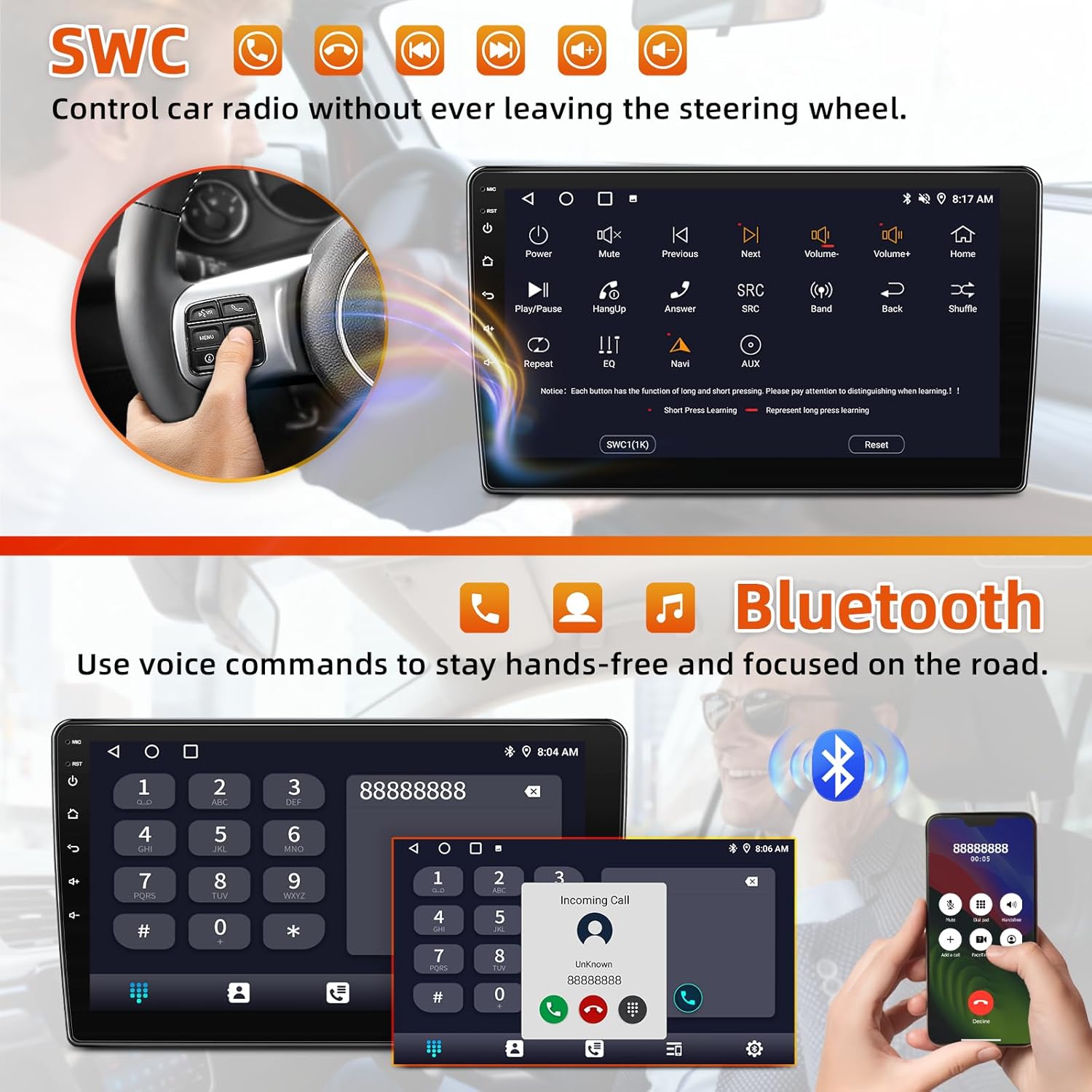
Image 4.3: The car radio display showing the Steering Wheel Control (SWC) learning interface and the Bluetooth dialer, with a hand demonstrating SWC usage.
4.4 FM/AM Radio & EQ Adjust
Enjoy your favorite radio stations with the built-in FM/AM tuner. Customize your audio experience using the Digital Sound Processor (DSP) and Equalizer (EQ) settings.
- റേഡിയോ ട്യൂണിംഗ്: Select the FM or AM band. Use the scan function or manual tuning to find stations. Save frequently listened stations as presets.
- EQ/DSP: Access the Sound Settings menu to adjust equalizer bands, balance, fader, and other DSP effects for optimal sound quality.

Image 4.4: The car radio display showing the FM/AM radio interface with preset stations and current frequency, indicating available radio bands.

Image 4.5: The car radio display showing the built-in DSP (Digital Sound Processor) interface, allowing users to tune into their favorite music sound modes and adjust audio settings for a superior listening experience.
4.5 സ്പ്ലിറ്റ് സ്ക്രീൻ പ്രവർത്തനം
The split-screen feature allows you to run two applications simultaneously on the display, such as navigation and music playback, without switching between apps.
- സജീവമാക്കൽ: സ്പ്ലിറ്റ്-സ്ക്രീൻ മോഡ് സജീവമാക്കാൻ, സമീപകാല ആപ്പുകൾ ബട്ടൺ ദീർഘനേരം അമർത്തുക അല്ലെങ്കിൽ സ്ക്രീനിന്റെ ഒരു വശത്തേക്ക് ഒരു ആപ്പ് വലിച്ചിടുക.

Image 4.6: The car radio display demonstrating split-screen functionality, showing navigation on one side and music playback on the other, allowing simultaneous operation of different applications.
5. പരിപാലനം
5.1 സ്ക്രീൻ കെയർ
To clean the touch screen, use a soft, lint-free cloth. For stubborn smudges, slightly dampസ്ക്രീൻ പ്രതലത്തിന് കേടുവരുത്തുന്ന ഉരച്ചിലുകളുള്ള വസ്തുക്കളോ കഠിനമായ രാസവസ്തുക്കളോ ഒഴിവാക്കുക.
5.2 സോഫ്റ്റ്വെയർ അപ്ഡേറ്റുകൾ
ഒപ്റ്റിമൽ പ്രകടനവും പുതിയ സവിശേഷതകളിലേക്കുള്ള ആക്സസും ഉറപ്പാക്കാൻ ഇടയ്ക്കിടെ സോഫ്റ്റ്വെയർ അപ്ഡേറ്റുകൾക്കായി പരിശോധിക്കുക. അപ്ഡേറ്റുകൾ സാധാരണയായി സിസ്റ്റം ക്രമീകരണങ്ങളിലൂടെയോ നിർമ്മാതാവിന്റെയോ website. Follow the provided instructions carefully when performing updates.
6. പ്രശ്നപരിഹാരം
നിങ്ങളുടെ കാർ സ്റ്റീരിയോയിൽ പ്രശ്നങ്ങൾ നേരിടുകയാണെങ്കിൽ, ഇനിപ്പറയുന്ന പൊതുവായ പ്രശ്നങ്ങളും പരിഹാരങ്ങളും പരിശോധിക്കുക:
- ശക്തിയില്ല:
- എല്ലാ പവർ കണക്ഷനുകളും ഫ്യൂസുകളും പരിശോധിക്കുക.
- വാഹനത്തിന്റെ ഇഗ്നിഷൻ ഓണാണെന്ന് ഉറപ്പാക്കുക.
- ശബ്ദമില്ല:
- സ്പീക്കർ കണക്ഷനുകൾ പരിശോധിക്കുക.
- വോളിയം ലെവലുകളും മ്യൂട്ട് ക്രമീകരണങ്ങളും പരിശോധിക്കുക.
- If using a factory ampലിഫയർ, ഉറപ്പാക്കുക AMP-DET wire is correctly connected (refer to Section 3.2).
- ജിപിഎസ് സിഗ്നൽ പ്രശ്നങ്ങൾ:
- ജിപിഎസ് ആന്റിന ശരിയായി ഇൻസ്റ്റാൾ ചെയ്തിട്ടുണ്ടെന്നും വ്യക്തമായ ഒരു ലൈൻ ഉണ്ടെന്നും ഉറപ്പാക്കുക. view ആകാശത്തിൻ്റെ.
- സിസ്റ്റം മെനുവിൽ GPS ക്രമീകരണങ്ങൾ പരിശോധിക്കുക.
- ബ്ലൂടൂത്ത് കണക്റ്റിവിറ്റി പ്രശ്നങ്ങൾ:
- സ്റ്റീരിയോയിലും ഫോണിലും ബ്ലൂടൂത്ത് പ്രവർത്തനക്ഷമമാക്കിയിട്ടുണ്ടെന്ന് ഉറപ്പാക്കുക.
- Delete previous pairings and try re-pairing.
- രണ്ട് ഉപകരണങ്ങളും പുനരാരംഭിക്കുക.
- ടച്ച് സ്ക്രീൻ പ്രതികരിക്കുന്നില്ല:
- Perform a system reset (refer to the system settings for reset options).
- സ്ക്രീൻ വൃത്തിയുള്ളതും അവശിഷ്ടങ്ങൾ ഇല്ലാത്തതുമാണെന്ന് ഉറപ്പാക്കുക.
For issues not covered here, or if problems persist, please contact customer support.
7 സ്പെസിഫിക്കേഷനുകൾ
| ഓപ്പറേറ്റിംഗ് സിസ്റ്റം | ആൻഡ്രോയിഡ് 13 |
| മെമ്മറി സ്റ്റോറേജ് കപ്പാസിറ്റി | 64 ജിബി |
| ഡിസ്പ്ലേ വലിപ്പം | 10 ഇഞ്ച് |
| കണക്റ്റിവിറ്റി ടെക്നോളജി | ബ്ലൂടൂത്ത്, യുഎസ്ബി, വൈ-ഫൈ |
| പ്രത്യേക സവിശേഷതകൾ | Android Auto, Apple CarPlay, Bluetooth, Built-In Wi-Fi, Touchscreen |
| ഓഡിയോ put ട്ട്പുട്ട് മോഡ് | സ്റ്റീരിയോ |
| മാപ്പ് തരം | ലോകമെമ്പാടും |
| ഇനത്തിൻ്റെ ഭാരം | 3.97 പൗണ്ട് |
| പാക്കേജ് അളവുകൾ | 11 x 8 x 5 ഇഞ്ച് |
8. വാറൻ്റി വിവരങ്ങൾ
This KOBANOICA car radio stereo is covered by a 2 വർഷത്തെ നിർമ്മാതാവിൻ്റെ വാറൻ്റി from the date of purchase. This warranty covers defects in materials and workmanship under normal use. It does not cover damage caused by improper installation, accident, misuse, abuse, neglect, unauthorized modification, or normal wear and tear.
വാറൻ്റി ക്ലെയിമുകൾക്കായി നിങ്ങളുടെ വാങ്ങിയതിൻ്റെ തെളിവ് സൂക്ഷിക്കുക.
9. ഉപഭോക്തൃ പിന്തുണ
If you have any questions regarding the installation, operation, or troubleshooting of your KOBANOICA Android 13 Car Radio Stereo, please do not hesitate to contact the seller or manufacturer's customer support. Provide your product model number and purchase details for efficient assistance.