
1. ആമുഖം
The Temtop LKC-1000C is a portable device designed to monitor Carbon Monoxide (CO) levels, temperature, and humidity in various environments. It features a TFT color display, custom alarm settings, and data logging capabilities, making it suitable for home, travel, RV, and camping use. This manual provides essential information for safe and effective operation.

ചിത്രം 1: The Temtop LKC-1000C Portable Carbon Monoxide Detector, showing its compact design and color display.
2 സുരക്ഷാ വിവരങ്ങൾ
Read all safety warnings and instructions before using this product. Failure to follow these instructions may result in electric shock, fire, or serious injury.
- This device is intended for personal monitoring and should not replace professional CO detection systems.
- Carbon Monoxide is an odorless, colorless gas. Symptoms of CO poisoning can include headaches, dizziness, nausea, and fatigue.
- തീവ്രമായ ഊഷ്മാവ്, ഈർപ്പം, നേരിട്ടുള്ള സൂര്യപ്രകാശം എന്നിവയിൽ ഉപകരണം തുറന്നുകാട്ടരുത്.
- ശക്തമായ വൈദ്യുതകാന്തിക മണ്ഡലങ്ങളിൽ നിന്ന് ഉപകരണം അകറ്റി നിർത്തുക.
- Never run a vehicle in an enclosed space without proper ventilation, as this can lead to dangerous CO levels.
- Ensure proper ventilation when using fuel-burning appliances like fireplaces or charcoal grills.
- ഉപകരണം സ്വയം തുറക്കാനോ നന്നാക്കാനോ ശ്രമിക്കരുത്. സഹായത്തിനായി ഉപഭോക്തൃ പിന്തുണയുമായി ബന്ധപ്പെടുക.
വീഡിയോ 1: Demonstrates the Temtop CO Detector in action, highlighting its use in detecting CO leaks from a water heater and emphasizing the importance of ventilation. This video is provided by the seller, Elitech Technology Inc.
വീഡിയോ 2: Shows the Temtop Carbon Monoxide Detector detecting CO from various sources like car exhaust, cigarette smoke, and charcoal grills, emphasizing its role in identifying hidden dangers. This video is provided by the seller, Elitech Technology Inc.
3. ഉൽപ്പന്നം കഴിഞ്ഞുview
The LKC-1000C is equipped with advanced features for comprehensive environmental monitoring:
- Professional-Grade CO Accuracy: Measures CO from 0-1000 PPM with 1 PPM resolution.
- All-in-One Clear Color Display: Simultaneously displays CO level, temperature, and humidity.
- ഇഷ്ടാനുസൃത അലേർട്ടുകൾ: User-definable alarm thresholds for CO levels.
- Easy Data Logging & Export: Records air quality data, exportable via USB to a computer.
- റീചാർജ് ചെയ്യാവുന്ന ബാറ്ററി: Provides up to 40-50 hours of operation (with backlight level 2).
- കേൾക്കാവുന്നതും ദൃശ്യപരവുമായ അലാറങ്ങൾ: Built-in buzzer and visual flash alerts for critical warnings.
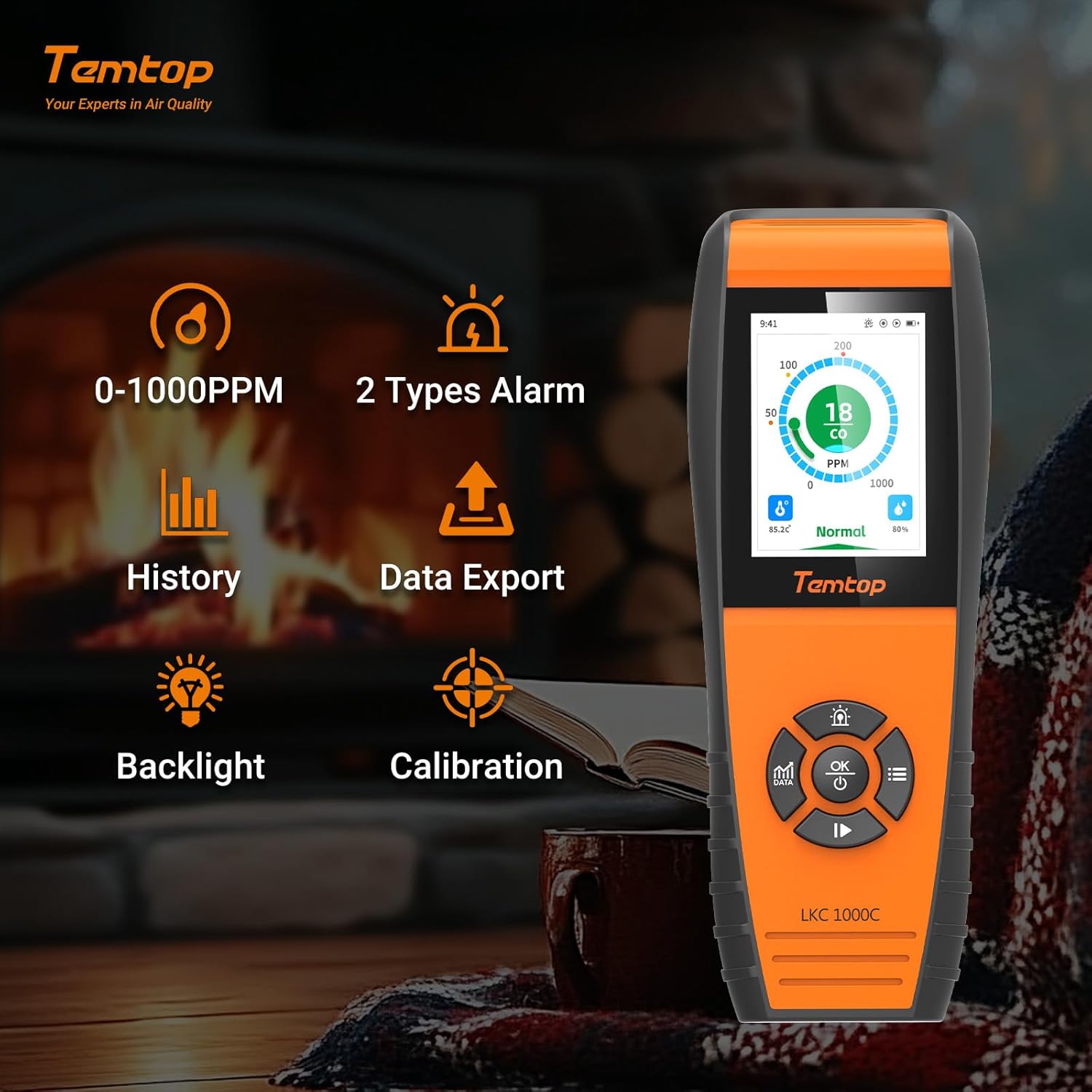
ചിത്രം 2: Key features of the Temtop LKC-1000C, illustrating its capabilities such as CO monitoring, data history, export, backlight, and calibration.
4. സജ്ജീകരണം
4.1 ഉപകരണം ചാർജ് ചെയ്യുന്നു
Before first use, fully charge the device using the provided USB-C cable. Connect the USB-C end to the device and the other end to a compatible USB power adapter (not included) or computer USB port.

ചിത്രം 3: The Temtop LKC-1000C being charged via its USB-C port, highlighting its long battery life.
4.2 പവർ ഓൺ/ഓഫ്
To power on or off the detector, press and hold the ശരി/പവർ button for 2 seconds. The device will perform an initialization sequence before entering the default monitoring interface.
വീഡിയോ 3: A detailed instructional video demonstrating how to use the Temtop CO Monitor LKC1000C, including power on/off and navigation. This video is provided by the seller, Elitech Technology Inc.
5. പ്രവർത്തന നിർദ്ദേശങ്ങൾ
5.1 ഇന്റർഫേസ് നാവിഗേറ്റ് ചെയ്യൽ
The device features a directional pad with ഉയർത്തുക/വർദ്ധിപ്പിക്കുക, താഴേക്ക്/കുറയ്ക്കുക, ഇടത്, ശരിയാണ്, ഒപ്പം OK buttons for navigation and selection.
5.2 Data Button (ഡാറ്റ)
അമർത്തുക ഡാറ്റ എന്നതിലേക്കുള്ള ബട്ടൺ view different data interfaces, including real-time graphs of CO levels. Data updates every 3 seconds for short periods and at longer intervals for extended monitoring.
5.3 അലാറം ക്രമീകരണങ്ങൾ
Access the Alarm Settings menu to customize CO alarm thresholds. The system default thresholds are:
- Lower Alarm Threshold: 50 PPM
- Over-limit Alert: 100 PPM
- Severely Over-limit Alert: 200 PPM
Use the navigation buttons to adjust these values and the OK സംരക്ഷിക്കാനുള്ള ബട്ടൺ.

ചിത്രം 4: The device display showing different CO alarm levels: Normal (green), Hazardous (orange), and Perilous (red), with corresponding PPM values.
5.4 System Settings (Time, Date, Units, Brightness, Language, Reset)
Navigate to the System Settings menu to configure various device parameters:
- സമയവും തീയതിയും: നിലവിലെ സമയവും തീയതിയും ക്രമീകരിക്കുക.
- യൂണിറ്റുകൾ: താപനില പ്രദർശനത്തിനായി സെൽഷ്യസിനും ഫാരൻഹീറ്റിനും ഇടയിൽ മാറുക.
- തെളിച്ചം: Adjust screen brightness (Levels 1-5, default 2).
- ഭാഷ: Select your preferred language (English, German, Spanish, French).
- പുന et സജ്ജമാക്കുക: ഫാക്ടറി ക്രമീകരണങ്ങളിലേക്ക് ഉപകരണം പുനഃസജ്ജമാക്കുക.
5.5 കാലിബ്രേഷൻ
The device supports calibration for CO, temperature, and humidity. Access the Calibration menu to perform these adjustments. For temperature and humidity, you can modify the "OFFSET" value to fine-tune accuracy.

ചിത്രം 5: The device displaying real-time temperature and humidity, alongside the manual calibration settings interface.
5.6 ഡാറ്റ എക്സ്പോർട്ട്
Connect the device to a computer via the USB-C cable to export historical data. The device will pop up a "USB connection successful" message. You can set the storage interval for data logging (default is 1 minute) and export data in CSV format.

ചിത്രം 6: The device interface for data export via USB and language selection options.
6. പരിപാലനം
- ഉപകരണം വൃത്തിയായും പൊടിയും അവശിഷ്ടങ്ങളും ഇല്ലാതെ സൂക്ഷിക്കുക. വൃത്തിയാക്കാൻ മൃദുവായതും ഉണങ്ങിയതുമായ തുണി ഉപയോഗിക്കുക.
- ഉപകരണം വെള്ളത്തിലോ മറ്റ് ദ്രാവകങ്ങളിലോ തുറന്നുകാട്ടുന്നത് ഒഴിവാക്കുക.
- ഉപയോഗത്തിലില്ലാത്തപ്പോൾ തണുത്തതും ഉണങ്ങിയതുമായ സ്ഥലത്ത് ഉപകരണം സൂക്ഷിക്കുക.
- Regularly check the battery level and recharge as needed to ensure continuous operation.
- The device is engineered for long-term accuracy with minimal maintenance, but periodic professional calibration may be recommended for critical applications.
7. പ്രശ്നപരിഹാരം
| പ്രശ്നം | സാധ്യമായ കാരണം | പരിഹാരം |
|---|---|---|
| ഉപകരണം പവർ ഓണാക്കുന്നില്ല. | കുറഞ്ഞ ബാറ്ററി അല്ലെങ്കിൽ ഉപകരണത്തിന്റെ തകരാറ്. | Charge the device fully. If the issue persists, contact customer support. |
| കൃത്യമല്ലാത്ത വായനകൾ. | Sensor interference, need for calibration, or environmental factors. | Ensure the device is in a stable environment. Perform CO, temperature, and humidity calibration as described in Section 5.5. |
| അലാറം ഇടയ്ക്കിടെ മുഴങ്ങുന്നു. | High CO levels detected or alarm thresholds set too low. | Investigate potential CO sources immediately. Ensure proper ventilation. Review and adjust alarm settings in Section 5.3 if necessary. |
| Cannot export data. | Improper USB connection or software issue. | Ensure the USB cable is securely connected to both the device and the computer. Try a different USB port or cable. Refer to Section 5.6. |
8 സ്പെസിഫിക്കേഷനുകൾ
- ബ്രാൻഡ്: ടെംടോപ്പ്
- മോഡൽ: LKC-1000C
- CO പരിധി: 0-1000 പിപിഎം
- ഊർജ്ജ സ്രോതസ്സ്: ബാറ്ററി പവർ (1 ലിഥിയം അയൺ ബാറ്ററി ഉൾപ്പെടുത്തിയിരിക്കുന്നു)
- ഉൽപ്പന്ന അളവുകൾ: 2.58"D x 1.2"W x 6.97"H
- ഇനത്തിൻ്റെ ഭാരം: 14.4 ഔൺസ്
- അലാറം തരം: കേൾക്കാവുന്ന
- പ്രവർത്തന ഈർപ്പം: 0%-90% RH
- ഉയർന്ന താപനില റേറ്റിംഗ്: 122 ഡിഗ്രി ഫാരൻഹീറ്റ്
- ഉൾപ്പെടുത്തിയ ഘടകങ്ങൾ: LKC1000C monitor, user manual, USB cable, calibration certificate
9. വാറൻ്റിയും പിന്തുണയും
For warranty information, technical support, or service inquiries, please refer to the official Temtop webസൈറ്റിൽ ബന്ധപ്പെടുകയോ അവരുടെ ഉപഭോക്തൃ സേവന വിഭാഗവുമായി ബന്ധപ്പെടുകയോ ചെയ്യുക. വാറന്റി ക്ലെയിമുകൾക്കായി നിങ്ങളുടെ വാങ്ങൽ രസീത് സൂക്ഷിക്കുക.