
ആമുഖം
This manual provides comprehensive instructions for the ALLIMITY RC933A FMB1 Voice Remote Control. Designed for ease of use, this remote offers full functionality for compatible TCL Mini LED Smart TV models without requiring complex programming or setup. Its ergonomic design ensures comfortable handling and reliable performance.
അനുയോജ്യമായ ടിവി മോഡലുകൾ:
- TCL Q8CX7
- TCL 85Q8CX7
- TCL 98Q8CX7
- TCL 75Q8CX7
- ടിസിഎൽ 65 സി 8 കെ
- ടിസിഎൽ 75 സി 89 കെ
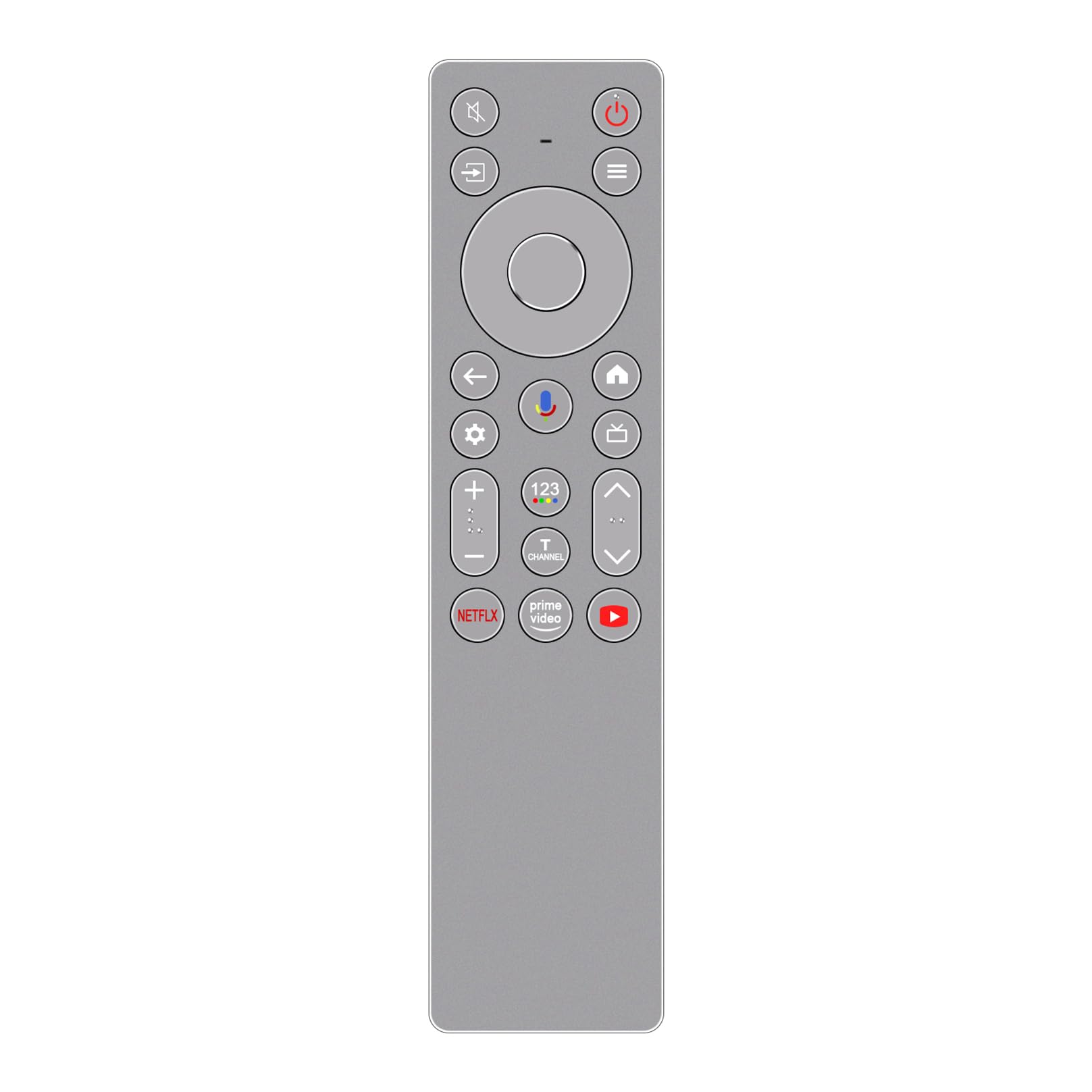
ചിത്രം: മുൻഭാഗം view of the ALLIMITY RC933A FMB1 Voice Remote Control, showcasing its button layout and sleek silver-grey finish.
സജ്ജമാക്കുക
The ALLIMITY RC933A FMB1 remote control is designed for immediate use with compatible TCL Smart TVs. No programming or complex setup is required. Simply install the batteries to begin operation.
ബാറ്ററി ഇൻസ്റ്റാളേഷൻ
- റിമോട്ട് കൺട്രോളിന്റെ പിൻഭാഗത്ത് ബാറ്ററി കമ്പാർട്ട്മെന്റ് കണ്ടെത്തുക.
- സ്ലൈഡ് ബാറ്ററി കമ്പാർട്ട്മെന്റ് കവർ തുറക്കുക.
- രണ്ട് AA ബാറ്ററികൾ ഇടുക, പോസിറ്റീവ് (+) ഉം നെഗറ്റീവ് (-) ടെർമിനലുകളും കമ്പാർട്ടുമെന്റിനുള്ളിലെ സൂചകങ്ങളുമായി ശരിയായി വിന്യസിക്കുന്നുണ്ടെന്ന് ഉറപ്പാക്കുക.
- ബാറ്ററി കമ്പാർട്ട്മെൻ്റ് കവർ സുരക്ഷിതമായി അടയ്ക്കുക.
The remote is now ready for use. Point it towards your TCL Smart TV and press any button to confirm functionality.
പ്രവർത്തന നിർദ്ദേശങ്ങൾ
The ALLIMITY RC933A FMB1 remote control provides intuitive access to your TV's functions, including voice commands and dedicated app buttons.
ബട്ടൺ പ്രവർത്തനങ്ങൾ കഴിഞ്ഞുview
- പവർ ബട്ടൺ: ടിവി ഓണാക്കുകയോ ഓഫാക്കുകയോ ചെയ്യുന്നു.
- Directional Pad (D-Pad) and OK Button: മെനുകളിലൂടെ നാവിഗേറ്റ് ചെയ്ത് തിരഞ്ഞെടുപ്പുകൾ സ്ഥിരീകരിക്കുക.
- ബാക്ക് ബട്ടൺ: മുമ്പത്തെ സ്ക്രീനിലേക്കോ മെനുവിലേക്കോ മടങ്ങുന്നു.
- ഹോം ബട്ടണ്: Accesses the TV's home screen.
- ക്രമീകരണ ബട്ടൺ: ടിവിയുടെ ക്രമീകരണ മെനു തുറക്കുന്നു.
- വോളിയം കൂട്ടുക/താഴ്ത്തുക: ടിവി വോളിയം ക്രമീകരിക്കുന്നു.
- ചാനൽ മുകളിലേക്കും താഴേക്കും: ടിവി ചാനലുകൾ മാറ്റുന്നു.
- നിശബ്ദ ബട്ടൺ: ടിവി ഓഡിയോ നിശബ്ദമാക്കുകയോ അൺമ്യൂട്ടുചെയ്യുകയോ ചെയ്യുന്നു.
- ഇൻപുട്ട്/ഉറവിട ബട്ടൺ: ഇൻപുട്ട് ഉറവിടങ്ങൾ (HDMI, AV, മുതലായവ) തിരഞ്ഞെടുക്കുന്നു.
- സമർപ്പിത ആപ്പ് ബട്ടണുകൾ: നെറ്റ്ഫ്ലിക്സ്, പ്രൈം വീഡിയോ, യൂട്യൂബ് എന്നിവയിലേക്ക് വേഗത്തിലുള്ള ആക്സസ്.
Voice Control Functionality
The remote features a voice command button for convenient control of your TV. This allows you to search for content, change settings, or launch apps using your voice.
- അമർത്തുക വോയ്സ് നിയന്ത്രണ ബട്ടൺ (typically indicated by a microphone icon).
- Hold the remote approximately 10-30 cm (4-12 inches) from your mouth.
- Speak your command clearly into the remote's microphone.
- Release the button once you have finished speaking.

ചിത്രം: വിശദമായ ഒരു ചിത്രം view of the ALLIMITY RC933A FMB1 remote control, with a magnified inset showing the multi-colored microphone icon for voice control.
മെയിൻ്റനൻസ്
Proper care and maintenance will ensure the longevity and optimal performance of your remote control.
വൃത്തിയാക്കൽ
- മൃദുവായതും ഉണങ്ങിയതുമായ തുണി ഉപയോഗിച്ച് റിമോട്ട് കൺട്രോൾ തുടയ്ക്കുക.
- കഠിനമായ അഴുക്കിന്, ചെറുതായി dampവെള്ളം അല്ലെങ്കിൽ നേരിയതും ഉരച്ചിലുകൾ ഇല്ലാത്തതുമായ ഒരു ക്ലീനർ ഉപയോഗിച്ച് തുണി തുടയ്ക്കുക. അമിതമായ ഈർപ്പം ഒഴിവാക്കുക.
- Do not use harsh chemicals, solvents, or abrasive cleaning pads, as these can damage the remote's surface or internal components.
ബാറ്ററി മാറ്റിസ്ഥാപിക്കൽ
- റിമോട്ടിന്റെ പ്രതികരണം മന്ദഗതിയിലാകുകയോ പ്രവർത്തിക്കുന്നത് നിർത്തുകയോ ചെയ്യുമ്പോൾ ബാറ്ററികൾ മാറ്റിസ്ഥാപിക്കുക.
- Always replace both batteries at the same time with new AA batteries.
- പഴയതും പുതിയതുമായ ബാറ്ററികളോ വ്യത്യസ്ത തരം ബാറ്ററികളോ മിക്സ് ചെയ്യരുത്.
- ചോർച്ച തടയാൻ റിമോട്ട് ദീർഘനേരം ഉപയോഗിക്കുന്നില്ലെങ്കിൽ ബാറ്ററികൾ നീക്കം ചെയ്യുക.
സംഭരണം
Store the remote control in a cool, dry place away from direct sunlight, extreme temperatures, and high humidity.
ട്രബിൾഷൂട്ടിംഗ്
If you encounter issues with your ALLIMITY RC933A FMB1 remote control, refer to the following common solutions:
- റിമോട്ട് പ്രതികരിക്കുന്നില്ല:
- ശരിയായ പോളാരിറ്റിയോടെ ബാറ്ററികൾ ശരിയായി ചേർത്തിട്ടുണ്ടോയെന്ന് പരിശോധിക്കുക.
- പുതിയ AA ബാറ്ററികൾ ഉപയോഗിച്ച് ബാറ്ററികൾ മാറ്റിസ്ഥാപിക്കുക.
- Ensure there are no obstructions between the remote control and the TV's infrared receiver.
- Make sure you are within the effective operating range (up to 10 meters).
- ശബ്ദ നിയന്ത്രണം പ്രവർത്തിക്കുന്നില്ല:
- റിമോട്ടിൽ പുതിയ ബാറ്ററികൾ ഉണ്ടെന്ന് ഉറപ്പാക്കുക.
- Press and hold the voice control button while speaking.
- Speak clearly and directly into the microphone.
- Check your TV's settings to ensure voice control is enabled and properly configured.
- Short transmission range:
- Replace batteries with new ones. Low battery power can reduce range.
- ശക്തമായ പ്രകാശ സ്രോതസ്സുകൾ (നേരിട്ടുള്ള സൂര്യപ്രകാശം അല്ലെങ്കിൽ തിളക്കമുള്ള ഫ്ലൂറസെന്റ് ലൈറ്റുകൾ പോലുള്ളവ) ഇൻഫ്രാറെഡ് സിഗ്നലിനെ തടസ്സപ്പെടുത്തുന്നില്ലെന്ന് ഉറപ്പാക്കുക.
- Remove any physical obstructions between the remote and the TV.
സ്പെസിഫിക്കേഷനുകൾ
| ബ്രാൻഡ് | അലിമിറ്റി |
| മോഡലിൻ്റെ പേര് | MM-RC933A-FMB1 |
| നിറം | Silver/Grey (as pictured) |
| കണക്റ്റിവിറ്റി ടെക്നോളജി | ഇൻഫ്രാറെഡ് (IR) |
| നിയന്ത്രണ തരം | വോയ്സ് കമാൻഡ് |
| പരമാവധി പരിധി | 10 മീറ്റർ (33 അടി) |
| ബട്ടണുകളുടെ എണ്ണം | 25 |
| ബാറ്ററി വിവരണം | AA (2 എണ്ണം ആവശ്യമാണ്) |
| ഉൽപ്പന്ന ഭാരം | 59 ഗ്രാം |
| അളവുകൾ (നീളം x വീതി) | 18.5 സെ.മീ (7.28 ഇഞ്ച്) x 4.8 സെ.മീ (1.89 ഇഞ്ച്) |
| പരമാവധി പിന്തുണയ്ക്കുന്ന ഉപകരണങ്ങൾ | 1 (for direct control, though it can be compatible with multiple models) |

ചിത്രം: വശങ്ങളിലായി view of the ALLIMITY RC933A FMB1 remote control, illustrating its length (18.5 cm / 7.28 in) and width (4.8 cm / 1.89 in).
വാറൻ്റിയും പിന്തുണയും
For specific warranty information or technical support regarding your ALLIMITY RC933A FMB1 Voice Remote Control, please refer to the documentation provided with your purchase or contact the retailer/manufacturer directly. Keep your purchase receipt as proof of purchase for any warranty claims.


