
1. ആമുഖം
വാങ്ങിയതിന് നന്ദി.asing the ELECOM Open-Ear Wireless Headphones (Model: LBT-OWS02ECMWH). These headphones are designed to provide a unique audio experience by allowing you to enjoy music and calls while remaining aware of your surroundings. Featuring Bluetooth 5.4 connectivity, IPX5 water resistance, and comfortable ear-hook design, they are suitable for various activities, including sports and daily use.
2 സുരക്ഷാ വിവരങ്ങൾ
ഈ ഉൽപ്പന്നം ഉപയോഗിക്കുന്നതിന് മുമ്പ് ദയവായി എല്ലാ സുരക്ഷാ നിർദ്ദേശങ്ങളും ശ്രദ്ധാപൂർവ്വം വായിക്കുക. ഭാവിയിലെ റഫറൻസിനായി ഈ മാനുവൽ സൂക്ഷിക്കുക.
- ഉൽപ്പന്നം ഡിസ്അസംബ്ലിംഗ് ചെയ്യരുത്, നന്നാക്കരുത് അല്ലെങ്കിൽ പരിഷ്ക്കരിക്കുക.
- Avoid exposing the product to extreme temperatures, direct sunlight, or high humidity.
- കുട്ടികൾക്കും വളർത്തുമൃഗങ്ങൾക്കും ലഭ്യമാകാതെ സൂക്ഷിക്കുക.
- Do not use the product while driving or cycling in situations where awareness of surroundings is critical.
- Prolonged listening at high volume may cause hearing damage.
- പ്രാദേശിക നിയന്ത്രണങ്ങൾ അനുസരിച്ച് ഉൽപ്പന്നവും അതിന്റെ ബാറ്ററിയും നശിപ്പിക്കുക.
3. പാക്കേജ് ഉള്ളടക്കം
പാക്കേജിൽ എല്ലാ ഇനങ്ങളും ഉണ്ടെന്ന് ഉറപ്പാക്കുക:
- Open-Ear Wireless Headphones (Left and Right)
- ചാർജിംഗ് കേസ്
- USB Charging Cable (USB-A to USB Type-C)
- ദ്രുത ആരംഭ ഗൈഡ്
4. ഉൽപ്പന്ന ഡയഗ്രം
Familiarize yourself with the components of your headphones and charging case.

Image: The ELECOM Open-Ear Wireless Headphones (white) and their charging case, showcasing the ear-hook design.

ചിത്രം: ഒരു ക്ലോസ്-അപ്പ് view of a single ELECOM Open-Ear Wireless Headphone, highlighting its compact design and touch sensor area.
5. സജ്ജീകരണം
5.1 ഹെഡ്ഫോണുകളും കേസും ചാർജ് ചെയ്യുന്നു
ആദ്യ ഉപയോഗത്തിന് മുമ്പ്, ഹെഡ്ഫോണുകളും ചാർജിംഗ് കേസും പൂർണ്ണമായും ചാർജ് ചെയ്യുക.
- ചാർജിംഗ് കെയ്സിലേക്ക് ഹെഡ്ഫോണുകൾ സ്ഥാപിക്കുക.
- Connect the supplied USB Type-C cable to the charging port on the case and to a USB power adapter (not included) or a computer's USB port.
- കേസിലെ ഇൻഡിക്കേറ്റർ ലൈറ്റുകൾ ചാർജിംഗ് നില കാണിക്കും.
ചാർജിംഗ് സമയം:
- Headphones: Approximately 1.5 hours
- ചാർജിംഗ് കേസ്: ഏകദേശം 1.5 മണിക്കൂർ

Image: The ELECOM charging case connected to a USB-C charging cable.
5.2 ബ്ലൂടൂത്ത് ജോടിയാക്കൽ
ആദ്യമായി നിങ്ങളുടെ ഹെഡ്ഫോണുകൾ ഒരു ഉപകരണവുമായി ബന്ധിപ്പിക്കാൻ:
- ചാർജിംഗ് കേസ് തുറക്കുക. ഹെഡ്ഫോണുകൾ സ്വയമേവ ജോടിയാക്കൽ മോഡിലേക്ക് പ്രവേശിക്കും.
- നിങ്ങളുടെ ഉപകരണത്തിൽ (സ്മാർട്ട്ഫോൺ, ടാബ്ലെറ്റ്, പിസി), ബ്ലൂടൂത്ത് പ്രവർത്തനക്ഷമമാക്കി ലഭ്യമായ ഉപകരണങ്ങൾക്കായി തിരയുക.
- Select "LBT-OWS02ECMWH" from the list of found devices.
- Once connected, the headphones will automatically pair with your device when taken out of the case.
The headphones support multi-point connection and can register up to 8 devices.

Image: A person holding the charging case with headphones, next to a smartphone displaying Bluetooth settings, indicating the pairing process.
6. പ്രവർത്തന നിർദ്ദേശങ്ങൾ
The headphones feature touch sensors for various controls.
6.1 പവർ ഓൺ/ഓഫ്
- പവർ ഓൺ: Open the charging case or take out the headphones. They will power on automatically.
- പവർ ഓഫ്: ഹെഡ്ഫോണുകൾ ചാർജിംഗ് കെയ്സിലേക്ക് തിരികെ വയ്ക്കുക, ലിഡ് അടയ്ക്കുക. അവ യാന്ത്രികമായി ഓഫാകും.
6.2 മ്യൂസിക് പ്ലേബാക്ക്
- പ്ലേ/താൽക്കാലികമായി നിർത്തുക: Tap the touch sensor on either headphone once.
- അടുത്ത ട്രാക്ക്: Double-tap the touch sensor on the right headphone.
- മുമ്പത്തെ ട്രാക്ക്: Double-tap the touch sensor on the left headphone.
6.3 വോളിയം നിയന്ത്രണം
- വോളിയം കൂട്ടുക: Triple-tap the touch sensor on the right headphone.
- വോളിയം താഴേക്ക്: Triple-tap the touch sensor on the left headphone.
6.4 കോൾ കൈകാര്യം ചെയ്യൽ
The headphones have a built-in microphone for calls.
- ഉത്തരം/അവസാന കോൾ: Tap the touch sensor on either headphone once.
- കോൾ നിരസിക്കുക: Press and hold the touch sensor on either headphone for 2 seconds.
6.5 വോയ്സ് അസിസ്റ്റന്റ്
The headphones support voice assistants like Siri and Google Assistant.
- വോയ്സ് അസിസ്റ്റന്റിനെ സജീവമാക്കുക: Press and hold the touch sensor on either headphone for 2 seconds (when not on a call).
6.6 സിംഗിൾ ഇയർബഡ് ഉപയോഗം
You can use either the left or right headphone independently. If one headphone is not in use, ensure it is powered off or stored in the charging case.
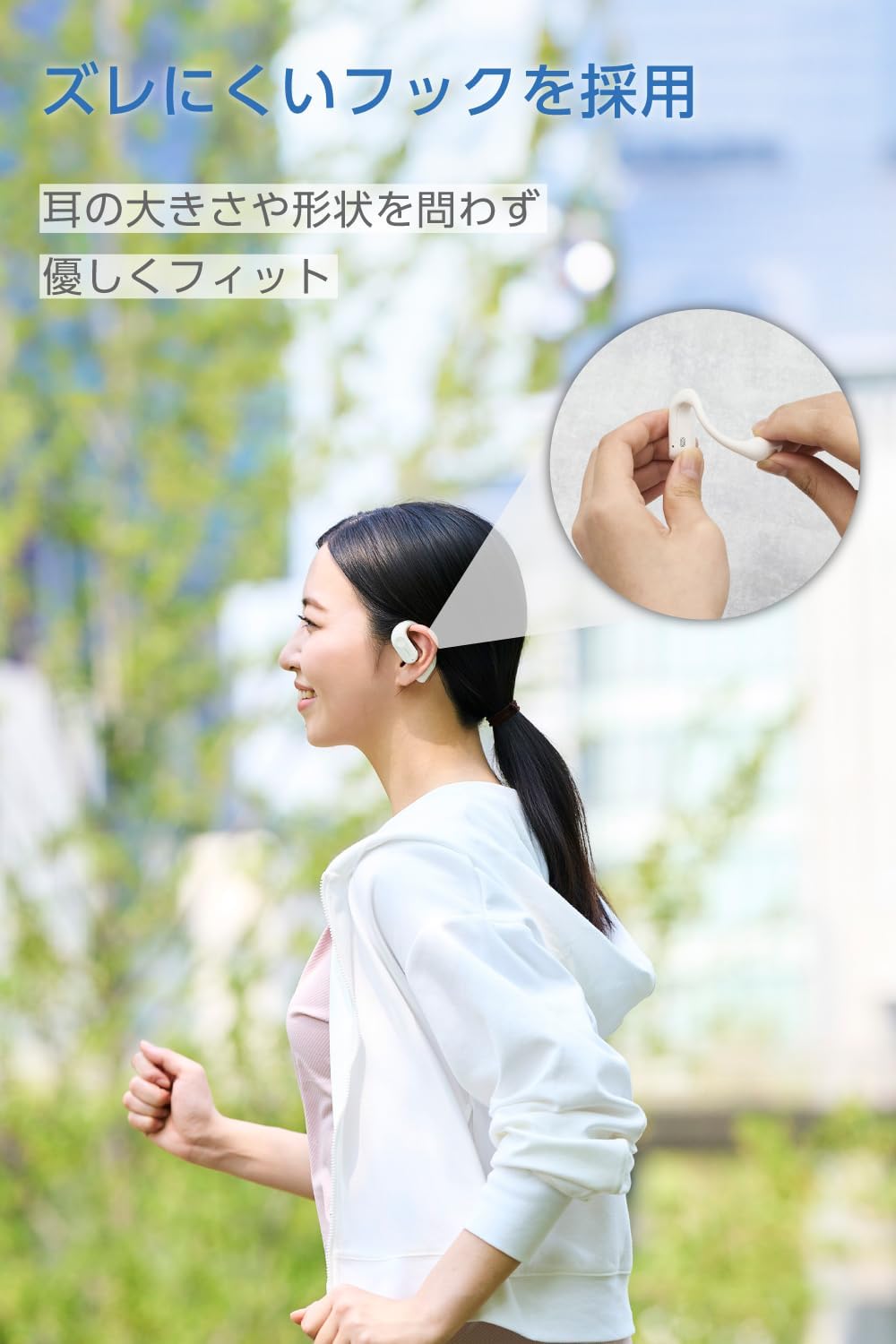
Image: A woman wearing the ELECOM Open-Ear Wireless Headphones, demonstrating the secure and comfortable fit during activity.
7. പരിപാലനം
നിങ്ങളുടെ ഹെഡ്ഫോണുകളുടെ ദീർഘായുസ്സും ഒപ്റ്റിമൽ പ്രകടനവും ഉറപ്പാക്കാൻ:
- Wipe the headphones and charging case with a soft, dry cloth.
- ഉരച്ചിലുകളുള്ള ക്ലീനറുകളോ ലായകങ്ങളോ ഉപയോഗിക്കരുത്.
- The headphones are IPX5 water-resistant, meaning they can withstand sweat and splashes. Do not submerge them in water. The charging case is not water-resistant.
- ഹെഡ്ഫോണുകൾ ഉപയോഗിക്കാത്തപ്പോൾ ചാർജിംഗ് കേസിൽ സൂക്ഷിക്കുക, അതുവഴി അവയെ സംരക്ഷിക്കാനും ചാർജ്ജ് ആയി നിലനിർത്താനും കഴിയും.

Image: The ELECOM Open-Ear Wireless Headphones with water droplets, illustrating their IPX5 water resistance.
8. പ്രശ്നപരിഹാരം
നിങ്ങൾക്ക് പ്രശ്നങ്ങൾ നേരിടുകയാണെങ്കിൽ, ഇനിപ്പറയുന്ന പരിഹാരങ്ങൾ പരീക്ഷിക്കുക:
- ശബ്ദമില്ല: ഹെഡ്ഫോണുകൾ ചാർജ് ചെയ്തിട്ടുണ്ടെന്നും ശരിയായി ജോടിയാക്കിയിട്ടുണ്ടെന്നും ഹെഡ്ഫോണുകളിലെയും നിങ്ങളുടെ ഉപകരണത്തിലെയും ശബ്ദം കൂട്ടിയിട്ടുണ്ടെന്നും ഉറപ്പാക്കുക.
- ജോടിയാക്കാൻ കഴിയില്ല: Make sure Bluetooth is enabled on your device and the headphones are in pairing mode. Try turning Bluetooth off and on again on your device.
- ചാർജിംഗ് പ്രശ്നങ്ങൾ: Check if the charging cable is securely connected and the power source is working. Ensure the headphones are correctly seated in the charging case.
- ഇടവിട്ടുള്ള കണക്ഷൻ: Ensure your device is within the 10m Bluetooth range and there are no significant obstacles between the headphones and your device.
If the problem persists, refer to the Quick Start Guide or contact customer support.
9 സ്പെസിഫിക്കേഷനുകൾ
| ആശയവിനിമയ രീതി | Bluetooth® Standard Version 5.4 |
| ഔട്ട്പുട്ട് | ബ്ലൂടൂത്ത് പവർ ക്ലാസ് 2 |
| പരമാവധി ആശയവിനിമയ ദൂരം | Approx. 10m (without obstacles) |
| ഫ്രീക്വൻസി ബാൻഡ് | 2.4GHz ബാൻഡ് |
| മോഡുലേഷൻ രീതി | FHSS (ഫ്രീക്വൻസി ഹോപ്പിംഗ് സ്പ്രെഡ് സ്പെക്ട്രം) |
| പിന്തുണയ്ക്കുന്ന ബ്ലൂടൂത്ത് പ്രോfiles | A2DP, AVRCP, HFP |
| A2DP Supported Codecs | എഎസി, എസ്ബിസി |
| A2DP Content Protection | എസ്സിഎംഎസ്-ടി |
| Max Registered Devices | 8 യൂണിറ്റുകൾ |
| Multipoint (Simultaneous Standby) | പിന്തുണച്ചു |
| Playback Frequency Range (A2DP) | 20-20,000Hz |
| തുടർച്ചയായ പ്ലേബാക്ക് സമയം | Approx. 7 hours (up to 22 hours with charging case) |
| പവർ ഉറവിടം | റീചാർജ് ചെയ്യാവുന്ന ലിഥിയം അയൺ ബാറ്ററി |
| റേറ്റുചെയ്ത വോളിയംtage | DC5V |
| ചാർജിംഗ് സമയം | Headphones: Approx. 1.5 hours, Charging Case: Approx. 1.5 hours |
| മൈക്രോഫോൺ തരം | MEMS തരം |
| ഹെഡ്ഫോൺ തരം | തുറന്ന ചെവി |
| ഡ്രൈവർ യൂണിറ്റ് | Approx. 12mm × 17mm |
| പ്രവർത്തന താപനില | 5°C മുതൽ 35°C വരെ |
| പ്രവർത്തന ഹ്യുമിഡിറ്റി | 20% മുതൽ 80% വരെ (കണ്ടെൻസിംഗ് അല്ലാത്തത്) |
| ജല പ്രതിരോധം | IPX5 (headphones only) |
| Dimensions (Headphone per ear) | Approx. 53mm × 37.8mm × 17.3mm |
| അളവുകൾ (ചാർജിംഗ് കേസ്) | Approx. 83mm × 66.4mm × 28.3mm |
| Weight (Headphone per ear) | ഏകദേശം 9.0 ഗ്രാം |
| ഭാരം (ചാർജിംഗ് കേസ്) | 61.0 ഗ്രാം |
| നിറം | ചന്ദ്രൻ വെള്ള |
10. വാറൻ്റി വിവരങ്ങൾ
ഈ ഉൽപ്പന്നം എ 1 വർഷത്തെ വാറൻ്റി from the date of purchase. Please retain your proof of purchase for warranty claims. The warranty covers manufacturing defects but does not cover damage caused by misuse, accidents, unauthorized modifications, or normal wear and tear.
11. പിന്തുണ
For further assistance, product information, or troubleshooting not covered in this manual, please visit the official ELECOM product support webസൈറ്റ്:
ELECOM Product Support: 8056.jp
നിങ്ങൾക്ക് സന്ദർശിക്കാനും കഴിയും ELECOM Brand Store on Amazon കൂടുതൽ ഉൽപ്പന്നങ്ങൾക്കും വിവരങ്ങൾക്കും.