
1. ഉൽപ്പന്നം കഴിഞ്ഞുview
The GDFStudio Modern Computer Desk is designed for compact spaces, offering a functional workspace with integrated storage. It features a rectangular tabletop, an open cubby, a storage drawer, and sturdy hairpin metal legs.

Image 1.1: The GDFStudio Modern Computer Desk, showcasinഒരു സാധാരണ ഹോം ഓഫീസ് പരിതസ്ഥിതിയിൽ അതിന്റെ രൂപകൽപ്പനയും പ്രവർത്തനക്ഷമതയും.
പ്രധാന സവിശേഷതകൾ:
- കോംപാക്റ്റ് ഡിസൈൻ: Optimized for smaller spaces, suitable for apartments, dorms, or home offices.
- സംയോജിത സംഭരണം: Includes an open cubby and a spacious drawer for organization.
- നീണ്ടുനിൽക്കുന്ന നിർമ്മാണം: Made from laminated particleboard and MDF with metal hairpin legs.
- വൈവിധ്യമാർന്ന ശൈലി: Wood-grain finish with black metal legs complements various interior designs.
2. സജ്ജീകരണവും അസംബ്ലിയും
Assembly is required for this product. Please follow these instructions carefully. It is recommended to have two people for assembly to ensure stability and prevent damage.
നിങ്ങൾ ആരംഭിക്കുന്നതിന് മുമ്പ്:
- Inspect all components for damage. Do not proceed with assembly if parts are damaged.
- Ensure all hardware and parts listed in the packing list are present.
- Clear a spacious, clean area for assembly. Place a soft cloth or cardboard on the floor to protect the desk components from scratches.
- കുട്ടികളെയും വളർത്തുമൃഗങ്ങളെയും അസംബ്ലി ഏരിയയിൽ നിന്ന് അകറ്റി നിർത്തുക.
അസംബ്ലി ഘട്ടങ്ങൾ:
- Identify and separate all components and hardware.
- Attach the hairpin legs to the designated points on the desk frame. Ensure all screws are tightened securely but do not overtighten.
- Assemble the drawer unit according to the provided diagram, ensuring the drawer slides are correctly oriented.
- Insert the assembled drawer into the desk unit.
- Carefully stand the desk upright.
- Verify all connections are secure and the desk is stable.

Image 2.1: Assembly diagram and dimensional overview, including weight capacities for the desk components.
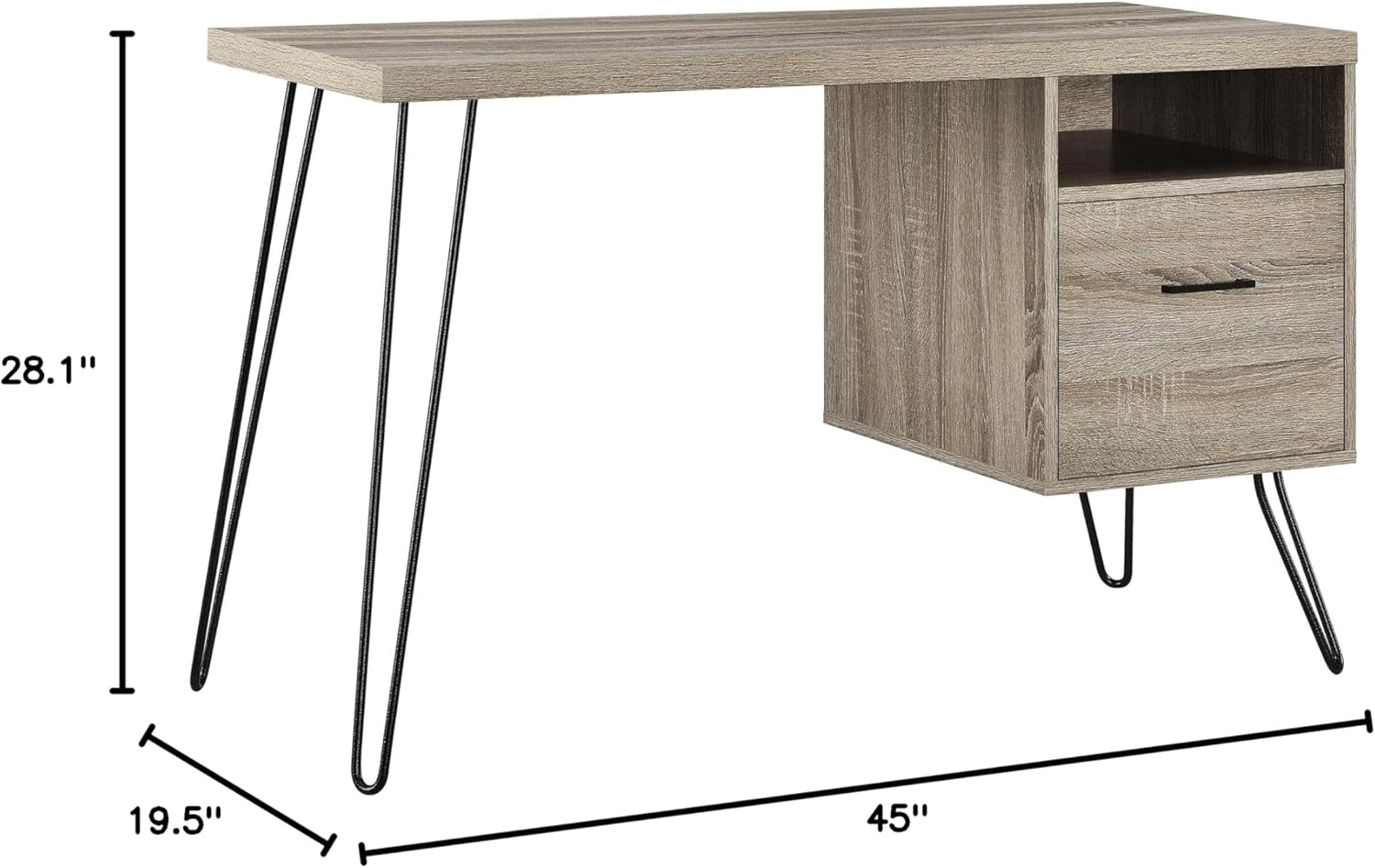
Image 2.2: Product dimensions: 45 inches (W) x 19.5 inches (D) x 28.1 inches (H).
3. പ്രവർത്തന നിർദ്ദേശങ്ങൾ
The GDFStudio Modern Computer Desk is designed for versatile use in various home or office settings.
ജോലിസ്ഥല ഉപയോഗം:
- Place your laptop, monitor, or writing materials on the main tabletop. The tabletop supports up to 60 lbs.
- Utilize the open cubby for quick access items such as notebooks, tablets, or small accessories. The cubby supports up to 10 lbs.
- The spacious drawer is suitable for storing letter-sized files or other office supplies, helping to keep your workspace organized. The drawer supports up to 20 lbs.

Image 3.1: The desk's storage drawer, designed to accommodate letter-sized fileകാര്യക്ഷമമായ സംഘടനയ്ക്ക് എസ്.
പ്ലേസ്മെന്റ് പരിഗണനകൾ:
- Position the desk on a level surface to ensure stability.
- Avoid placing the desk in direct sunlight or near heat sources to prevent material degradation.
- Ensure adequate space around the desk for comfortable use and access to the drawer.
4. പരിപാലനം
Proper care and maintenance will extend the life and appearance of your GDFStudio Modern Computer Desk.
വൃത്തിയാക്കൽ:
- പൊതുവായ വൃത്തിയാക്കലിനായി, മൃദുവായ, ഡി-ടച്ച് ഉപയോഗിച്ച് പ്രതലങ്ങൾ തുടയ്ക്കുക.amp തുണി.
- കഠിനമായ രാസവസ്തുക്കൾ, അബ്രാസീവ് ക്ലീനറുകൾ, അല്ലെങ്കിൽ ഫിനിഷിന് കേടുവരുത്തുന്ന പോളിഷുകൾ എന്നിവ ഉപയോഗിക്കുന്നത് ഒഴിവാക്കുക.
- Promptly wipe up spills to prevent staining or water damage to the laminated particleboard.
പൊതു പരിചരണം:
- Periodically check and tighten all screws and fasteners to ensure the desk remains stable.
- Avoid dragging the desk when moving it; always lift it to prevent damage to the legs and frame.
- Do not place excessively hot or cold items directly on the desk surface without protective coasters.
5. പ്രശ്നപരിഹാരം
നിങ്ങളുടെ മേശയിൽ എന്തെങ്കിലും പ്രശ്നങ്ങൾ നേരിടുകയാണെങ്കിൽ, താഴെ പറയുന്ന പൊതുവായ ട്രബിൾഷൂട്ടിംഗ് നുറുങ്ങുകൾ പരിശോധിക്കുക:
ഡെസ്ക് വോബിൾസ്:
- ഡെസ്ക് ഒരു ലെവൽ പ്രതലത്തിൽ സ്ഥാപിച്ചിട്ടുണ്ടെന്ന് ഉറപ്പാക്കുക.
- Check all leg attachments and frame connections. Tighten any loose screws.
- Verify that all hairpin legs are making even contact with the floor.
ഡ്രോയർ സ്റ്റിക്കുകൾ അല്ലെങ്കിൽ സുഗമമായി അടയ്ക്കാത്തത്:
- Remove the drawer and inspect the drawer slides for any obstructions or debris.
- Ensure the drawer slides are properly aligned and securely attached to both the drawer and the desk frame.
- Apply a small amount of silicone lubricant to the drawer slides if necessary.
6 സ്പെസിഫിക്കേഷനുകൾ
| ഫീച്ചർ | വിശദാംശങ്ങൾ |
|---|---|
| ബ്രാൻഡ് | ജിഡിഎഫ്സ്റ്റുഡിയോ |
| മോഡൽ നമ്പർ | 9658096PCOM |
| ഉൽപ്പന്ന അളവുകൾ (D x W x H) | 19.5" x 45" x 28.1" (49.5 സെ.മീ x 114.3 സെ.മീ x 71.4 സെ.മീ) |
| ഇനത്തിൻ്റെ ഭാരം | 57 പൗണ്ട് (25.9 കി.ഗ്രാം) |
| മെറ്റീരിയൽ | Laminated Particleboard, MDF, Metal (Hairpin Legs) |
| നിറം | Brown (Wood-grain finish) |
| ഡെസ്ക് ഡിസൈൻ | കമ്പ്യൂട്ടർ ഡെസ്ക് |
| ഡ്രോയറുകളുടെ എണ്ണം | 1 |
| പ്രത്യേക ഫീച്ചർ | Storage (Drawer, Open Cubby) |
| അസംബ്ലി ആവശ്യമാണ് | അതെ |
| ഭാര ശേഷി (ടേബിൾടോപ്പ്) | 60 പൗണ്ട് (27.2 കി.ഗ്രാം) |
| Weight Capacity (Cubby) | 10 പൗണ്ട് (4.5 കി.ഗ്രാം) |
| ഭാര ശേഷി (ഡ്രോയർ) | 20 പൗണ്ട് (9.1 കി.ഗ്രാം) |
7. വാറൻ്റിയും പിന്തുണയും
For information regarding product warranty, please refer to the documentation provided at the time of purchase or contact your retailer directly. For further assistance or support, please reach out to GDFStudio customer service through their official webനിങ്ങളുടെ വാങ്ങലിനൊപ്പം നൽകിയിരിക്കുന്ന സൈറ്റ് അല്ലെങ്കിൽ ബന്ധപ്പെടാനുള്ള വിവരങ്ങൾ.