
1. ആമുഖം
Thank you for choosing the TOPUTURE Foldable Walking Pad with Incline. This versatile fitness equipment is designed for both walking and running, offering a convenient way to stay active at home or in the office. Featuring a 4-in-1 design, adjustable incline, and a compact form factor, this treadmill provides an effective workout solution. Please read this manual carefully before use to ensure safe and optimal operation.
2 സുരക്ഷാ വിവരങ്ങൾ
WARNING: To reduce the risk of serious injury, read all important precautions and instructions in this manual before using the treadmill.
- ട്രെഡ്മിൽ എപ്പോഴും പരന്നതും സ്ഥിരതയുള്ളതുമായ ഒരു പ്രതലത്തിൽ വയ്ക്കുക.
- ഓപ്പറേഷൻ സമയത്ത് ട്രെഡ്മില്ലിൽ നിന്ന് കുട്ടികളെയും വളർത്തുമൃഗങ്ങളെയും അകറ്റി നിർത്തുക.
- Wear appropriate athletic footwear. Do not use the treadmill barefoot or in socks.
- Ensure the safety key is properly attached to your clothing before starting. In case of emergency, the safety key will stop the treadmill.
- Do not exceed the maximum user weight of 300 lbs (approximately 136 kg).
- ഏതെങ്കിലും വ്യായാമ പരിപാടി ആരംഭിക്കുന്നതിന് മുമ്പ് ഒരു ഡോക്ടറെ സമീപിക്കുക.
- ഉപയോഗത്തിലില്ലാത്തപ്പോഴോ വൃത്തിയാക്കൽ/പരിപാലനം നടത്തുന്നതിന് മുമ്പോ പവർ ഔട്ട്ലെറ്റിൽ നിന്ന് ട്രെഡ്മിൽ ഊരിമാറ്റുക.
- ട്രെഡ്മില്ലിൽ കേടുപാടുകളുണ്ടെങ്കിൽ, അല്ലെങ്കിൽ അത് ശരിയായി പ്രവർത്തിക്കുന്നില്ലെങ്കിൽ, അത് പ്രവർത്തിപ്പിക്കരുത്.
3. പാക്കേജ് ഉള്ളടക്കം
പാക്കേജിൽ ഇനിപ്പറയുന്ന ഇനങ്ങൾ ഉണ്ടോ എന്ന് പരിശോധിക്കുക:
- TOPUTURE Foldable Walking Pad with Incline Treadmill
- പവർ കോർഡ്
- ടൂൾ കിറ്റ്
- ഉപയോക്തൃ മാനുവൽ (ഈ പ്രമാണം)
- റിമോട്ട് കൺട്രോൾ
4. ഉൽപ്പന്ന സവിശേഷതകൾ
The TOPUTURE Foldable Walking Pad with Incline offers a range of features designed for a comprehensive and convenient workout:
- 4-ഇൻ-1 ഡിസൈൻ: Seamlessly switch between Walking, Running, Climbing, and Working modes to suit your fitness needs.
- Adjustable Manual Incline: Features a 0-9% manual incline adjustment to simulate uphill walking/running, enhancing calorie burn.
- Powerful 2.5 HP Motor: Provides smooth and consistent performance for various exercise intensities.
- ഒതുക്കമുള്ളതും മടക്കാവുന്നതും: Designed for easy storage, folding to a compact size of approximately 50x23x4.5 inches. Transport wheels allow for effortless movement.
- LED Display & Remote Control: Monitor your speed, time, distance, and calories burned on the integrated LED display. Control settings conveniently with the included remote.
- ആപ്പ് കണക്റ്റിവിറ്റി: Connect to a dedicated app for additional workout tracking and program options.
- കുറഞ്ഞ ശബ്ദ പ്രവർത്തനം: Operates at less than 45dB, making it suitable for home and office environments without causing disturbance.
- Generous Running Area: Provides a comfortable 40 x 16 inch running surface.
- ദൃഢമായ നിർമ്മാണം: Supports a maximum user weight of 300 lbs.
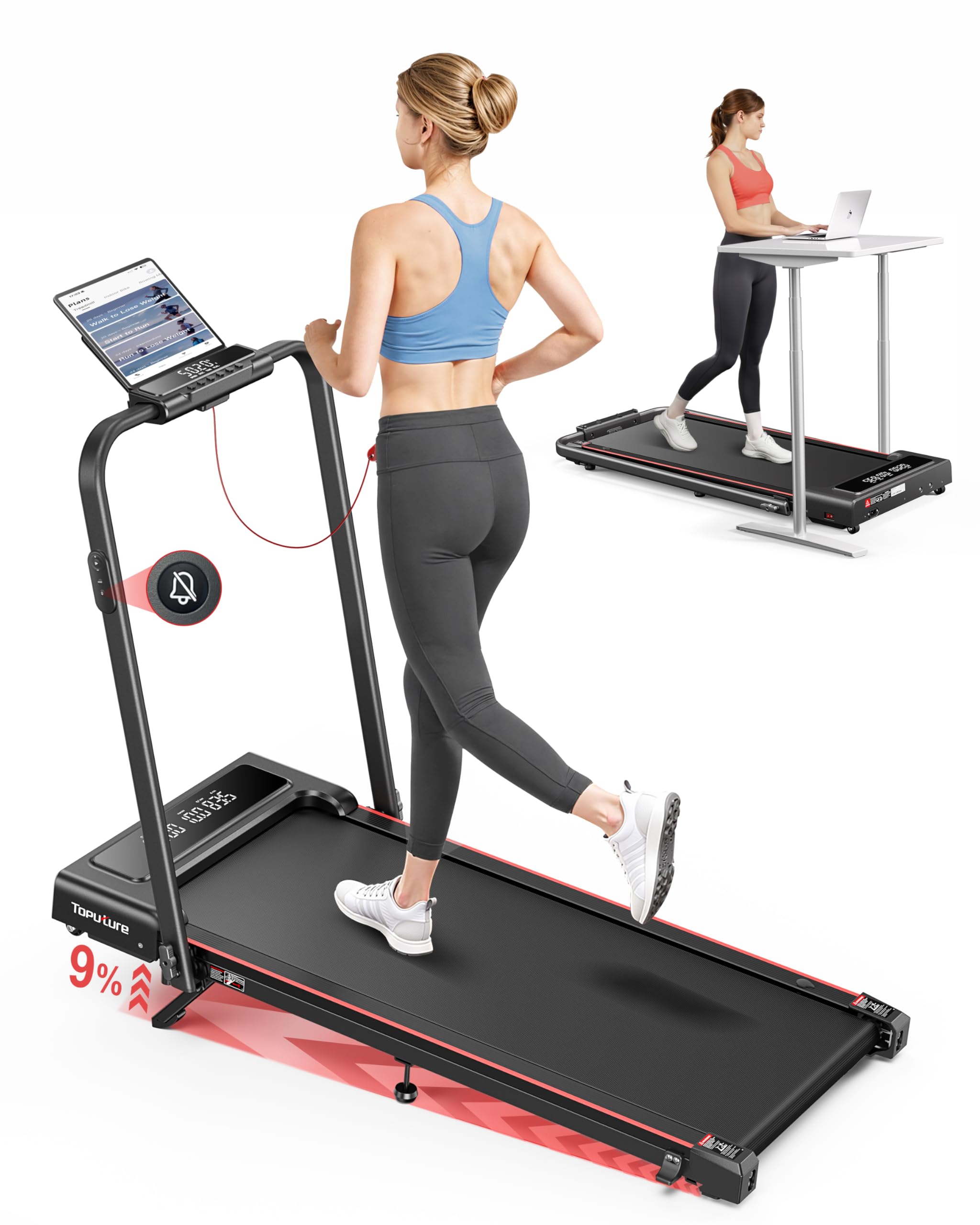
Image: The TOPUTURE walking pad features an adjustable 0-9% incline, designed to boost calorie burning during workouts.

Image: The 4-in-1 design allows for various uses, including walking under a desk or traditional running with the handle.

Image: Visual representation of the four distinct modes: Running, Climbing, Walking, and Working, with their respective speed ranges.
5. സജ്ജീകരണ ഗൈഡ്
The TOPUTURE Walking Pad is designed for minimal setup. Follow these steps to prepare your treadmill for use:
5.1 ട്രെഡ്മിൽ തുറക്കൽ
- ട്രെഡ്മിൽ അതിന്റെ പാക്കേജിംഗിൽ നിന്ന് ശ്രദ്ധാപൂർവ്വം നീക്കം ചെയ്യുക.
- Place the treadmill on a flat, level surface.
- If the handle is folded, gently lift it until it locks into the upright position. Ensure all locking mechanisms are secure.
5.2 Adjusting the Incline
ട്രെഡ്മില്ലിൽ മാനുവൽ ഇൻക്ലൈൻ ക്രമീകരണം ഉണ്ട്. ഇൻക്ലൈൻ മാറ്റാൻ:
- Unfold the footpad: Locate the adjustable footpads at the rear of the treadmill and unfold them.
- Insert the pin: Use the provided pin to secure the footpad at your desired incline level (0% or 9%).
- Adjust the middle footpad: Ensure the middle support footpad is also adjusted to provide stable support for the chosen incline.

Image: Step-by-step guide on how to manually adjust the treadmill's incline.
5.3 ബന്ധിപ്പിക്കുന്ന പവർ
Plug the power cord into the treadmill's power input port and then into a grounded electrical outlet. Ensure the power switch is in the OFF position before plugging in.
6. പ്രവർത്തന നിർദ്ദേശങ്ങൾ
6.1 പവർ ഓൺ/ഓഫ്
- Turn the main power switch located at the front of the treadmill to the ON position.
- Attach the safety key to the designated area on the console and clip the other end to your clothing. The display will illuminate.
- To turn off, remove the safety key, then switch the main power switch to OFF.
6.2 റിമോട്ട് കൺട്രോൾ ഉപയോഗിക്കുന്നു
The remote control allows you to start, stop, and adjust the speed of the treadmill.
- ആരംഭിക്കുക/നിർത്തുക: Press the START/STOP button to begin or end your workout.
- വേഗത ക്രമീകരണം: Use the '+' and '-' buttons to increase or decrease the speed.
- മോഡ് തിരഞ്ഞെടുക്കൽ: Some remotes may have buttons to switch between preset modes or programs.
6.3 Speed Adjustment and Modes
The treadmill supports various speed ranges depending on the mode:
- പ്രവർത്തന രീതി: 0.6 - 1.5 MPH (ideal for under-desk use).
- നടത്ത മോഡ്: 1.5 - 3 MPH.
- Climbing Mode: 0.6 - 3 MPH (when incline is engaged).
- പ്രവർത്തിക്കുന്ന മോഡ്: 3 - 7.6 MPH (with handle in upright position).

Image: The treadmill's low noise feature and remote control make it ideal for under-desk use, allowing for quiet operation.
6.4 ആപ്പ് ഉപയോഗിക്കുന്നത്
Download the dedicated TOPUTURE app from your smartphone's app store. Follow the in-app instructions to pair your device with the treadmill via Bluetooth. The app allows you to track progress, set goals (time, calories, distance), and access additional workout programs.
6.5 സുരക്ഷാ കീ
The safety key is a critical safety feature. Always ensure it is properly placed on the treadmill console and clipped to your clothing. If the safety key is dislodged, the treadmill will immediately stop, preventing potential injury.
7. പരിപാലനം
പതിവ് അറ്റകുറ്റപ്പണികൾ നിങ്ങളുടെ ട്രെഡ്മില്ലിന്റെ ദീർഘായുസ്സും മികച്ച പ്രകടനവും ഉറപ്പാക്കുന്നു.
7.1 ലൂബ്രിക്കേഷൻ
The running belt requires periodic lubrication to reduce friction and wear. Refer to the included tool kit for lubricating oil and instructions. Typically, lubrication is needed every 3-6 months depending on usage.
7.2 ബെൽറ്റ് ക്രമീകരണം
If the running belt feels loose, slips, or is off-center, it may need adjustment. Use the provided tool to adjust the belt tension and alignment screws at the rear of the treadmill. Adjust in small increments and test the belt after each adjustment.
7.3 വൃത്തിയാക്കൽ
പരസ്യം ഉപയോഗിച്ച് ട്രെഡ്മില്ലിന്റെ പ്രതലങ്ങൾ തുടയ്ക്കുകamp cloth after each use to remove sweat and dust. Do not use abrasive cleaners or solvents. Keep the area around the treadmill clean and free of obstructions.

Image: Instructions for adding lubricating oil and adjusting the running belt for optimal performance.
8. പ്രശ്നപരിഹാരം
If you encounter any issues with your TOPUTURE Walking Pad, refer to the following common problems and solutions:
| പ്രശ്നം | സാധ്യമായ കാരണം | പരിഹാരം |
|---|---|---|
| ട്രെഡ്മിൽ പവർ ഓൺ ആകുന്നില്ല. | Power cord not connected, power switch off, safety key not in place. | Check power cord connection, ensure power switch is ON, place safety key correctly. |
| ഓടുമ്പോൾ ബെൽറ്റ് തെന്നി വീഴുകയോ നിൽക്കുകയോ ചെയ്യുന്നു. | Belt too loose, motor overload, insufficient lubrication. | Adjust belt tension, reduce user weight/speed, lubricate the belt. |
| പ്രവർത്തന സമയത്ത് അസാധാരണമായ ശബ്ദം. | Loose components, belt friction, motor issue. | Check for loose screws, lubricate belt, contact customer support if noise persists. |
| റിമോട്ട് കൺട്രോൾ പ്രതികരിക്കുന്നില്ല. | Dead battery, interference, remote not paired. | Replace remote battery, ensure no obstructions, re-pair remote if necessary (refer to app instructions). |
9 സ്പെസിഫിക്കേഷനുകൾ
| ഫീച്ചർ | വിശദാംശങ്ങൾ |
|---|---|
| ഉൽപ്പന്ന അളവുകൾ (അൺഫോൾഡ്) | 126 x 62 x 12 സെ.മീ (ഏകദേശം 50 x 24.4 x 4.7 ഇഞ്ച്) |
| പായ്ക്ക് ചെയ്ത വലുപ്പം | 50 x 23 x 4.5 ഇഞ്ച് |
| ഇനത്തിൻ്റെ ഭാരം | 24.95 കി.ഗ്രാം (ഏകദേശം. 55 പൗണ്ട്) |
| മെറ്റീരിയൽ | അലോയ് സ്റ്റീൽ |
| മോട്ടോർ കുതിരശക്തി | 2.5 എച്ച്.പി |
| പരമാവധി വേഗത | മണിക്കൂറിൽ 7.6 മൈൽ |
| പരമാവധി ചരിവ് ശതമാനംtage | 9% (Manual Adjustment) |
| പ്രവർത്തിക്കുന്ന ഏരിയ | 40 x 16 ഇഞ്ച് |
| പരമാവധി ഉപയോക്തൃ ഭാരം | 300 പൗണ്ട് |
| Display Metrics | കത്തിച്ച കലോറികൾ, ദൂരം, വേഗത, സമയം |
| പ്രോഗ്രാമുകളുടെ എണ്ണം | 12 (via App) |
| പ്രത്യേക സവിശേഷതകൾ | Compact Design, Foldable, Lightweight, App Control, Remote Control |
| അസംബ്ലി ആവശ്യമാണ് | No (Installation-Free) |

Image: The treadmill is built to support a maximum user weight of 300 lbs.

Image: The treadmill's space-saving design allows it to be easily folded and moved using transport wheels for convenient storage.
10. വാറൻ്റിയും പിന്തുണയും
For warranty information, please refer to the documentation included with your product or contact TOPUTURE customer support directly. If you require assistance with setup, operation, maintenance, or troubleshooting that is not covered in this manual, please reach out to our customer service team.
ബന്ധപ്പെടാനുള്ള വിവരങ്ങൾ: Refer to your product packaging or the official TOPUTURE webഏറ്റവും പുതിയ ഉപഭോക്തൃ പിന്തുണ വിശദാംശങ്ങൾക്കായുള്ള സൈറ്റ്.


