
1. ആമുഖം
The Douk Audio BSA600 V2.0 is a 230W bridgeable stereo/mono subwoofer power amplifier designed to enhance tactile bass experiences. It delivers powerful low-frequency output, allowing users to feel explosions, rumbles, and music as tangible vibrations, adding realism to home theater, gaming, and simulation setups.

Image 1.1: Douk Audio BSA600 V2.0 Bass Shaker Ampജീവൻ.
2. ബോക്സിൽ എന്താണുള്ളത്?
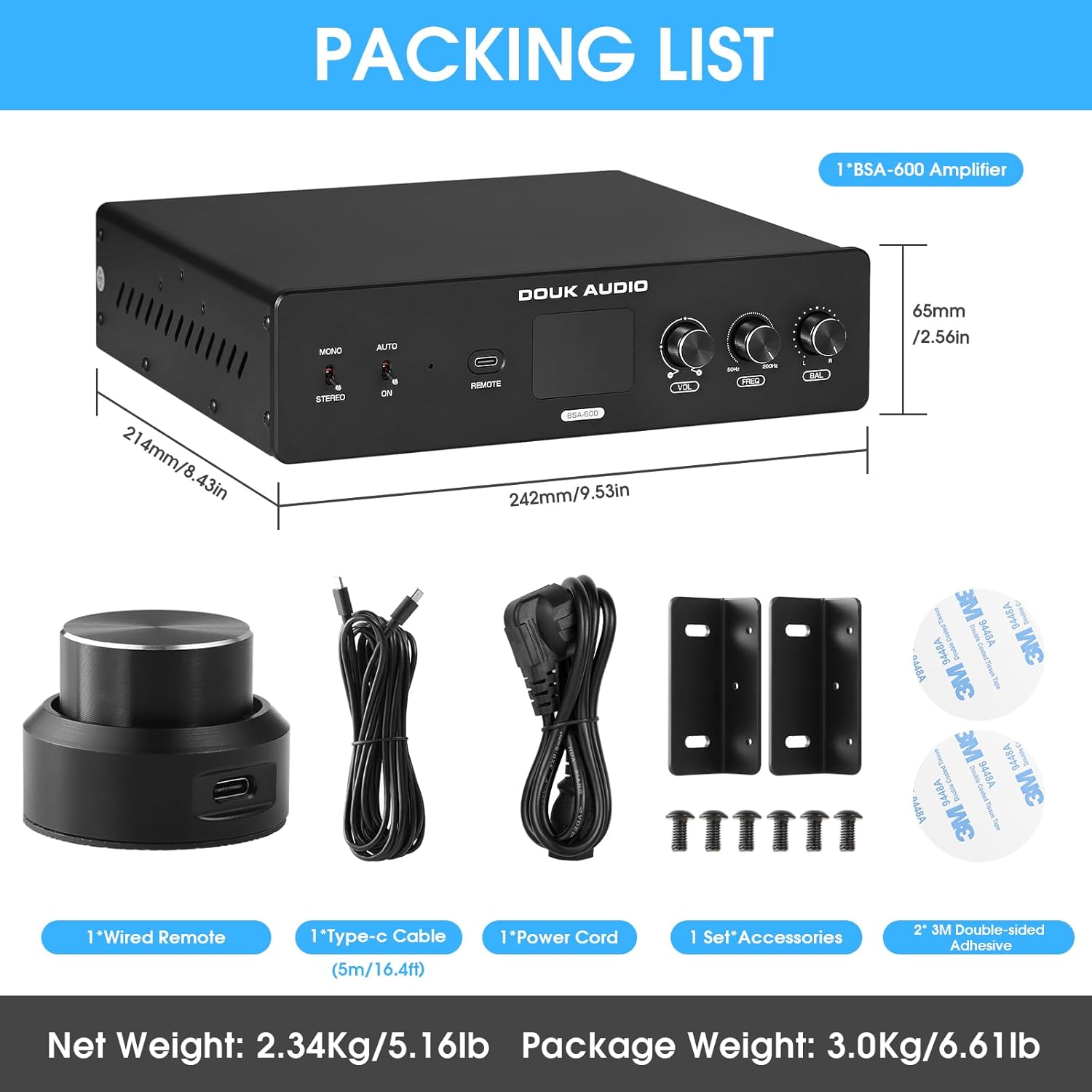
അൺബോക്സിംഗ് ചെയ്യുമ്പോൾ എല്ലാ ഇനങ്ങളും ഉണ്ടെന്ന് ഉറപ്പാക്കാൻ പാക്കേജ് ഉള്ളടക്കങ്ങൾ പരിശോധിക്കുക:
- 1 × Douk Audio BSA600 V2.0 Ampജീവപര്യന്തം
- 1 × Wired Remote Controller (5m/16.4ft cable)
- 1 × Type-C Cable (for remote)
- 1 × പവർ കോർഡ്
- 1 Set × Mounting Brackets
- 2 × Double-sided Adhesive Pads

Image 2.1: Contents of the BSA600 V2.0 package.
3. ഉൽപ്പന്നം കഴിഞ്ഞുview
3.1 ഫ്രണ്ട് പാനൽ നിയന്ത്രണങ്ങൾ
മുൻവശത്തെ പാനൽ അവശ്യ നിയന്ത്രണങ്ങളിലേക്കും സൂചകങ്ങളിലേക്കും പ്രവേശനം നൽകുന്നു:
- Mono/Stereo Select Switch: Toggles between mono (bridged) and stereo output modes.
- ഓട്ടോ/ഓൺ സ്വിച്ച്: Selects between manual power on/off and signal-sensing auto-on mode.
- പവർ സൂചകം: എപ്പോൾ പ്രകാശിക്കുന്നു ampലൈഫയർ ഓണാണ്.
- റിമോട്ട് ഇന്റർഫേസ്: Connects the wired remote controller.
- ഡിസ്പ്ലേ സ്ക്രീൻ: Shows the current volume level.
- VOL (Volume) Knob: മൊത്തത്തിലുള്ള ഔട്ട്പുട്ട് വോളിയം ക്രമീകരിക്കുന്നു.
- FREQ (Frequency) Knob: Adjusts the low-pass filter cutoff frequency from 50Hz to 200Hz.
- BAL (Balance) Knob: Adjusts the balance between left and right channels in stereo mode, or output levels for dual shakers.
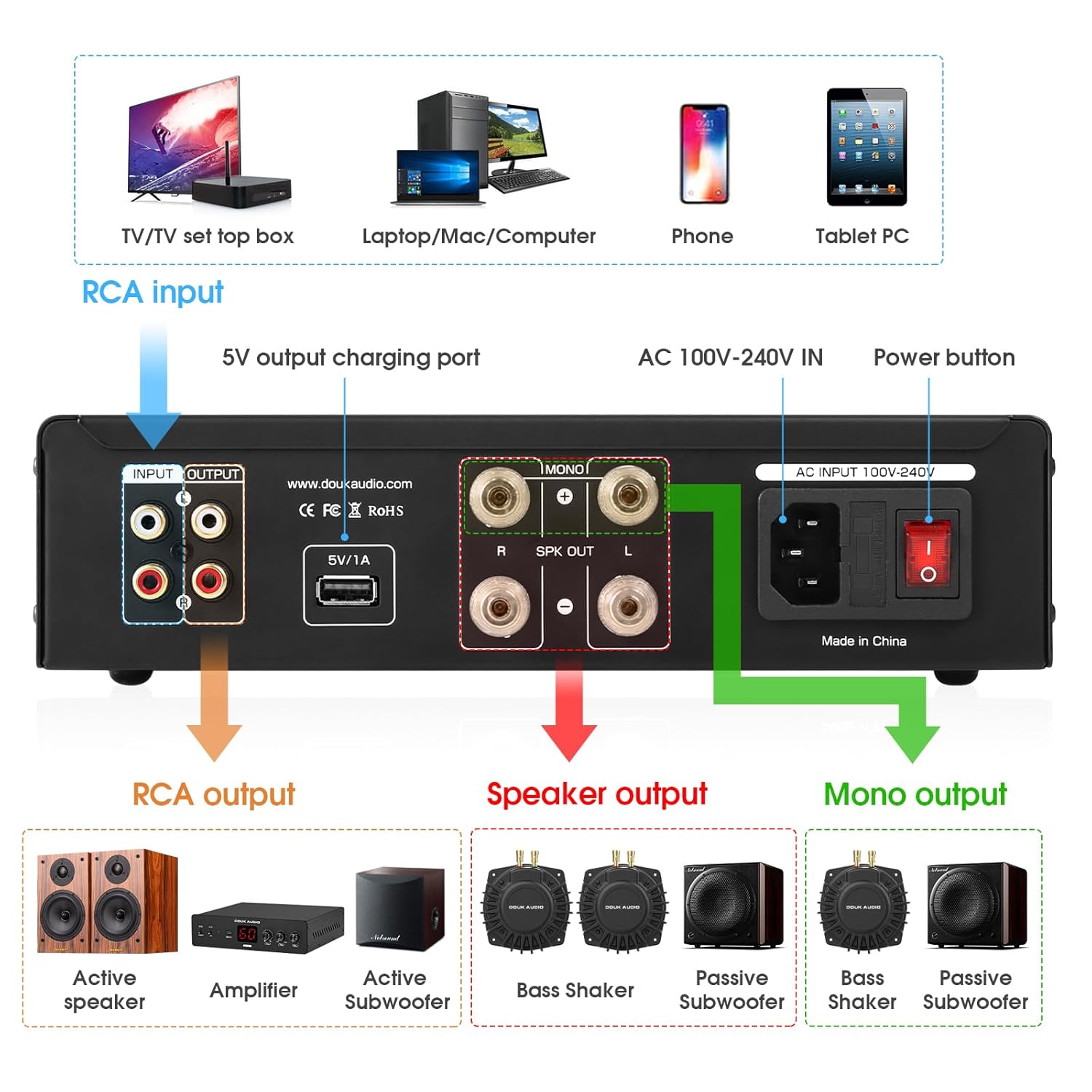
Image 3.1: Front panel layout with controls.
3.2 പിൻ പാനൽ കണക്ഷനുകൾ
പിൻ പാനലിൽ എല്ലാ ഇൻപുട്ട്, ഔട്ട്പുട്ട് കണക്ഷനുകളും ഉണ്ട്:
- ആർസിഎ ഇൻപുട്ട് (എൽ/ആർ): Connects to your audio source (e.g., AV receiver, sound card).
- RCA Output (L/R): For daisy-chaining multiple amplifiers or connecting to other audio equipment.
- 5V/1A USB Charging Port: Provides power for small accessories (e.g., LED lights, cooling fans).
- AC 100V-240V IN: ഇതിനായുള്ള പവർ ഇൻപുട്ട് ampജീവൻ.
- പവർ ബട്ടൺ: യൂണിറ്റിനുള്ള പ്രധാന പവർ സ്വിച്ച്.
- Speaker Output (L/R): Connects to passive bass shakers or subwoofers in stereo mode.
- Mono Output (Bridged): Connects to a single passive bass shaker or subwoofer in bridged mono mode for maximum power.
ചിത്രം 3.2: പിൻ പാനൽ കണക്ഷനുകൾ.
3.3 ആന്തരിക ഘടകങ്ങൾ
The BSA600 V2.0 utilizes a high-performance TPA3255 chip for efficient and powerful audio processing.

Image 3.3: TPA3255 high-performance audio chip.
4. സജ്ജീകരണം
4.1 പ്ലേസ്മെന്റും മൗണ്ടിംഗും
The compact design of the BSA600 V2.0 allows for flexible installation. Use the included mounting brackets and adhesive pads to secure the ampജീവപര്യന്തം:
- Under a couch or chair.
- Attached to a gaming chair or sim racing rig.
- Within an AV rack or cabinet.

ചിത്രം 4.1: ഉദാampലെ amplifier mounting under furniture.
4.2 ഓഡിയോ കണക്ഷനുകൾ
Follow these steps to connect your audio system:
- ഓഡിയോ ഉറവിടം ബന്ധിപ്പിക്കുക: Use RCA cables to connect the audio output of your source device (e.g., AV receiver, PC sound card) to the ആർസിഎ ഇൻപുട്ട് (എൽ/ആർ) ന് ampലിഫയറിന്റെ പിൻ പാനൽ.
- Connect Bass Shakers/Subwoofers:
- വേണ്ടി stereo operation (two bass shakers/subwoofers), connect each to the respective Speaker Output (L/R) ടെർമിനലുകൾ.
- വേണ്ടി mono (bridged) operation (a single, larger bass shaker/subwoofer), connect it to the Mono Output (Bridged) terminals. Ensure the amplifier is set to Mono mode via the front panel switch.
- ഡെയ്സി-ചെയിനിംഗ് (ഓപ്ഷണൽ): ഒന്നിലധികം ബന്ധിപ്പിക്കുകയാണെങ്കിൽ amplifiers, use RCA cables from the RCA Output (L/R) ആദ്യത്തേതിൽ നിന്ന് amplifier to the RCA Input of the next.
- പവർ ബന്ധിപ്പിക്കുക: Plug the included power cord into the AC 100V-240V IN port and then into a suitable power outlet.
- Connect Wired Remote: Plug the wired remote controller into the റിമോട്ട് interface on the front panel.
- USB Accessory (Optional): Connect any small 5V/1A USB-powered accessories to the 5V/1A USB ചാർജിംഗ് പോർട്ട്.

Image 4.2: Connection diagram for audio sources and outputs.
പ്രധാനപ്പെട്ടത്: എല്ലായ്പ്പോഴും ഉറപ്പാക്കുക amplifier is powered off before making any connections to prevent damage to the unit or connected devices.
5. പ്രവർത്തന നിർദ്ദേശങ്ങൾ
5.1 Powering On/Off and Modes
ദി amplifier offers three power modes:
- മാനുവൽ ഓൺ/ഓഫ്: സജ്ജമാക്കുക ഓട്ടോ/ഓൺ switch to "ON". Use the main power button on the rear panel or the wired remote to turn the unit on or off.
- Signal-Sensing Auto-On: സജ്ജമാക്കുക ഓട്ടോ/ഓൺ switch to "AUTO". The amplifier will automatically power on when an audio signal is detected and enter standby after 10 minutes of no signal.
- Triggered Control: This mode is typically used in integrated home theater systems where a trigger signal from a receiver or processor controls the amplifier's power state.

Image 5.1: Power and stereo/mono mode switches.
5.2 Using the Wired Remote Controller
The included wired remote provides convenient control from your listening position:
- ഷോർട്ട് പ്രസ്സ്: തിരിയുന്നു amplifier on or mutes the audio.
- ലോംഗ് പ്രസ്സ്: തിരിയുന്നു ampലൈഫ് ഓഫർ.
- തിരിക്കുക: വോളിയം ലെവൽ ക്രമീകരിക്കുന്നു.

Image 5.2: Wired remote controller for volume and power.
5.3 ഓഡിയോ ക്രമീകരണങ്ങൾ ക്രമീകരിക്കൽ
Use the front panel knobs to fine-tune your bass experience:
- വോൾ (വോളിയം): Rotate to increase or decrease the output volume. The current level is shown on the display.
- FREQ (Crossover Frequency): Rotate to set the low-pass filter cutoff frequency. This ensures only deep bass frequencies are sent to your shakers or subwoofers (range: 50Hz-200Hz).
- BAL (ബാലൻസ്): In stereo mode, adjust to balance the output between left and right channels. When using dual shakers, this helps match their output levels.

Image 5.3: Front panel adjustment knobs.
5.4 ഉൽപ്പന്ന പ്രദർശന വീഡിയോ
Video 5.4: A demonstration of the Douk Audio Bass Shaker Amplifier in use with a BS1 Tactile Transducer, showcasing its functionality and effect.
6. പരിപാലനം
To ensure the longevity and optimal performance of your Douk Audio BSA600 V2.0 ampലിഫയർ, ഈ പരിപാലന മാർഗ്ഗനിർദ്ദേശങ്ങൾ പാലിക്കുക:
- വൃത്തിയാക്കൽ: പുറംഭാഗം വൃത്തിയാക്കാൻ മൃദുവായതും ഉണങ്ങിയതുമായ തുണി ഉപയോഗിക്കുക amplifier. Avoid using liquid cleaners, aerosols, or solvents, as they may damage the finish or internal components.
- വെൻ്റിലേഷൻ: ഉറപ്പാക്കുക amplifier has adequate ventilation. Do not block the ventilation holes. Avoid placing the unit in enclosed spaces without airflow, as this can lead to overheating.
- പരിസ്ഥിതി: സൂക്ഷിക്കുക amplifier away from direct sunlight, heat sources, excessive dust, moisture, and strong electromagnetic fields.
- ഉപയോഗത്തിലില്ലാത്തപ്പോൾ പവർ ഓഫ്: എങ്കിൽ amplifier will not be used for an extended period, it is recommended to power it off and unplug it from the wall outlet.
7. പ്രശ്നപരിഹാരം
If you encounter issues with your BSA600 V2.0 amplifier-നെ കുറിച്ച് അറിയണമെങ്കിൽ, താഴെ പറയുന്ന പൊതുവായ ട്രബിൾഷൂട്ടിംഗ് ഘട്ടങ്ങൾ കാണുക:
- ശക്തിയില്ല:
- പവർ കോർഡ് രണ്ടിലേക്കും സുരക്ഷിതമായി ബന്ധിപ്പിച്ചിട്ടുണ്ടോയെന്ന് പരിശോധിക്കുക. ampലിഫയറും വാൾ ഔട്ട്ലെറ്റും.
- Ensure the main power button on the rear panel is in the "ON" position.
- മറ്റൊരു ഉപകരണം പ്ലഗ് ഇൻ ചെയ്ത് വാൾ ഔട്ട്ലെറ്റ് പ്രവർത്തനക്ഷമമാണെന്ന് ഉറപ്പാക്കുക.
- No Sound/Vibration:
- Confirm all audio input and output cables are correctly and securely connected.
- Check the volume level on the ampലൈഫയറും നിങ്ങളുടെ ഓഡിയോ ഉറവിടവും.
- ഉറപ്പാക്കുക amplifier is not muted (check the wired remote).
- പരിശോധിച്ചുറപ്പിക്കുക മോണോ/സ്റ്റീരിയോ switch is set correctly for your speaker configuration.
- If using "AUTO" power mode, ensure an audio signal is present.
- Distorted Sound/Weak Vibration:
- രണ്ടിലും വോളിയം ലെവൽ കുറയ്ക്കുക amplifier and the audio source to prevent clipping.
- ശരിയായ പോളാരിറ്റിക്കും സുരക്ഷിതമായ കോൺടാക്റ്റിനും സ്പീക്കർ വയർ കണക്ഷനുകൾ പരിശോധിക്കുക.
- ക്രമീകരിക്കുക FREQ (crossover frequency) knob to ensure appropriate frequencies are being sent to your shakers/subwoofers.
- Ensure the impedance of your connected speakers/shakers matches the amplifier's specifications (2Ω for mono, 4Ω for stereo).
- റിമോട്ട് കൺട്രോൾ പ്രതികരിക്കുന്നില്ല:
- Ensure the remote cable is securely plugged into the front panel interface.
- Check for any physical damage to the remote or its cable.
If the issue persists after attempting these steps, please refer to the Support section for further assistance.
8 സ്പെസിഫിക്കേഷനുകൾ
| ഫീച്ചർ | സ്പെസിഫിക്കേഷൻ |
|---|---|
| മോഡൽ | SUC-BSA-600-US (BSA600 V2.0) |
| ഔട്ട്പുട്ട് പവർ (സ്റ്റീരിയോ) | 115W × 2 (4Ω) |
| Output Power (Mono/Bridged) | 230W × 1 (2Ω) |
| വാല്യംtage | എസി 100-240V |
| ചാനലുകളുടെ എണ്ണം | 2 |
| ഇനത്തിന്റെ അളവുകൾ (L×W×H) | 9.53 x 8.43 x 2.56 ഇഞ്ച് (242 x 214 x 65 മിമി) |
| ഇനത്തിൻ്റെ ഭാരം | 5.2 പൗണ്ട് (2.34 കി.ഗ്രാം) |
| മെറ്റീരിയൽ തരം | അലുമിനിയം |
| ക്രോസ്ഓവർ ഫ്രീക്വൻസി ശ്രേണി | 50Hz - 200Hz (Low-Pass Filter) |
| USB പവർ putട്ട്പുട്ട് | 5V/1A |
| സുരക്ഷാ സർട്ടിഫിക്കേഷൻ | CE |
9. വാറൻ്റി
The Douk Audio BSA600 V2.0 Bass Shaker Amplifier comes with an 18-മാസ പരിമിത വാറൻ്റി വാങ്ങിയ തീയതി മുതൽ. സാധാരണ ഉപയോഗത്തിലുള്ള നിർമ്മാണ വൈകല്യങ്ങളും തകരാറുകളും ഈ വാറന്റി ഉൾക്കൊള്ളുന്നു. വാറന്റി ക്ലെയിമുകൾക്കായി നിങ്ങളുടെ വാങ്ങിയതിന്റെ തെളിവ് സൂക്ഷിക്കുക.
Optional extended protection plans may be available for purchase separately. Refer to your retailer for details on additional protection options.
10. പിന്തുണ
For technical assistance, troubleshooting, or warranty inquiries regarding your Douk Audio BSA600 V2.0 amplifier, please contact Douk Audio Direct through the retailer's platform or visit the official Douk Audio webബന്ധപ്പെടാനുള്ള വിവരങ്ങൾക്കുള്ള സൈറ്റ്.
ഓൺലൈൻ ഉറവിടങ്ങൾ:
- Douk Audio Official Store: സ്റ്റോർ സന്ദർശിക്കുക