
ആമുഖം
The Warmco D4 Pro is an 8-inch ultra-thin rechargeable portable fan designed for versatile use in various environments, including camping, outdoor activities, indoor spaces, and travel. It features a high-capacity 20000mAh battery, fast charging capabilities, an integrated LED light, and a programmable timer. This manual provides essential information for the safe and efficient operation and maintenance of your fan.
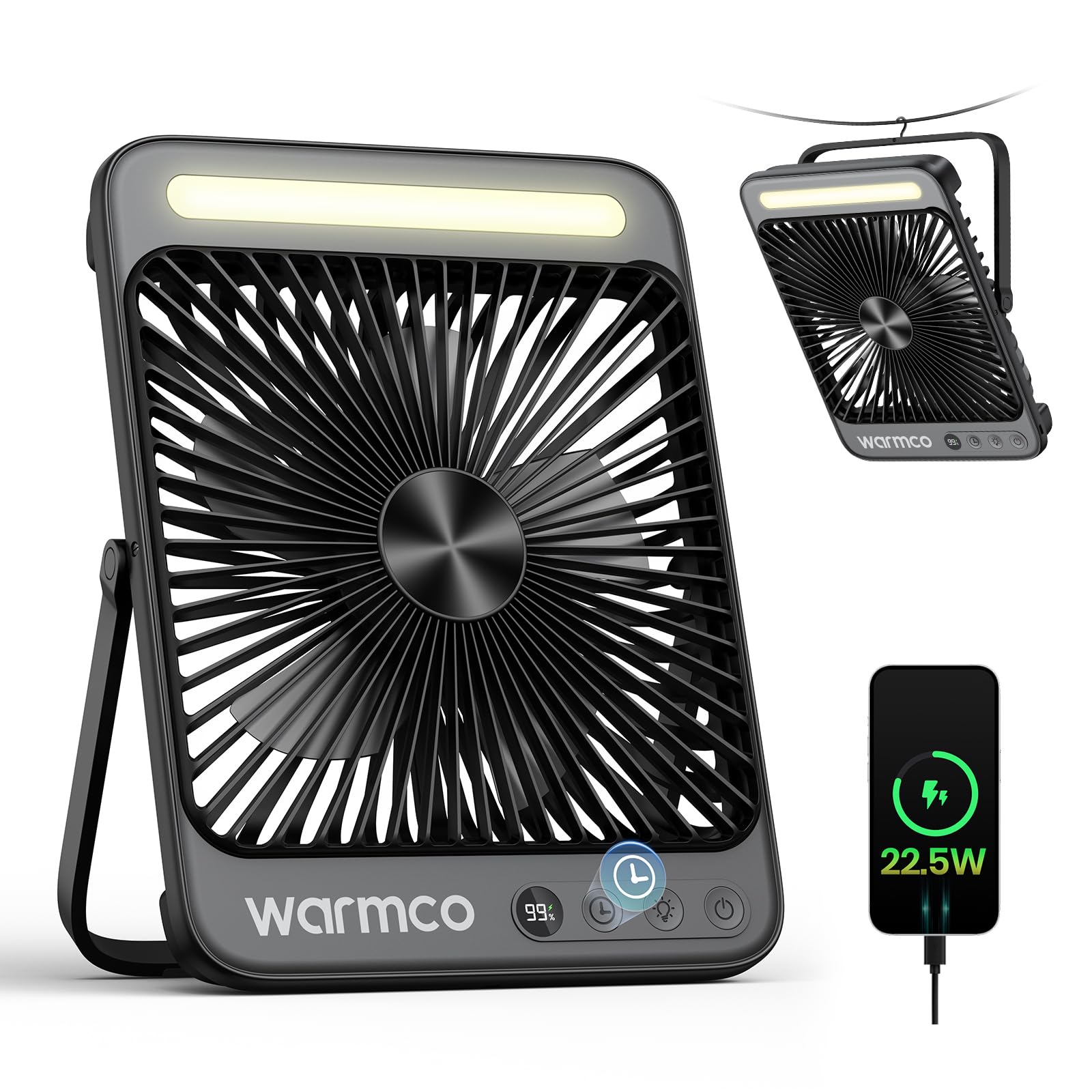
Figure 1: Warmco D4 Pro Portable Fan Overview
ഉൽപ്പന്ന സവിശേഷതകൾ
- ഉയർന്ന ശേഷിയുള്ള ബാറ്ററി: Equipped with a 20000mAh battery, providing 15 to 48 hours of runtime depending on speed settings.
- ഫാസ്റ്റ് ചാർജിംഗ്: Supports 18W input for a full charge in approximately 7 hours and 22.5W output for efficient device charging.
- ഒതുക്കമുള്ള & പോർട്ടബിൾ ഡിസൈൻ: Measures 1.77 x 8.27 x 10.71 inches and weighs 1.7 lbs, featuring a foldable stand and a built-in hanging hook for easy placement and transport.
- സംയോജിത LED ലൈറ്റ്: A built-in LED light with 3 adjustable brightness levels, suitable for illumination in various settings.
- വിസ്പർ-ക്വയറ്റ് ഓപ്പറേഷൻ: Utilizes an efficient brushless motor to keep noise levels below 45dB, ensuring a peaceful environment.
- ക്രമീകരിക്കാവുന്ന വായുപ്രവാഹം: Offers 4 fan speed settings to customize cooling intensity.
- സ്മാർട്ട് സവിശേഷതകൾ: An LED display shows current battery level and selected fan speed.
- ടൈമർ പ്രവർത്തനം: Programmable timer settings for 1, 2, 4, or 8 hours.
- എളുപ്പമുള്ള പരിപാലനം: Features a detachable front cover for convenient cleaning of the fan blades.

Figure 2: Extended Battery Life and Capacity

Figure 3: Ultra-thin and Portable Design
സജ്ജമാക്കുക
- അൺബോക്സിംഗ്: Carefully remove the fan and all included accessories (USB-C cable, instruction manual) from the packaging.
- പ്രാരംഭ ചാർജിംഗ്: Before first use, fully charge the fan. Connect the provided USB-C cable to the fan's input port and to an 18W (or higher) power adapter (not included). The LED display will show the charging progress. A full charge takes approximately 7 hours.
- പ്ലേസ്മെൻ്റ്:
- ഡെസ്ക്ടോപ്പ് ഉപയോഗം: Extend the foldable stand at the back of the fan to position it on a flat surface.
- തൂക്കിയിടൽ ഉപയോഗം: Utilize the built-in metal hook at the top of the fan to suspend it in tents, on branches, or other suitable locations.
വീഡിയോ 1: വിശദമായിview of the Warmco D4 Pro fan's features and setup.
പ്രവർത്തന നിർദ്ദേശങ്ങൾ
- പവർ ഓൺ/ഓഫ്: Press the power button (usually marked with a power symbol) once to turn the fan on. Press and hold the power button to turn it off.
- ഫാൻ വേഗത ക്രമീകരിക്കുക: While the fan is on, press the fan speed button (often marked with fan blades or 'F') repeatedly to cycle through the 4 available speed settings. The LED display will indicate the current speed.
- LED ലൈറ്റ് നിയന്ത്രിക്കുക: Press the light button (often marked with a light bulb symbol) repeatedly to cycle through the 3 brightness levels of the integrated LED light. Press again to turn the light off.
- ടൈമർ സജ്ജമാക്കുക: Press the timer button (often marked with a clock symbol) repeatedly to select a runtime of 1, 2, 4, or 8 hours. The fan will automatically turn off after the selected time.
- പവർ ബാങ്കായി ഉപയോഗിക്കുക: Connect your external device (e.g., smartphone) to the fan's 22.5W output USB port using an appropriate charging cable. The fan will begin charging your device.

Figure 4: Quiet Performance and Timer Function

ചിത്രം 5: പവർ ബാങ്കിന്റെ പ്രവർത്തനം
Video 2: Demonstration of the fan's portability and features for travel.
മെയിൻ്റനൻസ്
Regular cleaning ensures optimal performance and extends the lifespan of your fan.
- ഫാൻ ബ്ലേഡുകൾ വൃത്തിയാക്കൽ: The front cover of the fan is detachable for easy cleaning. Unscrew the screws on both sides of the fan counter-clockwise to remove the cover. Gently wipe the fan blades with a soft, dry cloth. Do not use abrasive cleaners or immerse the fan in water.
- ബാഹ്യ ശുചീകരണം: ഫാനിന്റെ പുറംഭാഗം മൃദുവായ, ഡി-ടച്ച് ഉപയോഗിച്ച് തുടയ്ക്കുക.amp തുണി.
- സംഭരണം: When not in use for extended periods, ensure the fan is clean and fully charged. Store it in a cool, dry place.

Figure 6: Detachable Front Panel for Easy Cleaning
ട്രബിൾഷൂട്ടിംഗ്
- ഫാൻ ഓണാക്കുന്നില്ല: Ensure the battery is sufficiently charged. Connect the fan to a power source using the USB-C cable and allow it to charge for at least 30 minutes before attempting to power on again.
- ദുർബലമായ വായുപ്രവാഹം: Check the selected fan speed setting and increase it if necessary. Ensure the fan blades are clean and free from obstructions.
- LED ലൈറ്റ് പ്രവർത്തിക്കുന്നില്ല: Verify the fan has adequate battery power. Press the light button to cycle through the brightness settings.
- Device Not Charging (Power Bank Function): Ensure the fan has sufficient battery charge. Check that the charging cable is securely connected to both the fan's output port and your device.
സ്പെസിഫിക്കേഷനുകൾ
| ഫീച്ചർ | സ്പെസിഫിക്കേഷൻ |
|---|---|
| ബ്രാൻഡ് | വാംകോ |
| മോഡലിൻ്റെ പേര് | ഡി 4 പ്രോ |
| അളവുകൾ (D x W x H) | 1.77" x 8.27" x 10.71" |
| ഇനത്തിൻ്റെ ഭാരം | 1.76 പൗണ്ട് (800 ഗ്രാം) |
| പവർ ഉറവിടം | ബാറ്ററി പവർ |
| ബാറ്ററി ശേഷി | 20000mAh (2 Nonstandard Battery batteries included) |
| ഇൻപുട്ട് പവർ | 18W (Charging time ~7 hours) |
| ഔട്ട്പുട്ട് പവർ | 22.5W (for charging devices) |
| ഫാൻ വേഗത | 4 ലെവലുകൾ |
| ശബ്ദ നില | 45 ഡെസിബെൽ |
| LED ലൈറ്റ് | Integrated, 3 levels |
| ടൈമർ | 1, 2, 4, അല്ലെങ്കിൽ 8 മണിക്കൂർ |
| ഉൾപ്പെടുത്തിയ ഘടകങ്ങൾ | D4 Pro Portable Fan, Instruction Manual, USB C Cable |
വാറൻ്റിയും പിന്തുണയും
The Warmco D4 Pro Portable Fan comes with a 3 വർഷത്തെ മാറ്റിസ്ഥാപിക്കൽ വാഗ്ദാനം. For any product inquiries, technical support, or warranty claims, please refer to the contact information provided in your product packaging or visit the official Warmco webസൈറ്റ്.

Figure 7: 3-Year Replacement Promise