
1. ആമുഖം
വാങ്ങിയതിന് നന്ദി.asing the VIFLYKOO Bluetooth 5.4 Turntable. This device combines classic vinyl playback with modern connectivity, featuring integrated stereo speakers, Bluetooth 5.4 for both receiving and transmitting audio, USB recording, and multiple audio outputs. This manual provides essential information for safe operation, setup, and maintenance of your turntable.

Image: The VIFLYKOO Bluetooth 5.4 Turntable, showcasing its mahogany finish and classic design.
2. സുരക്ഷാ നിർദ്ദേശങ്ങൾ
Please read these safety instructions carefully before using the product and retain them for future reference. Incorrect use may result in electric shock, fire, or other hazards.
- മഴ, ഈർപ്പം, അല്ലെങ്കിൽ തീവ്രമായ താപനില എന്നിവയിൽ യൂണിറ്റ് തുറന്നുകാട്ടരുത്.
- പവർ അഡാപ്റ്റർ നിങ്ങളുടെ പ്രാദേശിക പവർ സപ്ലൈയുമായി പൊരുത്തപ്പെടുന്നുണ്ടെന്ന് ഉറപ്പാക്കുക.
- സി തുറക്കരുത്.asing; എല്ലാ സേവനങ്ങളും യോഗ്യതയുള്ള ഉദ്യോഗസ്ഥർക്ക് റഫർ ചെയ്യുക.
- Keep the unit away from heat sources, direct sunlight, and strong magnetic fields.
- ഉണങ്ങിയ തുണി ഉപയോഗിച്ച് മാത്രം വൃത്തിയാക്കുക. ലിക്വിഡ് ക്ലീനറുകളോ എയറോസോളുകളോ ഉപയോഗിക്കരുത്.
- Place the turntable on a stable, level surface to prevent vibrations and ensure proper playback.
3. പാക്കേജ് ഉള്ളടക്കം
പാക്കേജിൽ എല്ലാ ഇനങ്ങളും ഉണ്ടെന്ന് ഉറപ്പാക്കുക:
- VIFLYKOO Bluetooth 5.4 Turntable
- പവർ അഡാപ്റ്റർ
- ഇൻസ്ട്രക്ഷൻ മാനുവൽ
- 45 RPM Adapter (for 7-inch records)
4. ഉൽപ്പന്നം കഴിഞ്ഞുview
Familiarize yourself with the main components and features of your turntable.
4.1 പ്രധാന സവിശേഷതകൾ
- ബ്ലൂടൂത്ത് 5.4 കണക്റ്റിവിറ്റി: Supports both receiving audio from external devices and transmitting audio to Bluetooth speakers or headphones.
- ഇന്റഗ്രേറ്റഡ് സ്റ്റീരിയോ സ്പീക്കറുകൾ: Two 5W speakers provide clear and authentic sound directly from the unit.
- 3-സ്പീഡ് ടേൺടേബിൾ: Plays 33 1/3, 45, and 78 RPM records.
- യുഎസ്ബി പ്രവർത്തനം: Allows recording vinyl to MP3/WAV files and playing digital audio from a USB drive.
- Multiple Audio Connections: RCA output for external amplifiers, 3.5mm AUX input for external audio sources, and a headphone output for private listening.
- ഓട്ടോ-സ്റ്റോപ്പ് ഫംഗ്ഷൻ: Automatically lifts the tonearm at the end of a record to protect the stylus and vinyl.
- Removable Dust Cover: Protects the platter and stylus from dust accumulation.
- Anti-Resonance Belt Drive: മെച്ചപ്പെട്ട ശബ്ദ നിലവാരത്തിനായി വൈബ്രേഷനുകൾ കുറയ്ക്കുന്നു.
4.2 ഘടകങ്ങൾ
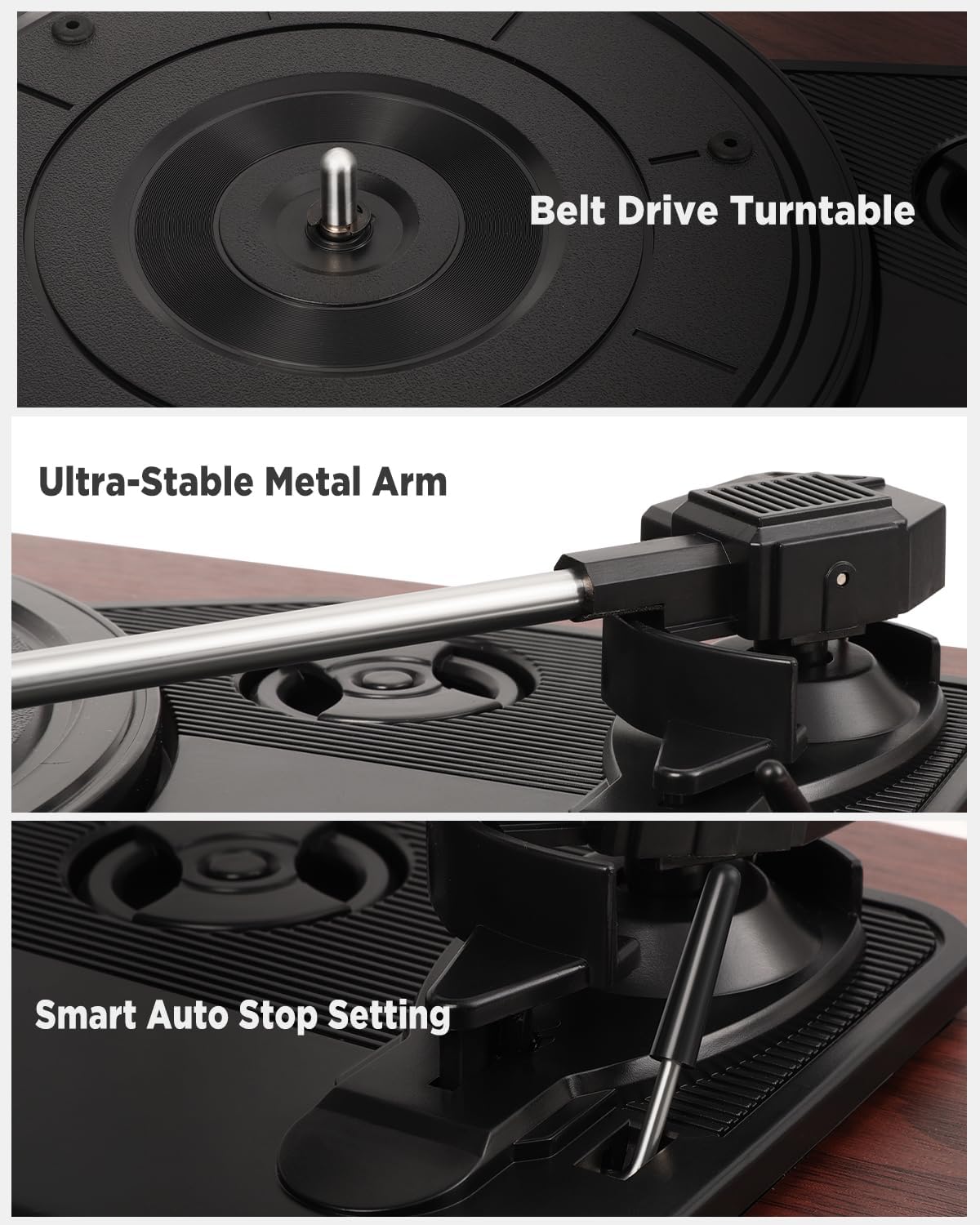
ചിത്രം: വിശദമായത് views of the belt drive system, the ultra-stable metal tonearm, and the smart auto-stop setting.

Image: An exploded diagram illustrating the internal structure of the integrated stereo speakers, highlighting the HiFi sound components.

Image: The rear panel of the turntable, showing the RCA output, AUX-in port, USB port, and headphone port, along with their respective functions.
5. സജ്ജീകരണം
Follow these steps to set up your turntable for the first time.
- ടേൺടേബിൾ അൺപാക്ക് ചെയ്യുക: പാക്കേജിംഗിൽ നിന്ന് എല്ലാ ഘടകങ്ങളും ശ്രദ്ധാപൂർവ്വം നീക്കം ചെയ്യുക.
- Position the Turntable: Place the unit on a flat, stable, and vibration-free surface. Ensure there is adequate ventilation around the unit.
- ഡസ്റ്റ് കവർ ഇൻസ്റ്റാൾ ചെയ്യുക: If not already installed, carefully attach the removable dust cover to the hinges at the back of the unit.
- സ്റ്റൈലസ് പ്രൊട്ടക്ടർ നീക്കം ചെയ്യുക: Gently remove the protective cap from the stylus (needle). Be careful not to touch the stylus itself.
- പവർ ബന്ധിപ്പിക്കുക: Insert the DC plug of the power adapter into the DC IN port on the back of the turntable, then plug the adapter into a wall outlet.
- പ്രാരംഭ പവർ ഓൺ: Turn the volume knob to power on the unit.
6. പ്രവർത്തന നിർദ്ദേശങ്ങൾ
6.1 വിനൈൽ റെക്കോർഡുകൾ പ്ലേ ചെയ്യുന്നു
- പൊടി കവർ തുറക്കുക.
- Place a vinyl record on the platter. If playing a 7-inch record, use the included 45 RPM adapter.
- സ്പീഡ് സെലക്ടർ സ്വിച്ച് ഉപയോഗിച്ച് ഉചിതമായ വേഗത (33, 45, അല്ലെങ്കിൽ 78 RPM) തിരഞ്ഞെടുക്കുക.
- ക്യൂയിംഗ് ലിവർ ഉപയോഗിച്ച് ടോൺആം സൌമ്യമായി ഉയർത്തുക.
- റെക്കോർഡിന്റെ ആവശ്യമുള്ള സ്റ്റാർട്ടിംഗ് ഗ്രൂവിന് മുകളിലൂടെ ടോൺആം നീക്കുക.
- Slowly lower the tonearm using the cueing lever. The record will begin to play.
- വോളിയം നോബ് ഉപയോഗിച്ച് വോളിയം ക്രമീകരിക്കുക.
- At the end of the record, the auto-stop function will automatically lift the tonearm and stop the platter rotation. Manually return the tonearm to its rest.
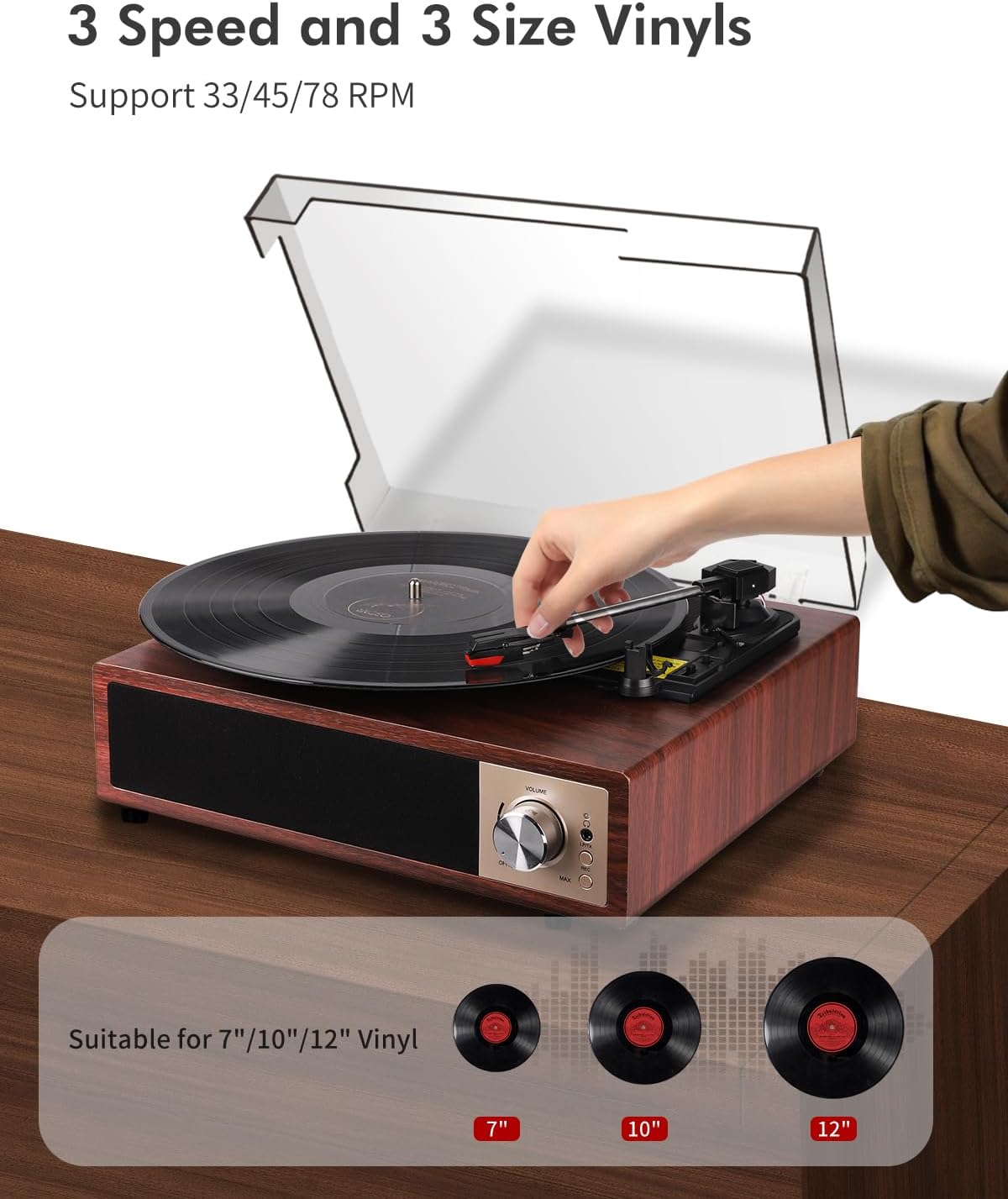
Image: A hand placing a record on the turntable, with visual representations of 7-inch, 10-inch, and 12-inch vinyl records, indicating support for all three sizes and 33/45/78 RPM speeds.
6.2 ബ്ലൂടൂത്ത് പ്രവർത്തനം
The turntable supports Bluetooth 5.4 for both receiving and transmitting audio.
6.2.1 Bluetooth Receiving (Playing music from your phone)
- ടർടേബിൾ ഓണാക്കുക.
- Switch the function mode to Bluetooth (BT). The Bluetooth indicator light will flash.
- Enable Bluetooth on your smartphone, tablet, or other Bluetooth device.
- ഇതിനായി തിരയുക "VIFLYKOO" in the list of available devices and select it to pair.
- Once paired, the indicator light will stop flashing. You can now play music from your device through the turntable's speakers.
6.2.2 Bluetooth Transmitting (Playing vinyl through external Bluetooth speakers/headphones)
- നിങ്ങളുടെ ബാഹ്യ ബ്ലൂടൂത്ത് സ്പീക്കറോ ഹെഡ്ഫോണുകളോ ജോടിയാക്കൽ മോഡിലാണെന്ന് ഉറപ്പാക്കുക.
- Turn on the turntable and select the desired input source (e.g., Phono for vinyl).
- Press and hold the Bluetooth button on the turntable to activate transmitting mode. The Bluetooth indicator will flash rapidly.
- The turntable will automatically search for and connect to nearby Bluetooth audio devices.
- Once connected, the indicator light will stop flashing, and audio from the turntable will play through your external Bluetooth device.

Image: Two scenarios demonstrating Bluetooth 5.4 functionality: a user receiving music from a smartphone to the turntable, and the turntable transmitting vinyl audio to external Bluetooth speakers and headphones.
6.3 USB Function (Recording & Playback)
The USB port allows you to convert your vinyl records to digital files or play audio fileഒരു USB ഡ്രൈവിൽ നിന്നുള്ള എസ്.
6.3.1 Recording Vinyl to USB
- Insert a USB drive into the USB port on the back of the turntable.
- Select the Phono input mode.
- നിങ്ങളുടെ വിനൈൽ റെക്കോർഡ് പ്ലേ ചെയ്യാൻ തുടങ്ങൂ.
- Press the 'REC' button (usually near the USB port or control panel) to start recording. The indicator light will confirm recording is active.
- Press the 'REC' button again to stop recording. The recorded audio will be saved as an MP3 or WAV file USB ഡ്രൈവിൽ.
6.3.2 Playing Audio from USB
- MP3 അല്ലെങ്കിൽ WAV ഓഡിയോ അടങ്ങിയ ഒരു USB ഡ്രൈവ് ഇടുക. fileയുഎസ്ബി പോർട്ടിലേക്ക് എസ്.
- Switch the function mode to USB.
- The turntable will automatically detect and begin playing the audio files. Use the control buttons (if available) to skip tracks or pause playback.

Image: The turntable with a USB drive inserted, illustrating the process of recording vinyl to digital files (MP3 or WAV) and playing music fileയുഎസ്ബി ഡ്രൈവിൽ നിന്നുള്ള ങ്ങൾ.
6.4 AUX ഇൻപുട്ട്
Connect external audio devices like MP3 players or smartphones via the 3.5mm AUX IN port.
- Connect one end of a 3.5mm audio cable (not included) to the AUX IN port on the turntable.
- മറ്റേ അറ്റം നിങ്ങളുടെ ബാഹ്യ ഉപകരണത്തിന്റെ ഹെഡ്ഫോൺ ജാക്കിലേക്കോ ഓഡിയോ ഔട്ട്പുട്ടിലേക്കോ ബന്ധിപ്പിക്കുക.
- Switch the function mode to AUX.
- Play audio from your external device, and it will be output through the turntable's speakers.
6.5 RCA ഔട്ട്പുട്ട്
നിങ്ങളുടെ ടേൺടേബിൾ ഒരു ബാഹ്യ ഉപകരണവുമായി ബന്ധിപ്പിക്കുക ampമെച്ചപ്പെടുത്തിയ ശബ്ദത്തിനായി ലിഫയർ അല്ലെങ്കിൽ പവർഡ് സ്പീക്കറുകൾ.
- Connect an RCA cable (not included) to the RCA OUT ports (Red for Right, White for Left) on the back of the turntable.
- നിങ്ങളുടെ ഉപകരണത്തിലെ അനുബന്ധ ഓഡിയോ ഇൻപുട്ടിലേക്ക് RCA കേബിളിന്റെ മറ്റേ അറ്റം ബന്ധിപ്പിക്കുക. ampലൈഫയർ അല്ലെങ്കിൽ പവർഡ് സ്പീക്കറുകൾ.
- ഉറപ്പാക്കുക amplifier/speakers are powered on and set to the correct input.
- Play your vinyl record, and the audio will be routed through the external system.
6.6 ഹെഡ്ഫോൺ ഔട്ട്പുട്ട്
സ്വകാര്യ ശ്രവണത്തിനായി, ഹെഡ്ഫോണുകൾ പ്രത്യേക ഹെഡ്ഫോൺ ജാക്കുമായി ബന്ധിപ്പിക്കുക.
- Plug your headphones into the 3.5mm headphone jack on the front or side of the turntable.
- The integrated speakers will typically mute when headphones are connected.
- സുഖകരമായ ശ്രവണ നിലയിലേക്ക് വോളിയം ക്രമീകരിക്കുക.
7. പരിപാലനം
ശരിയായ അറ്റകുറ്റപ്പണി നിങ്ങളുടെ ടർടേബിളിന്റെ ദീർഘായുസ്സും മികച്ച പ്രകടനവും ഉറപ്പാക്കുന്നു.
- യൂണിറ്റ് വൃത്തിയാക്കൽ: Wipe the turntable's surface with a soft, dry, lint-free cloth. Avoid using abrasive cleaners, waxes, or solvents.
- സ്റ്റൈലസ് വൃത്തിയാക്കൽ: സ്റ്റൈലസ് വൃത്തിയാക്കലിനായി രൂപകൽപ്പന ചെയ്ത മൃദുവായ ബ്രഷ് ഉപയോഗിക്കുക, പിന്നിൽ നിന്ന് മുന്നിലേക്ക് സൌമ്യമായി ബ്രഷ് ചെയ്യുക. നിങ്ങളുടെ വിരലുകൾ കൊണ്ട് സ്റ്റൈലസിൽ തൊടുന്നത് ഒഴിവാക്കുക.
- പൊടി മൂടൽ പരിചരണം: The removable acrylic dust cover can be cleaned with a soft, damp cloth. Avoid harsh chemicals that may scratch or cloud the acrylic.
- റെക്കോർഡ് കെയർ: Keep your vinyl records clean and free of dust to prevent damage to both the records and the stylus. Store them vertically in their sleeves.
- സ്റ്റൈലസ് മാറ്റിസ്ഥാപിക്കൽ: The stylus has a limited lifespan. If you notice a decrease in sound quality or increased skipping, consider replacing the stylus. Consult VIFLYKOO support for compatible replacement styli.
8. പ്രശ്നപരിഹാരം
If you encounter any issues, refer to the following troubleshooting guide.
| പ്രശ്നം | സാധ്യമായ കാരണം | പരിഹാരം |
|---|---|---|
| ശക്തിയില്ല | പവർ അഡാപ്റ്റർ ബന്ധിപ്പിച്ചിട്ടില്ല അല്ലെങ്കിൽ ഔട്ട്ലെറ്റ് തകരാറിലാണ്. | പവർ അഡാപ്റ്റർ സുരക്ഷിതമായി ബന്ധിപ്പിച്ചിട്ടുണ്ടെന്നും ഔട്ട്ലെറ്റ് പ്രവർത്തനക്ഷമമാണെന്നും ഉറപ്പാക്കുക. |
| സ്പീക്കറുകളിൽ നിന്ന് ശബ്ദമില്ല | Volume too low; headphones connected; incorrect input mode. | Increase volume; disconnect headphones; select correct input mode (Phono, BT, AUX, USB). |
| Record skips or sound distortion | Dirty record; dirty or worn stylus; turntable not level. | Clean record; clean or replace stylus; ensure turntable is on a level surface. |
| ബ്ലൂടൂത്ത് ജോടിയാക്കൽ പരാജയപ്പെടുന്നു | Device too far; incorrect mode; device not in pairing mode. | Ensure devices are close; select correct Bluetooth mode (receiving/transmitting); put external device in pairing mode. |
| USB റെക്കോർഡിംഗ് പ്രവർത്തിക്കുന്നില്ല | USB drive full or incompatible format; incorrect recording procedure. | Use a formatted USB drive (FAT32); ensure enough space; follow recording steps carefully. |
9 സ്പെസിഫിക്കേഷനുകൾ
Technical details of the VIFLYKOO Bluetooth 5.4 Turntable.
- ബ്രാൻഡ്: VIFLYKOO
- മോഡൽ നമ്പർ: 3388651
- ASIN: B0FP57JZHX
- GTIN/UPC: 774882248156
- ഭ്രമണ വേഗത: 33 1/3, 45, 78 ആർപിഎം
- മോട്ടോർ തരം: ബെൽറ്റ് ഓടിക്കുന്ന
- കണക്റ്റിവിറ്റി ടെക്നോളജി: Bluetooth 5.4 (Receive & Transmit), Auxiliary (3.5mm), USB, RCA
- സംയോജിത സ്പീക്കറുകൾ: Yes, 2 x 5W Stereo
- ഓഡിയോ pട്ട്പുട്ടുകൾ: RCA, 3.5mm Headphone Jack
- ഓഡിയോ ഇൻപുട്ടുകൾ: 3.5mm AUX-in, Bluetooth
- USB പ്രവർത്തനം: MP3/WAV Recording, MP3/WAV Playback
- പ്രത്യേക സവിശേഷതകൾ: Anti-resonance design, Automatic belt drive, Auto-stop function, Removable dust cover
- മെറ്റീരിയൽ: എഞ്ചിനീയറിംഗ് വുഡ്, മെറ്റൽ
- ഇനത്തിൻ്റെ ഭാരം: 2.15 കിലോഗ്രാം
- ഇനത്തിന്റെ അളവുകൾ (L x W x H): 35 സെ.മീ x 29 സെ.മീ x 12 സെ.മീ
- ഊർജ്ജ സ്രോതസ്സ്: Electric Cable (DC Adapter)
- സിഗ്നൽ ഫോർമാറ്റ്: അനലോഗ്, ഡിജിറ്റൽ
10. വാറൻ്റിയും പിന്തുണയും
Your VIFLYKOO Turntable is covered by a manufacturer's warranty and dedicated customer support.
- വാറൻ്റി: This product comes with a 2-year manufacturer's warranty from the date of purchase. Please retain your proof of purchase for warranty claims.
- ഉപഭോക്തൃ പിന്തുണ: For technical assistance, troubleshooting not covered in this manual, or warranty inquiries, please contact VIFLYKOO customer service through the retailer's platform or the official VIFLYKOO webസൈറ്റ്.