
1. ആമുഖം
The Portronics Toad Ergo Vertical Wireless Ergonomic Mouse is designed to provide a comfortable and natural hand posture, reducing strain during extended use. Its vertical design promotes a handshake grip, which can alleviate pressure on the wrist and palm. This manual provides instructions for setting up, operating, and maintaining your new ergonomic mouse.

Image: The Portronics Toad Ergo mouse shown next to a laptop, highlighting its 2.4 GHz wireless connectivity.
2. ബോക്സിൽ എന്താണുള്ളത്?
- 1 x Portronics Toad Ergo Vertical Wireless Mouse
- 1 x 2.4 GHz USB Receiver (dongle)
കുറിപ്പ്: AAA ബാറ്ററികൾ ഉൾപ്പെടുത്തിയിട്ടില്ല, അവ പ്രത്യേകം വാങ്ങേണ്ടതാണ്.
3. സജ്ജീകരണ ഗൈഡ്
3.1. ബാറ്ററികൾ ഇൻസ്റ്റാൾ ചെയ്യുന്നു
- മൗസിന്റെ അടിഭാഗത്ത് ബാറ്ററി കമ്പാർട്ട്മെന്റ് കണ്ടെത്തുക.
- ബാറ്ററി കമ്പാർട്ട്മെൻ്റ് കവർ തുറക്കുക.
- ശരിയായ പോളാരിറ്റി (+/-) ഉറപ്പാക്കിക്കൊണ്ട് രണ്ട് (2) AAA ബാറ്ററികൾ ഇടുക.
- ബാറ്ററി കമ്പാർട്ട്മെൻ്റ് കവർ സുരക്ഷിതമായി അടയ്ക്കുക.
3.2. യുഎസ്ബി റിസീവർ ബന്ധിപ്പിക്കുന്നു
- Remove the 2.4 GHz USB receiver from its storage slot on the underside of the mouse.
- നിങ്ങളുടെ കമ്പ്യൂട്ടറിൽ (PC അല്ലെങ്കിൽ Mac) ലഭ്യമായ ഒരു USB പോർട്ടിലേക്ക് USB റിസീവർ പ്ലഗ് ചെയ്യുക.
- നിങ്ങളുടെ കമ്പ്യൂട്ടർ ആവശ്യമായ ഡ്രൈവറുകൾ സ്വയമേവ കണ്ടെത്തി ഇൻസ്റ്റാൾ ചെയ്യണം. ഇതിന് കുറച്ച് നിമിഷങ്ങൾ എടുത്തേക്കാം.
3.3. മൗസിൽ പവർ ചെയ്യൽ
Once the batteries are installed and the USB receiver is connected, the mouse is ready for use. There is no separate power switch; the mouse will activate upon movement and enter a power-saving hibernation mode when idle.
4. പ്രവർത്തന നിർദ്ദേശങ്ങൾ
4.1. എർഗണോമിക് ഗ്രിപ്പ്
The vertical design of the Toad Ergo mouse encourages a natural handshake grip, aligning your wrist and forearm in a more neutral position. This design aims to reduce muscle strain and discomfort often associated with traditional horizontal mice.

Image: A hand demonstrating the comfortable, natural grip on the vertical ergonomic mouse.

Image: Visual representation of the mouse's 57-degree vertical angle, designed to support a natural hand posture.

Image: A comparison showing the ergonomic mouse promoting a neutral wrist position versus the twisted wrist position with a traditional mouse.
4.2. ബട്ടൺ പ്രവർത്തനങ്ങൾ
The Portronics Toad Ergo mouse features 6 buttons for enhanced control:
- ഇടത് ക്ലിക്ക് ബട്ടൺ: സ്റ്റാൻഡേർഡ് പ്രൈമറി ക്ലിക്ക് ഫംഗ്ഷൻ.
- റൈറ്റ് ക്ലിക്ക് ബട്ടൺ: സ്റ്റാൻഡേർഡ് സെക്കൻഡറി ക്ലിക്ക് ഫംഗ്ഷൻ.
- സ്ക്രോൾ വീൽ: For vertical scrolling. Can also be pressed for middle-click functionality.
- DPI ബട്ടൺ: കഴ്സർ സെൻസിറ്റിവിറ്റി (DPI) ക്രമീകരിക്കുന്നു.
- ഫോർവേഡ് ബട്ടൺ: മുന്നോട്ട് നാവിഗേറ്റ് ചെയ്യുന്നു web ബ്രൗസറുകൾ അല്ലെങ്കിൽ ആപ്ലിക്കേഷനുകൾ.
- ബാക്ക്വേർഡ് ബട്ടൺ: പിന്നിലേക്ക് നാവിഗേറ്റ് ചെയ്യുന്നു web ബ്രൗസറുകൾ അല്ലെങ്കിൽ ആപ്ലിക്കേഷനുകൾ.

Image: An illustration clearly marking the Left Button, Right Button, Scroll Wheel, DPI Button, Forward Button, and Backward Button on the mouse.

ചിത്രം: വിശദമായത് views of the DPI button, scroll wheel, dedicated back and forward buttons, and the textured wrist support area.
4.3. DPI (കഴ്സർ വേഗത) ക്രമീകരിക്കൽ
The mouse features adjustable DPI settings, allowing you to customize cursor sensitivity for different tasks. Press the DPI ബട്ടൺ (located near the scroll wheel) to cycle through the available DPI settings: 1200, 1600, 2400, and 3200 DPI. A higher DPI setting results in faster cursor movement across the screen with less physical mouse movement.
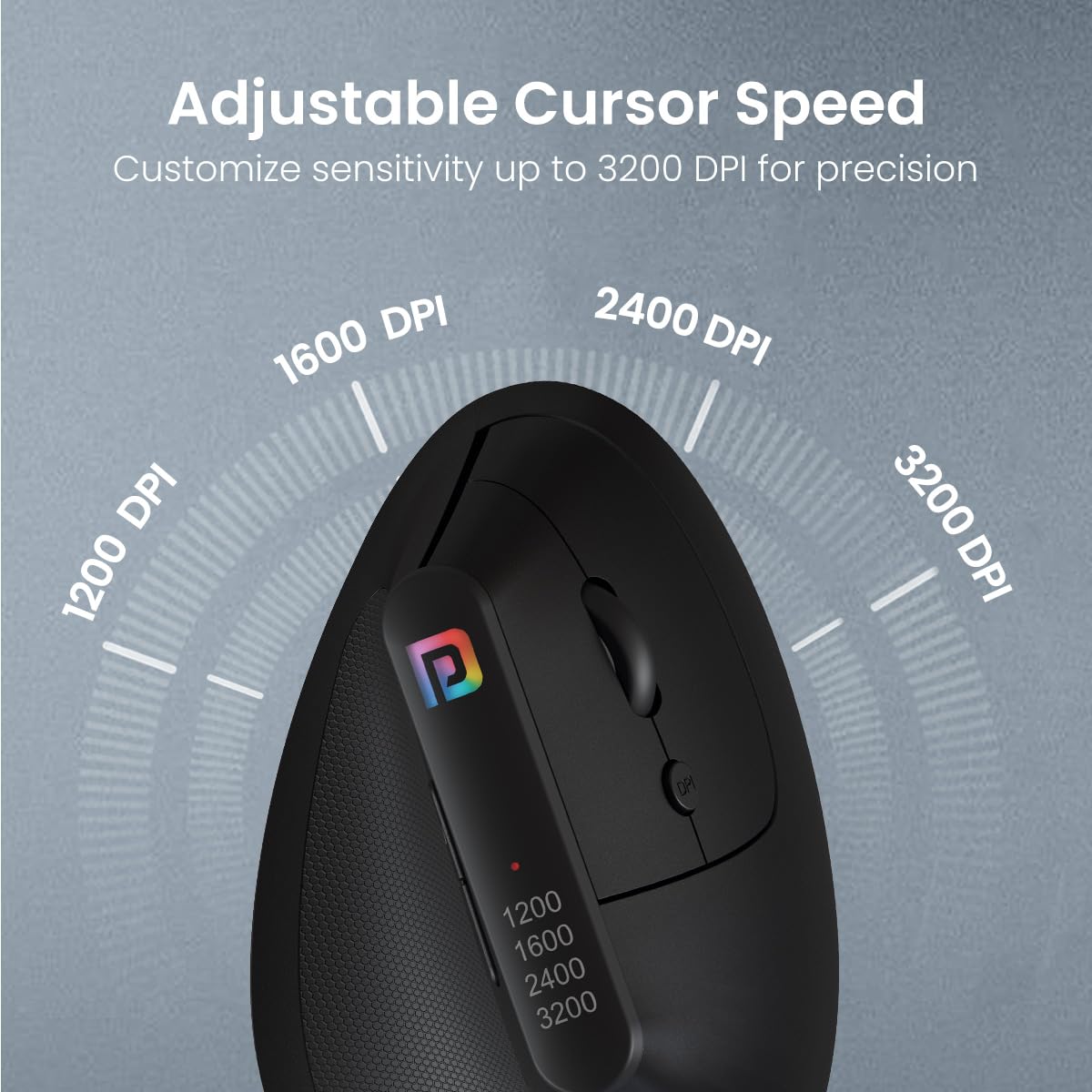
Image: Visual representation of the adjustable DPI levels (1200, 1600, 2400, 3200) and their effect on cursor speed.
5. പരിപാലനം
5.1. വൃത്തിയാക്കൽ
മികച്ച പ്രകടനവും ശുചിത്വവും നിലനിർത്താൻ, നിങ്ങളുടെ മൗസ് പതിവായി വൃത്തിയാക്കുക:
- മൃദുവായ, ലിൻ്റ് രഹിത തുണി ഉപയോഗിക്കുകampവെള്ളം അല്ലെങ്കിൽ മൃദുവായ ക്ലീനിംഗ് ലായനി ഉപയോഗിച്ചാണ്.
- കഠിനമായ രാസവസ്തുക്കൾ, അബ്രസീവ് ക്ലീനറുകൾ, അല്ലെങ്കിൽ ലായകങ്ങൾ എന്നിവ ഉപയോഗിക്കുന്നത് ഒഴിവാക്കുക.
- Do not allow liquids to enter the mouse's interior.
- Clean the optical sensor on the underside of the mouse with a dry cotton swab if cursor tracking becomes erratic.
5.2. ബാറ്ററി മാറ്റിസ്ഥാപിക്കൽ
When the mouse's performance degrades or it becomes unresponsive, it is likely time to replace the AAA batteries. Follow the instructions in Section 3.1 to replace the batteries.
5.3. സംഭരണം
When not in use for extended periods, store the mouse in a cool, dry place. You may remove the batteries to prevent potential leakage, especially if storing for several months.
6. പ്രശ്നപരിഹാരം
| പ്രശ്നം | സാധ്യമായ കാരണം | പരിഹാരം |
|---|---|---|
| Mouse is unresponsive or not moving. | Low or dead batteries. USB receiver not connected. Mouse not powered on. | Replace batteries. Ensure USB receiver is firmly plugged into a working USB port. |
| ക്രമരഹിതമായ കഴ്സർ ചലനം. | Dirty optical sensor. Uneven or reflective surface. Interference. | Clean the optical sensor. Use a mouse pad or non-reflective surface. Move mouse closer to receiver or away from other wireless devices. |
| ബട്ടണുകൾ ശരിയായി പ്രവർത്തിക്കുന്നില്ല. | Software issue. Physical damage. | Restart your computer. Ensure drivers are updated. If problem persists, contact support. |
| വയർലെസ് കണക്ഷൻ പ്രശ്നങ്ങൾ. | Distance from receiver. Interference. | Reduce distance between mouse and receiver. Avoid placing receiver near other electronic devices. Try a different USB port. |
7 സ്പെസിഫിക്കേഷനുകൾ
- ബ്രാൻഡ്: പോര്ട്രോണിക്സ്
- മോഡൽ: POR-1808
- കണക്റ്റിവിറ്റി: 2.4 GHz വയർലെസ് (USB റിസീവർ)
- ബട്ടണുകൾ: 6D (Left, Right, Scroll Wheel, DPI, Forward, Backward)
- DPI ക്രമീകരണങ്ങൾ: Adjustable up to 3200 DPI (1200, 1600, 2400, 3200)
- എർഗണോമിക് ഡിസൈൻ: Vertical, Handshake Grip
- ഊർജ്ജ സ്രോതസ്സ്: 2 x AAA ബാറ്ററികൾ (ഉൾപ്പെടുത്തിയിട്ടില്ല)
- ഓപ്പറേറ്റിംഗ് സിസ്റ്റം അനുയോജ്യത: വിൻഡോസ്, മാക് ഒഎസ്
- ഉൽപ്പന്ന അളവുകൾ: 10 x 8 x 0.1 സെ.മീ (ഏകദേശം)
- ഇനത്തിൻ്റെ ഭാരം: 140 ഗ്രാം (ഏകദേശം)
- ഉൾപ്പെടുത്തിയ ഘടകങ്ങൾ: 1N Wireless Mouse
- മാതൃരാജ്യം: ചൈന
8. വാറണ്ടിയും പിന്തുണയും
For warranty information and customer support, please refer to the warranty card included with your product or visit the official Portronics website. You can also contact Portronics customer service directly for assistance with product issues or inquiries.
Portronics Customer Service: 9555-245-245
വാറന്റി ക്ലെയിമുകൾക്കായി നിങ്ങളുടെ വാങ്ങൽ രസീത് സൂക്ഷിക്കുക.