
ആമുഖം
This manual provides essential information for the safe and efficient use of your Google Pixel 9 Pro 5G smartphone. Please read these instructions carefully before operating your device.

ചിത്രം 1: മുൻഭാഗം view of the Google Pixel 9 Pro 5G.
ബോക്സിൽ എന്താണുള്ളത്
പാക്കേജിംഗിൽ എല്ലാ ഇനങ്ങളും ഉണ്ടെന്ന് ഉറപ്പാക്കുക:
- ഗൂഗിൾ പിക്സൽ 9 പ്രോ സ്മാർട്ട്ഫോൺ
- USB-C മുതൽ USB-C കേബിൾ വരെ (1m, USB 2.0)
- സിം ട്രേ എജക്റ്റർ ടൂൾ
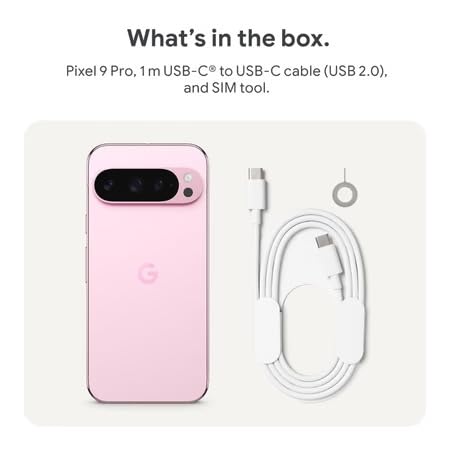
Figure 2: Included items in the Pixel 9 Pro packaging.
സജ്ജമാക്കുക
1. സിം കാർഡ് ചേർക്കൽ
- Locate the SIM tray on the side of your Pixel 9 Pro.
- Insert the provided SIM ejector tool into the small hole on the SIM tray and press gently until the tray pops out.
- സ്വർണ്ണ കോൺടാക്റ്റുകൾ താഴേക്ക് അഭിമുഖീകരിക്കുന്ന തരത്തിൽ നിങ്ങളുടെ നാനോ-സിം കാർഡ് ട്രേയിൽ വയ്ക്കുക. അത് ശരിയായി സ്ഥാപിച്ചിട്ടുണ്ടെന്ന് ഉറപ്പാക്കുക.
- സിം ട്രേ ഫ്ലഷ് ആകുന്നതുവരെ ശ്രദ്ധാപൂർവ്വം ഉപകരണത്തിലേക്ക് തിരികെ തള്ളുക.
2. പ്രാരംഭ ചാർജിംഗ്
ആദ്യ ഉപയോഗത്തിന് മുമ്പ്, നിങ്ങളുടെ ഉപകരണം പൂർണ്ണമായും ചാർജ് ചെയ്യാൻ ശുപാർശ ചെയ്യുന്നു.
- നിങ്ങളുടെ ഫോണിന്റെ അടിയിലുള്ള ചാർജിംഗ് പോർട്ടിലേക്ക് USB-C കേബിൾ ബന്ധിപ്പിക്കുക.
- Connect the other end of the cable to a compatible USB power adapter (sold separately) and plug it into a power outlet.
- സ്ക്രീനിലെ ബാറ്ററി ഐക്കൺ ചാർജിംഗ് നിലയെ സൂചിപ്പിക്കും.
3. പവർ ഓൺ/ഓഫ്
- പവർ ഓണാക്കാൻ: Press and hold the Power button (located on the right side) until the Google logo appears on the screen.
- പവർ ഓഫ് ചെയ്യാൻ: പവർ ബട്ടൺ അമർത്തിപ്പിടിക്കുക, തുടർന്ന് സ്ക്രീനിൽ 'പവർ ഓഫ്' ടാപ്പ് ചെയ്യുക.
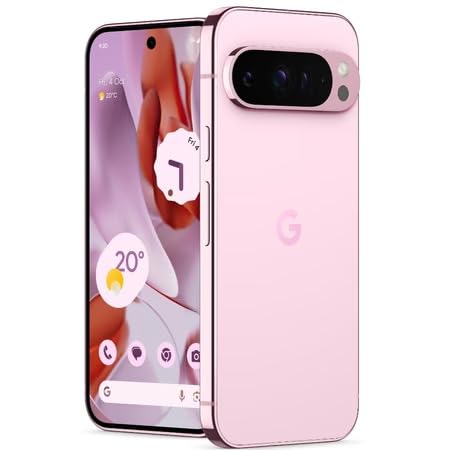
Figure 3: Power and volume buttons on the side of the device.
4. ആദ്യ തവണ സജ്ജീകരണ വിസാർഡ്
Upon powering on for the first time, follow the on-screen instructions to:
- നിങ്ങളുടെ ഭാഷയും പ്രദേശവും തിരഞ്ഞെടുക്കുക.
- ഒരു Wi-Fi നെറ്റ്വർക്കിലേക്ക് കണക്റ്റുചെയ്യുക.
- നിങ്ങളുടെ Google അക്കൗണ്ട് ഉപയോഗിച്ച് സൈൻ ഇൻ ചെയ്യുക അല്ലെങ്കിൽ പുതിയൊരെണ്ണം സൃഷ്ടിക്കുക.
- Set up security features such as fingerprint unlock, face unlock, PIN, pattern, or password.
- ഒരു പഴയ ഉപകരണത്തിൽ നിന്ന് ഡാറ്റ കൈമാറുക (ഓപ്ഷണൽ).
പ്രവർത്തന നിർദ്ദേശങ്ങൾ
അടിസ്ഥാന നാവിഗേഷൻ
- ടച്ച്സ്ക്രീൻ ആംഗ്യങ്ങൾ: Interact with the device using taps, swipes, pinches (for zoom), and long presses.
- ഹോം സ്ക്രീൻ: Access your applications, widgets, and customize your layout.
- അറിയിപ്പുകൾ: സ്ക്രീനിന്റെ മുകളിൽ നിന്ന് താഴേക്ക് സ്വൈപ്പ് ചെയ്യുക view അറിയിപ്പുകൾ.
- ദ്രുത ക്രമീകരണങ്ങൾ: Swipe down twice from the top of the screen to access quick settings toggles (Wi-Fi, Bluetooth, etc.).
ക്യാമറ ഓപ്പറേഷൻ
The Pixel 9 Pro features a powerful triple rear camera system.

Figure 4: Rear camera system of the Pixel 9 Pro.
- ക്യാമറ തുറക്കുന്നു: Tap the Camera app icon on your home screen or lock screen.
- ലെൻസുകൾ മാറ്റൽ: Tap the icons on the viewfinder to switch between wide, ultrawide, and 5x telephoto lenses.
- ഷൂട്ടിംഗ് മോഡുകൾ: Select from various modes such as Night Sight for low-light conditions, ആസ്ട്രോഫോട്ടോഗ്രഫി for capturing stars, മാക്രോ for close-up shots, ലോംഗ് എക്സ്പോഷർ for creative effects, and ഛായാചിത്രം for depth-of-field effects.
- സൂപ്പർ റെസല്യൂഷൻ സൂം: Pinch the screen to digitally zoom up to 30x. For video, Super Res Zoom supports up to 20x.
- Pro Controls: Access advanced camera settings like shutter speed and manual focus for greater creative control.
ബാറ്ററി മാനേജ്മെൻ്റ്
- ബാറ്ററി നില പരിശോധിക്കുന്നു: View ബാറ്ററി ശതമാനംtage in the status bar or in Settings > Battery.
- പരമാവധി ബാറ്ററി ലാഭിക്കൽ: Enable this mode in Settings > Battery > Extreme Battery Saver to significantly extend battery life.
- ചാർജിംഗ്: Use the provided USB-C cable and a compatible power adapter for optimal charging speed.
സുരക്ഷാ സവിശേഷതകൾ
Your Pixel 9 Pro incorporates multiple hardware security layers to protect your data.
- ഫിംഗർപ്രിന്റ് അൺലോക്ക്: Register your fingerprints in Settings > Security & privacy > Device unlock.
- ഫേസ് അൺലോക്ക്: സൗകര്യപ്രദമായ അൺലോക്കിംഗിനായി മുഖം തിരിച്ചറിയൽ സജ്ജമാക്കുക.
- പിൻ/പാറ്റേൺ/പാസ്വേഡ്: Always set a strong screen lock method.
- സോഫ്റ്റ്വെയർ അപ്ഡേറ്റുകൾ: Regularly install system updates to ensure your device has the latest security patches.
താപനില സെൻസർ
The Pixel 9 Pro includes a thermometer for measuring temperature.
- Open the dedicated Thermometer app.
- Follow the on-screen instructions to measure body temperature or the temperature of objects.
- Temperature data can be saved and tracked within the Fitbit application.
മെയിൻ്റനൻസ്
നിങ്ങളുടെ ഉപകരണം വൃത്തിയാക്കുന്നു
- Use a soft, lint-free cloth to clean the screen and body of your phone.
- Avoid using abrasive materials, harsh chemicals, or aerosol sprays.
- Do not submerge the device in water, despite its water-resistant rating.
സോഫ്റ്റ്വെയർ അപ്ഡേറ്റുകൾ
Google regularly releases software updates to improve performance, add features, and enhance security.
- To check for updates, go to Settings > System > System update.
- Ensure your device is connected to Wi-Fi and has sufficient battery charge before installing updates.
ഫിസിക്കൽ കെയർ
The Pixel 9 Pro is built with Corning Gorilla Glass Victus 2 and is water-resistant, offering durability against everyday drops and spills.
- While durable, avoid excessive impacts or drops to prevent damage.
- Consider using a screen protector and a protective case for additional safeguarding.
ട്രബിൾഷൂട്ടിംഗ്
ഉപകരണം പ്രതികരിക്കുന്നില്ല
If your phone becomes unresponsive, perform a force restart:
- ഉപകരണം പുനരാരംഭിക്കുന്നത് വരെ ഏകദേശം 10-15 സെക്കൻഡ് നേരത്തേക്ക് പവർ ബട്ടൺ അമർത്തിപ്പിടിക്കുക.
ആപ്പുകൾ ക്രാഷാകുന്നു അല്ലെങ്കിൽ മരവിക്കുന്നു
- പ്രശ്നമുള്ള ആപ്പ് അടച്ച് വീണ്ടും തുറക്കുക.
- Clear the app's cache: Go to Settings > Apps > See all apps > [App Name] > Storage & cache > Clear cache.
- ഗൂഗിൾ പ്ലേ സ്റ്റോറിൽ നിന്ന് ആപ്പ് അതിന്റെ ഏറ്റവും പുതിയ പതിപ്പിലേക്ക് അപ്ഡേറ്റ് ചെയ്തിട്ടുണ്ടെന്ന് ഉറപ്പാക്കുക.
- നിങ്ങളുടെ ഫോൺ പുനരാരംഭിക്കുക.
നെറ്റ്വർക്ക് കണക്റ്റിവിറ്റി പ്രശ്നങ്ങൾ (വൈ-ഫൈ/സെല്ലുലാർ)
- Toggle Wi-Fi or cellular data off and then back on.
- നിങ്ങളുടെ ഫോൺ പുനരാരംഭിക്കുക.
- നിങ്ങളുടെ സിം കാർഡ് ശരിയായി ചേർത്തിട്ടുണ്ടെന്ന് ഉറപ്പാക്കുക.
- Reset network settings: Go to Settings > System > Reset options > Reset Wi-Fi, mobile & Bluetooth.
ബാറ്ററി വേഗത്തിൽ തീർന്നു
- വൈദ്യുതി ഉപയോഗിക്കുന്ന ആപ്പുകൾ തിരിച്ചറിയാൻ ക്രമീകരണങ്ങൾ > ബാറ്ററി എന്നതിൽ ബാറ്ററി ഉപയോഗം പരിശോധിക്കുക.
- സ്ക്രീൻ തെളിച്ചവും സ്ക്രീൻ ടൈംഔട്ട് ദൈർഘ്യവും കുറയ്ക്കുക.
- Disable unnecessary features like GPS, Bluetooth, and Wi-Fi when not in use.
- Enable Extreme Battery Saver mode.
ഫാക്ടറി റീസെറ്റ് (അവസാന ആശ്രയം)
Warning: A factory reset will erase all data from your phone. Back up all important data before proceeding.
- ക്രമീകരണങ്ങൾ > സിസ്റ്റം > റീസെറ്റ് ഓപ്ഷനുകൾ > എല്ലാ ഡാറ്റയും മായ്ക്കുക (ഫാക്ടറി റീസെറ്റ്) എന്നതിലേക്ക് പോകുക.
- Confirm your decision when prompted.
സ്പെസിഫിക്കേഷനുകൾ
| ഫീച്ചർ | വിശദാംശങ്ങൾ |
|---|---|
| ബ്രാൻഡ് | ഗൂഗിൾ |
| മോഡൽ | പിക്സൽ 9 പ്രോ |
| ഓപ്പറേറ്റിംഗ് സിസ്റ്റം | ആൻഡ്രോയിഡ് 15 |
| പ്രോസസ്സർ | ഗൂഗിൾ ടെൻസർ G4 (3.1 GHz) |
| റാം | 16 ജിബി |
| ആന്തരിക സംഭരണം | 256 ജിബി |
| പ്രദർശിപ്പിക്കുക | 6.3 Inches LTPO OLED (Actua), 1280 x 2856 Pixels, 120 Hz Refresh Rate |
| പിൻ ക്യാമറ | 50 MP wide + 48 MP ultrawide (Macro) + 48 MP 5x telephoto |
| മുൻ ക്യാമറ | 42 എം.പി |
| ബാറ്ററി ശേഷി | 4700 മില്ലിamp Hours (up to 24 hours average life) |
| കണക്റ്റിവിറ്റി | 5G, Wi-Fi 7, Bluetooth 5.3, NFC, UWB, USB-C |
| സിം കാർഡ് | Single Nano SIM |
| ജല പ്രതിരോധം | വെള്ളത്തെ പ്രതിരോധിക്കുന്ന |
| അളവുകൾ | 8 x 72 x 153 മില്ലിമീറ്റർ |
| ഭാരം | 198 ഗ്രാം |
വാറൻ്റിയും പിന്തുണയും
വാറൻ്റി വിവരങ്ങൾ
Your Google Pixel 9 Pro 5G comes with a 1 വർഷത്തെ നിർമ്മാതാവിൻ്റെ വാറൻ്റി വാങ്ങിയ തീയതി മുതൽ. സാധാരണ ഉപയോഗത്തിലുള്ള നിർമ്മാണ വൈകല്യങ്ങൾ ഈ വാറന്റി ഉൾക്കൊള്ളുന്നു. വാറന്റി ക്ലെയിമുകൾക്കായി നിങ്ങളുടെ വാങ്ങിയതിന്റെ തെളിവ് സൂക്ഷിക്കുക.
ഉപഭോക്തൃ പിന്തുണ
For technical assistance, warranty claims, or other support inquiries, please contact Google customer service:
- നിർമ്മാതാവ്: Google LLC, 1600 Ampഹിറ്റ്ഹീറ്റർ പാർക്ക്വേ, മൗണ്ടൻ View, CA 94043, USA
- Phone Support (India): +91 7718892303
- Importer Contact (India): Nexora Axis Private Limited (+91 7718892303)
For the most up-to-date support information, please visit the official Google Pixel support webസൈറ്റ്.


