
1. ആമുഖം
This manual provides detailed instructions for the proper use and maintenance of your LIGE Smart Watch FV6-B2. Please read this manual thoroughly before using the device to ensure optimal performance and longevity.
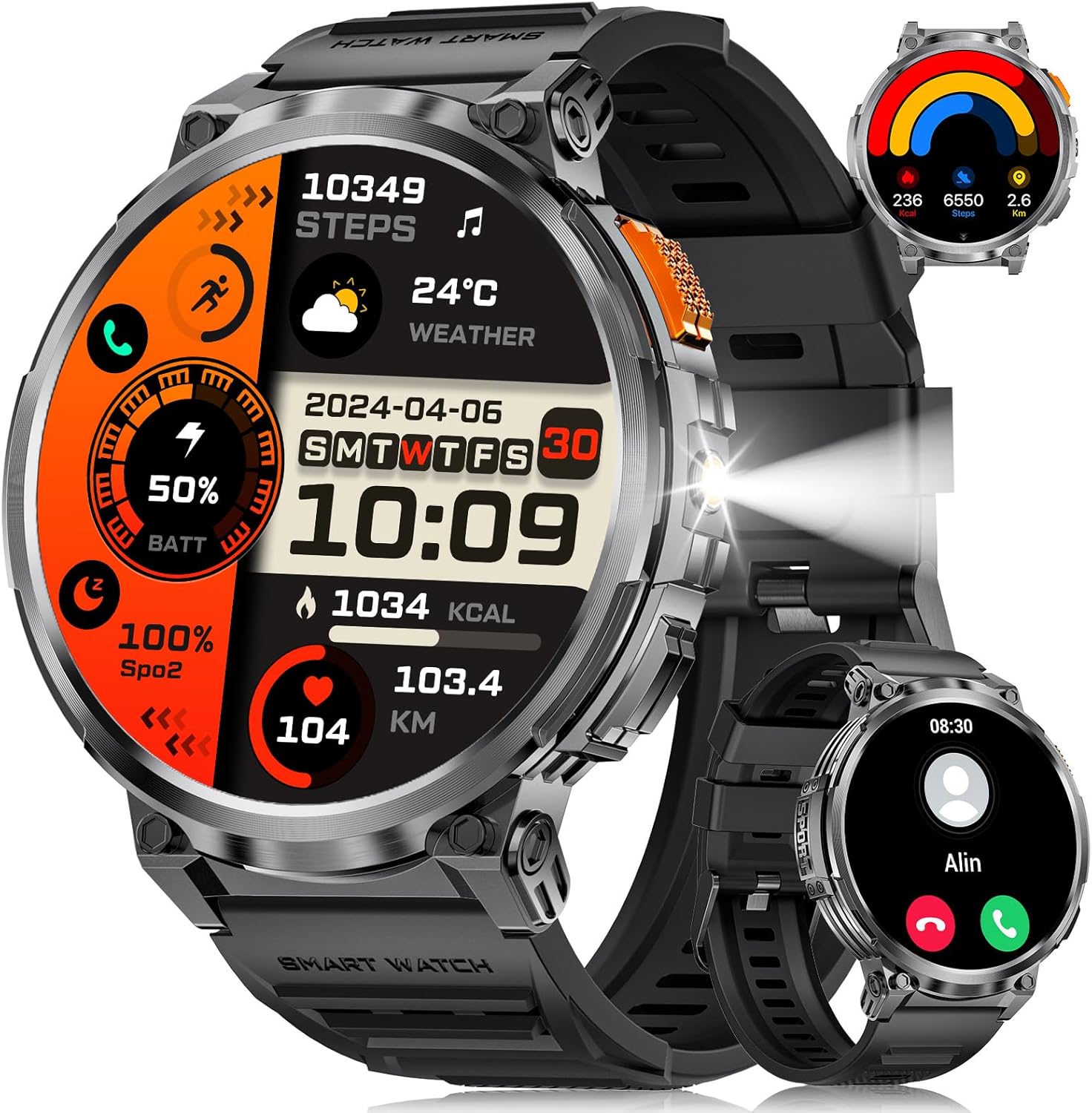
ചിത്രം 1.1: LIGE Smart Watch FV6-B2 displaying various health and activity metrics.
2. പാക്കേജ് ഉള്ളടക്കം
പാക്കേജിൽ എല്ലാ ഇനങ്ങളും ഉണ്ടെന്ന് ഉറപ്പാക്കുക:
- 1 x LIGE Smart Watch FV6-B2
- 1 x Watch Strap (pre-installed or separate)
- 1 x ചാർജിംഗ് കേബിൾ
- Accessories and Extension Tools (for strap adjustment, if applicable)
- 1 x ഉപയോക്തൃ മാനുവൽ (ഈ പ്രമാണം)
3. സജ്ജീകരണ ഗൈഡ്
3.1 പ്രാരംഭ ചാർജിംഗ്
Before first use, fully charge your smartwatch. Connect the provided charging cable to the watch and a compatible USB power source. A full charge typically takes approximately 2.5 hours. The watch features a 730mAh battery, providing extended usage time.

ചിത്രം 3.1: Smartwatch connected to its charging cable, highlighting the 730mAh battery.
3.2 ആപ്പ് ഇൻസ്റ്റാളേഷനും ജോടിയാക്കലും
To unlock the full functionality of your LIGE Smart Watch FV6-B2, download and install the companion application on your smartphone. The watch is compatible with Android 4.4 and iOS 8.0 or above. Refer to the quick start guide or packaging for the specific app name and QR code.
- Scan the QR code provided in the watch packaging or search for the app in your smartphone's app store.
- നിങ്ങളുടെ സ്മാർട്ട്ഫോണിൽ ആപ്ലിക്കേഷൻ ഇൻസ്റ്റാൾ ചെയ്യുക.
- ഒരു അക്കൗണ്ട് സൃഷ്ടിക്കുന്നതിനോ ലോഗിൻ ചെയ്യുന്നതിനോ ആപ്പ് തുറന്ന് ഓൺ-സ്ക്രീൻ നിർദ്ദേശങ്ങൾ പാലിക്കുക.
- നിങ്ങളുടെ സ്മാർട്ട്ഫോണിൽ ബ്ലൂടൂത്ത് പ്രവർത്തനക്ഷമമാക്കുക.
- Within the app, search for your LIGE Smart Watch FV6-B2 and initiate the pairing process.
- നിങ്ങളുടെ സ്മാർട്ട്ഫോണിലും സ്മാർട്ട് വാച്ചിലും പെയറിംഗ് അഭ്യർത്ഥന സ്ഥിരീകരിക്കുക.
For visual guidance, a connection video may be available. Check the product page or manufacturer's webകൂടുതൽ വിവരങ്ങൾക്ക് സൈറ്റ്.
4. പ്രവർത്തന നിർദ്ദേശങ്ങൾ
4.1 ഇന്റർഫേസ് നാവിഗേറ്റ് ചെയ്യൽ
The LIGE Smart Watch FV6-B2 features a 1.85-inch HD display with a 360x360 resolution and a highly responsive touch interface. Navigate through menus and functions with simple swipes and taps.
- മുകളിലേക്കും താഴേക്കും സ്വൈപ്പ് ചെയ്യുക: Scroll through notifications or menu options.
- ഇടത്തേക്ക്/വലത്തേക്ക് സ്വൈപ്പ് ചെയ്യുക: Access quick widgets or different watch faces.
- ടാപ്പ് ചെയ്യുക: ഒരു ഇനം തിരഞ്ഞെടുക്കുകയോ ഒരു ആപ്ലിക്കേഷൻ തുറക്കുകയോ ചെയ്യുക.
- സൈഡ് ബട്ടൺ: Typically used to return to the home screen, power on/off, or access the app list.

ചിത്രം 4.1: വിശദമായി view of the 1.85-inch HD display.
4.2 ബ്ലൂടൂത്ത് കോളിംഗും അറിയിപ്പുകളും
Once paired with your smartphone, the watch supports Bluetooth calling and displays notifications.
- കോളുകൾ ചെയ്യുക/ഉത്തരം നൽകുക: Use the built-in microphone and speaker to handle calls directly from your wrist. Access the dial keypad or call records on the watch.
- സന്ദേശ അറിയിപ്പുകൾ: Receive alerts for incoming messages from various applications (e.g., SMS, social media).

ചിത്രം 4.2: Bluetooth calling and notification features on the smartwatch.
4.3 ആരോഗ്യ നിരീക്ഷണം
The watch utilizes advanced biosensor technology for continuous health tracking.
- ഹൃദയമിടിപ്പ് നിരീക്ഷണം: ദിവസം മുഴുവൻ നിങ്ങളുടെ ഹൃദയമിടിപ്പ് അളക്കുന്നു.
- രക്തസമ്മർദ്ദ നിരീക്ഷണം: രക്തസമ്മർദ്ദ വായനകൾ നൽകുന്നു.
- ഉറക്ക നിരീക്ഷണം: നിങ്ങളുടെ ഉറക്ക പാറ്റേണുകൾ ട്രാക്ക് ചെയ്യുന്നു, അതിൽ ഗാഢമായതും ലഘുവായതുമായ ഉറക്കം ഉൾപ്പെടുന്നു.tages. View detailed sleep reports in the companion app.

ചിത്രം 4.3: Sleep monitoring interface on the smartwatch.
4.4 സ്പോർട്സ് മോഡുകളും ആക്ടിവിറ്റി ട്രാക്കിംഗും
The watch supports over 120 sports modes to track your physical activities.
- Built-in Modes: Access over 20 pre-installed exercise modes.
- ഇഷ്ടാനുസൃത മോഡുകൾ: Add over 100 additional sports modes via the app (e.g., running, badminton, baseball).
- Tracking Metrics: Records training history, speed, rhythm, heart rate, and steps to help plan and improve exercise efficiency.

ചിത്രം 4.4: കഴിഞ്ഞുview of multiple sports tracking modes.
4.5 അധിക പ്രവർത്തനങ്ങൾ
The LIGE Smart Watch FV6-B2 includes several utility features:
- കാലാവസ്ഥാ പ്രവചനം
- വോയ്സ് അസിസ്റ്റൻ്റ്
- അലാറം ക്ലോക്ക്
- സ്റ്റോപ്പ് വാച്ച്
- പെഡോമീറ്റർ
- Music Control Playback
- ഫോട്ടോ നിയന്ത്രണം
- കുടിവെള്ള ഓർമ്മപ്പെടുത്തൽ
- Multi-language Switching
- Women's Health Tracking
- തെളിച്ചം ക്രമീകരിക്കൽ
- ശല്യപ്പെടുത്തരുത് മോഡ്
- ഒരു പാസ്വേഡ് സജ്ജമാക്കുക
- Raise Hand to Turn On Screen
- Built-in Flashlight (range up to 20m)

ചിത്രം 4.5: Multifunctional interface showing various features.
Over 200 watch desktop faces can be downloaded and switched. You can also customize the watch face with your favorite pictures.
5. പരിപാലനം
5.1 ജല പ്രതിരോധം
The LIGE Smart Watch FV6-B2 has an IP68 waterproof rating. This means it is protected against dust ingress and can withstand immersion in water up to 1.5 meters for up to 30 minutes. It is suitable for use in rainy conditions, during sweating, or while showering. However, it is not recommended for diving or high-pressure water activities.

ചിത്രം 5.1: Smartwatch demonstrating its IP68 waterproof capability.
5.2 ശുചീകരണവും പരിചരണവും
- പതിവായി വാച്ചും സ്ട്രാപ്പും മൃദുവായ, ഡി-ക്ലാസ് ഉപയോഗിച്ച് വൃത്തിയാക്കുക.amp തുണി.
- കഠിനമായ രാസവസ്തുക്കൾ, അബ്രസീവ് ക്ലീനറുകൾ, അല്ലെങ്കിൽ ലായകങ്ങൾ എന്നിവ ഉപയോഗിക്കുന്നത് ഒഴിവാക്കുക, കാരണം ഇവ വാച്ചിന്റെ ഫിനിഷിനും സീലുകൾക്കും കേടുവരുത്തും.
- ചാർജ് ചെയ്യുന്നതിനു മുമ്പ് ചാർജിംഗ് കോൺടാക്റ്റുകൾ വൃത്തിയുള്ളതും വരണ്ടതുമാണെന്ന് ഉറപ്പാക്കുക, അങ്ങനെ അവയ്ക്ക് നാശം സംഭവിക്കില്ല.
- ഉപയോഗത്തിലില്ലാത്തപ്പോൾ വാച്ച് തണുത്തതും വരണ്ടതുമായ സ്ഥലത്ത് സൂക്ഷിക്കുക.
6. പ്രശ്നപരിഹാരം
6.1 Watch Will Not Turn On
- നൽകിയിരിക്കുന്ന കേബിൾ ഉപയോഗിച്ച് വാച്ച് കുറഞ്ഞത് 10 മിനിറ്റെങ്കിലും ചാർജ് ചെയ്യുക.
- If it still does not turn on, press and hold the side button for 10 seconds to force a restart.
- If the issue persists, charge the watch fully for 2.5 hours.
- If the watch still does not power on after these steps, contact customer support.
6.2 Watch Stopped Working Suddenly
- Restart the watch by pressing and holding the side button for 10 seconds.
- വാച്ച് ആവശ്യത്തിന് ചാർജ് ചെയ്തിട്ടുണ്ടെന്ന് ഉറപ്പാക്കുക.
- If the problem continues, consider resetting the watch via the settings menu: Settings > System > Reset. Note that a reset will erase all data on the watch.
- പ്രശ്നം നിലനിൽക്കുകയാണെങ്കിൽ, ഉപഭോക്തൃ പിന്തുണയുമായി ബന്ധപ്പെടുക.
6.3 കണക്റ്റിവിറ്റി പ്രശ്നങ്ങൾ (ബ്ലൂടൂത്ത്)
- നിങ്ങളുടെ സ്മാർട്ട്ഫോണിലും സ്മാർട്ട് വാച്ചിലും ബ്ലൂടൂത്ത് പ്രവർത്തനക്ഷമമാക്കിയിട്ടുണ്ടെന്ന് ഉറപ്പാക്കുക.
- Make sure the watch is within the Bluetooth range of your smartphone (typically 10 meters or 33 feet).
- നിങ്ങളുടെ സ്മാർട്ട്ഫോണും സ്മാർട്ട് വാച്ചും പുനരാരംഭിക്കുക.
- Unpair and re-pair the watch through the companion app.
- Check if the companion app is running in the background and has necessary permissions.
7 സ്പെസിഫിക്കേഷനുകൾ
| ഫീച്ചർ | വിശദാംശങ്ങൾ |
|---|---|
| മോഡൽ നമ്പർ | FV6-B2 |
| ഡിസ്പ്ലേ വലിപ്പം | 1.85 ഇഞ്ച് |
| ഡിസ്പ്ലേ റെസല്യൂഷൻ | 360x360 പിക്സലുകൾ |
| ബാറ്ററി ശേഷി | 730 mAh (ലിഥിയം പോളിമർ) |
| ചാർജിംഗ് സമയം | ഏകദേശം 2.5 മണിക്കൂർ |
| സാധാരണ ഉപയോഗം ബാറ്ററി ലൈഫ് | 15+ ദിവസം |
| സ്റ്റാൻഡ്ബൈ ബാറ്ററി ലൈഫ് | 50+ ദിവസം |
| വാട്ടർ റെസിസ്റ്റൻസ് റേറ്റിംഗ് | IP68 |
| കണക്റ്റിവിറ്റി | ബ്ലൂടൂത്ത് |
| അനുയോജ്യമായ OS | Android 4.4-ഉം അതിനുമുകളിലും, iOS 8.0-ഉം അതിനുമുകളിലും |
| ഓപ്പറേറ്റിംഗ് സിസ്റ്റം | ആസ്റ്ററോയിഡ് ഒഎസ് |
| മെമ്മറി സ്റ്റോറേജ് കപ്പാസിറ്റി | 128 MB |
| ഇനത്തിൻ്റെ ഭാരം | 8.8 ഔൺസ് |
| പാക്കേജ് അളവുകൾ | 8.07 x 3.78 x 0.87 ഇഞ്ച് |
8. വാറൻ്റിയും പിന്തുണയും
8.1 വാറൻ്റി വിവരങ്ങൾ
Specific warranty details are not provided in the available product information. Please refer to the warranty card included in your product packaging or contact the manufacturer directly for comprehensive warranty terms and conditions.
8.2 ഉപഭോക്തൃ പിന്തുണ
Should you encounter any issues or have questions regarding your LIGE Smart Watch FV6-B2, please contact our customer support team. We aim to respond to all inquiries within 24 hours.
For support, please visit the official LIGE webസൈറ്റ് അല്ലെങ്കിൽ നിങ്ങളുടെ ഉൽപ്പന്ന പാക്കേജിംഗിൽ നൽകിയിരിക്കുന്ന കോൺടാക്റ്റ് വിവരങ്ങൾ റഫർ ചെയ്യുക.
9. ഔദ്യോഗിക ഉൽപ്പന്ന വീഡിയോകൾ
No official product videos from the seller were found in the provided data for this model. Please check the product's online listing or the manufacturer's webലഭ്യമായ വീഡിയോ ഉറവിടങ്ങൾക്കായുള്ള സൈറ്റ്.