
1. ആമുഖം
The CORBOBO LINGBAO K75 is a 75% wireless mechanical keyboard designed for versatility and performance. It features three-mode connectivity (2.4GHz wireless, Bluetooth, and wired USB-C), hot-swappable switches, vibrant RGB backlighting, and a high-capacity 10000mAh battery. This manual provides detailed instructions for setting up, operating, and maintaining your keyboard.
2. പാക്കേജ് ഉള്ളടക്കം
- K75 Wireless Mechanical Keyboard x1
- ഉപയോക്തൃ മാനുവൽ x1
- USB-C കേബിൾ x1
- കീക്യാപ്പ് പുള്ളർ x1
- Extra Switches x2
3. ഉൽപ്പന്നം കഴിഞ്ഞുview
The LINGBAO K75 keyboard combines a compact 75% layout with advanced features for an enhanced typing and gaming experience. Key features include a gasket structure for improved acoustics, durable PBT keycaps, and customizable RGB lighting.
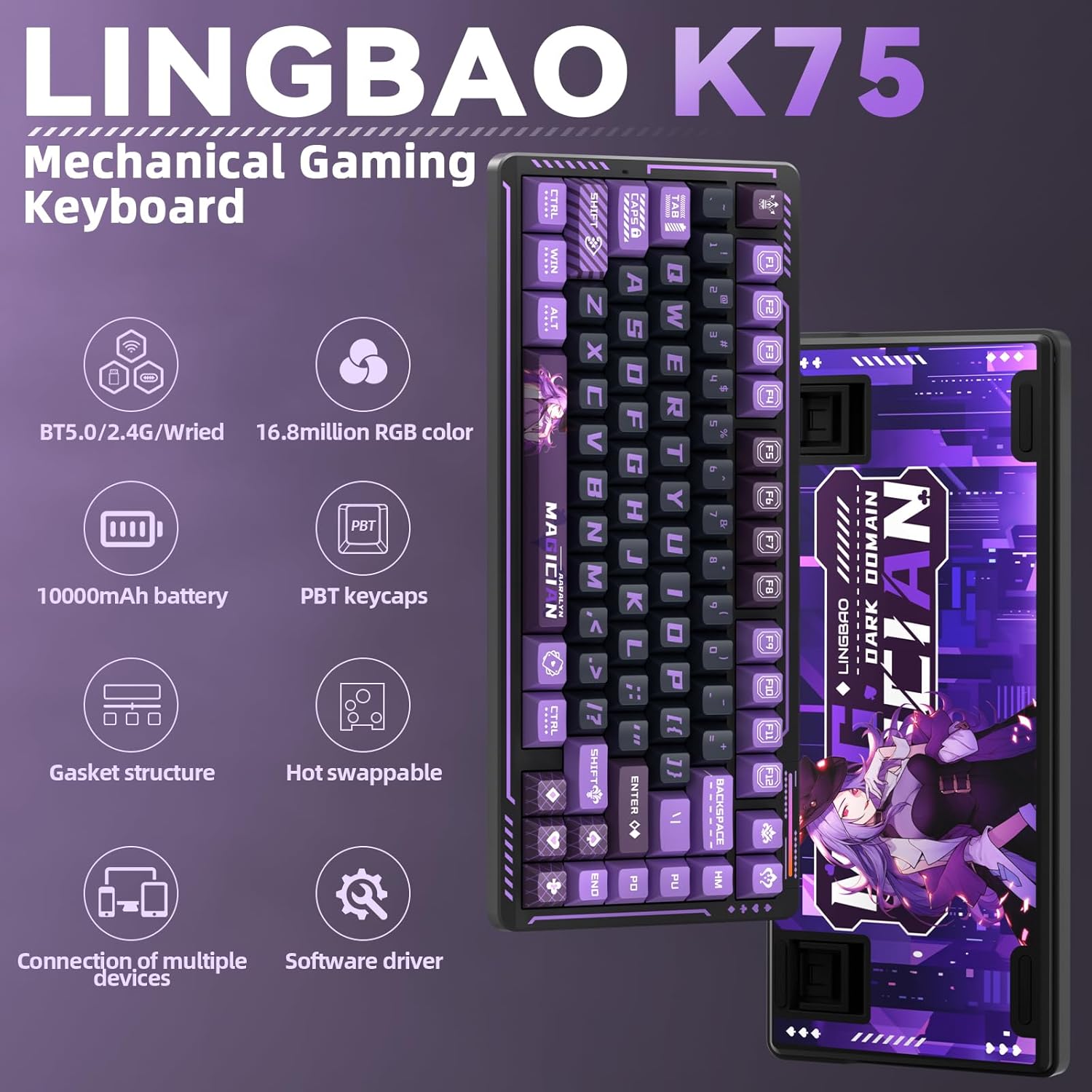
Image 1: LINGBAO K75 Mechanical Gaming Keyboard highlighting key features such as BT5.0/2.4G/Wired connectivity, 16.8 million RGB colors, 10000mAh battery, PBT keycaps, gasket structure, hot-swappable switches, connection of multiple devices, and software driver.

Image 2: Detailed diagram illustrating the five-layer gasket structure of the K75 keyboard, including PBT keycaps, FR4 positioning plate, PO sandwich foam, IXPE switch pad, PET sound optimizing pad, cotton layer, and silicone base pad.
4. സജ്ജീകരണം
4.1 പ്രാരംഭ ചാർജിംഗ്
Before first use, fully charge the keyboard using the provided USB-C cable. Connect the cable to the keyboard's USB-C port and the other end to a computer's USB port. Do not use mobile phone fast chargers or overcurrent/overvoltagഇ ചാർജറുകൾ, as this may damage the battery.

Image 3: The K75 keyboard connected via USB-C, illustrating its 10,000 mAh large-capacity battery, capable of approximately 40 hours with RGB lighting or 500 hours with lights off.
4.2 കണക്റ്റിവിറ്റി മോഡുകൾ
The K75 keyboard supports three connection modes: 2.4GHz wireless, Bluetooth (BT5.0), and wired USB-C. Use the switch located on the top edge of the keyboard to select your desired mode.

Image 4: Close-up of the K75 keyboard's top edge, showing the 2.4G/USB/BT mode switch, the USB-C port, and the hidden magnetic compartment for the 2.4GHz USB receiver.
- 2.4GHz വയർലെസ്: Insert the USB receiver into an available USB port on your computer. Switch the keyboard to '2.4G' mode. The keyboard should connect automatically.
- Bluetooth (BT5.0): Switch the keyboard to 'BT' mode. On your device (PC, laptop, smartphone, tablet), search for Bluetooth devices and select 'K75'. The keyboard can store up to 5 different Bluetooth devices.
- വയർഡ് USB-C: Connect the USB-C cable from the keyboard to your computer. Switch the keyboard to 'USB' mode. This mode provides a stable connection and is required for driver customization.
5. പ്രവർത്തന നിർദ്ദേശങ്ങൾ
5.1 RGB ബാക്ക്ലൈറ്റിംഗ്
The K75 keyboard features 16.8 million color RGB backlighting with various effects. You can adjust the lighting using keyboard shortcuts or the dedicated software driver.

Image 5: The K75 keyboard displaying various RGB lighting effects and illustrating how to adjust them using Fn key combinations for switching light effect modes, light color, speed, and brightness.
- ലൈറ്റ് ഇഫക്റ്റ് മോഡുകൾ മാറ്റുന്നു: അമർത്തുക Fn + \|
- Switching Light Color: അമർത്തുക Fn + ടാബ്
- Light Speed Down/Up: അമർത്തുക എഫ്എൻ + ↑/↓
- തെളിച്ചം കൂട്ടുക/കുറയ്ക്കുക: അമർത്തുക Fn + ←/→
- Side Light Strips: ഉപയോഗിക്കുക എഫ്എൻ + /? to switch colors, Fn + .> to switch brightness, Fn + Shift + ! to toggle modes, and Fn + Ctrl + @ to switch speed.
- Top Ambient Light: ഉപയോഗിക്കുക എഫ്എൻ + ബി to enter power mode, Fn+Z to switch colors, Fn + Shift + . to toggle modes, and Fn + Ctrl + / to switch speed.
- Music-synchronized Lighting: The keyboard supports a unique music rhythm lighting effect mode via the driver software, converting computer audio into dynamic RGB backlight effects.
5.2 Programmable Driver
The K75 keyboard supports full-key macro command programming and comprehensive customization through its multi-functional software driver. This driver allows for personalized key assignments and lighting effects.

Image 6: Screenshot of the K75 keyboard's multi-functional software driver, showing options for key assignment, macro programming, RGB settings, and music rhythm synchronization. The driver can be downloaded from bit.ly/m/corbobo.
കുറിപ്പ്: The driver can only be used and configured when the keyboard is connected via wired USB-C mode and is compatible with വിൻഡോസ് സിസ്റ്റങ്ങൾ.
5.3 ഹോട്ട്-സ്വാപ്പബിൾ സ്വിച്ചുകൾ
The K75 features a full-key hot-swappable socket, allowing users to easily replace 3-pin or 5-pin mechanical switches without soldering. This provides flexibility for customizing your typing feel.
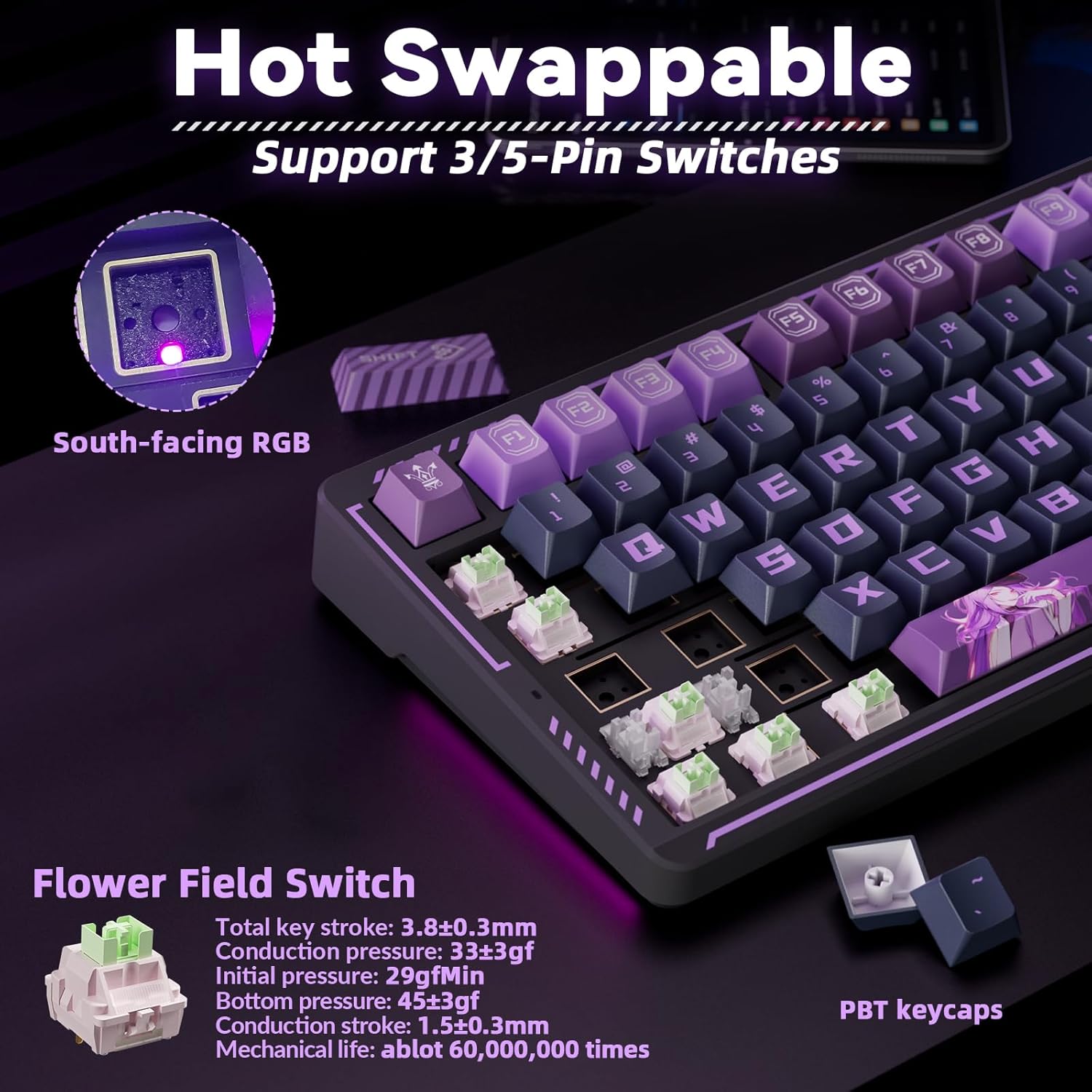
Image 7: The K75 keyboard with several keycaps and switches removed, demonstrating its hot-swappable feature. It highlights the 'Flower Field Switch' specifications and the durable PBT keycaps.
ഒരു സ്വിച്ച് മാറ്റിസ്ഥാപിക്കാൻ:
- നൽകിയിരിക്കുന്ന കീക്യാപ്പ് പുള്ളർ ഉപയോഗിച്ച് കീക്യാപ്പ് ശ്രദ്ധാപൂർവ്വം നീക്കം ചെയ്യുക.
- Use a switch puller (not included, but often comes with replacement switches) to gently pull the switch upwards until it detaches from the PCB.
- പുതിയ സ്വിച്ചിന്റെ പിന്നുകൾ പിസിബിയിലെ ദ്വാരങ്ങളുമായി വിന്യസിക്കുക, അത് സ്ഥലത്ത് ക്ലിക്ക് ആകുന്നതുവരെ ദൃഢമായി അമർത്തുക. പിന്നുകൾ വളയുന്നത് ഒഴിവാക്കാൻ സ്വിച്ച് ശരിയായി സ്ഥാപിച്ചിട്ടുണ്ടെന്ന് ഉറപ്പാക്കുക.
- കീക്യാപ്പ് വീണ്ടും ഘടിപ്പിക്കുക.
6. പരിപാലനം
6.1 വൃത്തിയാക്കൽ
To clean your keyboard, first disconnect it from all power sources. Use a soft, lint-free cloth dampened with a small amount of water or a mild cleaning solution. Avoid spraying liquids directly onto the keyboard. For cleaning between keycaps, use a can of compressed air or the provided keycap puller to remove keycaps and clean the switches and plate.
6.2 ബാറ്ററി കെയർ
To prolong battery life, always charge the keyboard exclusively via a computer's USB port. Avoid using mobile phone fast chargers or any chargers that deliver overcurrent or overvoltage, as these can degrade the battery over time.
7. പ്രശ്നപരിഹാരം
- കീബോർഡ് പ്രതികരിക്കുന്നില്ല: Ensure the keyboard is charged and the correct connection mode (2.4G, BT, or USB) is selected. For wireless modes, check if the USB receiver is properly inserted or if Bluetooth is paired. Try connecting via USB-C cable.
- RGB ലൈറ്റിംഗ് പ്രവർത്തിക്കുന്നില്ല: Check keyboard brightness settings using Fn shortcuts. Ensure the driver software is correctly installed and configured if using custom effects.
- രജിസ്റ്റർ ചെയ്യാത്ത കീകൾ: ഒരു പ്രത്യേക കീ പ്രവർത്തിക്കുന്നില്ലെങ്കിൽ, അതിന്റെ സ്വിച്ച് നീക്കം ചെയ്ത് വീണ്ടും സ്ഥാപിക്കാൻ ശ്രമിക്കുക. പ്രശ്നം നിലനിൽക്കുകയാണെങ്കിൽ, സ്വിച്ച് മാറ്റിസ്ഥാപിക്കേണ്ടി വന്നേക്കാം.
- Driver software issues: Ensure the keyboard is connected via USB-C cable to a Windows system when using the driver. Reinstall the driver if necessary.
8 സ്പെസിഫിക്കേഷനുകൾ
| ഫീച്ചർ | സ്പെസിഫിക്കേഷൻ |
|---|---|
| ഉൽപ്പന്ന അളവുകൾ | 13.77 x 7.08 x 1.88 ഇഞ്ച് |
| ഇനത്തിൻ്റെ ഭാരം | 3.19 പൗണ്ട് |
| കണക്റ്റിവിറ്റി ടെക്നോളജി | 2.4GHz, BT 5.0, USB-C |
| ബാറ്ററി ശേഷി | 10000mAh (2 Nonstandard Battery batteries included) |
| കീബോർഡ് വിവരണം | മെക്കാനിക്കൽ ഗെയിമിംഗ് കീബോർഡ് |
| കീക്യാപ് മെറ്റീരിയൽ | PBT (Two-color injection-molded) |
| സ്വിച്ച് തരം | Pre-lubed Linear Mechanical Switches (Hot-swappable 3-pin or 5-pin) |
| ബാക്ക്ലൈറ്റിംഗ് | ആർജിബി (16.8 ദശലക്ഷം നിറങ്ങൾ) |
| അനുയോജ്യമായ ഉപകരണങ്ങൾ | ഗെയിമിംഗ് കൺസോൾ, ലാപ്ടോപ്പ്, പിസി, സ്മാർട്ട്ഫോൺ, ടാബ്ലെറ്റ് |
| പ്രത്യേക സവിശേഷതകൾ | Anime design, Backlit, Hot-Swappable, Programmable Keys |
9. ഔദ്യോഗിക ഉൽപ്പന്ന വീഡിയോ
ഒരു വിഷ്വൽ ഓവറിനായി ഔദ്യോഗിക ഉൽപ്പന്ന വീഡിയോ കാണുകview of the CORBOBO LINGBAO K75 Gaming Keyboard's features and design.
വീഡിയോ 1: ഔദ്യോഗിക ഉൽപ്പന്ന വീഡിയോ ഷോasing the LINGBAO K75 Gaming Keyboard by CORBOBO Direct. This video highlights the keyboard's design, RGB lighting, and overall aesthetic.
10. വാറൻ്റിയും പിന്തുണയും
For warranty information and technical support, please refer to the contact details provided on the product packaging or visit the official CORBOBO webസൈറ്റ്. വാറൻ്റി ക്ലെയിമുകൾക്കായി നിങ്ങളുടെ വാങ്ങൽ രസീത് സൂക്ഷിക്കുക.