
ആമുഖം
This manual provides detailed instructions for the installation, operation, and maintenance of your ANRAN Q04 Solar 4G LTE Security Camera. Please read this manual thoroughly before using the product to ensure proper functionality and safety. Keep this manual for future reference.

Image: Two ANRAN Q04 white solar security cameras, showcasing the solar panel and antenna design.
പാക്കേജ് ഉള്ളടക്കം
Verify that all components are present in your package. If any items are missing or damaged, please contact customer support.
- ANRAN Q04 Solar 4G LTE Security Camera(s)
- സോളാർ പാനൽ (മോഡൽ വകഭേദത്തെ ആശ്രയിച്ച് സംയോജിതമോ വേറിട്ടതോ)
- മൗണ്ടിംഗ് ബ്രാക്കറ്റും സ്ക്രൂകളും
- യുഎസ്ബി ചാർജിംഗ് കേബിൾ
- ഉപയോക്തൃ മാനുവൽ (ഈ പ്രമാണം)
- SIM Card (pre-installed or included, depending on region/package)
- MicroSD Card (optional, may be included in some packages)
ഉൽപ്പന്നം കഴിഞ്ഞുview
The ANRAN Q04 camera is a wireless outdoor security solution featuring 4G LTE connectivity and solar power. It is designed for continuous surveillance in locations without Wi-Fi access or consistent power supply.

Image: ANRAN Q04 black solar security camera, highlighting the inclusion of a SIM card and a 32GB microSD card.
പ്രധാന സവിശേഷതകൾ:
- 4G LTE കണക്റ്റിവിറ്റി: Operates independently without Wi-Fi.
- സൗരോർജ്ജം: Integrated solar panel for continuous charging of the built-in 9600mAh battery.
- 100% വയർ രഹിതം: Flexible placement without power cables.
- മൂന്ന് രാത്രി ദർശന മോഡുകൾ: Smart, Color, and Infrared for clear visibility in low light.
- IP66 കാലാവസ്ഥാ പ്രതിരോധം: Designed for outdoor use, resistant to dust and water.
- ലോക്കൽ & ക്ലൗഡ് സംഭരണം: Supports up to 128GB MicroSD card (not included) and offers cloud storage options.
സജ്ജമാക്കുക
1. പ്രാരംഭ ചാർജിംഗ്
Before first use, fully charge the camera's internal battery using the provided USB cable and a 5V/2A power adapter (not included). A full charge ensures optimal performance, especially during initial setup or periods of low sunlight.
2. SIM Card & MicroSD Card Installation
- Locate the SIM card slot and MicroSD card slot on the camera (usually under a rubber seal).
- Insert the 4G LTE SIM card (ensure it is activated and has a data plan) into the SIM slot with the gold contacts facing down.
- Insert a MicroSD card (up to 128GB, Class 10 or higher recommended) into the MicroSD slot if local storage is desired.
- Securely close the rubber seal to maintain waterproofing.

Image: ANRAN Q04 white solar security camera with an arrow pointing to the MicroSD card slot, indicating local storage capability up to 128GB.
3. ആപ്പ് ഡൗൺലോഡും അക്കൗണ്ട് സൃഷ്ടിക്കലും
- Download the "ANRAN" app from your smartphone's app store (iOS App Store or Google Play Store).
- ആപ്പ് തുറന്ന് ഒരു പുതിയ അക്കൗണ്ട് സൃഷ്ടിക്കുക അല്ലെങ്കിൽ നിങ്ങൾക്ക് ഇതിനകം ഒന്ന് ഉണ്ടെങ്കിൽ ലോഗിൻ ചെയ്യുക.
4. Camera Pairing/Connection
- Power on the camera. Wait for the indicator light to show it's ready for pairing (refer to the camera's LED indicator guide in the app or a separate quick start guide).
- In the ANRAN app, tap the "+" icon to add a new device.
- Select "4G Camera" or the appropriate camera type.
- Follow the on-screen instructions to scan the QR code on the camera or manually enter its device ID.
- കണക്റ്റുചെയ്തുകഴിഞ്ഞാൽ, നിങ്ങളുടെ ക്യാമറയ്ക്ക് പേര് നൽകാനും പ്രാരംഭ ക്രമീകരണങ്ങൾ കോൺഫിഗർ ചെയ്യാനും കഴിയും.
5. മ ing ണ്ടിംഗ് നിർദ്ദേശങ്ങൾ
സ്വീകരിക്കുന്ന ഒരു സ്ഥലം തിരഞ്ഞെടുക്കുക ample direct sunlight for the solar panel and provides the desired viewing ആംഗിൾ.
- Mark the drilling points on the wall or mounting surface using the mounting bracket as a template.
- ആവശ്യമെങ്കിൽ പൈലറ്റ് ദ്വാരങ്ങൾ തുരന്ന് വാൾ ആങ്കറുകൾ ഇടുക.
- Attach the mounting bracket to the surface using the provided screws.
- Secure the camera to the mounting bracket.
- Adjust the camera angle and solar panel orientation for optimal sunlight exposure and coverage.

Image: A woman installing an ANRAN Q04 white solar security camera on an outdoor wall, demonstrating simple installation.

Image: An ANRAN Q04 black solar security camera mounted on a tree, illustrating its 100% wire-free and 4G capabilities, powered by an integrated solar panel.
ക്യാമറ പ്രവർത്തിപ്പിക്കുന്നത്
1. തത്സമയം View
Open the ANRAN app and select your camera from the device list. The live view will display the real-time feed from your camera. You can use on-screen controls for pan/tilt (if supported by your model), zoom, and two-way audio.
2. റെക്കോർഡിംഗും പ്ലേബാക്കും
The camera records video based on motion detection or continuous recording settings (if configured).
- പ്രാദേശിക സംഭരണം: Recordings are saved to the installed MicroSD card. Access them via the app's playback section.
- ക്ലൗഡ് സംഭരണം: If subscribed, recordings are uploaded to the cloud. Access them through the app's cloud history.
3. രാത്രി കാഴ്ച മോഡുകൾ
The ANRAN Q04 supports three night vision modes, which can be configured in the app settings:
- സ്മാർട്ട് മോഡ്: Automatically switches between infrared and color night vision based on detected motion or ambient light.
- വർണ്ണ മോഡ്: Utilizes built-in spotlights to provide full-color video in low-light conditions.
- ഇൻഫ്രാറെഡ് മോഡ്: Uses infrared LEDs for black and white video in complete darkness.
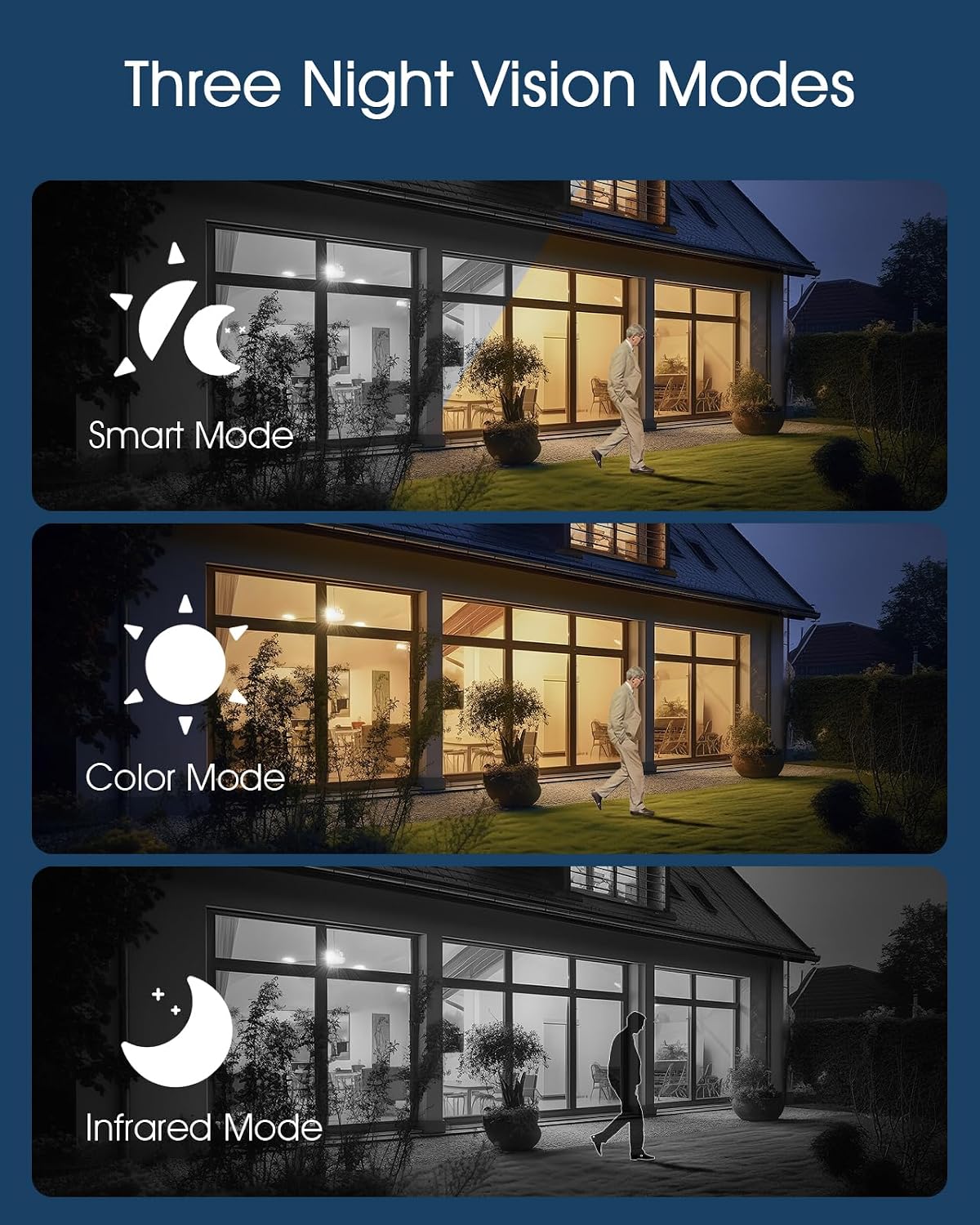
Image: Visual representation of the three night vision modes (Smart, Color, Infrared) available on the ANRAN Q04 camera, showing their distinct appearances.
4. മോഷൻ ഡിറ്റക്ഷൻ ക്രമീകരണങ്ങൾ
Configure motion detection sensitivity, detection zones, and notification preferences within the ANRAN app. This allows you to receive alerts only for relevant events.
മെയിൻ്റനൻസ്
1. വൃത്തിയാക്കൽ
- ക്യാമറ ലെൻസും സോളാർ പാനലും പതിവായി മൃദുവായ, ഡി-ടച്ച് ഉപയോഗിച്ച് തുടയ്ക്കുക.amp പൊടി, അഴുക്ക് അല്ലെങ്കിൽ അവശിഷ്ടങ്ങൾ നീക്കം ചെയ്യാനുള്ള തുണി.
- Ensure the solar panel is clean for efficient charging.
- കഠിനമായ രാസവസ്തുക്കളോ ഉരച്ചിലുകൾ ഉപയോഗിക്കരുത്.
2. ബാറ്ററി പരിചരണം
- The camera is designed for continuous solar charging. Ensure the solar panel receives adequate direct sunlight daily.
- If the camera is installed in a shaded area or during prolonged periods of low sunlight, occasional manual charging via USB may be required.
- Avoid extreme temperatures that can degrade battery performance.

Image: ANRAN Q04 black solar security camera with its solar panel, illustrating its capability for 365 days of non-stop solar power due to the 9600mAh battery and IP66 waterproof rating.
ട്രബിൾഷൂട്ടിംഗ്
| പ്രശ്നം | സാധ്യമായ പരിഹാരം |
|---|---|
| ക്യാമറ ഓണാക്കുന്നില്ല. | Ensure the battery is charged. Connect to a USB power source for initial charging. Check the power button. |
| No 4G signal. | Verify the SIM card is correctly inserted and activated with a data plan. Check network coverage in the installation area. Try restarting the camera. |
| ആപ്പിലേക്ക് കണക്റ്റ് ചെയ്യാൻ കഴിയുന്നില്ല. | Ensure the camera is powered on and the SIM card has an active data connection. Restart the app and the camera. Follow the pairing steps again. |
| രാത്രിയിൽ വീഡിയോ നിലവാരം മോശമാണ്. | Check night vision settings in the app (Smart, Color, Infrared). Ensure the camera lens is clean and not obstructed. |
| Battery not charging via solar. | Ensure the solar panel is clean and receives at least 4-6 hours of direct sunlight daily. Reposition the camera or panel if necessary. |
സ്പെസിഫിക്കേഷനുകൾ
- മോഡൽ: Q04
- കണക്റ്റിവിറ്റി: 4G LTE (SIM card required)
- ശക്തി: Solar Panel with 9600mAh Rechargeable Battery
- സംഭരണം: MicroSD Card (up to 128GB, not included), Cloud Storage (subscription optional)
- കാലാവസ്ഥ പ്രതിരോധം: IP66 വാട്ടർപ്രൂഫ് ആൻഡ് ഡസ്റ്റ് പ്രൂഫ്
- പ്രവർത്തന താപനില: -40°F മുതൽ 140°F വരെ (-40°C മുതൽ 60°C വരെ)
- രാത്രി കാഴ്ച: Smart, Color, Infrared Modes
- ഓഡിയോ: ടു-വേ ഓഡിയോ

Image: ANRAN Q04 white solar security camera operating outdoors in the rain, demonstrating its IP66 waterproof and dustproof rating and ability to withstand temperatures from -40°F to 140°F.
വാറൻ്റിയും പിന്തുണയും
ANRAN products typically come with a limited warranty. Please refer to the warranty card included in your package or visit the official ANRAN webവിശദമായ വാറന്റി നിബന്ധനകൾക്കും വ്യവസ്ഥകൾക്കും സൈറ്റ്.
For technical support, troubleshooting assistance, or warranty claims, please contact ANRAN customer service through their official webസൈറ്റ് അല്ലെങ്കിൽ നിങ്ങളുടെ ഉൽപ്പന്ന പാക്കേജിംഗിൽ നൽകിയിരിക്കുന്ന ബന്ധപ്പെടാനുള്ള വിവരങ്ങൾ.
Webസൈറ്റ്: www.anran-cctv.com (Please verify official webസൈറ്റ്)