
1. ആമുഖം
This manual provides essential information for the safe and effective operation, maintenance, and troubleshooting of your TOPUTURE TP5 Walking Pad Treadmill. Please read this manual thoroughly before initial use and retain it for future reference.
The TOPUTURE TP5 is a versatile 4-in-1 folding treadmill designed for home and office use, featuring an adjustable 12% incline, a handle bar, app control, and a Bluetooth speaker. It supports speeds from 0.6 to 10 MPH.
2 സുരക്ഷാ വിവരങ്ങൾ
പ്രധാന സുരക്ഷാ മുൻകരുതലുകൾ:
- ഏതെങ്കിലും വ്യായാമ പരിപാടി ആരംഭിക്കുന്നതിന് മുമ്പ് എല്ലായ്പ്പോഴും ഒരു ഡോക്ടറുമായി കൂടിയാലോചിക്കുക.
- ട്രെഡ്മില്ല് ഒരു പരന്നതും സ്ഥിരതയുള്ളതുമായ പ്രതലത്തിൽ ചുറ്റും മതിയായ ക്ലിയറൻസോടെ വയ്ക്കുക.
- ഓപ്പറേഷൻ സമയത്ത് ട്രെഡ്മില്ലിൽ നിന്ന് കുട്ടികളെയും വളർത്തുമൃഗങ്ങളെയും അകറ്റി നിർത്തുക.
- ഉചിതമായ കായിക പാദരക്ഷകളും വസ്ത്രങ്ങളും ധരിക്കുക.
- ട്രെഡ്മിൽ കേടായാലോ തകരാറിലായാലും അത് പ്രവർത്തിപ്പിക്കരുത്.
- Ensure the safety key is properly attached to your clothing during use. The treadmill will stop if the safety key is disengaged.
- പരമാവധി ഭാര ശേഷി 300 പൗണ്ട് (136 കിലോഗ്രാം) കവിയരുത്.
- ഉപയോഗത്തിലില്ലാത്തപ്പോഴോ വൃത്തിയാക്കൽ/പരിപാലനം നടത്തുന്നതിന് മുമ്പോ പവർ ഔട്ട്ലെറ്റിൽ നിന്ന് ട്രെഡ്മിൽ ഊരിമാറ്റുക.
3. പാക്കേജ് ഉള്ളടക്കം
പാക്കേജിൽ എല്ലാ ഘടകങ്ങളും ഉണ്ടെന്ന് ഉറപ്പാക്കുക:
- TOPUTURE TP5 Walking Pad Treadmill (main unit)
- Handle Bar (pre-installed or easily attachable)
- പവർ കോർഡ്
- റിമോട്ട് കൺട്രോൾ
- സുരക്ഷാ കീ
- ഉപയോക്തൃ മാനുവൽ (ഈ പ്രമാണം)
- Lubricant (if included for maintenance)
4. സജ്ജീകരണം
4.1 അൺപാക്കിംഗും പ്ലേസ്മെന്റും
- ട്രെഡ്മിൽ അതിന്റെ പാക്കേജിംഗിൽ നിന്ന് ശ്രദ്ധാപൂർവ്വം നീക്കം ചെയ്യുക.
- Place the treadmill on a level, hard surface. Ensure there is at least 2 feet of clear space behind the treadmill and 1 foot on each side.
4.2 Handle Bar Assembly (Tool-Free)
The handle bar features a snap-on design for tool-free assembly. Lift the handle bar into the upright position until it locks securely into place. Ensure both sides are firmly engaged before use.

ചിത്രം 4.2.1: Tool-Free Handle Bar Assembly. The handle bar can be easily raised and locked into position for running mode.
4.3 ചരിവ് ക്രമീകരണം
The TOPUTURE TP5 offers three manual incline levels: 1%, 6%, and 12%. To adjust the incline:
- ട്രെഡ്മിൽ ഓഫ് ചെയ്തിട്ടുണ്ടെന്നും പ്ലഗ് ഊരിവെച്ചിട്ടുണ്ടെന്നും ഉറപ്പാക്കുക.
- Carefully lift the front of the treadmill.
- Adjust the support legs at the front to the desired incline level (1%, 6%, or 12%) and secure them with the provided pins or locking mechanism.
- Ensure the treadmill is stable before use.
ചിത്രം 4.3.1: Manual Incline Adjustment. The treadmill offers 1%, 6%, and 12% incline settings.
5. പ്രവർത്തന നിർദ്ദേശങ്ങൾ
5.1 പവർ ഓൺ/ഓഫ്
- Connect the power cord to the treadmill and a grounded electrical outlet.
- Flip the main power switch located near the power cord inlet to the 'ON' position.
- Attach the safety key to the designated slot on the console and clip the other end to your clothing.
- To power off, remove the safety key, then flip the main power switch to 'OFF'.
5.2 Modes of Operation (4-in-1 Functionality)
The TP5 treadmill supports various exercise modes:
- Working Mode (0.6-1.5 MPH): Handle bar folded down, ideal for use under a standing desk.
- Walking Mode (1.5-5 MPH): Handle bar folded down, suitable for brisk walking.
- Climbing Mode (0.6-3 MPH): Handle bar upright, with incline engaged for a climbing simulation.
- Running Mode (3-10 MPH): Handle bar upright, for jogging and running.

ചിത്രം 5.2.1: 4-in-1 Treadmill Modes. The treadmill adapts to various exercise needs.
5.3 സ്പീഡ് അഡ്ജസ്റ്റ്മെന്റ്
Speed can be adjusted using the touch screen controls on the console, the remote control, or via the connected sports app.
- ടച്ച് സ്ക്രീൻ: Use the '+' and '-' buttons on the LED display to increase or decrease speed.
- റിമോട്ട് കൺട്രോൾ: The included remote control allows for convenient speed adjustments and pause/start functions.
- Sports App: Connect to the recommended sports app for advanced control and program selection.
5.4 Multifunction LED Display
The integrated LED display provides real-time feedback on your workout metrics:
- സമയം: നിങ്ങളുടെ വ്യായാമത്തിന്റെ ദൈർഘ്യം.
- വേഗത: നിലവിലെ വേഗത MPH-ൽ.
- കലോറികൾ: കണക്കാക്കിയ കലോറികൾ കത്തിച്ചു.
- ദൂരം: Distance covered in miles.
- ഹൃദയമിടിപ്പ്: Your heart rate when gripping the sensors on the handle bar.

ചിത്രം 5.4.1: Multifunction LED Display. Track your workout progress with clear metrics.
5.5 Bluetooth Speaker and App Control
ബ്ലൂടൂത്ത് സ്പീക്കർ:
- നിങ്ങളുടെ മൊബൈൽ ഉപകരണത്തിൽ ബ്ലൂടൂത്ത് പ്രവർത്തനക്ഷമമാക്കുക.
- ഇതിനായി തിരയുക the treadmill's Bluetooth name (e.g., "TOPUTURE TP5") and pair.
- Once connected, you can play audio through the treadmill's built-in speaker.
App Control (FITSHOW App):
- Download the 'FITSHOW' app from your device's app store.
- Open the app and follow the instructions to connect to your TOPUTURE TP5 treadmill via Bluetooth.
- The app allows you to control speed, select pre-set programs, track workout data, and engage with scenic videos.

ചിത്രം 5.5.1: App Control Interface. Enhance your workout with the FITSHOW app.

ചിത്രം 5.5.2: Dual Intelligent Control. Control your treadmill via remote or smartphone app.
6. പരിപാലനം
പതിവ് അറ്റകുറ്റപ്പണികൾ നിങ്ങളുടെ ട്രെഡ്മില്ലിന്റെ ദീർഘായുസ്സും മികച്ച പ്രകടനവും ഉറപ്പാക്കുന്നു.
6.1 വൃത്തിയാക്കൽ
- വൃത്തിയാക്കുന്നതിന് മുമ്പ് എല്ലായ്പ്പോഴും ട്രെഡ്മിൽ അഴിക്കുക.
- കൺസോളിന്റെയും പുറം പ്രതലങ്ങളുടെയും തുടയ്ക്കൽ മൃദുവായ, damp തുണി. ഉരച്ചിലുകൾ ഉണ്ടാക്കുന്ന ക്ലീനറുകളോ ലായകങ്ങളോ ഒഴിവാക്കുക.
- പൊടിയും അവശിഷ്ടങ്ങളും അടിഞ്ഞുകൂടുന്നത് തടയാൻ ട്രെഡ്മില്ലിന്റെ അടിയിൽ ഇടയ്ക്കിടെ വാക്വം ക്ലീനർ ഉപയോഗിക്കുക.
6.2 റണ്ണിംഗ് ബെൽറ്റ് ലൂബ്രിക്കേഷൻ
The running belt requires periodic lubrication to reduce friction and extend its lifespan. Refer to the specific instructions provided with your lubricant or contact customer support for guidance on frequency and application.
6.3 റണ്ണിംഗ് ബെൽറ്റ് അഡ്ജസ്റ്റ്മെൻ്റ്
If the running belt starts to slip or drift to one side, it may need adjustment. Consult the troubleshooting section or contact customer support for detailed instructions on how to tension and center the belt.
7. പ്രശ്നപരിഹാരം
If you encounter issues with your treadmill, refer to the common problems and solutions below. If the problem persists, contact customer support.
| പ്രശ്നം | സാധ്യമായ കാരണം | പരിഹാരം |
|---|---|---|
| ട്രെഡ്മിൽ പവർ ഓൺ ആകുന്നില്ല | Power cord not connected; Main switch off; Safety key not in place | Check power cord connection; Turn main switch ON; Ensure safety key is inserted |
| ഓടുമ്പോൾ ബെൽറ്റ് തെന്നി വീഴുകയോ നിൽക്കുകയോ ചെയ്യുന്നു | Belt too loose; Overload; Motor issue | Adjust belt tension; Reduce user weight; Contact support |
| പ്രവർത്തന സമയത്ത് അസാധാരണമായ ശബ്ദം | Loose parts; Lack of lubrication; Motor issue | Check for loose bolts; Lubricate belt; Contact support |
| ഡിസ്പ്ലേ ശരിയായി പ്രവർത്തിക്കുന്നില്ല | Loose connection; Electronic fault | Check connections; Restart treadmill; Contact support |
8 സ്പെസിഫിക്കേഷനുകൾ
| ഫീച്ചർ | സ്പെസിഫിക്കേഷൻ |
|---|---|
| ബ്രാൻഡ് | TOPUTURE |
| മോഡലിൻ്റെ പേര് | TP5 |
| ഉൽപ്പന്ന അളവുകൾ (LxWxH) | 52.3" x 28.2" x 5.1" |
| ഇനത്തിൻ്റെ ഭാരം | 78 പൗണ്ട് |
| മെറ്റീരിയൽ | അലോയ് സ്റ്റീൽ |
| പരമാവധി വേഗത | മണിക്കൂറിൽ 10 മൈൽ |
| പരമാവധി കുതിരശക്തി | 2.5 കുതിരശക്തി |
| പരമാവധി ചരിവ് ശതമാനംtage | 12% (Manual Adjustment) |
| പരമാവധി ഭാരം ശുപാർശ | 300 പൗണ്ട് |
| റണ്ണിംഗ് ബെൽറ്റ് അളവുകൾ | 41'' x 16.5'' (1040മിമീ x 420മിമീ) |
| ഡിസ്പ്ലേ തരം | എൽഇഡി |
| കണക്റ്റിവിറ്റി ടെക്നോളജി | ബ്ലൂടൂത്ത് |
| പ്രത്യേക സവിശേഷതകൾ | Built-In Speaker, Foldable, Heart Rate Monitor, Portable, Shock Absorbent |
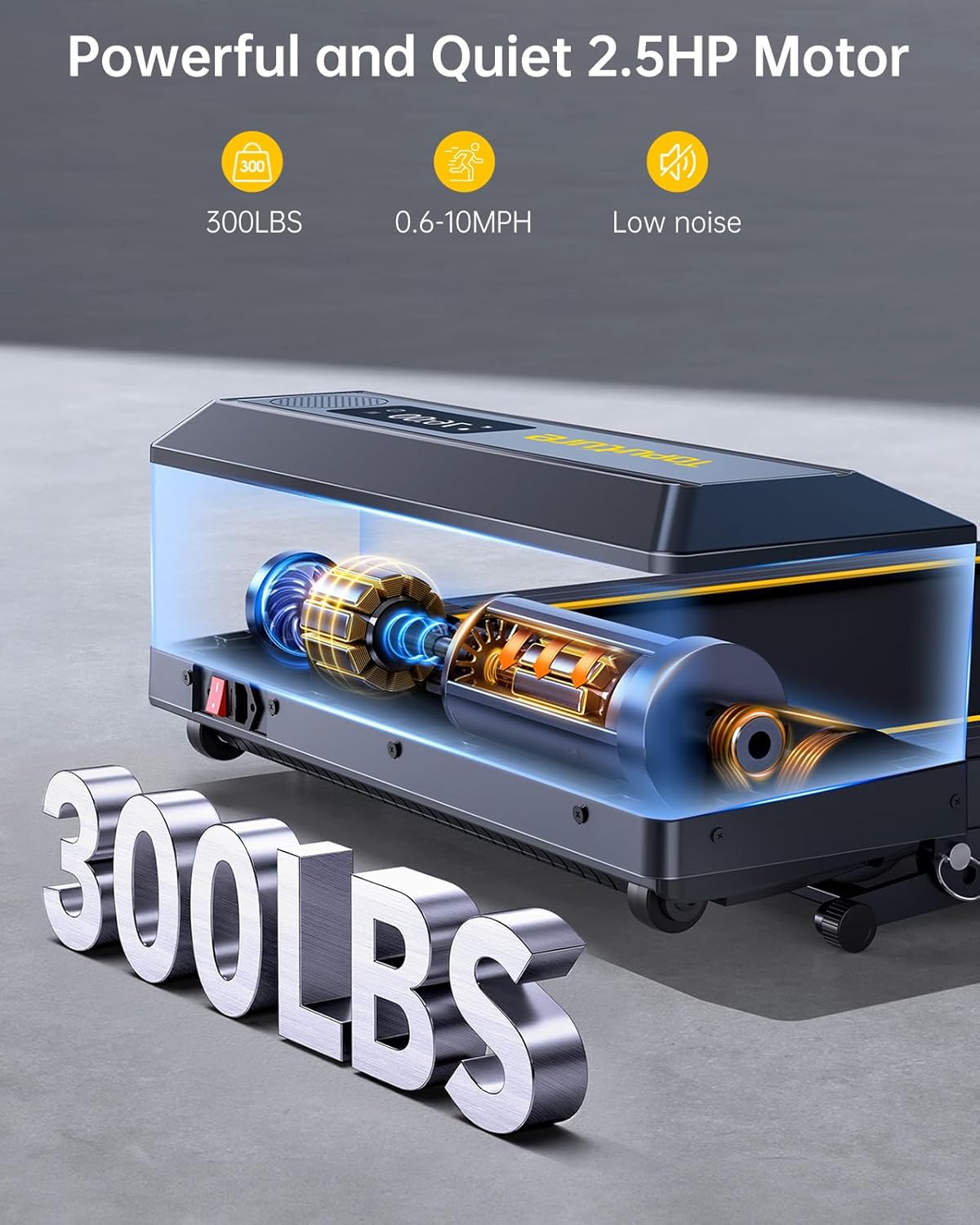
ചിത്രം 8.1: Powerful and Quiet 2.5HP Motor. Supports up to 300 lbs with low noise operation.

ചിത്രം 8.2: Extra Wide Comfortable Running Area. Dimensions of 1040mm x 420mm for comfortable use.

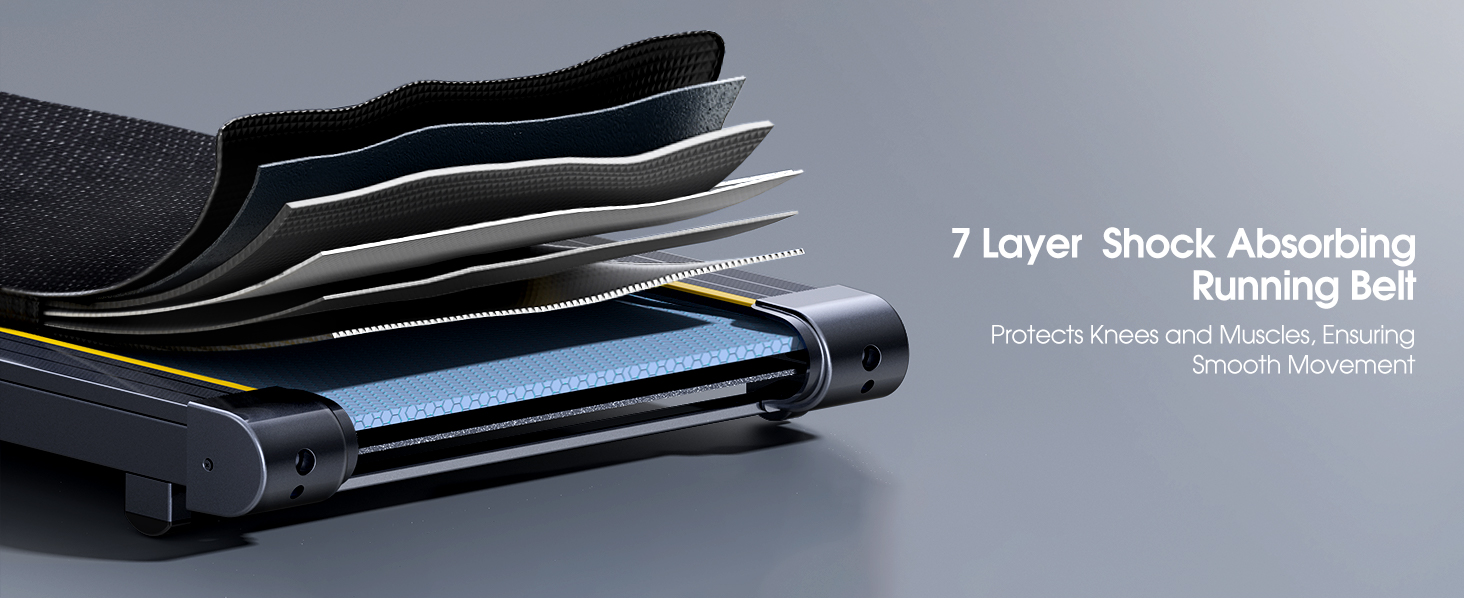
ചിത്രം 8.3: High-Tech Running Belt and Shock Absorption. Features a 7-layer belt and 8 shock absorbers for joint protection.

ചിത്രം 8.4: Convenient Folding Design and Storage. The treadmill folds for easy storage under furniture or against a wall.
9. വാറൻ്റിയും പിന്തുണയും
9.1 വാറൻ്റി വിവരങ്ങൾ
The TOPUTURE TP5 Walking Pad Treadmill comes with a ഒരു വർഷത്തെ വാറൻ്റി from the date of purchase. This warranty covers manufacturing defects and ensures the product meets quality standards. Please retain your proof of purchase for warranty claims.
9.2 ഉപഭോക്തൃ പിന്തുണ
For any questions, technical assistance, or warranty claims, please contact TOPUTURE customer support. You can typically reach support by:
- Logging into your Amazon account.
- Navigating to 'Your Orders'.
- Finding the specific order ID for your treadmill.
- Clicking on 'Contact Seller'.
Our support team is committed to providing high-quality assistance.