
1. ആമുഖം
Thank you for choosing the Harman-Kardon Enchant-1100 Dolby Atmos Soundbar with Enchant Subwoofer. This system is designed to deliver an immersive audio experience with 3D surround sound, enhanced dialogue clarity, and powerful bass. This manual provides essential information for setting up, operating, and maintaining your new audio system. Please read it thoroughly before use to ensure proper installation and optimal performance.
2 സുരക്ഷാ വിവരങ്ങൾ
വൈദ്യുതാഘാതം, തീപിടുത്തം അല്ലെങ്കിൽ യൂണിറ്റിന് കേടുപാടുകൾ എന്നിവ തടയാൻ ഇനിപ്പറയുന്ന സുരക്ഷാ മുൻകരുതലുകൾ പാലിക്കുക:
- ഊർജ്ജ സ്രോതസ്സ്: യൂണിറ്റിൽ സൂചിപ്പിച്ചിരിക്കുന്നതുപോലെ ഒരു എസി പവർ സ്രോതസ്സിലേക്ക് മാത്രം യൂണിറ്റ് ബന്ധിപ്പിക്കുക.
- വെൻ്റിലേഷൻ: വെന്റിലേഷൻ ദ്വാരങ്ങളൊന്നും തടയരുത്. ശരിയായ വായുസഞ്ചാരത്തിനായി യൂണിറ്റിന് ചുറ്റും മതിയായ ഇടം ഉറപ്പാക്കുക.
- ജലവും ഈർപ്പവും: മഴ, ഈർപ്പം, തുള്ളികൾ, തെറിക്കൽ എന്നിവയ്ക്ക് യൂണിറ്റ് വിധേയമാക്കരുത്. പാത്രങ്ങൾ പോലുള്ള ദ്രാവകങ്ങൾ നിറച്ച വസ്തുക്കൾ ഉപകരണത്തിൽ വയ്ക്കരുത്.
- ചൂട്: റേഡിയേറ്ററുകൾ, ഹീറ്റ് രജിസ്റ്ററുകൾ, സ്റ്റൗകൾ അല്ലെങ്കിൽ മറ്റ് ഉപകരണങ്ങൾ (ഉൾപ്പെടെ) പോലുള്ള താപ സ്രോതസ്സുകൾക്ക് സമീപം യൂണിറ്റ് സ്ഥാപിക്കരുത്. ampലൈഫയറുകൾ) ചൂട് ഉത്പാദിപ്പിക്കുന്നത്.
- വൃത്തിയാക്കൽ: ഉണങ്ങിയ തുണി ഉപയോഗിച്ച് മാത്രം വൃത്തിയാക്കുക.
- സേവനം: ഈ ഉൽപ്പന്നം സ്വയം സേവിക്കാൻ ശ്രമിക്കരുത്. യോഗ്യതയുള്ള സേവന ഉദ്യോഗസ്ഥർക്ക് എല്ലാ സേവനങ്ങളും റഫർ ചെയ്യുക.
3. ബോക്സിൽ എന്താണുള്ളത്?
എല്ലാ ഘടകങ്ങളും ശ്രദ്ധാപൂർവ്വം അൺപാക്ക് ചെയ്യുക, ഇനിപ്പറയുന്ന ഇനങ്ങൾ നിങ്ങളുടെ പക്കലുണ്ടെന്ന് ഉറപ്പാക്കുക:
- Harman-Kardon Enchant-1100 Soundbar
- Harman-Kardon Enchant Subwoofer
- ബാറ്ററികളുള്ള റിമോട്ട് കൺട്രോൾ
- HDMI കേബിൾ
- പവർ കോഡുകൾ (സൗണ്ട്ബാറിനും സബ് വൂഫറിനും)
- Wall-Mount Brackets (with screws)
- ദ്രുത ആരംഭ ഗൈഡ്
4. ഉൽപ്പന്നം കഴിഞ്ഞുview
4.1 Soundbar Front and Top Controls
The soundbar features a sleek design with integrated controls and indicators for easy access.

ചിത്രം: മുൻഭാഗം view of the Harman-Kardon Enchant-1100 Soundbar, showcasing its minimalist design and fabric grille.
- പവർ ബട്ടൺ: സൗണ്ട്ബാർ ഓണാക്കുകയോ ഓഫാക്കുകയോ ചെയ്യുന്നു.
- വോളിയം കൂട്ടുക/താഴ്ത്തുക: മാസ്റ്റർ വോളിയം ലെവൽ ക്രമീകരിക്കുന്നു.
- ഉറവിട ബട്ടൺ: Cycles through available input sources (HDMI, Optical, Bluetooth, Wi-Fi).
- LED സൂചകങ്ങൾ: Display current status, input source, and volume level.
4.2 Soundbar Rear Connections
The rear panel provides all necessary ports for connecting to your television and other devices.

ചിത്രം: പിൻഭാഗം view of the Harman-Kardon Enchant-1100 Soundbar, showing the various input and output ports.
- HDMI eARC/ARC: Connects to your TV's HDMI ARC/eARC port for high-quality audio and control.
- ഒപ്റ്റിക്കൽ: Digital audio input for devices without HDMI ARC.
- യുഎസ്ബി (ടൈപ്പ് എ): സേവന അല്ലെങ്കിൽ ഫേംവെയർ അപ്ഡേറ്റുകൾക്കായി.
- ഇഥർനെറ്റ്: വയർഡ് നെറ്റ്വർക്ക് കണക്ഷനായി.
- എസി പവർ: പവർ കോഡുമായി ബന്ധിപ്പിക്കുന്നു.
4.3 Enchant Subwoofer
The wireless subwoofer provides deep, impactful bass to complement the soundbar.
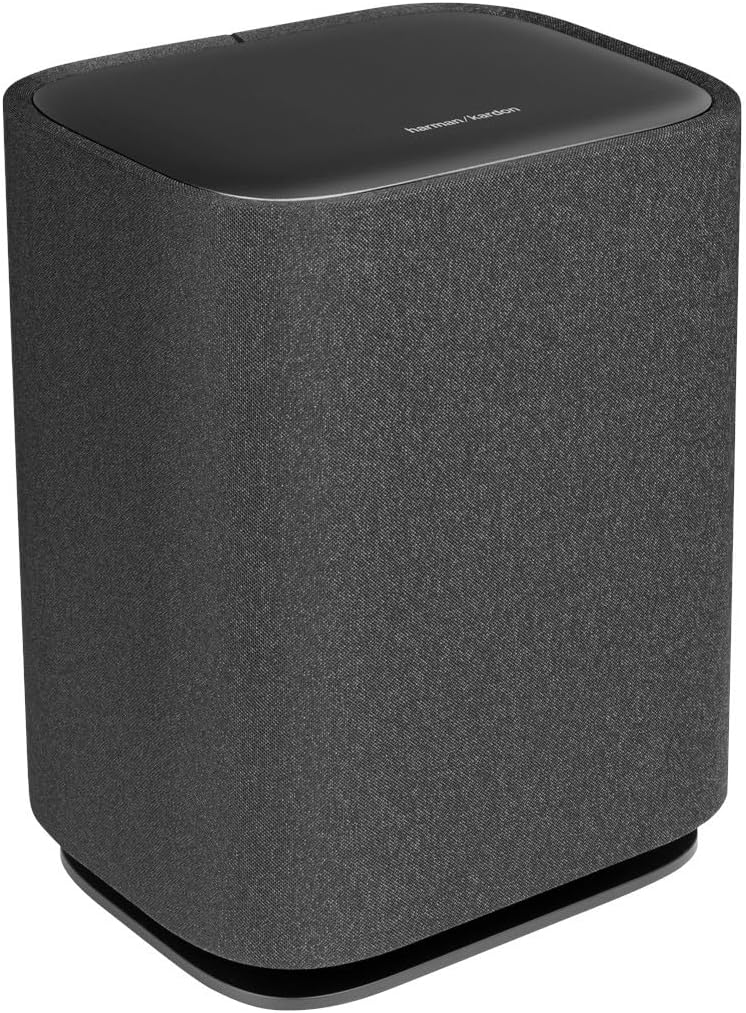
ചിത്രം: മുൻവശവും വശവും view of the Harman-Kardon Enchant Subwoofer, featuring its fabric-covered cylindrical design.

ചിത്രം: പിൻഭാഗം view of the Harman-Kardon Enchant Subwoofer, showing the power input and pairing controls.
- പവർ ഇൻപുട്ട്: Connects to the subwoofer's power cord.
- ജോടിയാക്കൽ ബട്ടൺ: Used to manually pair the subwoofer with the soundbar if automatic pairing fails.
- സർവീസ് പോർട്ട്: For technical servicing.
5. സജ്ജീകരണം
5.1 പ്ലേസ്മെൻ്റ്
മികച്ച ഓഡിയോ അനുഭവത്തിന് ഒപ്റ്റിമൽ പ്ലേസ്മെന്റ് നിർണായകമാണ്.

Image: A Harman-Kardon soundbar positioned below a television in a living room setting, demonstrating typical placement.
- സൗണ്ട്ബാർ: Place the soundbar centrally below your TV, ensuring it is not obstructed. For wall mounting, use the provided brackets and follow the wall-mounting guide.
- സബ്വൂഫർ: Position the subwoofer anywhere in the room. Wireless connectivity allows flexibility. For best bass response, experiment with different locations, typically near a wall or in a corner.
5.2 കണക്ഷനുകൾ
- HDMI eARC/ARC കണക്ഷൻ (ശുപാർശ ചെയ്യുന്നത്):
Connect one end of the HDMI cable to the HDMI eARC/ARC port on the soundbar and the other end to the HDMI ARC/eARC port on your TV. This connection supports the highest quality audio formats, including Dolby Atmos, and allows your TV remote to control the soundbar's volume. - ഒപ്റ്റിക്കൽ കണക്ഷൻ (ഇതര):
If your TV does not have an HDMI ARC/eARC port, connect an optical cable from the TV's optical digital output to the OPTICAL IN port on the soundbar. Note that this connection does not support Dolby Atmos. - പവർ കണക്ഷൻ:
പവർ കോഡുകൾ സൗണ്ട്ബാറിലേക്കും സബ് വൂഫറിലേക്കും ബന്ധിപ്പിക്കുക, തുടർന്ന് അവയെ ഒരു വാൾ ഔട്ട്ലെറ്റിൽ പ്ലഗ് ചെയ്യുക.
5.3 വയർലെസ് സബ് വൂഫർ ജോടിയാക്കൽ
The subwoofer should automatically pair with the soundbar upon powering on. If pairing fails:
- സൗണ്ട്ബാറും സബ് വൂഫറും ഓണാക്കിയിട്ടുണ്ടെന്ന് ഉറപ്പാക്കുക.
- Press and hold the Pairing button on the rear of the subwoofer until the LED indicator flashes rapidly.
- On the soundbar, press and hold the Source button for 5 seconds. The soundbar display will show "PAIRING".
- Once connected, the LED on the subwoofer will turn solid, and the soundbar will indicate successful pairing.
5.4 Sound Calibration
The Enchant-1100 features easy sound calibration to optimize audio for your room. Follow the on-screen instructions on your TV (if connected via HDMI eARC) or refer to the Harman Kardon One App for detailed calibration steps.
6. പ്രവർത്തന നിർദ്ദേശങ്ങൾ
6.1 അടിസ്ഥാന പ്രവർത്തനം
- പവർ ഓൺ/ഓഫ്: സൗണ്ട്ബാറിലോ റിമോട്ട് കൺട്രോളിലോ ഉള്ള പവർ ബട്ടൺ അമർത്തുക.
- വോളിയം നിയന്ത്രണം: Use the Volume Up/Down buttons on the soundbar or remote.
- ഉറവിട തിരഞ്ഞെടുപ്പ്: Press the Source button on the soundbar or remote to cycle through HDMI, Optical, Bluetooth, and Wi-Fi inputs.
- നിശബ്ദമാക്കുക: Press the Mute button on the remote to temporarily silence the audio.
6.2 ബ്ലൂടൂത്ത് ജോടിയാക്കൽ
ഒരു ബ്ലൂടൂത്ത് ഉപകരണം ബന്ധിപ്പിക്കുന്നതിന്:
- Press the Bluetooth button on the remote or cycle to the Bluetooth source on the soundbar. The soundbar will enter pairing mode, indicated by a flashing LED.
- On your device (smartphone, tablet), enable Bluetooth and select "Harman-Kardon Enchant-1100" from the list of available devices.
- Once connected, the LED on the soundbar will become solid.
6.3 Wi-Fi and Streaming Features
The Enchant-1100 supports various streaming technologies:
- Google Cast: Stream audio from Cast-enabled apps directly to your soundbar.
- എയർപ്ലേ: ആപ്പിൾ ഉപകരണങ്ങളിൽ നിന്ന് ഓഡിയോ സ്ട്രീം ചെയ്യുക.
- Spotify കണക്റ്റ്: സ്പോട്ടിഫൈ ആപ്പിൽ നിന്ന് നേരിട്ട് സംഗീത പ്ലേബാക്ക് നിയന്ത്രിക്കുക.
- Harman Kardon One App: Download the app for advanced control, setup, and access to additional features.
6.4 Immersive Audio Technologies
The soundbar utilizes advanced technologies for a superior listening experience:
- ഡോൾബി അറ്റ്മോസ് & ഡിടിഎസ്:എക്സ്: Experience multi-dimensional sound that moves around you. Ensure your content source and TV support these formats for optimal effect.
- MultiBeam™: Creates a wide soundstage by reflecting sound off walls, providing a surround sound experience without additional rear speakers.
- Harman PureVoice™: Enhances dialogue clarity, making sure voices are distinct even during intense action scenes.
6.5 ഉൽപ്പന്ന വീഡിയോകൾ
Watch these videos for visual guidance on setup and features:
വീഡിയോ: ഒരു ജനറൽ ഓവർview of the Harman-Kardon Enchant series, highlighting key features and design elements. (Duration: 0:53)
Video: A short demonstration of the soundbar's audio capabilities and immersive sound. (Duration: 0:31)
7. പരിപാലനം
- വൃത്തിയാക്കൽ: സൗണ്ട്ബാറിന്റെയും സബ് വൂഫറിന്റെയും പ്രതലങ്ങൾ വൃത്തിയാക്കാൻ മൃദുവായതും ഉണങ്ങിയതുമായ തുണി ഉപയോഗിക്കുക. ലിക്വിഡ് ക്ലീനറുകളോ അബ്രസീവ് വസ്തുക്കളോ ഉപയോഗിക്കരുത്.
- സോഫ്റ്റ്വെയർ അപ്ഡേറ്റുകൾ: Periodically check for firmware updates via the Harman Kardon One App or the Harman Kardon support webമികച്ച പ്രകടനവും പുതിയ സവിശേഷതകളിലേക്കുള്ള ആക്സസും ഉറപ്പാക്കാൻ സൈറ്റ്.
- വെൻ്റിലേഷൻ: Ensure that the ventilation openings on the soundbar and subwoofer are not blocked to prevent overheating.
8. പ്രശ്നപരിഹാരം
നിങ്ങൾക്ക് പ്രശ്നങ്ങൾ നേരിടുകയാണെങ്കിൽ, ഇനിപ്പറയുന്ന പൊതുവായ പ്രശ്നങ്ങളും പരിഹാരങ്ങളും പരിശോധിക്കുക:
| പ്രശ്നം | സാധ്യമായ പരിഹാരം |
|---|---|
| ശക്തിയില്ല | Ensure power cords are securely connected to both the unit and a working power outlet. Try a different outlet. |
| ശബ്ദമില്ല | Check input source selection. Verify volume levels on both the soundbar and TV. Ensure cables (HDMI, Optical) are correctly connected. |
| സബ്വൂഫർ കണക്റ്റ് ചെയ്യുന്നില്ല | Perform manual pairing as described in Section 5.3. Ensure the subwoofer is powered on and within range of the soundbar. |
| മോശം ശബ്ദ നിലവാരം | Check audio settings on your TV and source device. Ensure the soundbar is not obstructed. Run sound calibration. |
| റിമോട്ട് കൺട്രോൾ പ്രവർത്തിക്കുന്നില്ല | ബാറ്ററികൾ മാറ്റിസ്ഥാപിക്കുക. റിമോട്ടിനും സൗണ്ട്ബാറിനും ഇടയിൽ തടസ്സങ്ങളൊന്നുമില്ലെന്ന് ഉറപ്പാക്കുക. |
| No Dolby Atmos/DTS:X | Ensure your TV and content source support Dolby Atmos/DTS:X and are connected via HDMI eARC. Check TV audio output settings. |
9 സ്പെസിഫിക്കേഷനുകൾ
| ഫീച്ചർ | വിശദാംശങ്ങൾ |
|---|---|
| മോഡലിൻ്റെ പേര് | HKENCH1100BLKAM |
| സ്പീക്കർ തരം | സൗണ്ട്ബാർ |
| പ്രത്യേക സവിശേഷതകൾ | 3D Surround Sound, DTS:X, MultiBeam, Bluetooth, Wi-Fi, Airplay, Google Cast, Spotify Connect, Smart Dialogue Enhancement with Harman PureVoice Tech, Easy Sound Calibration, UltraHD 4K Pass-Through with Dolby Vision, HDMI eARC, Harman Kardon One App, Multi-Channel Surround Sound |
| ശുപാർശ ചെയ്യുന്ന ഉപയോഗങ്ങൾ | സറൗണ്ട് സൗണ്ട് സിസ്റ്റങ്ങൾക്കായി |
| അനുയോജ്യമായ ഉപകരണങ്ങൾ | ടെലിവിഷൻ, ഹോം തിയേറ്റർ |
| സറൗണ്ട് സൗണ്ട് ചാനൽ കോൺഫിഗറേഷൻ | 5.1 |
| നിറം | കറുപ്പ് |
| ഉൽപ്പന്ന അളവുകൾ (സൗണ്ട്ബാർ) | 5.1"D x 45.2"W x 2.6"H |
| ഇനത്തിൻ്റെ ഭാരം | 10.1 Pounds (Soundbar) |
| ഇനങ്ങളുടെ എണ്ണം | 2 (Soundbar and Subwoofer) |
| നിയന്ത്രണ രീതി | റിമോട്ട്, ടച്ച് |
| വയർലെസ് കമ്മ്യൂണിക്കേഷൻ ടെക്നോളജി | ബ്ലൂടൂത്ത്, വൈഫൈ |
| വൂഫർ വ്യാസം | 6.5 ഇഞ്ച് (സബ്വൂഫർ) |
| പവർ ഉറവിടം | AC |
| ഫ്രീക്വൻസി പ്രതികരണം | 52 Hz - 20 kHz (-6dB) |
| മൗണ്ടിംഗ് തരം | ടേബിൾടോപ്പ് മൗണ്ട് |
| യു.പി.സി | 840377559134 |
10. വാറൻ്റി വിവരങ്ങൾ
This Harman-Kardon product is covered by a limited warranty. The terms and conditions of the warranty may vary by region. Please refer to the warranty card included in your product packaging or visit the official Harman Kardon webവിശദമായ വാറന്റി വിവരങ്ങൾക്കും രജിസ്ട്രേഷനും സൈറ്റ്.
11. പിന്തുണ
For further assistance, technical support, or customer service, please visit the official Harman Kardon support webസൈറ്റ് ചെയ്യുക അല്ലെങ്കിൽ അവരുടെ ഉപഭോക്തൃ സേവന ടീമുമായി ബന്ധപ്പെടുക:
- Webസൈറ്റ്: www.harmankardon.com/support
- ഓൺലൈൻ ഉറവിടങ്ങൾ: FAQs, troubleshooting guides, and software downloads are available on the support webസൈറ്റ്.