
1. ആമുഖം
Thank you for choosing the UGREEN Qi2 15W 2-in-1 Wireless Charging Stand. This device is designed to provide efficient and convenient wireless charging for your compatible iPhone and AirPods simultaneously. Please read this manual thoroughly before use to ensure proper operation and to maximize the product's lifespan.
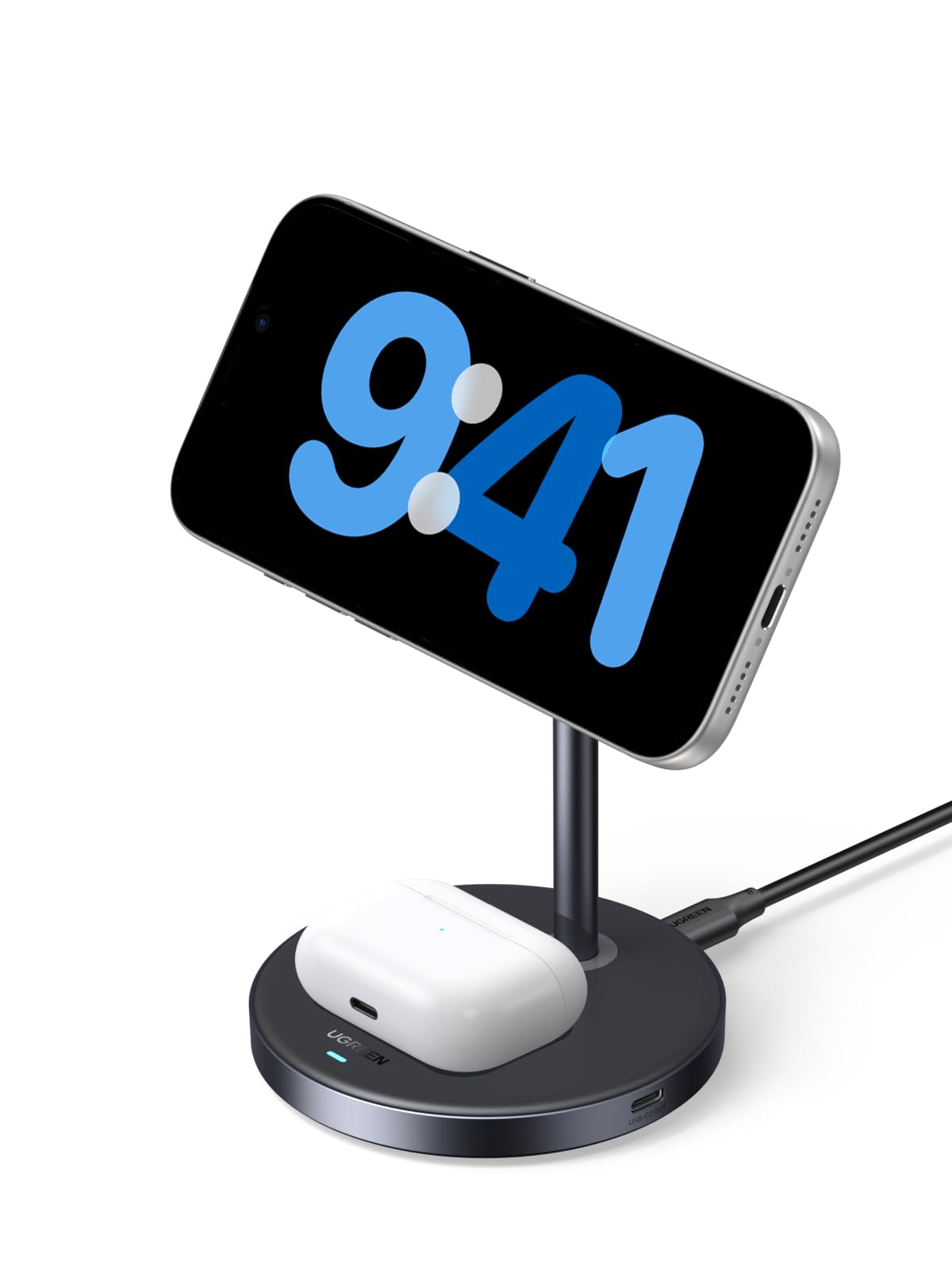
Image: The UGREEN Qi2 15W 2-in-1 Wireless Charging Stand, a sleek grey stand with a magnetic charging pad for an iPhone and a base for AirPods.
2. പാക്കേജ് ഉള്ളടക്കം
നിങ്ങളുടെ പാക്കേജിൽ എല്ലാ ഇനങ്ങളും ഉണ്ടെന്ന് ഉറപ്പാക്കുക:
- 1 x UGREEN Qi2 15W 2-in-1 Wireless Charging Stand
- 1 x USB-C മുതൽ USB-C കേബിൾ വരെ
- 1 x ഉപയോക്തൃ മാനുവൽ

Image: A visual representation of the package contents, including the charging stand, a USB-C cable, and the user manual.
3. സജ്ജീകരണ നിർദ്ദേശങ്ങൾ
- പവർ കേബിൾ ബന്ധിപ്പിക്കുക: Insert one end of the provided USB-C to USB-C cable into the USB-C port on the back of the charging stand.
- Connect to a Power Adapter: Connect the other end of the USB-C cable to a compatible power adapter (not included). For optimal performance, a power adapter of 27W or higher is recommended.
- പ്ലേസ്മെൻ്റ്: Place the charging stand on a stable, flat surface away from direct sunlight or heat sources.
4. പ്രവർത്തന നിർദ്ദേശങ്ങൾ
4.1 Charging an iPhone
The stand features a magnetic charging pad for your iPhone. Ensure your iPhone is compatible with MagSafe or has a MagSafe-compatible case.
- Align your iPhone with the magnetic charging pad on the stand. The magnets will automatically snap your iPhone into place, ensuring proper alignment for charging.
- The charging indicator on your iPhone will confirm that charging has begun.

Image: An iPhone magnetically attached to the charging stand, displaying a charging icon and 75% battery level, indicating 15W fast wireless charging.
4.2 Charging AirPods
The base of the stand is equipped with a wireless charging pad for your AirPods.
- Place your AirPods charging case (with wireless charging capability) onto the designated charging area on the base of the stand.
- Ensure the AirPods case is centered on the charging pad for optimal charging. The indicator light on your AirPods case will show its charging status.

Image: The UGREEN charging stand simultaneously charging an iPhone on the magnetic pad and an AirPods case on the base. An Apple Watch is shown nearby but marked as 'Not Included'.
4.3 ക്രമീകരിക്കാവുന്ന Viewing ആംഗിൾ
The magnetic charging pad for the iPhone can be adjusted to various angles (15°-90°) and rotated 360° for both vertical and horizontal viewing. This allows for comfortable viewing during video calls, media consumption, or checking notifications while charging.
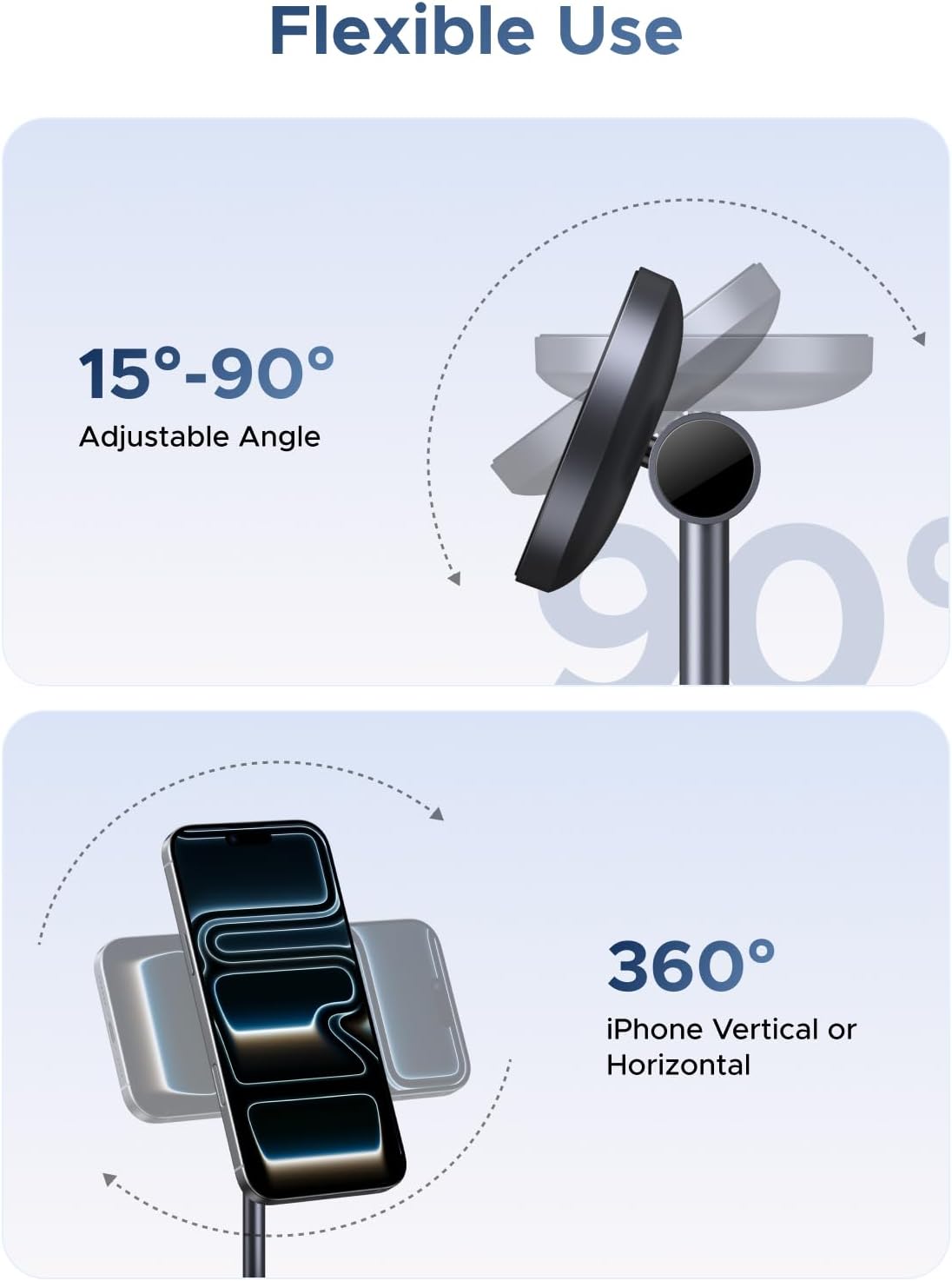
Image: Diagrams illustrating the adjustable angle of the iPhone charging pad from 15 to 90 degrees and 360-degree rotation for vertical or horizontal phone orientation.
4.4 കാന്തിക അഡോർപ്ഷൻ
The magnetic charging pad utilizes 16 powerful magnets to generate a strong holding force of 7N, ensuring your iPhone remains securely attached during charging and use.

ചിത്രം: ഒരു ക്ലോസ്-അപ്പ് view showing an iPhone magnetically attaching to the charging pad, with blue light effects indicating the strong magnetic connection.
5 അനുയോജ്യത
This charging stand is compatible with a range of devices:
- iPhones (15W): iPhone 12, 13, 14, 15, 16, 17 Series (including Mini, Plus, Pro, Pro Max models).
- AirPods (5W): AirPods 2, AirPods 3rd Gen, AirPods Pro, AirPods Pro 2nd Gen. (Note: Not compatible with AirPods model A1602 released in 2017 and model A2897 released in 2022.)
- ഫോൺ കേസുകൾ: Works with most standard cases (≤5mm thick). For magnetic charging, a MagSafe-compatible case is required. Non-MagSafe cases may prevent proper magnetic attachment and charging.

Image: A chart detailing compatibility for 15W iPhone charging (iPhone 12-17 series), 5W AirPods charging (AirPods 2/3/4, AirPods Pro 1/2/3, Galaxy Buds), and phone case compatibility (MagSafe cases supported, non-MagSafe cases not).
6 സുരക്ഷാ വിവരങ്ങൾ
The UGREEN Qi2 15W 2-in-1 Wireless Charging Stand incorporates multiple protection features to ensure safe charging:
- അമിത ചൂടാക്കൽ സംരക്ഷണം: Prevents the charger and devices from reaching unsafe temperatures.
- ഓവർകറന്റ് സംരക്ഷണം: Safeguards against excessive electrical current.
- ഷോർട്ട് സർക്യൂട്ട് സംരക്ഷണം: വൈദ്യുത ഷോർട്ട്സിൽ നിന്ന് സംരക്ഷിക്കുന്നു.
- ThermalGuard Technology: Monitors temperature 200 times per second for enhanced safety.
പൊതു സുരക്ഷാ മുൻകരുതലുകൾ:
- ഉപകരണം ദ്രാവകങ്ങൾ, ഈർപ്പം അല്ലെങ്കിൽ തീവ്രമായ താപനില എന്നിവയിൽ തുറന്നുകാട്ടരുത്.
- Avoid dropping or disassembling the charger.
- കുട്ടികൾക്ക് ലഭ്യമാകാതെ സൂക്ഷിക്കുക.
- Use only the provided cable or a certified USB-C cable.

Image: A person sleeping peacefully next to the charging stand, with icons illustrating overheating, overcurrent, and short circuit protection, emphasizing safety.

Image: A cutaway diagram of the charging pad, highlighting the internal components and the 'ThermalGuard' feature that monitors temperature 200 times per second.
7. പരിപാലനം
- വൃത്തിയാക്കൽ: Disconnect the charger from power before cleaning. Use a soft, dry cloth to wipe the surface. Do not use harsh chemicals or abrasive materials.
- സംഭരണം: ഉപയോഗത്തിലില്ലാത്തപ്പോൾ തണുത്തതും ഉണങ്ങിയതുമായ സ്ഥലത്ത് ചാർജർ സൂക്ഷിക്കുക.
- കേബിൾ കെയർ: Avoid bending or twisting the charging cable excessively to prevent damage.
8. പ്രശ്നപരിഹാരം
| പ്രശ്നം | സാധ്യമായ കാരണം | പരിഹാരം |
|---|---|---|
| ഉപകരണം ചാർജ് ചെയ്യുന്നില്ല | 1. Incorrect placement 2. Incompatible phone case 3. Power adapter insufficient 4. Cable not properly connected | 1. Realign device on charging pad. 2. Remove non-MagSafe case or use a MagSafe-compatible one. 3. 27W അല്ലെങ്കിൽ അതിൽ കൂടുതൽ പവർ അഡാപ്റ്റർ ഉപയോഗിക്കുക. 4. Ensure cable is securely connected to both charger and power adapter. |
| സ്ലോ ചാർജിംഗ് | 1. Power adapter output too low 2. Device misalignment 3. Background apps consuming power | 1. 27W അല്ലെങ്കിൽ അതിൽ കൂടുതൽ പവർ അഡാപ്റ്റർ ഉപയോഗിക്കുക. 2. Ensure device is perfectly centered on the charging pad. 3. Close unnecessary apps on your device. |
| ചാർജർ അമിതമായി ചൂടാക്കുന്നു | 1. Environmental temperature too high 2. Device misalignment 3. Foreign objects on charging pad | 1. Move charger to a cooler environment. 2. Realign device. 3. Remove any metal objects or foreign materials from the charging surface. |
9 സ്പെസിഫിക്കേഷനുകൾ
| ഫീച്ചർ | വിശദാംശങ്ങൾ |
|---|---|
| മോഡൽ നമ്പർ | W710 |
| ബ്രാൻഡ് | ഉഗ്രീൻ |
| ഇൻപുട്ട് വോളിയംtage | 12 വോൾട്ട് (എസി) |
| Ampഉന്മേഷം | 3 Amps |
| വാട്ട്tage | 15 വാട്ട്സ് (പരമാവധി) |
| കണക്റ്റർ തരം | യുഎസ്ബി ടൈപ്പ് സി |
| അനുയോജ്യമായ ഉപകരണങ്ങൾ | Smartphones (iPhone 12-17 Series), Headphones (AirPods with wireless charging case) |
| പ്രത്യേക ഫീച്ചർ | Qi2 Certified, 2-in-1 Charging, Magnetic Alignment, Adjustable Angle, Multiple Protection |
| നിറം | ചാരനിറം |
10. വാറൻ്റിയും പിന്തുണയും
UGREEN products come with a standard manufacturer's warranty. For specific warranty details, please refer to the warranty card included in your package or visit the official UGREEN webസൈറ്റ്.
If you encounter any issues or have questions regarding your UGREEN Qi2 15W 2-in-1 Wireless Charging Stand, please contact UGREEN customer support through the following channels:
- ഉദ്യോഗസ്ഥൻ Webസൈറ്റ്: www.ugreen.com
- ഇമെയിൽ പിന്തുണ: നിങ്ങളുടെ ഉൽപ്പന്ന പാക്കേജിംഗ് അല്ലെങ്കിൽ ഔദ്യോഗിക പാക്കേജിംഗ് കാണുക webബന്ധപ്പെടാനുള്ള ഇമെയിലിനുള്ള സൈറ്റ്.
- ഓൺലൈൻ ചാറ്റ്: Available on the UGREEN official webപ്രവൃത്തി സമയങ്ങളിൽ സൈറ്റ്.
Please have your product model number (W710) and purchase information ready when contacting support.