
1. ആമുഖം
This user manual provides comprehensive instructions for the installation, operation, and maintenance of your ANYFAR Decoder Adapter, model RM-BM2506F. This device integrates advanced features like Wireless CarPlay, Android Auto, Mirror Link, and USB media playback into your vehicle's existing infotainment system, enhancing your driving experience with modern connectivity.
Please read this manual thoroughly before installation and use to ensure proper functionality and to avoid any damage to the product or your vehicle.
2. ഉൽപ്പന്നം കഴിഞ്ഞുview
The ANYFAR Decoder Adapter is designed to seamlessly integrate smartphone functionalities into your car's display while retaining all original vehicle controls and features. It offers a digital transmission for high-fidelity audio and supports various multimedia options.

ചിത്രം 2.1: The ANYFAR Decoder Adapter main unit. This image displays the compact design of the decoder box with its various ports and connectors, including the ANYFAR branding.

ചിത്രം 2.2: കഴിഞ്ഞുview of Wireless CarPlay Smart Module features for BMW EVO/MGU System. This graphic highlights key functionalities such as Bluetooth, CarPlay, Android Auto, Factory Protocol retention, Lossless Installation, Voice Control, Live Map, and Online Entertainment.
3 അനുയോജ്യത
This decoder adapter is specifically designed for:
- വാഹന മോഡലുകൾ: 2017–2018 BMW 1 Series, 2 Series, 3 Series, 4 Series, 5 Series, X1, X2, X3, X4, X5, X6, and MINI.
- ഇൻഫോടെയ്ൻമെൻ്റ് സിസ്റ്റം: Vehicles equipped with the EVO/MGU system.
Important Compatibility Check:
Before installation, it is crucial to verify your car's system and LVDS port type. This adapter is അനുയോജ്യമല്ല with NBT systems or 4-PIN LVDS ports.

ചിത്രം 3.1: Visual guide for checking car system and LVDS port compatibility. This image shows examples of NBT (incompatible) vs. EVO ID5, ID6, ID7 (compatible) system interfaces, and illustrates the difference between a compatible 6-PIN LVDS port and an incompatible 4-PIN LVDS port.
- Step 1: Check your original car radio homescreen menu picture. Ensure it matches EVO ID5, ID6, or ID7 systems, not NBT.
- Step 2: Check the LVDS port on the back of the OEM car screen. It must be a 6-PIN connector.
4. പാക്കേജ് ഉള്ളടക്കം
പാക്കേജിൽ ഇനിപ്പറയുന്ന ഇനങ്ങൾ ഉൾപ്പെടുന്നു:
- ANYFAR Decoder Adapter (Main Unit)
- പവർ കേബിൾ
- LVDS OUT Cable (1 PC)
- LVDS IN Cable (1 PC)
- RCA & USB Cable
- ഉപയോക്തൃ മാനുവൽ (ഈ പ്രമാണം)

ചിത്രം 4.1: Contents of the ANYFAR Decoder Adapter package. This image displays the main decoder unit with its dimensions (152mm x 102mm x 30mm) and the included cables: Power cable, LVDS OUT, LVDS IN, and RCA & USB cable.
5. സജ്ജീകരണവും ഇൻസ്റ്റാളേഷനും
Installation of the ANYFAR Decoder Adapter requires technical knowledge and careful handling of vehicle electronics. It is recommended that installation be performed by a qualified professional.
5.1 പ്രീ-ഇൻസ്റ്റലേഷൻ പരിശോധനകൾ
- Verify vehicle compatibility as described in Section 3.
- ഇൻസ്റ്റാളേഷൻ ആരംഭിക്കുന്നതിന് മുമ്പ് വാഹനത്തിന്റെ ഇഗ്നിഷൻ ഓഫാണെന്നും ബാറ്ററി വിച്ഛേദിക്കപ്പെട്ടിട്ടുണ്ടെന്നും ഉറപ്പാക്കുക.
- Gather all necessary tools (e.g., trim removal tools, screwdrivers).
5.2 ഇൻസ്റ്റലേഷൻ ഘട്ടങ്ങൾ (പൊതു ഗൈഡ്)
- Carefully remove the vehicle's infotainment screen and access the rear connections.
- Disconnect the original LVDS cable from the screen.
- Connect the provided LVDS IN cable from the decoder to the original LVDS port on the screen.
- Connect the provided LVDS OUT cable from the decoder to the vehicle's original LVDS cable.
- Connect the power cable and other necessary cables (e.g., RCA for camera, USB) to the decoder unit and the vehicle's wiring harness.
- Securely mount the decoder unit in a suitable location within the dashboard, ensuring it does not interfere with other components.
- Reconnect the vehicle's battery and test the system before reassembling the dashboard.
കുറിപ്പ്:
Detailed vehicle-specific installation guides may be available from the manufacturer's support channels. Always refer to your vehicle's service manual for specific panel removal and wiring diagrams.
6. പ്രവർത്തന നിർദ്ദേശങ്ങൾ
6.1 Switching Between Original System and Adapter System
After installation, you can switch between your car's original OEM system and the ANYFAR adapter system by long-pressing the "Menu" button on your car's control knob.
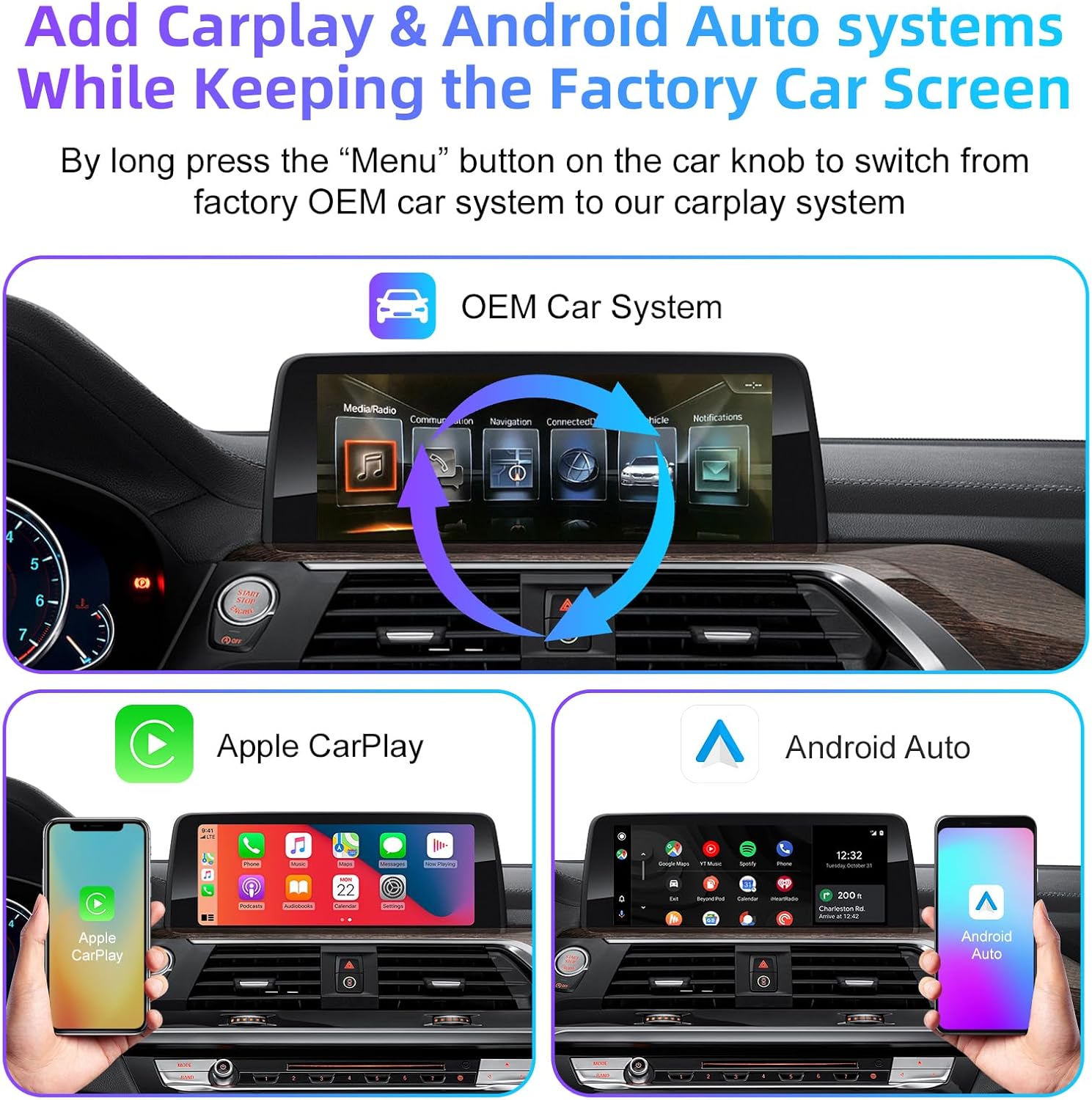
ചിത്രം 6.1: Illustration of switching between the OEM car system and the CarPlay/Android Auto interface. This image shows the original BMW infotainment screen and then the Apple CarPlay and Android Auto interfaces, indicating the seamless transition.
6.2 വയർലെസ് കാർപ്ലേയും ആൻഡ്രോയിഡ് ഓട്ടോയും
The adapter supports both wireless Apple CarPlay and wireless Android Auto. Once connected, you can access navigation, music, calls, messaging, and voice assistant features directly on your car's screen without needing to plug in your phone.
- കണക്ഷൻ: Pair your smartphone via Bluetooth to the adapter, then follow the on-screen prompts to enable Wireless CarPlay or Android Auto.
- പ്രവർത്തനക്ഷമത: Enjoy full access to compatible apps, including maps, music streaming, communication, and more.
6.3 Mirror Link & USB Drive Playback
The Mirror Link (AirPlay for iOS) feature allows you to mirror your smartphone's display onto the car screen. This is ideal for viewing videos from apps like YouTube, Netflix, or Disney+.
- മിറർ ലിങ്ക്: Connect your phone to the adapter via Wi-Fi or USB to cast your screen.
- യുഎസ്ബി പ്ലേബാക്ക്: The integrated USB port allows you to play videos or music directly from a USB drive. It can also be used to charge your phone.
6.4 ഇന്റലിജന്റ് വോയ്സ് കൺട്രോൾ
Utilize your phone's voice assistant (Siri for CarPlay, Google Assistant for Android Auto) for hands-free operation. This allows for safer driving by controlling navigation, music, and calls using voice commands.

ചിത്രം 6.2: Demonstrating intelligent voice control functionality. This image shows examples of voice commands for Siri (Apple CarPlay) and Google Assistant (Android Auto) for tasks like playing music or making calls.
6.5 Retaining Original Car Controls
The adapter ensures that all original car controls remain fully functional. You can continue to use the touchscreen, voice control, physical buttons, and the iDrive knob to navigate and control the system.

ചിത്രം 6.3: Highlighting the retention of original car controls. This image shows the use of steering wheel buttons (e.g., volume, voice awakening) and the central control panel (iDrive knob with "HOME" button for switching to CarPlay) while the adapter is active.
6.6 Backup Camera Input Support
The decoder supports connecting an aftermarket backup camera or front camera. When the vehicle is shifted into reverse, the camera feed will automatically display on the car screen.
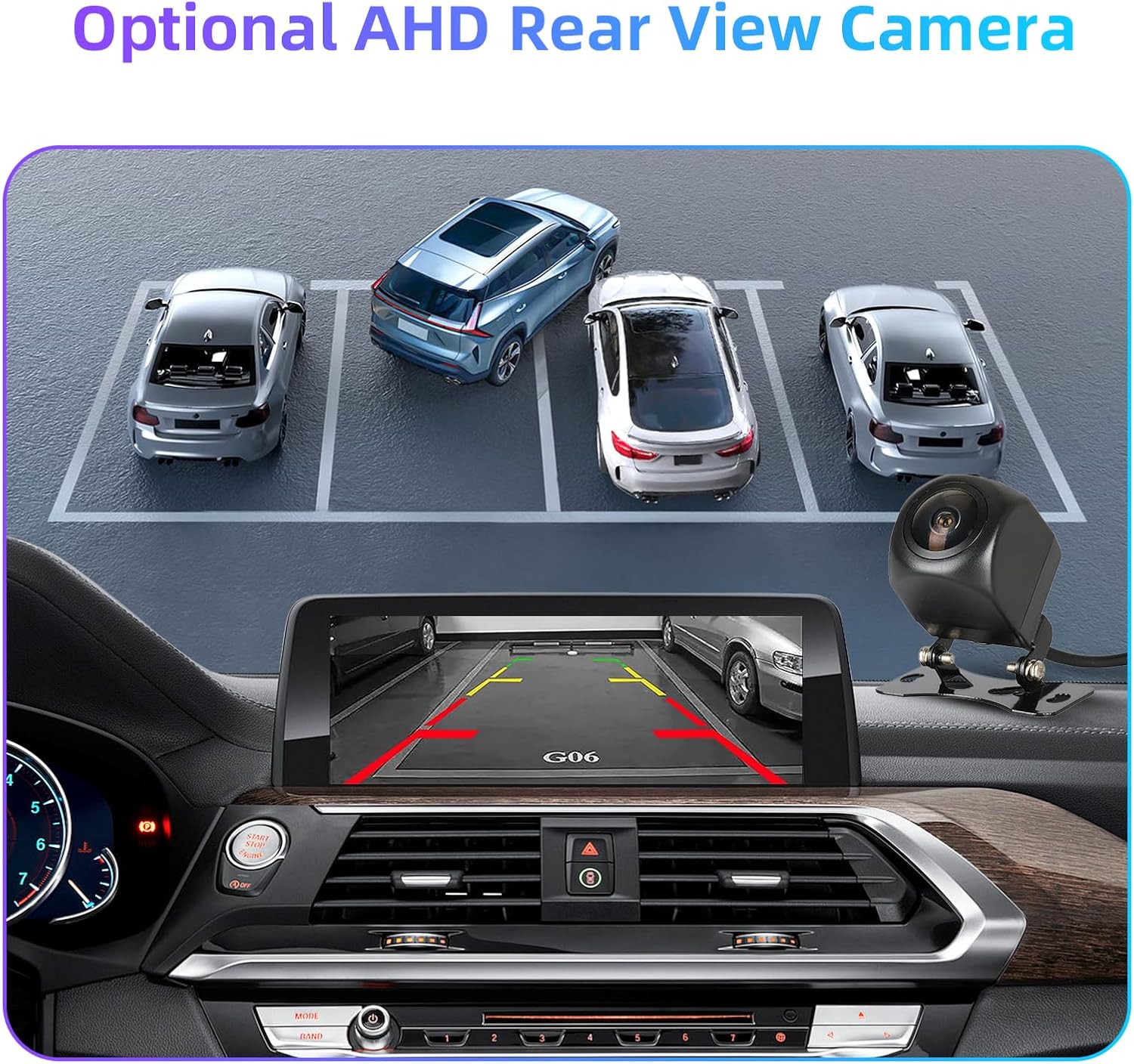
ചിത്രം 6.4: Display of an optional AHD rear view camera feed on the car screen. This image illustrates how the backup camera view, complete with parking guidelines, is integrated into the infotainment display.
7. ഓഡിയോ putട്ട്പുട്ട്
The ANYFAR Decoder Adapter provides premium in-car Hi-Fi audio through digital transmission. This ensures high-quality, uninterrupted music playback without signal interference or audio delay, preserving the original sound quality of your car's audio system.
Audio output is routed through the car's factory Bluetooth system, which minimizes interference and provides faster sound response.

ചിത്രം 7.1: Steps for connecting Bluetooth audio output. This image shows the process: 1. Pair the Car Bluetooth, 2. Connect CarPlay, 3. Sound Output selection on the iPhone to "CAR BT".
8. പരിപാലനം
The ANYFAR Decoder Adapter is designed for durability and requires minimal maintenance. Follow these guidelines to ensure optimal performance:
- വൃത്തിയാക്കൽ: Keep the unit free from dust and debris. Use a soft, dry cloth for cleaning. Avoid liquid cleaners.
- സോഫ്റ്റ്വെയർ അപ്ഡേറ്റുകൾ: നിർമ്മാതാവിന്റെ website for any available firmware updates to ensure compatibility and access to new features.
- പരിസ്ഥിതി വ്യവസ്ഥകൾ: തീവ്രമായ താപനിലയിലോ ഈർപ്പത്തിലോ യൂണിറ്റ് തുറന്നുകാട്ടുന്നത് ഒഴിവാക്കുക.
9. പ്രശ്നപരിഹാരം
If you encounter issues with your ANYFAR Decoder Adapter, please refer to the following common troubleshooting steps:
- ഡിസ്പ്ലേ/കറുത്ത സ്ക്രീൻ ഇല്ല:
- Ensure all cables are securely connected, especially the LVDS IN and OUT cables.
- Verify that the power cable is properly connected and receiving power.
- Confirm your vehicle's compatibility (EVO/MGU system, 6-PIN LVDS port).
- ഓഡിയോ ഇല്ല:
- Check your phone's Bluetooth connection to the car.
- Ensure the car's audio input is set to the correct Bluetooth source.
- Verify volume levels on both your phone and the car's infotainment system.
- കാർപ്ലേ/ആൻഡ്രോയിഡ് ഓട്ടോ വയർലെസ് ആയി കണക്റ്റ് ചെയ്യുന്നില്ല:
- നിങ്ങളുടെ സ്മാർട്ട്ഫോണിൽ ബ്ലൂടൂത്തും വൈഫൈയും പ്രവർത്തനക്ഷമമാക്കിയിട്ടുണ്ടെന്ന് ഉറപ്പാക്കുക.
- നിങ്ങളുടെ ഫോണിന്റെ ബ്ലൂടൂത്ത് ക്രമീകരണങ്ങളിൽ നിന്ന് ഉപകരണം മറന്ന് വീണ്ടും പെയർ ചെയ്യുക.
- Restart both your phone and the car's infotainment system.
- Original Car Controls Not Responding:
- Check all wiring connections to the decoder unit.
- Ensure the decoder is receiving proper power.
- Try resetting the car's infotainment system (refer to your car's manual).
If the problem persists after attempting these steps, please contact ANYFAR customer support for further assistance.
10 സ്പെസിഫിക്കേഷനുകൾ
| ഫീച്ചർ | വിശദാംശങ്ങൾ |
|---|---|
| മോഡൽ നമ്പർ | RM-BM2506F |
| ബ്രാൻഡ് | എത്ര ദൂരെ |
| അനുയോജ്യമായ വാഹനങ്ങൾ | 2017-2018 BMW (1-5 Series, X1-X6), MINI with EVO/MGU System |
| കണക്റ്റിവിറ്റി ടെക്നോളജി | USB, Wireless (Bluetooth, Wi-Fi for CarPlay/Android Auto) |
| കൺട്രോളർ തരം | Hand Control (retains original car controls) |
| പ്രത്യേക ഫീച്ചർ | Hands-Free Calling, Wireless CarPlay, Wireless Android Auto, Mirror Link, USB Playback, Backup Camera Support |
| അനുയോജ്യമായ ഉപകരണങ്ങൾ | സ്മാർട്ട്ഫോൺ (iOS, Android) |
| കണക്റ്റർ തരം | Micro USB (for USB playback/charging) |
| ഓഡിയോ put ട്ട്പുട്ട് മോഡ് | Stereo (via car's factory Bluetooth) |
| പാക്കേജ് അളവുകൾ | 9.61 x 6.81 x 3.94 ഇഞ്ച് |
| ഇനത്തിൻ്റെ ഭാരം | 1.91 പൗണ്ട് |
11. വാറൻ്റിയും പിന്തുണയും
For warranty information and technical support, please refer to the official ANYFAR webസൈറ്റിൽ ബന്ധപ്പെടുകയോ അവരുടെ ഉപഭോക്തൃ സേവനവുമായി നേരിട്ട് ബന്ധപ്പെടുകയോ ചെയ്യുക. ഏതെങ്കിലും വാറന്റി ക്ലെയിമുകൾക്ക് വാങ്ങിയതിന്റെ തെളിവായി നിങ്ങളുടെ വാങ്ങൽ രസീത് സൂക്ഷിക്കുക.
നിർമ്മാതാവ്: Huizhou Rhythm Technology Co, Ltd
ആദ്യം ലഭ്യമായ തീയതി: സെപ്റ്റംബർ 9, 2025