
1. ഉൽപ്പന്നം കഴിഞ്ഞുview
The FIRMERST 2 Zone 200W Low Voltage Landscape Transformer is designed to convert standard 120V AC household current to a safe 12V/14V AC output for outdoor landscape lighting. It features dual independent zones, multiple operating modes, a detachable photocell sensor, and built-in safety mechanisms for reliable and customizable outdoor illumination.

ചിത്രം 1.1: മുൻഭാഗം view of the FIRMERST 2 Zone 200W Low Voltage Landscape Transformer, showcasing its circular design, control panel, and connected power and sensor cords.
പ്രധാന സവിശേഷതകൾ:
- Dual-Zone Independent Control: Manage two separate lighting zones with individual countdown schedules.
- 5 ഓപ്പറേറ്റിംഗ് മോഡുകൾ: Includes Photocell Auto (dusk-to-dawn), Dusk-to-Timer, Timer (on/off at set times), Countdown Timer, and Manual On/Off.
- Detachable Outdoor Photocell Sensor: A 6ft replaceable sensor cord allows for optimal placement in shaded or bright areas.
- Circuit Breaker & Memory Function: Features a resettable circuit breaker for overload protection and retains settings after power loss.
- കുറഞ്ഞ വോള്യംtage Safe Output: Converts 120V AC to dual 12V/14V outputs, supporting up to 200W (max 80% load).
2 സുരക്ഷാ വിവരങ്ങൾ
Please read and understand all instructions before installing or operating this transformer. Failure to follow these instructions may result in electric shock, fire, or other hazards. Always disconnect power before servicing.
- Ensure the transformer is installed in a location protected from direct water spray and excessive moisture.
- പരമാവധി വാട്ട് കവിയരുത്tage capacity of 200W (80% load recommended for optimal performance).
- കുറഞ്ഞ വോള്യം മാത്രം ഉപയോഗിക്കുകtage landscape lighting fixtures with this transformer.
- All wiring should comply with local electrical codes.
- ട്രാൻസ്ഫോർമർ, വയറിംഗ് എന്നിവയിൽ നിന്ന് പ്രവർത്തന സമയത്ത് കുട്ടികളെയും വളർത്തുമൃഗങ്ങളെയും അകറ്റി നിർത്തുക.
3. ബോക്സിൽ എന്താണുള്ളത്?
- 1 x FIRMERST Low Voltagഇ ട്രാൻസ്ഫോർമർ
- 1 x Accessories Package (including photocell sensor, wire connectors, mounting hardware)
വീഡിയോ 3.1: ഒരു അൺബോക്സിംഗ് കൂടിview of the FIRMERST 2 Zone Low Voltage Landscape Transformer, demonstrating its components and features.
4. സജ്ജീകരണവും ഇൻസ്റ്റാളേഷനും
Follow these steps for proper installation of your landscape transformer.
4.1 ട്രാൻസ്ഫോർമർ ഘടിപ്പിക്കുന്നു
- Select a suitable outdoor location near a 120V AC power outlet.
- Mount the transformer at a minimum height of 12 inches (30 cm) from the ground.
- Use the provided mounting hardware to securely attach the transformer to a wall or sturdy surface.
4.2 വയറിംഗ് ലാൻഡ്സ്കേപ്പ് ലൈറ്റുകൾ
- Ensure the transformer is unplugged from the power source.
- കുറഞ്ഞ വോള്യം ബന്ധിപ്പിക്കുകtage wires from your landscape lights to the appropriate terminals (COM, 12V, 14V) for Zone 1 and Zone 2.
- Refer to the wiring diagram for correct connections. Ensure all connections are tight and secure.

Image 4.1: Diagram illustrating the four main installation steps: mounting height, connecting wires, fixing to wall, and placing lights.
4.3 Photocell Sensor Connection
- Plug the detachable photocell sensor into the designated port on the transformer.
- Position the sensor in an area that receives natural light, avoiding direct artificial light sources that could interfere with its operation.

Image 4.2: The detachable photocell sensor, shown with an illustration of how it detects dusk to turn lights on and dawn to turn them off.
4.4 Cable Selection
Choose the appropriate cable gauge based on the total wattage and length of your lighting circuit to ensure optimal performance and prevent voltagഇ ഡ്രോപ്പ്.

Image 4.3: Visual guide for selecting appropriate cable gauges (e.g., 12AWG for 50FT, 100FT, 150FT) based on length and load.
5. പ്രവർത്തന നിർദ്ദേശങ്ങൾ
The transformer offers five distinct operating modes for flexible control of your landscape lighting. Each zone can be configured independently.
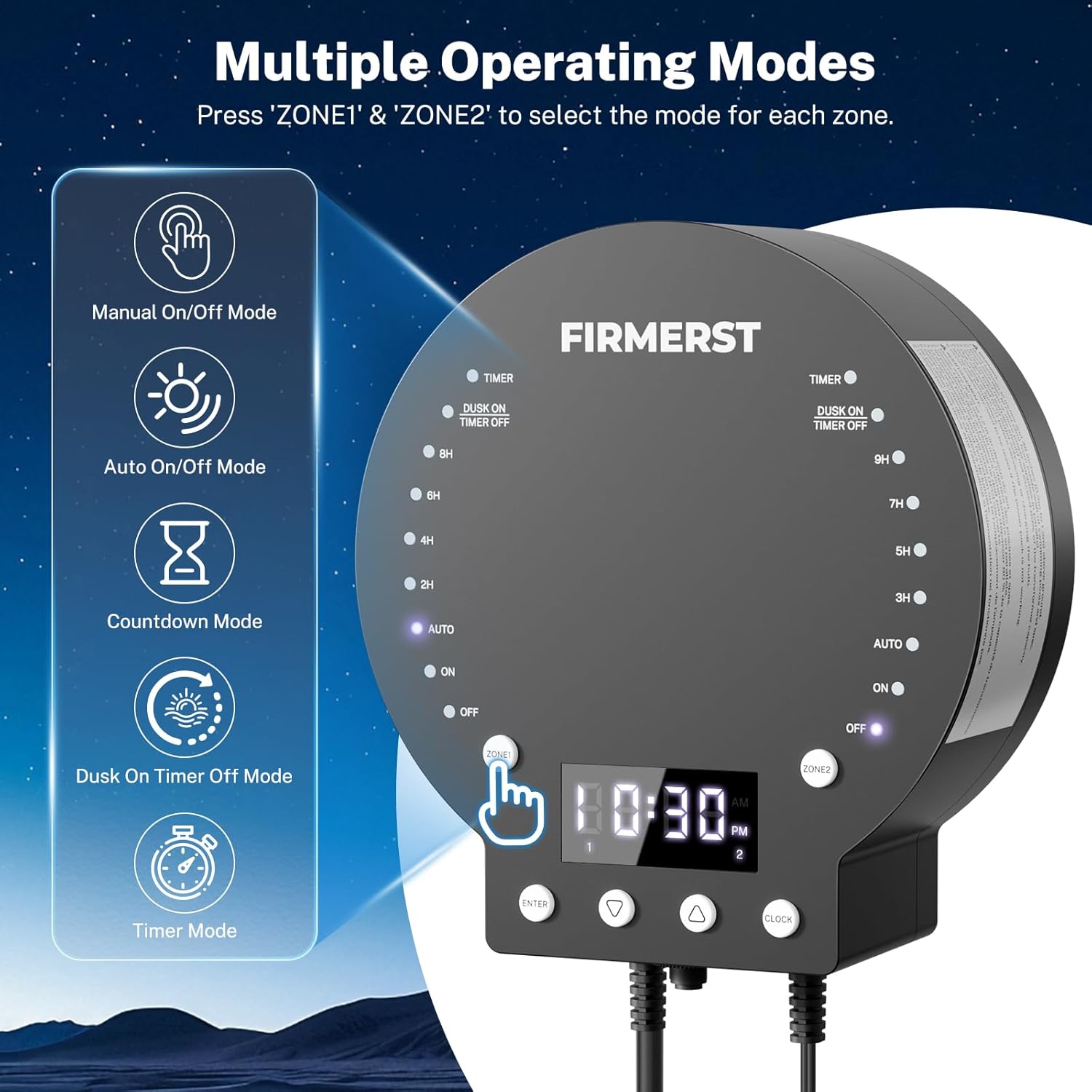
Image 5.1: The transformer's control panel highlighting the five operating modes for each zone: Timer, Dusk On/Timer Off, Countdown, Auto, and Manual On/Off.
5.1 ക്ലോക്ക് ക്രമീകരിക്കുക
Press the 'CLOCK' button to enter clock setting mode. Use the 'UP' and 'DOWN' arrows to adjust the hour and minute. Press 'ENTER' to confirm.
5.2 ഓപ്പറേറ്റിംഗ് മോഡുകൾ തിരഞ്ഞെടുക്കൽ
Press the 'ZONE1' or 'ZONE2' button repeatedly to cycle through the available operating modes for each respective zone. The illuminated indicator light will show the currently selected mode.
- Manual On/Off Mode: Lights remain continuously ON or OFF. Select 'ON' or 'OFF' for constant operation.
- Auto On/Off Mode (Photocell Dusk-to-Dawn): Lights automatically turn ON at dusk and OFF at dawn based on the photocell sensor. Select 'AUTO'.
- കൗണ്ട്ഡൗൺ മോഡ്: Lights turn ON at dusk and remain ON for a set duration (2H, 4H, 6H, 8H for Zone 1; 3H, 5H, 7H, 9H for Zone 2). Select the desired hour.
- Dusk On/Timer Off Mode: Lights turn ON at dusk and turn OFF at a specific programmed time. Select 'DUSK ON TIMER OFF'.
- ടൈമർ മോഡ്: Lights turn ON and OFF at specific programmed times. Select 'TIMER'.

ചിത്രം 5.2: ഉദാample of dual-zone timer control, showing Zone 1 in Manual On/Off mode and Zone 2 in Timer Mode with specific start and close times.

Image 5.3: Illustration of Auto Mode, where the photocell sensor automatically activates lights at dusk and deactivates them at dawn.
6. പ്രത്യേക സവിശേഷതകൾ
6.1 Dual-Zone Independent Control
The transformer allows for independent control of two separate lighting zones. This means you can set different operating modes and schedules for lights connected to Zone 1 and Zone 2, providing maximum flexibility for your landscape design.

Image 6.1: The transformer's dual-zone capability, showing separate lighting configurations for Zone 1 (pathway lights) and Zone 2 (garden lights).
6.2 സർക്യൂട്ട് ബ്രേക്കർ
A resettable circuit breaker is located on the bottom of the unit. In case of an overload or short circuit, the breaker will trip to protect the transformer and connected lights. To reset, simply press the button after resolving the issue.

ചിത്രം 6.2: ക്ലോസ്-അപ്പ് view of the bottom of the transformer, indicating the location of the resettable circuit breaker and the 12V/14V AC output terminals for both zones.
6.3 മെമ്മറി പ്രവർത്തനം
The transformer is equipped with a memory function that retains the last programmed settings even after a power outage. This eliminates the need for reprogramming after temporary power interruptions.

ചിത്രം 6.3: പിൻഭാഗം view of the transformer, highlighting the memory function and the wiring terminals for Zone 1 and Zone 2.
7. പരിപാലനം
- ട്രാൻസ്ഫോർമറും വയറിംഗും ഇടയ്ക്കിടെ പരിശോധിച്ച് കേടുപാടുകൾ സംഭവിച്ചിട്ടുണ്ടോ അല്ലെങ്കിൽ തേയ്മാനം സംഭവിച്ചിട്ടുണ്ടോ എന്ന് പരിശോധിക്കുക.
- Keep the photocell sensor clean and free from obstructions to ensure accurate dusk-to-dawn operation.
- ട്രാൻസ്ഫോർമറിന്റെ പുറംഭാഗം മൃദുവായ, ഡി-ക്ലാസ്സർ ഉപയോഗിച്ച് വൃത്തിയാക്കുക.amp തുണി. കഠിനമായ രാസവസ്തുക്കളോ ഉരച്ചിലുകളുള്ള ക്ലീനറുകളോ ഉപയോഗിക്കരുത്.
- Ensure proper ventilation around the transformer to prevent overheating.
8. പ്രശ്നപരിഹാരം
- ലൈറ്റുകൾ കത്തുന്നില്ല: Check the power connection, ensure the circuit breaker is not tripped, verify the operating mode settings, and inspect wiring for loose connections.
- Lights staying on/off at wrong times: Check the photocell sensor for obstructions or interference from artificial light. Verify the clock setting and programmed timer schedules.
- മിന്നുന്ന വിളക്കുകൾ: This may indicate an overloaded circuit or insufficient cable gauge. Reduce the total wattage of connected lights or upgrade to a thicker gauge wire.
- Transformer not responding: Disconnect power for a few minutes, then reconnect. If the issue persists, contact customer support.
9 സ്പെസിഫിക്കേഷനുകൾ
| സ്പെസിഫിക്കേഷൻ | വിശദാംശങ്ങൾ |
|---|---|
| മോഡൽ നമ്പർ | MDK1-12V2Z200W-USA |
| ഇൻപുട്ട് വോളിയംtage | 120V എസി |
| Putട്ട്പുട്ട് വോളിയംtage | 12V/14V എസി |
| പരമാവധി ഔട്ട്പുട്ട് വാട്ട്tage | 200W (80% load recommended) |
| സോണുകൾ | 2 സ്വതന്ത്ര മേഖലകൾ |
| ഓപ്പറേറ്റിംഗ് മോഡുകൾ | 5 (Manual, Auto, Countdown, Dusk-On/Timer-Off, Timer) |
| ഫോട്ടോസെൽ സെൻസർ | Detachable, 6ft cord |
| സുരക്ഷാ സവിശേഷതകൾ | റീസെറ്റബിൾ സർക്യൂട്ട് ബ്രേക്കർ |
| മെമ്മറി ഫംഗ്ഷൻ | അതെ |
| അളവുകൾ | 10.94 x 9.37 x 5.08 ഇഞ്ച് |
| ഭാരം | 6.39 പൗണ്ട് |
| സർട്ടിഫിക്കേഷൻ | UL ലിസ്റ്റുചെയ്തു |

Image 9.1: Diagram showing the physical dimensions of the transformer, along with specifications for the UL Listed power cord (SJTOW 18AWG/3C, 3 Feet) and sensor cord (SPT-1W 20AWG/2C, 6 Feet).
10. വാറൻ്റിയും പിന്തുണയും
For warranty information or technical support, please refer to the contact details provided with your product packaging or visit the official FIRMERST webസൈറ്റ്. വാറൻ്റി ക്ലെയിമുകൾക്കായി നിങ്ങളുടെ വാങ്ങൽ രസീത് സൂക്ഷിക്കുക.