
1. ആമുഖം
Thank you for choosing the MECHEN M33 Hi-Res MP3 Player. This device is designed to provide a high-fidelity audio experience with support for various lossless formats, Bluetooth 5.3 connectivity, and a user-friendly touchscreen interface. This manual will guide you through the setup, operation, and maintenance of your new MP3 player.
2. പാക്കേജ് ഉള്ളടക്കം
താഴെ ലിസ്റ്റ് ചെയ്തിരിക്കുന്ന എല്ലാ ഇനങ്ങളും നിങ്ങളുടെ പാക്കേജിൽ ഉൾപ്പെടുത്തിയിട്ടുണ്ടെന്ന് ദയവായി പരിശോധിക്കുക:
- MECHEN M33 Hi-Res MP3 Player
- USB-C ഡാറ്റ കേബിൾ
- സംരക്ഷണ ലെതർ കേസ്
- 128GB External Memory Card (pre-installed or separate)
- ഉപയോക്തൃ മാനുവൽ (ഈ പ്രമാണം)
3. ഉൽപ്പന്നം കഴിഞ്ഞുview
The MECHEN M33 features a compact design with a durable zinc alloy body and a 2.8-inch HD touchscreen for intuitive navigation. It supports high-resolution audio formats and offers versatile connectivity options.
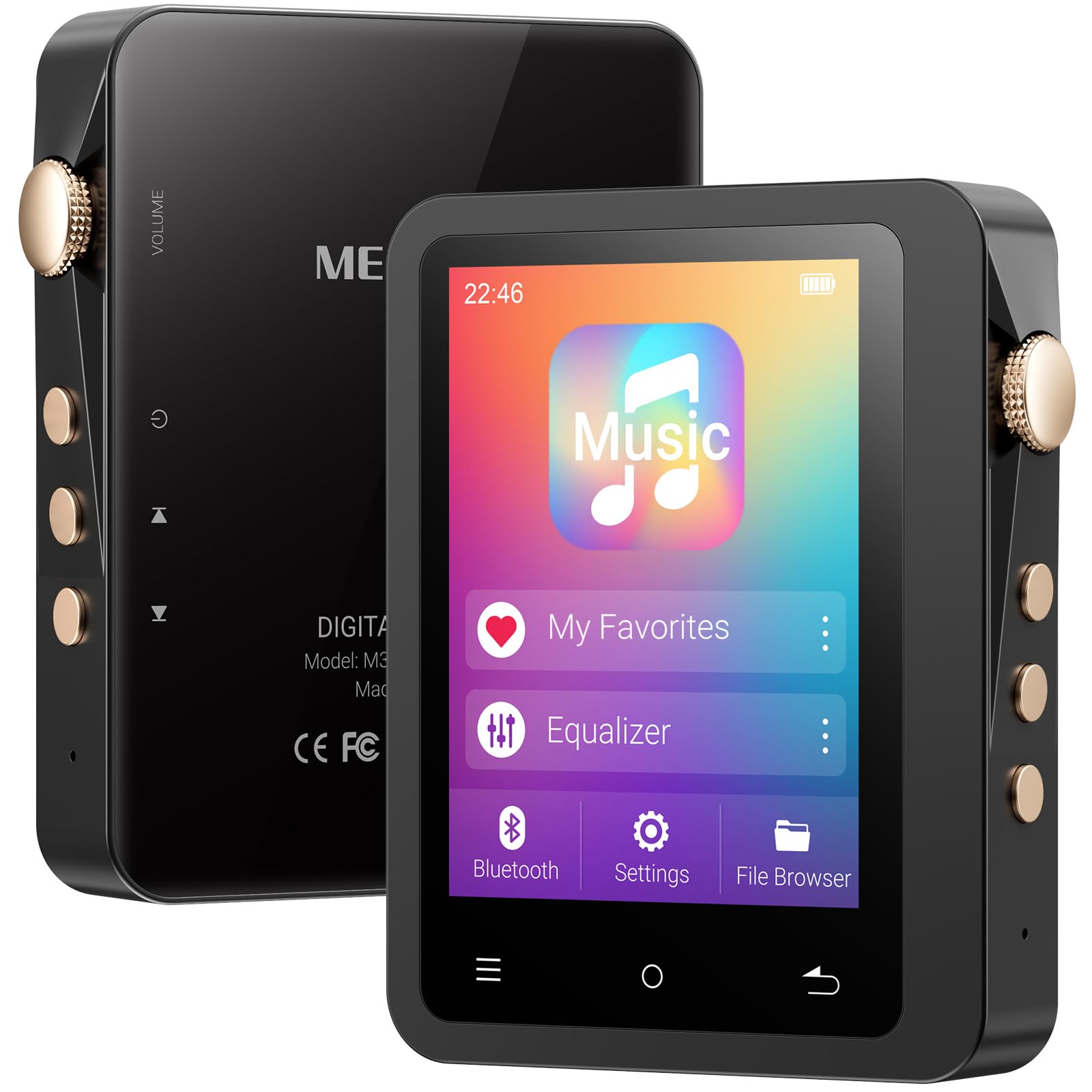
Image: The MECHEN M33 Hi-Res MP3 Player, showcasing its 2.8-inch touchscreen and compact form factor, often accompanied by its protective leather case.
പ്രധാന സവിശേഷതകൾ:
- ഹൈ-ഫൈ സൗണ്ട് ക്വാളിറ്റി: Built-in DAC decoding chip supports DSD (DSF/DFF), FLAC, APE, ALAC, MP3, AAC, and other formats.
- ബ്ലൂടൂത്ത് 5.3: Stable wireless connection for headphones and speakers.
- നീണ്ട ബാറ്ററി ലൈഫ്: 2000mAh battery provides up to 60 hours of continuous playback.
- വികസിപ്പിക്കാവുന്ന സംഭരണം: Standard 128GB external memory card, expandable up to 512GB (TF card not included for expansion).
- 2.8 ഇഞ്ച് എച്ച്ഡി ടച്ച്സ്ക്രീൻ: Simple UI design for easy navigation and song categorization.
- മോടിയുള്ള ബിൽഡ്: Solid zinc alloy shell, scratch-resistant and wear-resistant.
4. സജ്ജീകരണം
4.1 ഉപകരണം ചാർജ് ചെയ്യുന്നു
Before first use, fully charge the MP3 player. Connect the provided USB-C data cable to the player's USB-C port and the other end to a USB power adapter (not included) or a computer's USB port. The charging indicator will show the charging status. A full charge typically takes a few hours.
4.2 പവർ ഓൺ/ഓഫ്
- പവർ ഓണാക്കാൻ: Press and hold the Power button (usually located on the side) for a few seconds until the screen lights up.
- പവർ ഓഫ് ചെയ്യാൻ: Press and hold the Power button for a few seconds. A power-off prompt will appear on the screen. Select 'Power Off' to shut down the device.
4.3 Inserting/Removing MicroSD Card
The device comes with a 128GB external memory card. If you wish to use a different card or expand storage further (up to 512GB), follow these steps:
- തിരുകാൻ: Locate the MicroSD card slot on the device. Gently push the MicroSD card into the slot until it clicks into place. Ensure the card is oriented correctly.
- നീക്കം ചെയ്യാൻ: Gently push the MicroSD card inward until it springs out slightly. Then, pull it out of the slot. Always ensure the device is powered off before removing the card to prevent data loss.
5. അടിസ്ഥാന പ്രവർത്തനം
5.1 ഇന്റർഫേസ് നാവിഗേറ്റ് ചെയ്യൽ
The MECHEN M33 features a 2.8-inch touchscreen. Swipe left, right, up, or down to navigate through menus and options. Tap on icons to select them. The user interface is designed for simplicity and ease of use.
5.2 മ്യൂസിക് പ്ലേബാക്ക്
- From the main menu, tap on 'Music' or 'Player'.
- Browse your music library by artist, album, genre, or folder.
- Tap on a song to begin playback.
- During playback, you can control volume, skip tracks, pause/play, and access playback settings from the screen.
5.3 ബ്ലൂടൂത്ത് ജോടിയാക്കൽ
To connect your MECHEN M33 to Bluetooth headphones or speakers:
- നിങ്ങളുടെ ബ്ലൂടൂത്ത് ഓഡിയോ ഉപകരണം ജോടിയാക്കൽ മോഡിലാണെന്ന് ഉറപ്പാക്കുക.
- On the MP3 player, go to 'Settings' and then 'Bluetooth'.
- Turn Bluetooth 'On'. The player will scan for available devices.
- Select your desired device from the list to pair. Once paired, audio will be routed wirelessly.
6. വിപുലമായ സവിശേഷതകൾ
6.1 Hi-Fi Audio Playback
The MECHEN M33 supports various high-resolution lossless audio formats including DSD (DSF/DFF), FLAC, APE, and ALAC, in addition to common formats like MP3 and AAC. For the best audio experience, use high-quality headphones and lossless audio files.
6.2 സമനില
The device includes an equalizer function to customize your audio output. Access the equalizer settings during music playback or through the 'Settings' menu to adjust sound profiles according to your preference.
6.3 OTG Functionality
The MECHEN M33 supports OTG (On-The-Go) functionality, allowing it to act as a host to connect other USB devices, such as USB flash drives, for direct file transfer or playback. A compatible OTG adapter (not included) may be required.
7. File മാനേജ്മെൻ്റ്
സംഗീതം കൈമാറാൻ files to your MECHEN M33:
- Connect the MP3 player to your computer using the provided USB-C data cable.
- The player will appear as a removable disk drive on your computer.
- നിങ്ങളുടെ ഓഡിയോ വലിച്ചിടുക files into the appropriate folders on the player's internal storage or the MicroSD card.
- ഒരിക്കൽ fileകൾ കൈമാറ്റം ചെയ്യപ്പെട്ടുകഴിഞ്ഞാൽ, USB കേബിൾ വിച്ഛേദിക്കുന്നതിന് മുമ്പ് നിങ്ങളുടെ കമ്പ്യൂട്ടറിൽ നിന്ന് ഉപകരണം സുരക്ഷിതമായി പുറത്തെടുക്കുക.
8. പരിപാലനം
8.1 ഉപകരണം വൃത്തിയാക്കുന്നു
Wipe the device with a soft, dry, lint-free cloth. Do not use abrasive cleaners, alcohol, or solvents, as these may damage the surface or internal components.
8.2 ബാറ്ററി കെയർ
- Avoid exposing the device to extreme temperatures (hot or cold) as this can reduce battery life.
- പരമാവധി ബാറ്ററി ആയുസ്സ് ലഭിക്കാൻ, ഇടയ്ക്കിടെ ബാറ്ററി പൂർണ്ണമായും കളയുന്നത് ഒഴിവാക്കുക.
- If storing the device for an extended period, charge it to about 50% before storage.
9. പ്രശ്നപരിഹാരം
- ഉപകരണം ഓണാക്കുന്നില്ല: ബാറ്ററി ചാർജ്ജ് ചെയ്തിട്ടുണ്ടെന്ന് ഉറപ്പാക്കുക. ഒരു പവർ സ്രോതസ്സിലേക്ക് കണക്റ്റ് ചെയ്ത് വീണ്ടും ശ്രമിക്കുക.
- ശബ്ദമില്ല: Check volume levels. Ensure headphones are properly connected or Bluetooth is paired correctly. Verify audio file ഫോർമാറ്റ് അനുയോജ്യത.
- ബ്ലൂടൂത്ത് കണക്ഷൻ പ്രശ്നങ്ങൾ: രണ്ട് ഉപകരണങ്ങളും ജോടിയാക്കൽ മോഡിലാണെന്നും പരിധിക്കുള്ളിലാണെന്നും ഉറപ്പാക്കുക. ഉപകരണം ജോടിയാക്കി മാറ്റി വീണ്ടും ജോടിയാക്കാൻ ശ്രമിക്കുക.
- Files not recognized: ഓഡിയോ ഉറപ്പാക്കുക files are in a supported format. Check if the MicroSD card is properly inserted and formatted.
- Device frozen: പുനരാരംഭിക്കാൻ നിർബന്ധിതമാക്കാൻ പവർ ബട്ടൺ ഏകദേശം 10-15 സെക്കൻഡ് അമർത്തിപ്പിടിക്കുക.
10 സ്പെസിഫിക്കേഷനുകൾ
| ഫീച്ചർ | സ്പെസിഫിക്കേഷൻ |
|---|---|
| ബ്രാൻഡ് | മെച്ചൻ |
| മോഡലിൻ്റെ പേര് | M33 |
| പ്രത്യേക ഫീച്ചർ | Equalizer, Touch Screen |
| കണക്റ്റിവിറ്റി ടെക്നോളജി | Aux, Bluetooth 5.3, USB-C |
| മെമ്മറി സ്റ്റോറേജ് കപ്പാസിറ്റി | 128 GB (external card included), expandable up to 512 GB |
| നിറം | DE-Black01 |
| സ്ക്രീൻ വലിപ്പം | 2.8 ഇഞ്ച് |
| അനുയോജ്യമായ ഉപകരണങ്ങൾ | Headphones, Speakers, Cars (via Aux/Bluetooth) |
| ഉൾപ്പെടുത്തിയ ഘടകങ്ങൾ | 1*MP3 Player, Data Cable, Protective Case, 128GB Memory Card |
| ഡിസ്പ്ലേ ടെക്നോളജി | എൽസിഡി |
| ഇനത്തിൻ്റെ ഭാരം | 167 ഗ്രാം |
| നിർമ്മാതാവ് | മെച്ചൻ |
| മോഡൽ നമ്പർ | M33 |
11. വാറൻ്റിയും പിന്തുണയും
This product includes a 30-day unconditional return policy and a 1-year exchange service. For any questions, technical support, or warranty claims, please contact MECHEN customer support. We aim to reply to all inquiries within 24 hours.