
1. ഉൽപ്പന്നം കഴിഞ്ഞുview
The VOCOO Digital Thermometer Hygrometer Model 6215W provides accurate indoor temperature and humidity readings on a large 14.7cm LCD display. It features a comfort level indicator, a clock with date display, and records maximum and minimum values. The device supports 12/24 hour time format and Celsius/Fahrenheit temperature units, with an adjustable backlight for enhanced visibility.
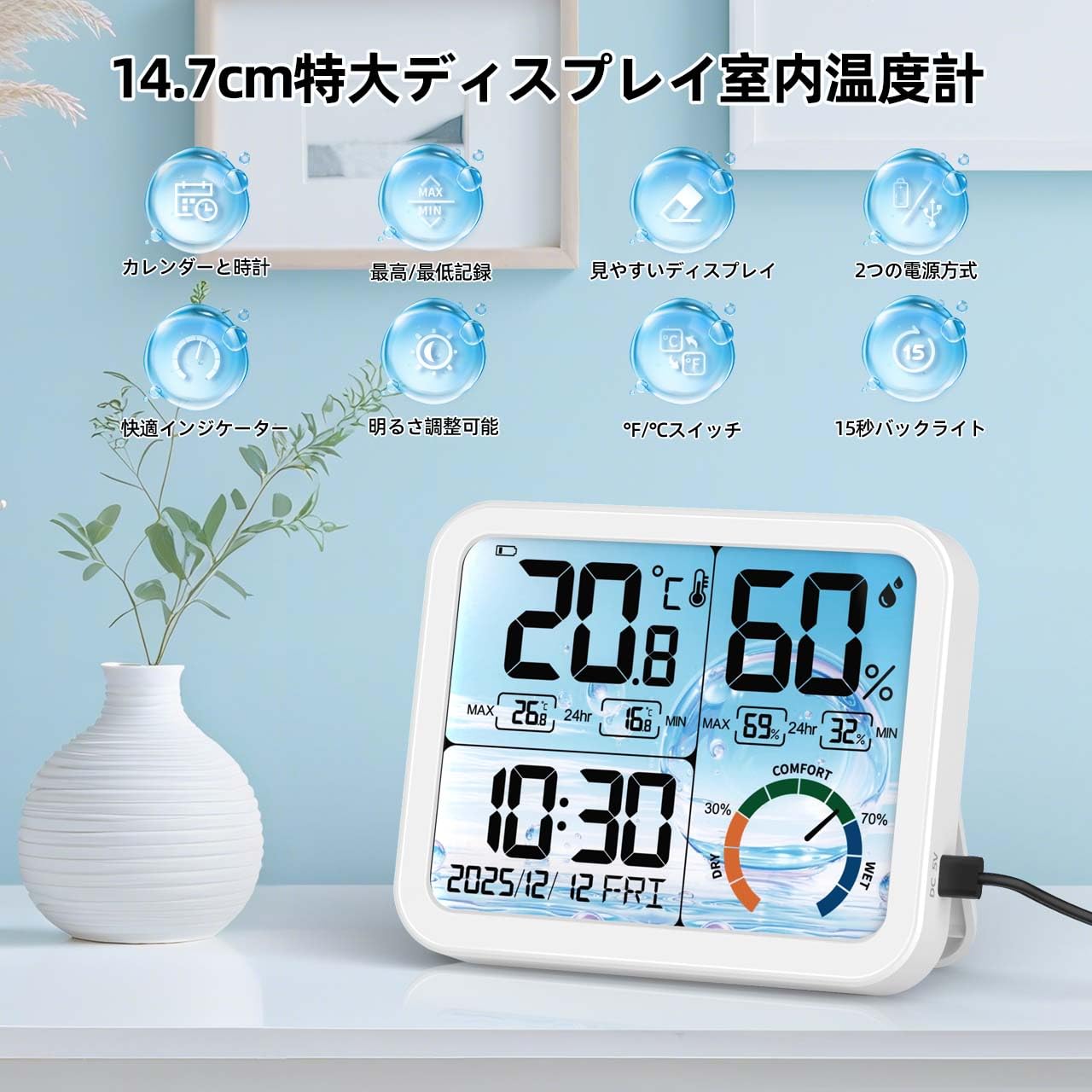
ചിത്രം 1.1: മുൻഭാഗം view of the VOCOO Digital Thermometer Hygrometer displaying various functions.
2. പാക്കേജ് ഉള്ളടക്കം
- VOCOO Digital Thermometer Hygrometer (Model 6215W)
- ഉപയോക്തൃ മാനുവൽ
- USB Power Cable (if applicable)
- ബാറ്ററികൾ (ഉൾപ്പെടുത്തിയാൽ)
3. Device Layout and Buttons
Familiarize yourself with the device's components and control buttons.

ചിത്രം 3.1: പിൻഭാഗം view of the device highlighting the battery compartment, stand, hanging hole, USB charging port, and control buttons.
- °C/°F ബട്ടൺ: Switches between Celsius and Fahrenheit temperature units.
- "+" ബട്ടൺ: Increases values during setting, used for calibration.
- "-" ബട്ടൺ: Decreases values during setting, used for calibration.
- 12H/24H Button (Gear Icon): Adjusts date and time, switches between 12-hour and 24-hour time formats.
- ബാറ്ററി കമ്പാർട്ട്മെൻ്റ്: Holds 3 AAA batteries.
- യുഎസ്ബി ചാർജിംഗ് പോർട്ട്: ബാഹ്യ വൈദ്യുതി വിതരണത്തിനായി.
- തൂങ്ങിക്കിടക്കുന്ന ദ്വാരം: മതിൽ കയറുന്നതിന്.
- നിൽക്കുക: For desktop placement.
4. സജ്ജീകരണം
4.1 ഉപകരണം ഓൺ ചെയ്യുന്നു
- ഉപകരണത്തിന്റെ പിൻഭാഗത്തുള്ള ബാറ്ററി കമ്പാർട്ട്മെന്റ് കവർ തുറക്കുക.
- ശരിയായ പോളാരിറ്റി (+/-) ഉറപ്പാക്കിക്കൊണ്ട് 3 AAA ബാറ്ററികൾ ഇടുക.
- Alternatively, connect the device to a USB power source using the provided USB cable.
- The display will light up, and the device will begin measuring temperature and humidity.
4.2 പ്രാരംഭ സമയ, തീയതി ക്രമീകരണം
- അമർത്തിപ്പിടിക്കുക 12H/24H (Gear Icon) button on the back of the device for approximately 3 seconds to enter time setting mode.
- The year will start flashing. Use the "+" or "-" buttons to adjust the year (2023-2099).
- അമർത്തുക 12H/24H button again to confirm and move to the month setting.
- Repeat the process for month, day, hour, and minute.
- മിനിറ്റ് സജ്ജമാക്കിയ ശേഷം, അമർത്തുക 12H/24H ക്രമീകരണ മോഡിൽ നിന്ന് പുറത്തുകടക്കാൻ ബട്ടൺ.
- To switch between 12-hour and 24-hour display, briefly press the 12H/24H button outside of setting mode.
4.3 താപനില യൂണിറ്റ് തിരഞ്ഞെടുക്കൽ
ചുരുക്കത്തിൽ അമർത്തുക ° C/° F button on the back of the device to switch between Celsius (°C) and Fahrenheit (°F) temperature units.
4.4 പ്ലേസ്മെൻ്റ്
Place the device on a flat surface using its integrated stand or mount it on a wall using the hanging hole. Ensure it is placed in a location where accurate ambient temperature and humidity measurements are desired, away from direct sunlight, heat sources, or drafts.

ചിത്രം 4.1: ഉദാamples of suitable placement locations for the device.
5. പ്രവർത്തന നിർദ്ദേശങ്ങൾ
5.1 താപനിലയും ഈർപ്പവും പ്രദർശിപ്പിക്കുന്നു
The large LCD display shows the current temperature and humidity. Readings are updated approximately every 30 seconds. If the temperature falls outside the measurable range (-9.9°C to 70°C), "LL" (Low) or "HH" (High) will be displayed.
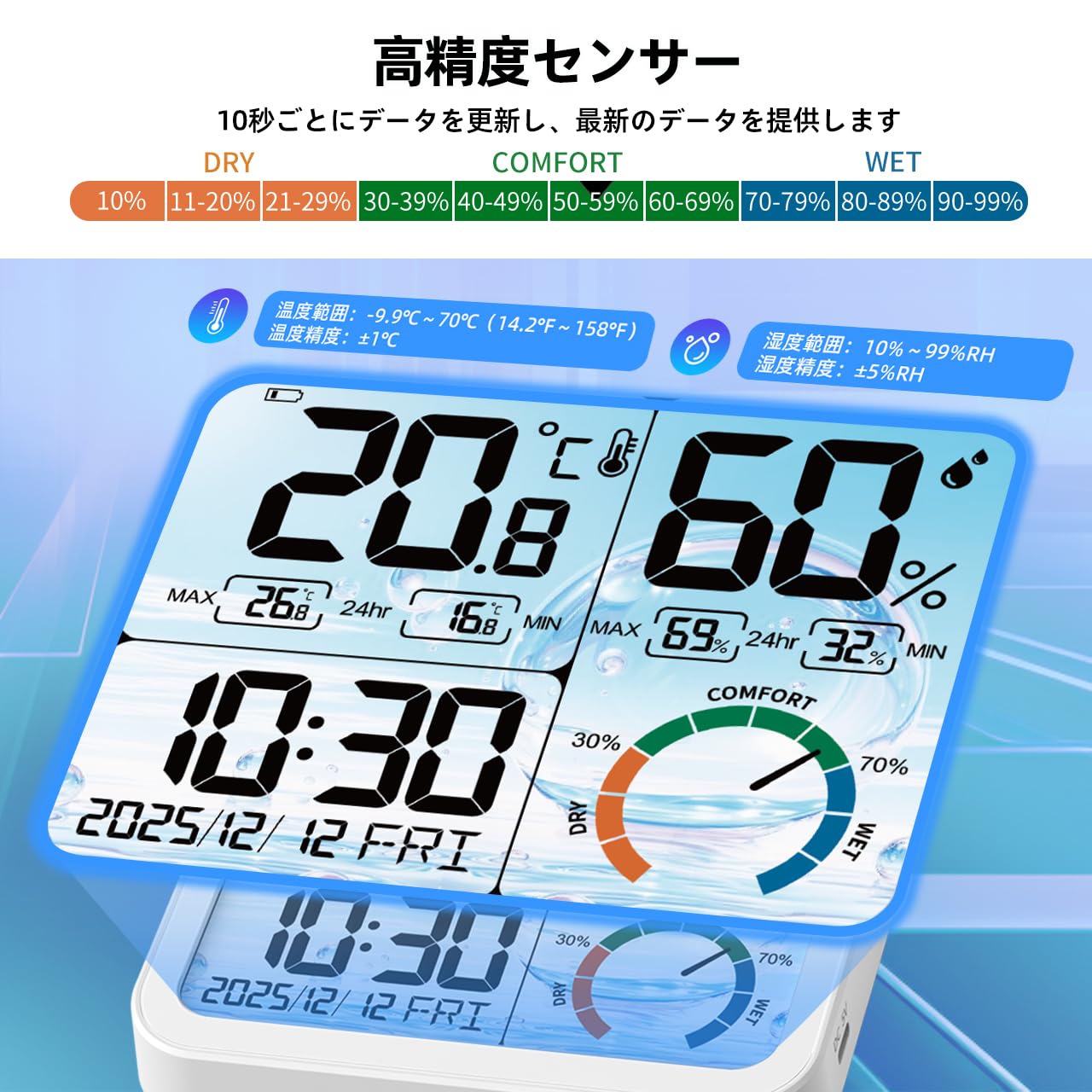
ചിത്രം 5.1: വിശദമായത് view of the display and sensor specifications.
5.2 കംഫർട്ട് ലെവൽ ഇൻഡിക്കേറ്റർ
The device features a color-coded icon to indicate the current comfort level based on humidity:
- വരണ്ട: 0-29% RH (Red/Yellow/Green-Yellow icon)
- ആശ്വാസം: 30-69% RH (Green/Aqua/Blue icon)
- ആർദ്ര: 70-99% RH (Blue/Dark Blue/Purple icon)

Image 5.2: Visual representation of the comfort level indicator.
5.3 MAX/MIN Record
The device automatically records the maximum and minimum temperature and humidity values over a 24-hour period. These records are updated daily after 0:00 (midnight).

Image 5.3: MAX/MIN temperature and humidity records with daily trend graphs.
5.4 ബാക്ക്ലൈറ്റ് ഫംഗ്ഷൻ
The device features an adjustable backlight. When powered via USB, there are 4 brightness levels (None, Dim, Medium, Bright). When running on battery power, the backlight automatically turns off after 15 seconds to conserve energy. To activate the backlight in battery mode, gently touch the top of the device.

Image 5.4: Demonstration of the 4-level backlight adjustment when connected to power.

Image 5.5: Backlight in battery mode, showing 15-second auto-off and power saving features.
6. കാലിബ്രേഷൻ പ്രവർത്തനം
The device includes a high-precision calibration function to adjust temperature and humidity readings if necessary, ensuring consistency with other measuring instruments or to correct for environmental changes and aging.
- To enter calibration mode, press and hold both the "+" ഒപ്പം "-" ഏകദേശം 3 സെക്കൻഡ് നേരത്തേക്ക് ഒരേസമയം ബട്ടണുകൾ അമർത്തുക.
- The temperature value will start flashing. Use the "+" or "-" buttons to adjust the temperature within a range of ±5°C.
- അമർത്തുക ° C/° F button to confirm the temperature adjustment and move to humidity calibration.
- The humidity value will start flashing. Use the "+" or "-" buttons to adjust the humidity within a range of ±10% RH.
- അമർത്തുക ° C/° F button again to save the calibration settings and exit calibration mode.
7. പരിപാലനം
- വൃത്തിയാക്കൽ: മൃദുവായതും ഉണങ്ങിയതുമായ തുണി ഉപയോഗിച്ച് ഉപകരണം തുടയ്ക്കുക. അബ്രാസീവ് ക്ലീനറുകൾ ഉപയോഗിക്കരുത് അല്ലെങ്കിൽ ഉപകരണം വെള്ളത്തിൽ മുക്കരുത്.
- ബാറ്ററി മാറ്റിസ്ഥാപിക്കൽ: When the low battery icon appears on the display, replace the 3 AAA batteries in the battery compartment. Ensure correct polarity.
- സംഭരണം: ഉപകരണം ദീർഘനേരം സൂക്ഷിക്കുകയാണെങ്കിൽ, ചോർച്ച തടയാൻ ബാറ്ററികൾ നീക്കം ചെയ്യുക. തണുത്തതും വരണ്ടതുമായ സ്ഥലത്ത് സൂക്ഷിക്കുക.
8. പ്രശ്നപരിഹാരം
| പ്രശ്നം | സാധ്യമായ കാരണം | പരിഹാരം |
|---|---|---|
| ഡിസ്പ്ലേ ഇല്ല അല്ലെങ്കിൽ മങ്ങിയ ഡിസ്പ്ലേ | ബാറ്ററികൾ കുറവാണ് അല്ലെങ്കിൽ പവർ കണക്ഷൻ ഇല്ല. | Replace batteries or connect to a USB power source. |
| തെറ്റായ സമയം/തീയതി | സമയം/തീയതി ശരിയായി സജ്ജീകരിച്ചിട്ടില്ല. | Refer to "4.2 Initial Time and Date Setting" to adjust. |
| Temperature/Humidity reading "LL" or "HH" | താപനില/ഈർപ്പം അളക്കാവുന്ന പരിധിക്ക് പുറത്താണ്. | Move the device to an environment within the specified operating range. |
| കൃത്യമല്ലാത്ത വായനകൾ | Device needs calibration or is placed in an unsuitable location. | Refer to "6. Calibration Function" or relocate the device away from direct heat/cold sources or drafts. |
9 സ്പെസിഫിക്കേഷനുകൾ
- മോഡൽ: 6215W
- ഡിസ്പ്ലേ തരം: 14.7cm Large LCD
- താപനില അളക്കൽ ശ്രേണി: -9.9°C മുതൽ 70°C വരെ (14.2°F മുതൽ 158°F വരെ)
- താപനില കൃത്യത: ±1°C (for 0°C to 40°C range)
- ഈർപ്പം അളക്കുന്നതിനുള്ള ശ്രേണി: 10% RH മുതൽ 99% RH വരെ
- ഈർപ്പം കൃത്യത: ±5% RH
- ഡാറ്റ അപ്ഡേറ്റ് ഇടവേള: ഏകദേശം 30 സെക്കൻഡ്
- ബാക്ക്ലൈറ്റ്: 4 levels (USB powered), 15-second auto-off (battery powered)
- സമയ പ്രദർശനം: 12H/24H തിരഞ്ഞെടുക്കാവുന്നത്
- തീയതി പരിധി: 2023-2099
- Day of Week Languages: English, German, Italian, Spanish, French, Danish, Swedish
- ഊർജ്ജ സ്രോതസ്സ്: 3 x AAA Batteries (not included) or USB Power
- അളവുകൾ: Approximately 14 cm (Length) x 11.5 cm (Height) x 2.3 cm (Depth)
- ഭാരം: 380 ഗ്രാം
- മെറ്റീരിയൽ: പ്ലാസ്റ്റിക്
Image 9.1: Device dimensions.
10. ഔദ്യോഗിക ഉൽപ്പന്ന വീഡിയോകൾ
Watch these official videos for visual guidance on using your VOCOO Digital Thermometer Hygrometer.
വീഡിയോ 10.1: ഉൽപ്പന്നം കഴിഞ്ഞുview and key features demonstration (0:44).
Video 10.2: Demonstration of setting up time and date (0:28).
Video 10.3: Guide to using the backlight and comfort indicator (0:50).
11. വാറൻ്റിയും പിന്തുണയും
For warranty information or technical support, please contact VOCOO customer service. Refer to the product packaging or the official VOCOO webബന്ധപ്പെടാനുള്ള വിശദാംശങ്ങൾക്കുള്ള സൈറ്റ്.
- നിർമ്മാതാവ്: VOCOO
- വിൽപ്പനക്കാരൻ: VOCOO JP (via Amazon.co.jp)
- ആദ്യം ലഭ്യമായ തീയതി: ഓഗസ്റ്റ് 4, 2025
വാറന്റി ക്ലെയിമുകൾക്കായി നിങ്ങളുടെ വാങ്ങൽ രസീത് സൂക്ഷിക്കുക.