
1. ഉൽപ്പന്നം കഴിഞ്ഞുview
The USX MOUNT XTL908 is a heavy-duty tilting TV wall mount designed for large televisions ranging from 60 to 120 inches. It supports TVs weighing up to 220 lbs and features a low-profile design, positioning the TV just 2.6 inches from the wall. The mount is compatible with VESA patterns up to 900x600mm and can be installed on wood studs (16-32 inches apart), concrete, or brick walls.

Image 1.1: The USX MOUNT XTL908 TV Wall Mount installed in a modern living room setting.

Image 1.2: The ultra-slim profile of the mount, showing the TV positioned close to the wall.
2 സുരക്ഷാ വിവരങ്ങൾ
Read all instructions carefully before installation. If you have any questions, consult a qualified installer. Improper installation can result in serious injury or damage.
- ഭാരം ശേഷി: Do not exceed the maximum weight capacity of 220 lbs (100 kg). This mount is intended for use only with the maximum weights indicated.
- ടിവി വലുപ്പം: 60 മുതൽ 120 ഇഞ്ച് വരെ വലിപ്പമുള്ള ടിവികൾക്കായി ഈ മൗണ്ട് രൂപകൽപ്പന ചെയ്തിരിക്കുന്നു.
- ചുമർ തരം: Install only on wood studs, solid concrete, or brick walls. ചെയ്യരുത് install on drywall alone.
- സ്റ്റഡ് സ്പെയ്സിംഗ്: Ensure wood studs are spaced between 16 and 32 inches apart.
- മൗണ്ടിംഗ് ഹാർഡ്വെയർ: Use only the provided mounting hardware. If you require concrete anchors, please contact customer support.
- Integrity Test: After installation, perform an integrity test by gently pulling on the mount to ensure it is securely fastened to the wall.

Image 2.1: The robust construction of the mount, designed to securely hold TVs up to 220 lbs.
3. പാക്കേജ് ഉള്ളടക്കം
Please verify that all components are present and undamaged before installation. If any parts are missing or defective, contact customer support.
- വാൾ പ്ലേറ്റ് അസംബ്ലി
- ടിവി ബ്രാക്കറ്റുകൾ (2)
- Mounting Hardware Kit (screws, washers, spacers, anchors for concrete/brick)
- മ Template ണ്ടിംഗ് ടെംപ്ലേറ്റ്
- ഇൻസ്ട്രക്ഷൻ മാനുവൽ
4 സ്പെസിഫിക്കേഷനുകൾ
| ഫീച്ചർ | സ്പെസിഫിക്കേഷൻ |
|---|---|
| മൗണ്ടിംഗ് തരം | മതിൽ മൗണ്ട് |
| ചലന തരം | ചരിവ് |
| ബ്രാൻഡ് | യുഎസ്എക്സ് മൌണ്ട് |
| മെറ്റീരിയൽ | ലോഹം |
| നിറം | കറുപ്പ് |
| അനുയോജ്യമായ ഉപകരണങ്ങൾ | ടെലിവിഷൻ |
| പരമാവധി ടിൽറ്റ് ആംഗിൾ | 12 Degrees Down, 5 Degrees Up |
| Minimum Supported Screen Size | 60 ഇഞ്ച് |
| Maximum Supported Screen Size | 120 ഇഞ്ച് |
| പരമാവധി ലോഡ് കപ്പാസിറ്റി | 220 പൗണ്ട് (100 കി.ഗ്രാം) |
| VESA അനുയോജ്യത | 900x600 മിമി വരെ |
| Wall Distance (Low Profile) | 2.6 ഇഞ്ച് |
| Stud Spacing Compatibility | 16-32 ഇഞ്ച് |

Image 4.1: Visual representation of VESA patterns supported and the maximum load capacity of 220 lbs.

Image 4.2: Technical drawing showing the dimensions of the TV interface and wall plate.

ചിത്രം 4.3: മറ്റൊന്ന് view of the product dimensions, highlighting key measurements.
5. സജ്ജീകരണവും ഇൻസ്റ്റാളേഷനും
Before you begin, ensure you have all necessary tools and that your wall type is suitable for this mount. The installation video below provides a visual guide.
Video 5.1: Official USX MOUNT XTL908 installation video, demonstrating the step-by-step mounting process.
5.1 പ്രീ-ഇൻസ്റ്റലേഷൻ പരിശോധനകൾ
- ടിവി അനുയോജ്യത പരിശോധിക്കുക: Check your TV's weight and VESA mounting pattern to ensure it falls within the mount's specifications (60-120 inches, up to 220 lbs, VESA up to 900x600mm).
- മതിൽ തരം തിരിച്ചറിയുക: Determine if your wall is wood stud, solid concrete, or brick.
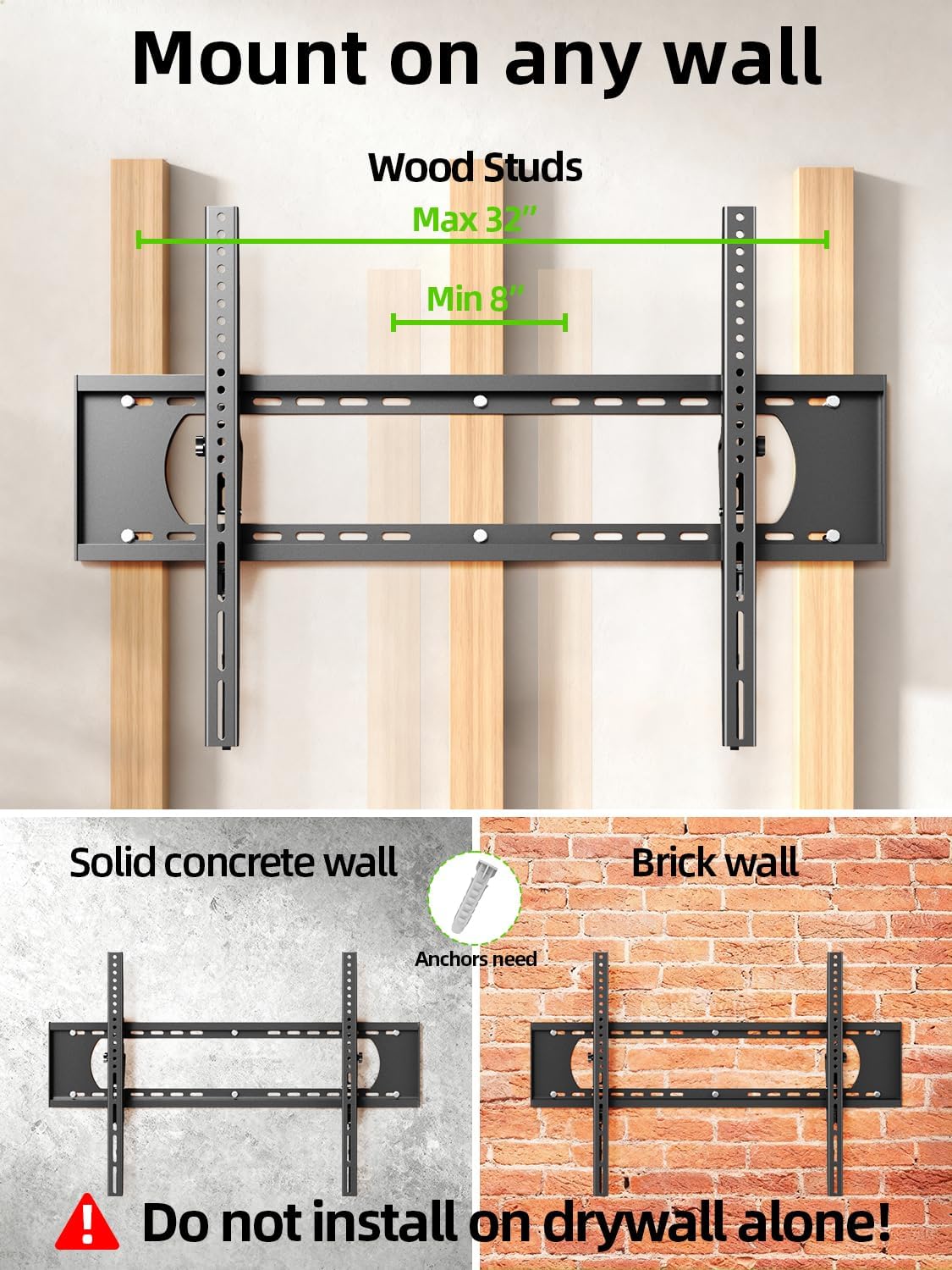
Image 5.2: The mount is suitable for wood studs (16-32" spacing), solid concrete, and brick walls. Not for drywall alone.
5.2 Attaching TV Brackets
Depending on your TV's back, choose the appropriate option:
- For Flat TV Back: Align the TV brackets with the VESA holes on the back of your TV. Secure them using the appropriate screws and washers from the hardware kit. Do not overtighten.
- For Irregular TV Back: If your TV has an irregular or curved back, use the provided spacers to create a flat mounting surface before attaching the brackets.
5.3 വാൾ പ്ലേറ്റ് മൌണ്ട് ചെയ്യൽ
Use the provided mounting template to mark the drill holes on your wall. Ensure the template is level before marking.
- വുഡ് സ്റ്റഡുകൾക്ക്: Locate the center of your wood studs. Drill pilot holes (7/32 in. / 5.5mm diameter, 2.5 in. / 64mm depth). Secure the wall plate using lag bolts and washers. Do not use plastic anchors for wood studs.
- For Concrete/Brick Walls: Drill pilot holes (3/8 in. / 10mm diameter, 2.5 in. / 64mm depth). Insert concrete anchors into the drilled holes. Secure the wall plate using lag bolts and washers.
After securing the wall plate, perform an integrity test by pulling on the mount to ensure it is firmly attached to the wall.

Image 5.3: Simplified 3-step installation process: 1. Attach TV brackets, 2. Mount wall plate, 3. Hang up TV.
5.4 Hanging and Securing the TV
- Carefully lift the TV with the attached brackets and hook them onto the top edge of the wall plate.
- ബ്രാക്കറ്റുകൾ വാൾ പ്ലേറ്റിൽ പൂർണ്ണമായും ഇടപഴകുന്നത് വരെ ടിവി സൌമ്യമായി താഴ്ത്തുക.
- Use the quick lock and release pull tabs to secure the TV to the wall plate, preventing accidental dislodgement.
6. പ്രവർത്തന നിർദ്ദേശങ്ങൾ
6.1 ടിൽറ്റ് ആംഗിൾ ക്രമീകരിക്കൽ
The USX MOUNT XTL908 allows for easy tilt adjustment to optimize your viewing angle and reduce glare. The mount can tilt 5 degrees upwards and 12 degrees downwards.
- To adjust the tilt, loosen the tilting adjustment knobs located on the TV brackets.
- നിങ്ങൾക്ക് ആവശ്യമുള്ള ആംഗിളിലേക്ക് ടിവി ചരിക്കുക.
- Tighten the tilting adjustment knobs to secure the TV in place.
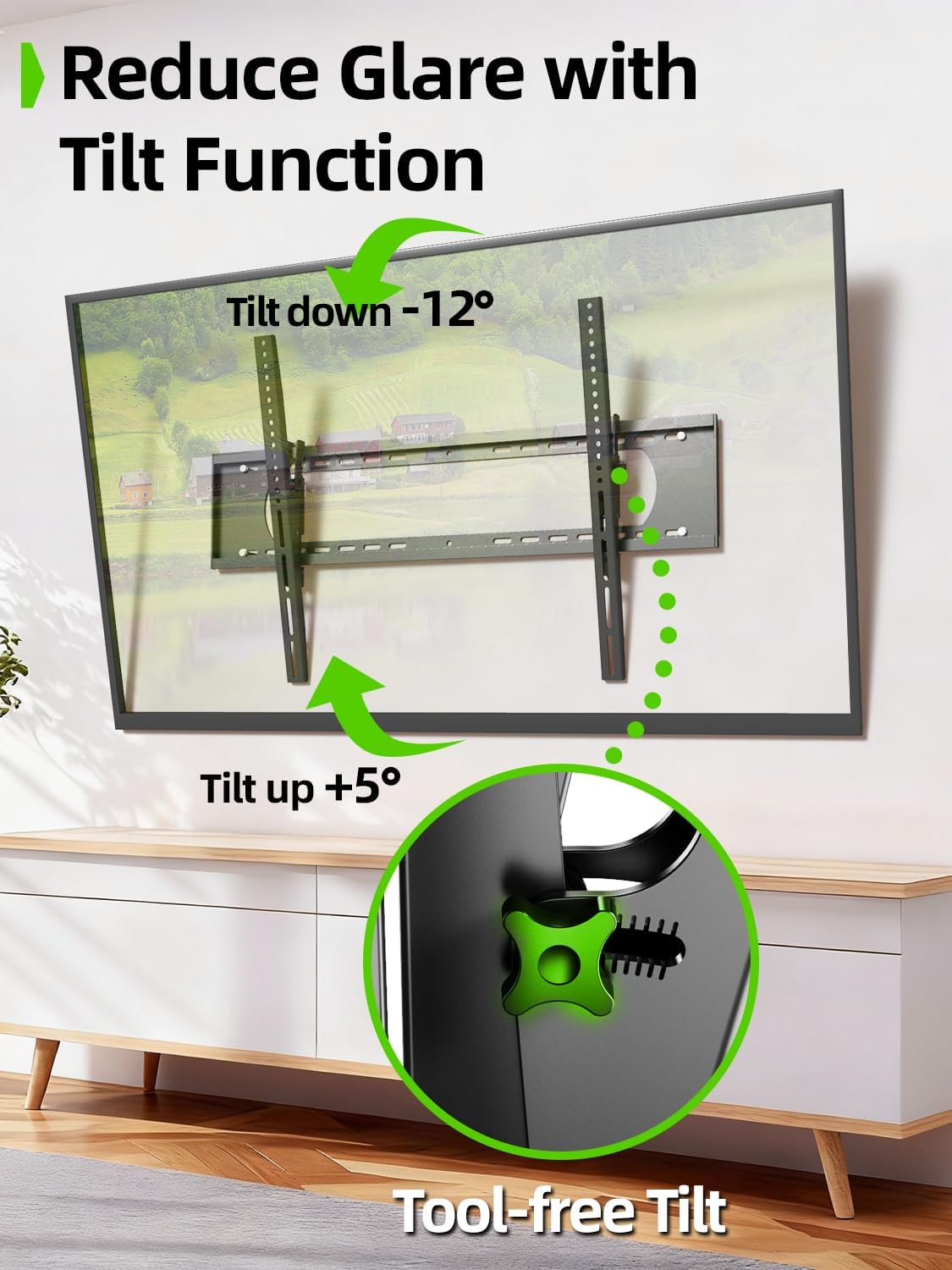
Image 6.1: The tilt function allows for easy adjustment up to +5° and down to -12° to reduce glare.

Image 6.2: The mount's tilt range for optimal viewവിവിധ സ്ഥാനങ്ങളിൽ നിന്ന്.
6.2 Quick Lock and Release
The mount features pull tabs for easy locking and releasing of the TV from the wall plate.
- ലേക്ക് പൂട്ടുക the TV, ensure the pull tabs are pushed upwards into the locked position after hanging the TV.
- ലേക്ക് റിലീസ് the TV, gently pull down on the cords attached to the tabs. This will unlock the TV from the wall plate, allowing you to lift it off.

Image 6.3: The adjustable pull tabs for easy locking and releasinടിവിയുടെ ഗ്രാം.

Image 6.4: Illustration of pulling the cords to release the TV from the mount.
7. പരിപാലനം
പതിവ് അറ്റകുറ്റപ്പണികൾ നിങ്ങളുടെ ടിവി വാൾ മൗണ്ടിന്റെ ദീർഘായുസ്സും സുരക്ഷിതമായ പ്രവർത്തനവും ഉറപ്പാക്കുന്നു.
- വൃത്തിയാക്കൽ: പൊടി നീക്കം ചെയ്യാൻ മൃദുവായതും ഉണങ്ങിയതുമായ തുണി ഉപയോഗിച്ച് മൗണ്ട് തുടയ്ക്കുക. ഉരച്ചിലുകൾ ഉള്ള ക്ലീനറുകളോ ലായകങ്ങളോ ഉപയോഗിക്കുന്നത് ഒഴിവാക്കുക.
- ആനുകാലിക പരിശോധനകൾ: Periodically check all screws and bolts to ensure they are tight and secure. Re-tighten if necessary.
- കേടുപാടുകൾക്കായി പരിശോധിക്കുക: Inspect the mount for any signs of wear, corrosion, or damage. If any issues are found, contact customer support and do not use the mount until it is repaired or replaced.
8. പ്രശ്നപരിഹാരം
If you encounter any issues during or after installation, refer to the following common problems and solutions.
| പ്രശ്നം | സാധ്യമായ കാരണം | പരിഹാരം |
|---|---|---|
| ടിവി നിലവാരമില്ലാത്തതാണ് | ഇൻസ്റ്റാളേഷൻ സമയത്ത് വാൾ പ്ലേറ്റ് നിരപ്പായിട്ടില്ല. | Remove TV, loosen wall plate screws, adjust level, re-tighten. Ensure to use a level during installation. |
| Mount feels loose on the wall | Screws not fully tightened; incorrect wall anchors used; wall material not suitable. | Ensure all lag bolts are fully tightened. Verify correct anchors for concrete/brick. Do not install on drywall alone. If issues persist, consult a professional. |
| TV cannot be tilted | Tilting adjustment knobs are too tight. | Loosen the tilting adjustment knobs on the TV brackets to allow movement. Re-tighten once desired angle is achieved. |
| TV cannot be removed from mount | Quick release pull tabs are in the locked position. | Pull down on the cords attached to the quick release tabs to unlock the TV. |
9. വാറൻ്റിയും പിന്തുണയും
For warranty information or technical support, please refer to the contact details provided with your purchase or visit the official USX MOUNT webസൈറ്റ്. ഏതെങ്കിലും വാറന്റി ക്ലെയിമുകൾക്ക് വാങ്ങിയതിന്റെ തെളിവായി നിങ്ങളുടെ വാങ്ങൽ രസീത് സൂക്ഷിക്കുക.
If you have any questions or require additional assistance, please do not hesitate to contact USX MOUNT customer service.