
1. ആമുഖം
Thank you for choosing the PureMate 12L/Day Dehumidifier. This appliance is designed to effectively remove excess moisture from your indoor environment, helping to prevent dampness, condensation, mould, and musty odours. By maintaining optimal humidity levels, it contributes to a healthier and more comfortable living space. Please read this manual thoroughly before operating the dehumidifier to ensure safe and efficient use.
This dehumidifier features a 12-litre per day extraction capacity, an automatic humidity sensor, a digital display, a 24-hour timer, auto shut-off, and options for continuous drainage or manual tank emptying. It is also equipped with castor wheels and a carry handle for easy portability.
2. സുരക്ഷാ നിർദ്ദേശങ്ങൾ
To reduce the risk of fire, electric shock, or injury, always observe the following basic safety precautions:
- ഉപകരണം ഉപയോഗിക്കുന്നതിന് മുമ്പ് എല്ലാ നിർദ്ദേശങ്ങളും ശ്രദ്ധാപൂർവ്വം വായിക്കുക.
- Ensure the power supply matches the rating label on the dehumidifier.
- Do not operate the dehumidifier with a damaged cord or plug. If the supply cord is damaged, it must be replaced by the manufacturer, its service agent, or similarly qualified persons to avoid a hazard.
- യൂണിറ്റ് എപ്പോഴും ഉറച്ചതും നിരപ്പായതുമായ ഒരു പ്രതലത്തിൽ സ്ഥാപിക്കുക.
- Maintain at least 20 cm (8 inches) clearance around the unit for proper air circulation.
- എയർ ഇൻലെറ്റിലേക്കോ ഔട്ട്ലെറ്റിലേക്കോ വസ്തുക്കൾ തിരുകരുത്.
- ഉപകരണം താപ സ്രോതസ്സുകൾ, നേരിട്ടുള്ള സൂര്യപ്രകാശം, കത്തുന്ന വസ്തുക്കൾ എന്നിവയിൽ നിന്ന് അകറ്റി നിർത്തുക.
- Unplug the unit before cleaning, moving, or performing any maintenance.
- ഈ ഉപകരണം, അവരുടെ സുരക്ഷയ്ക്ക് ഉത്തരവാദിയായ ഒരു വ്യക്തി ഉപകരണത്തിൻ്റെ ഉപയോഗത്തെ സംബന്ധിച്ച മേൽനോട്ടമോ നിർദ്ദേശമോ നൽകിയിട്ടില്ലെങ്കിൽ, ശാരീരികമോ ഇന്ദ്രിയപരമോ മാനസികമോ ആയ കഴിവുകൾ കുറഞ്ഞതോ അനുഭവത്തിൻ്റെയും അറിവിൻ്റെയും അഭാവം ഉള്ള വ്യക്തികൾക്ക് (കുട്ടികൾ ഉൾപ്പെടെ) ഉപയോഗിക്കാൻ ഉദ്ദേശിച്ചുള്ളതല്ല.
- കുട്ടികൾ ഉപകരണം ഉപയോഗിച്ച് കളിക്കുന്നില്ലെന്ന് ഉറപ്പാക്കാൻ മേൽനോട്ടം വഹിക്കണം.
- Do not use the appliance in areas where water is likely to splash onto it.
3. ഉൽപ്പന്നം കഴിഞ്ഞുview
The PureMate 12L/Day Dehumidifier is designed for efficient moisture removal and ease of use. Below are the key components and features.

ചിത്രം 3.1: ഫ്രണ്ട് view of the PureMate 12L/Day Dehumidifier, showing its compact design and the '12L Per Day' capacity label.
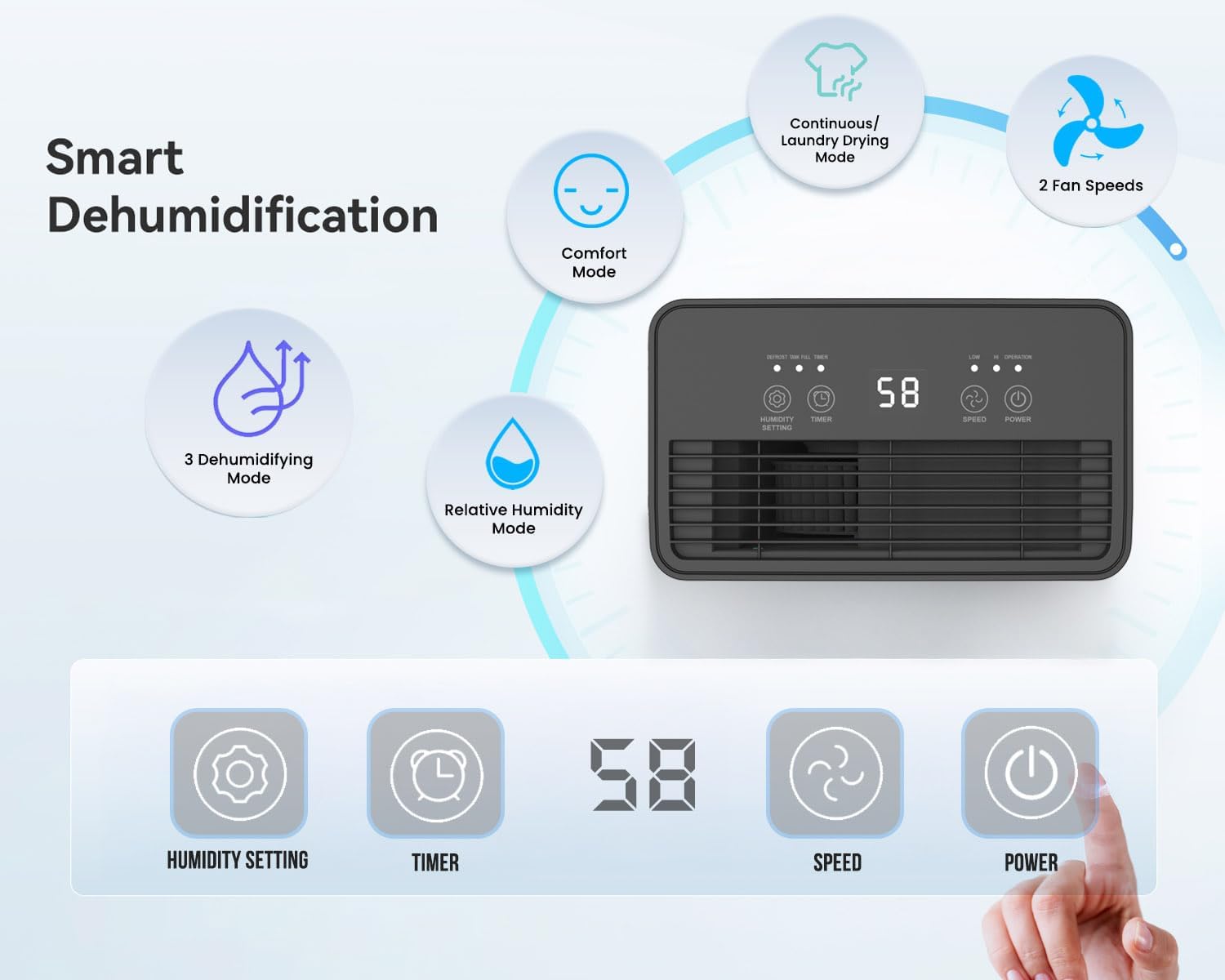
ചിത്രം 3.2: Illustration of the dehumidifier's smart features and control panel. It highlights Comfort Mode, Continuous/Laundry Drying Mode, 2 Fan Speeds, 3 Dehumidifying Modes, Relative Humidity Mode, and the digital display with buttons for Humidity Setting, Timer, Speed, and Power.
പ്രധാന സവിശേഷതകൾ:
- ശക്തമായ ഈർപ്പം നീക്കംചെയ്യൽ: Extracts up to 12 litres of moisture per day.
- Customisable Humidity Control: Offers Continuous Mode, Comfort Mode, and adjustable Relative Humidity (30-90% RH).
- Digital Display & Controls: Intuitive LED display and touch panel for easy operation.
- 24-മണിക്കൂർ ടൈമർ: Allows scheduled operation.
- യാന്ത്രിക ഷട്ട്-ഓഫ്: Activates when the 2-litre water tank is full.
- ഡ്യുവൽ ഡ്രെയിനേജ് ഓപ്ഷനുകൾ: Manual tank emptying or continuous drainage via a hose.
- കഴുകാവുന്ന എയർ ഫിൽറ്റർ: Improves air quality by capturing dust.
- പോർട്ടബിൾ ഡിസൈൻ: Equipped with castor wheels and an integrated handle for easy movement.
- കുറഞ്ഞ ശബ്ദ പ്രവർത്തനം: Operates quietly at 33-37 dB.
4. സജ്ജീകരണം
4.1 അൺപാക്കിംഗ്
- ഡീഹ്യൂമിഡിഫയർ അതിന്റെ പാക്കേജിംഗിൽ നിന്ന് ശ്രദ്ധാപൂർവ്വം നീക്കം ചെയ്യുക.
- ടേപ്പ് അല്ലെങ്കിൽ സംരക്ഷണ ഫിലിമുകൾ ഉൾപ്പെടെ എല്ലാ പാക്കിംഗ് വസ്തുക്കളും നീക്കം ചെയ്യുക.
- Retain the packaging for future storage or transport if needed.
4.2 പ്ലേസ്മെൻ്റ്
Proper placement is crucial for optimal performance and safety.
- Place the dehumidifier on a firm, level surface to prevent vibration and water spillage.
- Ensure there is at least 20 cm (8 inches) of clear space around the air inlet and outlet to allow for proper airflow. Do not block these openings.
- ചൂട് ഉൽപ്പാദിപ്പിക്കുന്ന ഉപകരണങ്ങൾക്ക് സമീപമോ നേരിട്ട് സൂര്യപ്രകാശം ഏൽക്കുന്ന സ്ഥലത്തോ ഉപകരണം വയ്ക്കുന്നത് ഒഴിവാക്കുക.
- For best results, close all doors and windows in the room where the dehumidifier is operating to create an enclosed environment.
4.3 പവർ കണക്ഷൻ
- പവർ കോർഡ് പൂർണ്ണമായും നീട്ടിയിട്ടുണ്ടെന്നും കേടുപാടുകൾ സംഭവിച്ചിട്ടില്ലെന്നും ഉറപ്പാക്കുക.
- വോള്യവുമായി പൊരുത്തപ്പെടുന്ന ഒരു ഗ്രൗണ്ടഡ് ഇലക്ട്രിക്കൽ ഔട്ട്ലെറ്റിലേക്ക് പവർ കോർഡ് പ്ലഗ് ചെയ്യുകtagയൂണിറ്റിന്റെ ആവശ്യകതകൾ.
5. പ്രവർത്തന നിർദ്ദേശങ്ങൾ
The dehumidifier features an intuitive touch control panel and digital display for easy operation.

ചിത്രം 5.1: Close-up of the dehumidifier's touch control panel and the removable 2-litre water tank, illustrating the high-extraction capacity and drainage options.
5.1 പവർ ഓൺ/ഓഫ്
- അമർത്തുക പവർ യൂണിറ്റ് ഓണാക്കാനോ ഓഫാക്കാനോ നിയന്ത്രണ പാനലിലെ ബട്ടൺ.
5.2 Dehumidifying Modes
The dehumidifier offers several operating modes to suit different needs:
- Relative Humidity Mode: അമർത്തുക ഹ്യുമിഡിറ്റി ക്രമീകരണം button to set your desired humidity level between 30% and 90% RH (Relative Humidity) in 5% increments. The unit will automatically adjust its operation to maintain this level.
- കംഫർട്ട് മോഡ്: This mode automatically sets the target humidity based on the current room temperature for optimal comfort.
- തുടർച്ചയായ മോഡ്: The unit operates continuously without targeting a specific humidity level, ideal for very damp conditions or for drying laundry.
- അലക്കു ഉണക്കൽ മോഡ്: Similar to Continuous Mode, this setting is optimized for drying clothes indoors by continuously removing moisture from the air.

ചിത്രം 5.2: Visual representation of the Continuous mode and various humidity solutions provided by the dehumidifier, including dry laundry, protection against black mould, and elimination of window condensation.
5.3 ഫാൻ വേഗത
- അമർത്തുക വേഗത button to cycle between different fan speeds (e.g., Low, High). Higher fan speed results in faster dehumidification.
5.4 24-Hour Timer
- അമർത്തുക ടൈമർ button to set the desired operating duration (in hours) for the unit to turn on or off automatically.
- Each press increases the timer setting. Once the desired time is set, the unit will operate for that duration or turn off after that duration, depending on its current state.

ചിത്രം 5.3: Depicts the 24-hour timer function and the quiet operation of the dehumidifier (33-37 dB), allowing for undisturbed use even during sleep.
5.5 Digital Display and Indicator Lights
- The digital display shows the current room humidity level or the set humidity/timer value.
- Humidity Indicator Light: The unit features an LED light that changes color based on the ambient humidity level:
- ചുവപ്പ്: Humidity level is greater than 65%.
- പച്ച: Humidity level is between 40% and 55%.
- നീല: Humidity level is less than 40%.
- ഓട്ടോ ഡിഫ്രോസ്റ്റ് ഫംഗ്ഷൻ: The unit automatically performs defrosting when frost builds up on the evaporator coils, ensuring efficient operation in cooler temperatures.

ചിത്രം 5.4: Illustrates the Automatic Dehumidification Mode, where the unit adjusts target humidity based on room temperature, and the Auto Defrost Function. Also shows the Humidity Indicator Light with its color codes (Red, Green, Blue) for different humidity ranges.
6. ഡ്രെയിനേജ് ഓപ്ഷനുകൾ
The PureMate dehumidifier offers two methods for water drainage:
6.1 Manual Water Tank Emptying
- The dehumidifier is equipped with a 2-litre water tank.
- When the tank is full, the unit will automatically shut off, and an indicator light (usually 'Full' or 'Tank Full') will illuminate.
- യൂണിറ്റിൽ നിന്ന് വാട്ടർ ടാങ്ക് ശ്രദ്ധാപൂർവ്വം പുറത്തെടുക്കുക.
- ശേഖരിച്ച വെള്ളം ഒരു സിങ്കിലേക്കോ ഡ്രെയിനിലേക്കോ ഒഴിക്കുക.
- Reinsert the empty water tank firmly into the unit. The dehumidifier will resume operation.
6.2 തുടർച്ചയായ ഡ്രെയിനേജ്
- For maintenance-free operation, you can connect a 12mm hose (not included) for continuous drainage.
- Locate the continuous drainage outlet on the back or side of the unit.
- Attach one end of a 12mm hose to this outlet.
- Ensure the other end of the hose is placed in a drain or a larger container, ensuring a downward slope for gravity drainage.
- Once connected, the water will bypass the internal tank and drain directly.
7. പരിപാലനം
പതിവ് അറ്റകുറ്റപ്പണികൾ നിങ്ങളുടെ ഡീഹ്യൂമിഡിഫയറിന്റെ മികച്ച പ്രകടനവും ദീർഘായുസ്സും ഉറപ്പാക്കുന്നു.
7.1 എയർ ഫിൽട്ടർ വൃത്തിയാക്കൽ
The washable air filter helps to capture dust and improve air quality. Clean it regularly, typically every two weeks, or more often if used in a dusty environment.
- ഡീഹ്യൂമിഡിഫയർ ഓഫ് ചെയ്ത് പവർ ഔട്ട്ലെറ്റിൽ നിന്ന് അത് ഊരിമാറ്റുക.
- എയർ ഫിൽറ്റർ കണ്ടെത്തി നീക്കം ചെയ്യുക (സാധാരണയായി യൂണിറ്റിന്റെ പിൻഭാഗത്തോ വശത്തോ).
- Gently wash the filter under running tap water. For stubborn dirt, use a soft brush and mild detergent.
- Rinse thoroughly and allow the filter to air dry completely before reinserting it. Do not use a dryer or direct heat.
- Once dry, place the filter back into its position.
7.2 വാട്ടർ ടാങ്ക് വൃത്തിയാക്കൽ
Clean the water tank periodically to prevent mould and bacteria growth.
- യൂണിറ്റ് ഓഫ് ചെയ്ത് അൺപ്ലഗ് ചെയ്യുക.
- വാട്ടർ ടാങ്ക് നീക്കം ചെയ്യുക.
- Wash the tank with warm water and a mild detergent. Rinse thoroughly.
- Dry the tank completely before placing it back into the dehumidifier.
7.3 പുറംഭാഗം വൃത്തിയാക്കൽ
- ഡീഹ്യൂമിഡിഫയറിന്റെ പുറംഭാഗം മൃദുവായ, ഡി ഉപയോഗിച്ച് തുടയ്ക്കുകamp തുണി.
- അബ്രാസീവ് ക്ലീനറുകളോ, ലായകങ്ങളോ, കഠിനമായ രാസവസ്തുക്കളോ ഉപയോഗിക്കരുത്, കാരണം ഇവ ഉപരിതലത്തിന് കേടുവരുത്തും.
8. പ്രശ്നപരിഹാരം
നിങ്ങളുടെ ഡീഹ്യുമിഡിഫയറിൽ പ്രശ്നങ്ങൾ നേരിടുകയാണെങ്കിൽ, ദയവായി ഇനിപ്പറയുന്ന പൊതുവായ പ്രശ്നങ്ങളും പരിഹാരങ്ങളും പരിശോധിക്കുക:
| പ്രശ്നം | സാധ്യമായ കാരണം | പരിഹാരം |
|---|---|---|
| ഡീഹ്യൂമിഡിഫയർ ഓണാക്കുന്നില്ല. | No power supply. Power cord not plugged in. Water tank full or not correctly inserted. | വൈദ്യുതി കണക്ഷൻ പരിശോധിക്കുക. വാട്ടർ ടാങ്ക് ശൂന്യമാക്കി ശരിയായി വീണ്ടും ചേർക്കുക. |
| No water collected or very little water collected. | Room humidity is already low. Temperature is too low (below 5°C). Air filter is clogged. Dehumidifier is in continuous drainage mode. | Increase target humidity setting. Ensure room temperature is adequate. Clean the air filter. Check if continuous drainage hose is properly connected and draining. |
| യൂണിറ്റ് ശബ്ദമയമാണ്. | യൂണിറ്റ് നിരപ്പായ പ്രതലത്തിലല്ല. എയർ ഫിൽട്ടർ അടഞ്ഞുകിടക്കുന്നു. | യൂണിറ്റ് ഒരു പരന്നതും സ്ഥിരതയുള്ളതുമായ പ്രതലത്തിൽ വയ്ക്കുക. എയർ ഫിൽട്ടർ വൃത്തിയാക്കുക. |
| വായുസഞ്ചാരം ദുർബലമാണ്. | Air inlet/outlet blocked. Air filter clogged. | Ensure clear space around the unit. Clean the air filter. |
If the problem persists after trying these solutions, please contact PureMate customer support.
9 സ്പെസിഫിക്കേഷനുകൾ
Detailed technical specifications for the PureMate 12L/Day Dehumidifier PM411.

ചിത്രം 9.1: Diagram illustrating the dimensions of the PureMate Dehumidifier: 41.5cm Height, 29cm Width, 17cm Depth.
| ഫീച്ചർ | സ്പെസിഫിക്കേഷൻ |
|---|---|
| ബ്രാൻഡ് | പ്യുർമേറ്റ് |
| മോഡലിൻ്റെ പേര് | PM411 |
| നിർജ്ജലീകരണ ശേഷി | 12 Litres per Day |
| ടാങ്ക് വോളിയം | 2 ലിറ്റർ |
| ഉൽപ്പന്ന അളവുകൾ (D x W x H) | 17 x 29 x 41.5 സെ.മീ |
| ഇനത്തിൻ്റെ ഭാരം | 8 കി.ഗ്രാം |
| ഓപ്പറേഷൻ മോഡ് | Automatic, Continuous |
| പ്രത്യേക സവിശേഷതകൾ | Countdown Timer, Programmable |
| ഉയർന്ന താപനില റേറ്റിംഗ് | 30 ഡിഗ്രി സെൽഷ്യസ് |
10. വാറൻ്റിയും പിന്തുണയും
For warranty information, please refer to the warranty card included with your product or visit the official PureMate website. If you require technical support, troubleshooting assistance beyond this manual, or have any questions regarding your PureMate 12L/Day Dehumidifier, please contact PureMate customer service through their official channels.