
1. ആമുഖം
Welcome to the user manual for your new DOOGEE Blade 10 Ultra Rugged Smartphone. This device is engineered for durability and high performance, featuring an Octa-core processor, a 50MP camera, and robust IP68/IP69K and MIL-STD-810H certifications for water, dust, and shock resistance. This manual provides essential information on setting up, operating, maintaining, and troubleshooting your smartphone to ensure optimal performance and longevity.
2. ഉൽപ്പന്നം കഴിഞ്ഞുview
The DOOGEE Blade 10 Ultra combines a sleek, ultra-thin design with rugged capabilities. Familiarize yourself with the device's physical features and components.

ചിത്രം 2.1: മുന്നിലും പിന്നിലും view of the DOOGEE Blade 10 Ultra smartphone.

ചിത്രം 2.2: വിശദമായി view of the transparent back cover, showcasing ആന്തരിക ഘടകങ്ങൾ.

ചിത്രം 2.3: സൈഡ് പ്രോfile highlighting the 10.7mm ultra-thin design.
3. സജ്ജീകരണം
3.1 സിം കാർഡും മൈക്രോ എസ്ഡി കാർഡും ഇൻസ്റ്റാൾ ചെയ്യൽ
The DOOGEE Blade 10 Ultra supports Dual SIM 4G and expandable storage up to 2TB via a microSD card. Ensure the phone is powered off before inserting or removing cards.
- ഉപകരണത്തിന്റെ വശത്ത് സിം കാർഡ് ട്രേ കണ്ടെത്തുക.
- ട്രേ തുറക്കാൻ നൽകിയിരിക്കുന്ന സിം എജക്റ്റർ ഉപകരണം ഉപയോഗിക്കുക.
- Carefully place your Nano-SIM cards and/or microSD card into the designated slots. Ensure correct orientation.
- ട്രേ ഫ്ലഷ് ആകുന്നതുവരെ ഉപകരണത്തിലേക്ക് പതുക്കെ തിരികെ തള്ളുക.
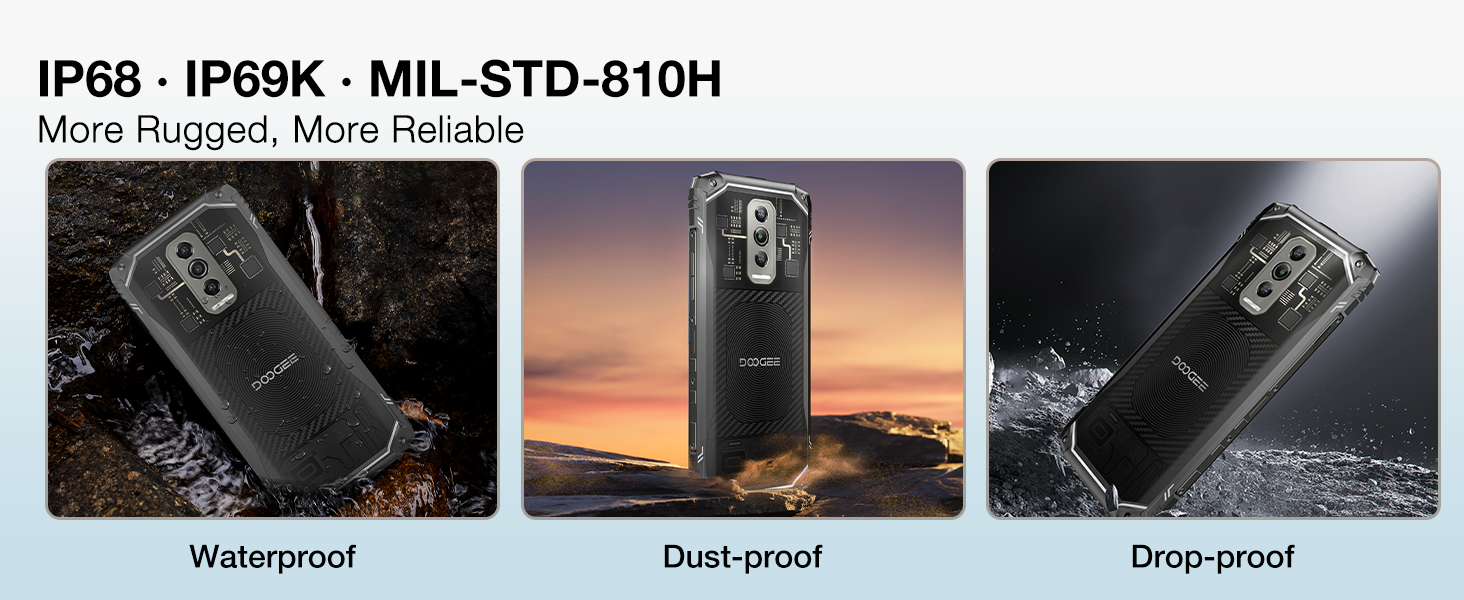
Figure 3.1: Illustration of inserting SIM and microSD cards into the tray.
3.2 പ്രാരംഭ പവർ-ഓണും അടിസ്ഥാന ക്രമീകരണങ്ങളും
Press and hold the power button until the DOOGEE logo appears. Follow the on-screen prompts to complete the initial setup, including language selection, Wi-Fi connection, and Google account setup.
4. പ്രവർത്തന നിർദ്ദേശങ്ങൾ
4.1 ഡിസ്പ്ലേയും യൂസർ ഇന്റർഫേസും
The Blade 10 Ultra features a 6.56-inch 90Hz display, providing a smooth visual experience. Navigate the Android 14 operating system using touch gestures. Swipe down from the top for notifications and quick settings, swipe up for the app drawer, and use the navigation bar or gestures for home, back, and recent apps.

Figure 4.1: The 6.56-inch HD+ 90Hz Waterdrop Display.
4.2 ക്യാമറ പ്രവർത്തനങ്ങൾ
Capture high-quality images with the 50MP AI main camera. The Morpho Imaging Algorithm enhances your photography with features like Super Night Mode for brighter low-light shots, EIS Anti-Shake for stable photos and videos, and EIS UltraZoom for detailed distant objects.
Video 4.1: Demonstrating the Morpho Imaging Algorithm for enhanced photography.

ചിത്രം 4.2: ഓവർview of Morpho Imaging Algorithm features for diverse photography.
4.3 പ്രകടനവും സംഭരണവും
Powered by a robust Octa-core processor, the Blade 10 Ultra ensures smooth multitasking and efficient performance. It comes with 20GB RAM (8GB physical + 12GB virtual) and 256GB internal storage, expandable up to 2TB with a microSD card.
Video 4.2: Highlighting the powerful Octa-core processor for fast and power-saving performance.

Figure 4.3: Visual representation of the Octa-core processor.

Figure 4.4: Details on RAM, ROM, and expandable storage.
4.4 ബാറ്ററി ലൈഫ്
The device is equipped with a 5150mAh large battery, providing extended usage times for standby, music playback, calls, video watching, and web ബ്രൗസിംഗ്.
വീഡിയോ 4.3: ഷോക്asing the 5150mAh large battery capacity.

ചിത്രം 4.5: ബാറ്ററി ശേഷിയും കണക്കാക്കിയ ഉപയോഗ സമയവും.
4.5 സുരക്ഷാ സവിശേഷതകൾ
Unlock your device securely using Face Recognition or the side-mounted Fingerprint Sensor. The fingerprint sensor offers a 0.19s response speed and 360° identification angle.

Figure 4.6: Dual unlocking modes for enhanced security.
4.6 കണക്റ്റിവിറ്റിയും നാവിഗേഷനും
The Blade 10 Ultra supports NFC for convenient mobile payments and data transfer, GPS for accurate navigation, and OTG for connecting external USB devices. It also features dual-band Wi-Fi for reliable internet access.

Figure 4.7: NFC functionality for seamless transactions.

Figure 4.8: GPS for precise location tracking and navigation.
4.7 ഓപ്പറേറ്റിംഗ് സിസ്റ്റം
The smartphone runs on the latest Android 14 system, offering advanced privacy and security features, along with a customizable user experience.
5. പരിപാലനം
5.1 Rugged Features
The DOOGEE Blade 10 Ultra is designed to withstand harsh environments, certified with IP68/IP69K for water and dust resistance, and MIL-STD-810H for shock resistance. This means it can endure submersion in water, exposure to dust, and drops from certain heights.
Video 5.1: Demonstrating the ruggedness and reliability of the DOOGEE Blade 10 Ultra.

Figure 5.1: Visual representation of the phone's waterproof, dustproof, and drop-proof capabilities.
5.2 ക്ലീനിംഗ് നിർദ്ദേശങ്ങൾ
To clean your device, power it off and wipe it gently with a soft, damp തുണി. സ്ക്രീനിനോ സി ക്കോ കേടുവരുത്തുന്ന കഠിനമായ രാസവസ്തുക്കളോ ഉരച്ചിലുകളോ ഉള്ള വസ്തുക്കൾ ഉപയോഗിക്കുന്നത് ഒഴിവാക്കുക.asing. Ensure all ports are dry before charging or connecting accessories after exposure to water.
6. പ്രശ്നപരിഹാരം
If you encounter issues with your DOOGEE Blade 10 Ultra, refer to the following common solutions:
- ഉപകരണം പവർ ചെയ്യുന്നില്ല: ബാറ്ററി ചാർജ്ജ് ചെയ്തിട്ടുണ്ടെന്ന് ഉറപ്പാക്കുക. ഫോൺ അതിന്റെ ചാർജറുമായി ബന്ധിപ്പിച്ച് കുറച്ച് മിനിറ്റ് കാത്തിരുന്ന് വീണ്ടും പവർ ചെയ്യാൻ ശ്രമിക്കുക.
- നെറ്റ്വർക്ക് കണക്റ്റിവിറ്റി പ്രശ്നങ്ങൾ: Check if your SIM card is correctly inserted. Verify that mobile data is enabled in settings. If issues persist, contact your network provider.
- മന്ദഗതിയിലുള്ള പ്രകടനം: Close unnecessary background applications. Clear cache from apps or perform a factory reset (back up data first).
- സ്ക്രീൻ പ്രതികരിക്കുന്നില്ല: Restart the device by holding the power button. If unresponsive, force restart by holding power and volume down buttons simultaneously for about 10 seconds.
- ക്യാമറ പ്രവർത്തിക്കുന്നില്ല: Ensure the camera app has necessary permissions. Restart the device.
For more complex issues, please refer to the support section or contact customer service.
7 സ്പെസിഫിക്കേഷനുകൾ
| ഫീച്ചർ | സ്പെസിഫിക്കേഷൻ |
|---|---|
| ബ്രാൻഡ് | ഡോഗി |
| മോഡൽ | Blade 10 Ultra |
| മെമ്മറി സ്റ്റോറേജ് കപ്പാസിറ്റി | 256 ജിബി (മൈക്രോ എസ്ഡി ഉപയോഗിച്ച് 2 ടിബി വരെ വികസിപ്പിക്കാം) |
| റാം | 20GB (8GB ഫിസിക്കൽ + 12GB വെർച്വൽ) |
| സ്ക്രീൻ വലിപ്പം | 6.56 ഇഞ്ച് |
| പുതുക്കിയ നിരക്ക് | 90Hz |
| വയർലെസ് കാരിയർ | Unlocked for All Carriers (Note: Not support T-mobile and AT&T networks) |
| നിറം | കറുപ്പ് |
| പ്രോസസ്സർ | ഒക്ടാ കോർ |
| പ്രധാന ക്യാമറ | 50MP AI ക്യാമറ |
| ബാറ്ററി ശേഷി | 5150mAh |
| ഈട് | IP68/IP69K Waterproof, Dustproof, Shockproof; MIL-STD-810H Certified |
| ഓപ്പറേറ്റിംഗ് സിസ്റ്റം | ആൻഡ്രോയിഡ് 14 |
| അളവുകൾ (L x W x H) | 6.45 x 2.98 x 0.33 ഇഞ്ച് (163.8 x 75.7 x 8.4 മിമി) |
| കനം | 10.7mm (ഏറ്റവും കനം കുറഞ്ഞ ഭാഗം) |
8. വാറൻ്റിയും പിന്തുണയും
Your DOOGEE Blade 10 Ultra comes with a two-year warranty service. For any product-related inquiries, technical assistance, or warranty claims, please contact DOOGEE customer support. You can find contact information on the official DOOGEE webസൈറ്റ് അല്ലെങ്കിൽ നിങ്ങളുടെ വാങ്ങൽ പ്ലാറ്റ്ഫോം വഴി.
വാറന്റി സാധൂകരണത്തിനായി നിങ്ങളുടെ വാങ്ങിയതിന്റെ തെളിവ് സൂക്ഷിക്കുക.