
Yealink SIP-T73U
യെലിങ്ക് SIP-T73U IP ഫോൺ ഉപയോക്തൃ മാനുവൽ
Model: SIP-T73U | Brand: Yealink
1. ഉൽപ്പന്നം കഴിഞ്ഞുview
The Yealink SIP-T73U is an advanced IP phone designed for professional communication environments. It features a large 3.7-inch display and supports up to 12 VoIP accounts. Equipped with Yealink's Optima Voice HD technology and the Opus wideband codec, the SIP-T73U delivers exceptional audio clarity. This model includes two USB ports, supports Power over Ethernet (PoE), and is compatible with EHS headsets. It also supports expansion modules with color screens and integrates Bluetooth and Wi-Fi connectivity. The unified firmware ensures consistent performance across the T7U series.
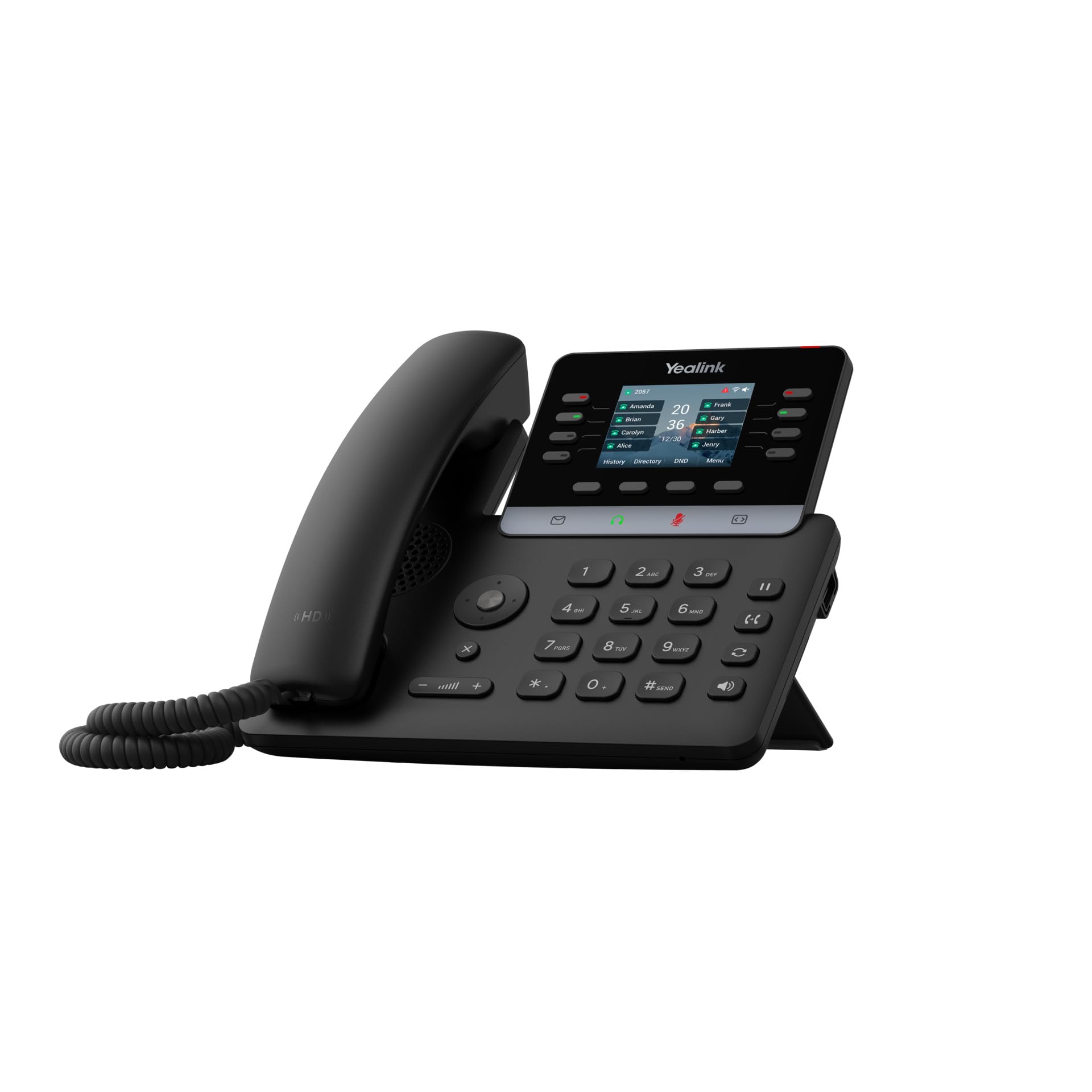
Figure 1: Yealink SIP-T73U IP Phone in a typical office setting.
2. പാക്കേജ് ഉള്ളടക്കം
Before installation, please verify that all items are present in your package:
- Yealink SIP-T73U IP Phone unit
- ചുരുട്ടിയ ചരടുള്ള ഹാൻഡ്സെറ്റ്
- Ethernet cable (LAN cable)
- ദ്രുത ആരംഭ ഗൈഡ്
- പവർ അഡാപ്റ്റർ (PoE ഉപയോഗിക്കുന്നില്ലെങ്കിൽ)
Note: The power adapter may not be included if the phone is designed primarily for Power over Ethernet (PoE) deployments.
3 പ്രധാന സവിശേഷതകൾ
- Supports up to 12 VoIP accounts.
- One-touch speed dial, redial, call transfer, call waiting.
- Call forwarding, call hold, group listening, emergency call.
- Mute, auto answer, Do Not Disturb (DND), hotline.
- 5-way conference calling.
- Direct IP call without SIP proxy.
- Customizable ringtones (select/import/delete).
- Manual or automatic date and time setting.
- Dial plan, XML browser, Action URL/URI.
- RTCP-XR (RFC3611), VQ-RTCPXR (RFC6035) support.
- Two USB ports (2.0 compatible).

ചിത്രം 2: മുൻഭാഗം view of the Yealink SIP-T73U, highlighting the display and keypad.
4. സജ്ജീകരണ ഗൈഡ്
- ഹാൻഡ്സെറ്റ് ബന്ധിപ്പിക്കുക: Plug the coiled cord into the handset port on the phone base and into the handset.
- Connect the Network:
- Connect one end of the Ethernet cable to the ഇൻ്റർനെറ്റ് port on the phone.
- ഇഥർനെറ്റ് കേബിളിൻ്റെ മറ്റേ അറ്റം ഒരു നെറ്റ്വർക്ക് സ്വിച്ചിലേക്കോ റൂട്ടറിലേക്കോ ബന്ധിപ്പിക്കുക.
- If using PoE, the phone will power on automatically.
- പവർ ബന്ധിപ്പിക്കുക (PoE ഉപയോഗിക്കുന്നില്ലെങ്കിൽ): If PoE is not available, connect the power adapter to the DC 5V port on the phone and then to a power outlet.
- പ്രാരംഭ ബൂട്ട്-അപ്പ്: The phone will power on and begin the boot-up sequence. This may take a few minutes.
- കോൺഫിഗറേഷൻ: Once booted, the phone will attempt to obtain network settings via DHCP and connect to your VoIP server. You may need to manually configure SIP account details via the phone's menu or a web interface, as provided by your VoIP service provider or IT administrator.

ചിത്രം 3: വശം view of the Yealink SIP-T73U, illustrating port locations for connections.
5. പ്രവർത്തന നിർദ്ദേശങ്ങൾ
5.1 കോളുകൾ ചെയ്യുന്നു
- ഡയൽ ചെയ്യുന്നു: ഹാൻഡ്സെറ്റ് എടുക്കുക അല്ലെങ്കിൽ അമർത്തുക സ്പീക്കർ button. Enter the phone number using the keypad and press the ഡയൽ ചെയ്യുക or അയക്കുക സോഫ്റ്റ് കീ.
- സ്പീഡ് ഡയൽ: Press a pre-configured speed dial key or use the directory.
- വീണ്ടും ഡയൽ ചെയ്യുക: അമർത്തുക വീണ്ടും ഡയൽ ചെയ്യുക soft key to call the last dialed number.
5.2 കോളുകൾക്ക് ഉത്തരം നൽകുന്നു
- ഫോൺ റിംഗ് ചെയ്യുമ്പോൾ, ഹാൻഡ്സെറ്റ് എടുക്കുക അല്ലെങ്കിൽ അമർത്തുക സ്പീക്കർ ബട്ടൺ.
- പകരമായി, അമർത്തുക ഉത്തരം സോഫ്റ്റ് കീ.
5.3 കോൾ മാനേജ്മെന്റ്
- പിടിക്കുക: ഒരു കോൾ സമയത്ത്, അമർത്തുക പിടിക്കുക soft key. Press it again to resume.
- കൈമാറ്റം: ഒരു കോൾ സമയത്ത്, അമർത്തുക കൈമാറ്റം soft key, dial the new number, and press കൈമാറ്റം again (blind transfer) or wait for the other party to answer before pressing കൈമാറ്റം (ട്രാൻസ്ഫറിൽ പങ്കെടുത്തു).
- സമ്മേളനം: ഒരു കോൾ സമയത്ത്, അമർത്തുക കോൺഫ് soft key, dial the number of the third party, and press കോൺഫ് വീണ്ടും എല്ലാ പാർട്ടികളിലും ചേരാൻ.
- നിശബ്ദമാക്കുക: അമർത്തുക നിശബ്ദമാക്കുക നിങ്ങളുടെ മൈക്രോഫോൺ മ്യൂട്ട് ചെയ്യാൻ ബട്ടൺ. അൺമ്യൂട്ട് ചെയ്യാൻ വീണ്ടും അമർത്തുക.

ചിത്രം 4: കോണാകൃതിയിലുള്ളത് view of the Yealink SIP-T73U, showcasing the ergonomic design and display visibility.
6. പരിപാലനം
- വൃത്തിയാക്കൽ: Use a soft, dry cloth to clean the phone's surface. Do not use abrasive cleaners or solvents.
- പരിസ്ഥിതി: Keep the phone away from direct sunlight, heat sources, and excessive moisture.
- ഫേംവെയർ അപ്ഡേറ്റുകൾ: Regularly check for and apply firmware updates provided by Yealink or your service provider to ensure optimal performance and security.
- കേബിൾ മാനേജുമെന്റ്: Ensure all cables are securely connected and not under strain.
7. പ്രശ്നപരിഹാരം
7.1 ഡയൽ ടോൺ ഇല്ല
- Check if the Ethernet cable is securely connected to both the phone and the network.
- PoE ഉപയോഗിക്കുന്നില്ലെങ്കിൽ, പവർ അഡാപ്റ്റർ ശരിയായി ബന്ധിപ്പിച്ചിട്ടുണ്ടെന്നും ഫോണിന് പവർ ലഭിക്കുന്നുണ്ടെന്നും ഉറപ്പാക്കുക.
- Verify network connectivity and ensure your VoIP service is active.
7.2 Cannot Make or Receive Calls
- Confirm that your SIP account is registered. Check the phone's display for registration status.
- Ensure the phone has an IP address. If not, check network settings.
- Contact your VoIP service provider or IT administrator for account-specific issues.
7.3 മോശം ഓഡിയോ നിലവാരം
- സ്ഥിരതയ്ക്കും ബാൻഡ്വിഡ്ത്തിനും വേണ്ടി നിങ്ങളുടെ നെറ്റ്വർക്ക് കണക്ഷൻ പരിശോധിക്കുക.
- മറ്റ് ഇലക്ട്രോണിക് ഉപകരണങ്ങളിൽ നിന്നുള്ള ഇടപെടലുകൾ ഇല്ലെന്ന് ഉറപ്പാക്കുക.
- Try adjusting the volume on the handset or speaker.
8 സ്പെസിഫിക്കേഷനുകൾ
| ബ്രാൻഡ് | യെലിങ്ക് |
| മോഡൽ | SIP-T73U |
| നിറം | കറുപ്പ് |
| ഫോൺ തരം | കോർഡഡ് |
| മെറ്റീരിയൽ | പ്ലാസ്റ്റിക് |
| പവർ ഉറവിടം | Electric Cable (PoE compatible) |
| ഡയലർ തരം | ഒറ്റ കീപാഡ് |
| അളവുകൾ (L x W x H) | 10.2 x 23.1 x 23.7 സെ.മീ (4.0 x 9.1 x 9.3 ഇഞ്ച്) |
| ഇനത്തിൻ്റെ ഭാരം | 450 ഗ്രാം (0.99 പൗണ്ട്) |
| അനുയോജ്യമായ ഉപകരണങ്ങൾ | Ethernet Network, VoIP Services |
| കോൺഫറൻസ് കോൾ ശേഷി | Basic (5-way conference) |
| മൾട്ടി-ലൈൻ പ്രവർത്തനം | അതെ |
| കോളർ ഐഡി | അതെ |
| അന്താരാഷ്ട്ര ആർട്ടിക്കിൾ കോഡ് | 06938818320680 |
9. വാറൻ്റിയും പിന്തുണയും
9.1 വാറൻ്റി വിവരങ്ങൾ
This product is covered by a warranty in accordance with current applicable laws. For specific warranty terms and conditions, please refer to the documentation provided at the time of purchase or contact your vendor.
9.2 സാങ്കേതിക പിന്തുണ
For technical assistance, troubleshooting, or further inquiries, please contact your VoIP service provider or the authorized Yealink reseller from whom you purchased the product. You can also visit the official Yealink website for support resources, FAQs, and firmware downloads:
Ask a question about this manual
Ask about setup, troubleshooting, compatibility, parts, safety, or missing instructions. Manuals+ will review the question and use this page’s manual context to help answer it.