
1. ആമുഖം
This manual provides instructions for the Adesso WKB-7010 Bluetooth Keyboard Case, designed for use with iPad Pro 11-inch and iPad Air 10.9-inch models. This product combines a protective case with a detachable wireless keyboard and integrated touchpad, transforming your tablet into a portable workstation.

Image 1.1: The Adesso WKB-7010 Bluetooth Keyboard Case with an iPad in use.
2. പാക്കേജ് ഉള്ളടക്കം
നിങ്ങളുടെ പാക്കേജിൽ എല്ലാ ഇനങ്ങളും ഉണ്ടെന്ന് ദയവായി പരിശോധിക്കുക:
- Adesso WKB-7010 Bluetooth Keyboard Case
- USB-C ചാർജിംഗ് കേബിൾ
- ഉപയോക്തൃ മാനുവൽ (ഈ പ്രമാണം)
3 അനുയോജ്യത
The Adesso WKB-7010 Bluetooth Keyboard Case is compatible with the following Apple iPad models:
- iPad Pro 11-inch: 1st generation (2018), 2nd generation (2020), 3rd generation (2021), 4th generation (2022)
- iPad Air 10.9-inch: 4th generation (2020), 5th generation (2022), 6th generation (2024 M2 models)
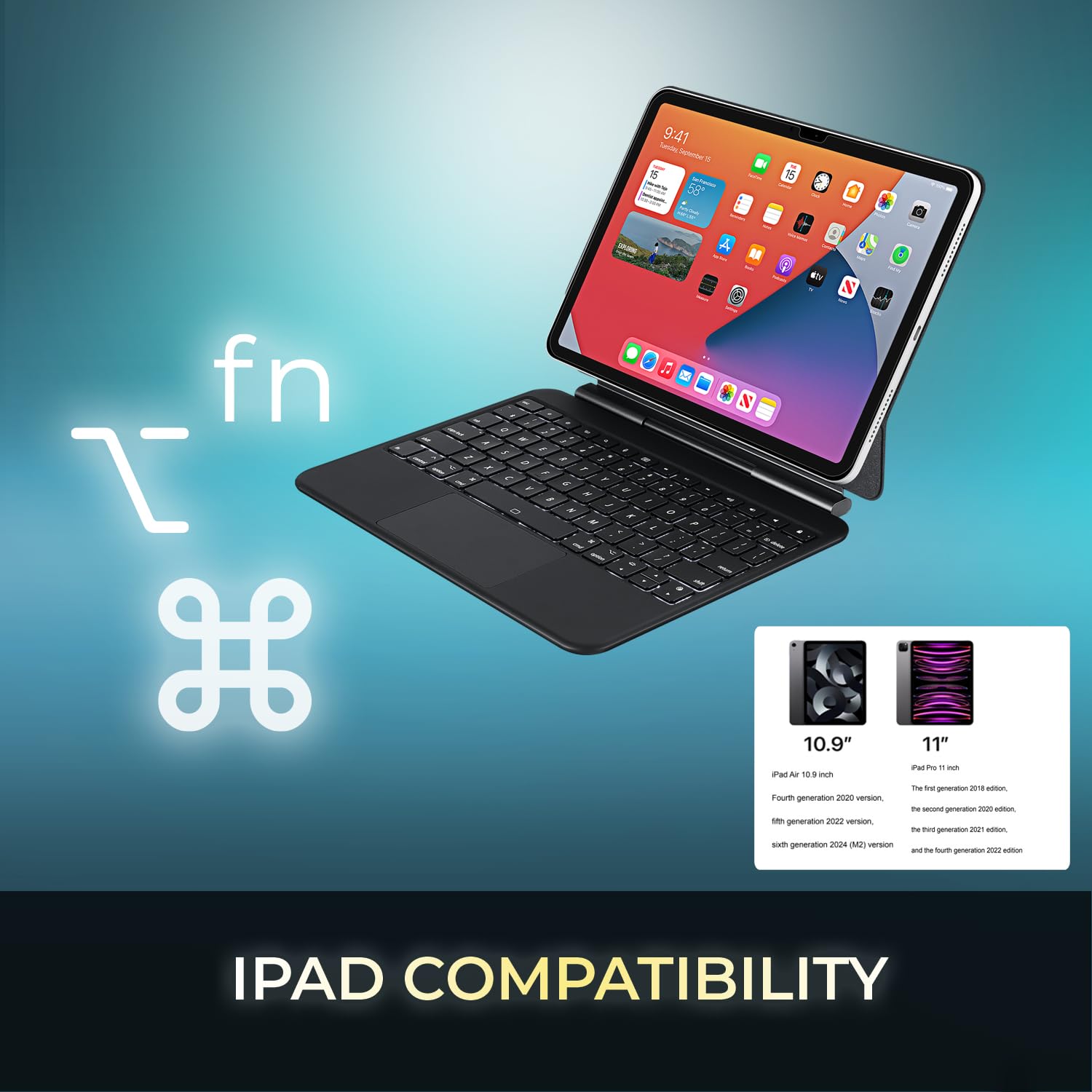
Image 3.1: Visual representation of compatible iPad models (10.9" and 11").
4. സവിശേഷതകൾ
- വേർപെടുത്താവുന്ന ഡിസൈൻ: The keyboard can be separated from the case for flexible use.
- ക്രമീകരിക്കാവുന്ന സ്റ്റാൻഡ്: The case converts into a stand with multiple viewകോണുകൾ.
- ഇന്റഗ്രേറ്റഡ് ടച്ച്പാഡ്: Provides precise navigation and multi-touch gesture support.
- ബ്ലൂടൂത്ത് 5.1 കണക്റ്റിവിറ്റി: Offers stable wireless connection up to 30 feet with low power consumption.
- റീചാർജ് ചെയ്യാവുന്ന ബാറ്ററി: Built-in 450 mAh lithium polymer battery for extended use.
- കത്രിക-സ്വിച്ച് കീകൾ: ലോ-പ്രോfile keys designed for comfortable and responsive typing.
- നീണ്ടുനിൽക്കുന്ന നിർമ്മാണം: Ultra-slim aluminum design for portability and protection.

Image 4.1: The case allows for various adjustable viewing angles for the iPad.

Image 4.2: The keyboard case features an ultra-slim and compact design, as shown with a ruler for scale.
5. സജ്ജീകരണം
5.1. കീബോർഡ് ചാർജ് ചെയ്യുന്നു
Before initial use, fully charge the keyboard. Connect the included USB-C cable to the keyboard's charging port and the other end to a USB power source (e.g., computer, wall adapter). The charging indicator light will illuminate during charging and turn off when fully charged.

Image 5.1: The keyboard features a built-in rechargeable battery and charges via USB-C.
5.2. Inserting Your iPad
Carefully place your iPad into the protective case, ensuring it is securely seated. The magnetic closure will help secure the tablet and keyboard when closed.
5.3. ബ്ലൂടൂത്ത് ജോടിയാക്കൽ
- കീബോർഡ് ഓണാക്കിയിട്ടുണ്ടെന്നും പൂർണ്ണമായും ചാർജ് ചെയ്തിട്ടുണ്ടെന്നും ഉറപ്പാക്കുക.
- പവർ സ്വിച്ച് "ഓൺ" സ്ഥാനത്തേക്ക് സ്ലൈഡ് ചെയ്തുകൊണ്ട് കീബോർഡ് ഓണാക്കുക.
- അമർത്തുക Fn + C keys simultaneously to activate Bluetooth pairing mode. The Bluetooth indicator light will flash.
- നിങ്ങളുടെ iPad-ൽ, പോകുക ക്രമീകരണങ്ങൾ > ബ്ലൂടൂത്ത്.
- ബ്ലൂടൂത്ത് ഓണാക്കുക.
- Locate "Adesso WKB-7010" (or similar) in the list of available devices and tap to connect.
- Once connected, the Bluetooth indicator light on the keyboard will stop flashing.

Image 5.2: The keyboard utilizes Bluetooth 5.1 wireless technology for connection.
6. പ്രവർത്തന നിർദ്ദേശങ്ങൾ
6.1. കീബോർഡ് പ്രവർത്തനങ്ങൾ
The keyboard features standard QWERTY layout keys and dedicated function keys for iPad control. Use the Fn key in combination with other keys for special functions (e.g., media control, volume, screen brightness).
6.2. ടച്ച്പാഡ് ഉപയോഗം
The integrated touchpad supports various gestures for navigation and interaction with your iPad. Ensure that "AssistiveTouch" or "Trackpad & Mouse" settings are configured on your iPad for optimal performance.
- ഒറ്റ വിരൽ ടാപ്പ്: ഇടത് ക്ലിക്ക്.
- രണ്ട് വിരലുകൾ കൊണ്ട് ടാപ്പ് ചെയ്യുക: (സന്ദർഭ മെനു) വലത്-ക്ലിക്ക് ചെയ്യുക.
- രണ്ട് വിരലുകളുടെ സ്ക്രോൾ: മുകളിലേക്കും/താഴേക്കും അല്ലെങ്കിൽ ഇടത്തോട്ടും/വലത്തോട്ടും സ്ക്രോൾ ചെയ്യുക.
- സൂം ചെയ്യാൻ പിഞ്ച് ചെയ്യുക: സൂം ഇൻ അല്ലെങ്കിൽ ഔട്ട് ചെയ്യാൻ രണ്ട് വിരലുകൾ ഉപയോഗിക്കുക.
- മൂന്ന് വിരലുകൾ ഉപയോഗിച്ച് മുകളിലേക്ക് സ്വൈപ്പ് ചെയ്യുക: ഹോം സ്ക്രീനിലേക്ക് പോകുക.
- മൂന്ന് വിരലുകൾ ഉപയോഗിച്ച് ഇടത്തോട്ടോ വലത്തോട്ടോ സ്വൈപ്പ് ചെയ്യുക: തുറന്ന അപ്ലിക്കേഷനുകൾക്കിടയിൽ മാറുക.
7. കീബോർഡ് ചാർജ് ചെയ്യുന്നു
The keyboard is equipped with a 450 mAh rechargeable lithium polymer battery. A full charge takes approximately 3 hours using the provided USB-C cable.
- Continuous Use (backlight off): 150 മണിക്കൂർ വരെ
- Continuous Use (backlight on): 2.5 മണിക്കൂർ വരെ
- സ്റ്റാൻഡ്ബൈ സമയം: 90 ദിവസം വരെ
When the battery is low, the power indicator light may flash or turn red. Connect the keyboard to a power source to recharge.
8. പരിപാലനം
- Keep the keyboard and case clean by wiping with a soft, dry cloth.
- തീവ്രമായ ഊഷ്മാവ്, ഈർപ്പം അല്ലെങ്കിൽ നേരിട്ടുള്ള സൂര്യപ്രകാശം എന്നിവയിലേക്ക് ഉപകരണം എക്സ്പോഷർ ചെയ്യുന്നത് ഒഴിവാക്കുക.
- കഠിനമായ രാസവസ്തുക്കളോ ഉരച്ചിലുകൾ ഉപയോഗിക്കരുത്.
- ദീർഘനേരം ഉപയോഗിക്കാത്തപ്പോൾ ഉപകരണം തണുത്തതും വരണ്ടതുമായ സ്ഥലത്ത് സൂക്ഷിക്കുക.
9. പ്രശ്നപരിഹാരം
9.1. കീബോർഡ് കണക്റ്റുചെയ്യുന്നില്ല
- കീബോർഡ് ഓണാക്കിയിട്ടുണ്ടെന്നും പൂർണ്ണമായും ചാർജ് ചെയ്തിട്ടുണ്ടെന്നും ഉറപ്പാക്കുക.
- Verify Bluetooth is enabled on your iPad.
- Put the keyboard into pairing mode (Fn + C).
- Forget the device on your iPad's Bluetooth settings and attempt to re-pair.
- നിങ്ങളുടെ ഐപാഡും കീബോർഡും പുനരാരംഭിക്കുക.
9.2. Touchpad Not Responding
- കീബോർഡ് ബ്ലൂടൂത്ത് വഴി ബന്ധിപ്പിച്ചിട്ടുണ്ടെന്ന് ഉറപ്പാക്കുക.
- Check iPad settings for "Trackpad & Mouse" or "AssistiveTouch" to ensure external input devices are enabled.
- കീബോർഡും ഐപാഡും പുനരാരംഭിക്കുക.
9.3. Keys Not Working
- കീബോർഡ് പൂർണ്ണമായും ചാർജ് ചെയ്തിട്ടുണ്ടെന്ന് ഉറപ്പാക്കുക.
- Verify a stable Bluetooth connection.
- ബാധിച്ച താക്കോലുകളുടെ ചുറ്റും അവശിഷ്ടങ്ങൾ നീക്കം ചെയ്യാൻ വൃത്തിയാക്കുക.
10 സ്പെസിഫിക്കേഷനുകൾ
| മോഡൽ നമ്പർ | WKB-7010 |
| കണക്റ്റിവിറ്റി ടെക്നോളജി | ബ്ലൂടൂത്ത് 5.1 |
| അനുയോജ്യമായ ഉപകരണങ്ങൾ | iPad Pro 11-inch, iPad Air 10.9-inch |
| ബാറ്ററി തരം | റീചാർജ് ചെയ്യാവുന്ന ലിഥിയം പോളിമർ |
| ബാറ്ററി ശേഷി | 450 mAh |
| ചാർജിംഗ് പോർട്ട് | USB-C |
| പ്രവർത്തന ദൂരം | 30 അടി വരെ (10 മീറ്റർ) |
| കീ സ്വിച്ച് തരം | കത്രിക-സ്വിച്ച് |
| മെറ്റീരിയൽ | Aluminum, Leather (case exterior) |
| അളവുകൾ (L x W x H) | 10 x 7.8 x 0.55 ഇഞ്ച് |
| ഭാരം | 1.2 പൗണ്ട് |
11. വാറൻ്റിയും പിന്തുണയും
This Adesso product comes with a 1 വർഷത്തെ ലിമിറ്റഡ് മാനുഫാക്ചറർ വാറന്റി. For warranty claims or technical support, please contact Adesso customer service. You can find contact information on the official Adesso webസൈറ്റ്: www.adesso.com
വാറന്റി സേവനത്തിനായി നിങ്ങളുടെ വാങ്ങിയതിന്റെ തെളിവ് സൂക്ഷിക്കുക.