
ആമുഖം
Thank you for choosing the Moukey MAMP3 2.0 ചാനൽ സ്റ്റീരിയോ Ampലൈഫയർ. ഈ amplifier is designed to provide high-quality audio for your home entertainment system, supporting various input sources including Bluetooth 5.3, FM radio, USB, and RCA. It also features two microphone inputs for karaoke and comprehensive EQ controls for a customized listening experience. Please read this manual thoroughly before operating the device to ensure proper use and optimal performance.
സുരക്ഷാ വിവരങ്ങൾ
- ഊർജ്ജ സ്രോതസ്സ്: ഉറപ്പാക്കുക amplifier is connected to a power outlet with the correct voltage as specified on the device.
- വെൻ്റിലേഷൻ: Do not block any ventilation openings. Allow adequate space around the ampഅമിതമായി ചൂടാകുന്നത് തടയാൻ ശരിയായ വായുസഞ്ചാരത്തിനുള്ള ലിഫയർ.
- ഈർപ്പം: സൂക്ഷിക്കുക amplifier away from water, moisture, and high humidity environments. Do not place liquid-filled objects on the unit.
- ചൂട്: സ്ഥാപിക്കുന്നത് ഒഴിവാക്കുക ampറേഡിയേറ്ററുകൾ, ഹീറ്റ് രജിസ്റ്ററുകൾ, സ്റ്റൗകൾ അല്ലെങ്കിൽ മറ്റ് താപ ഉൽപ്പാദിപ്പിക്കുന്ന ഉപകരണങ്ങൾ പോലുള്ള താപ സ്രോതസ്സുകൾക്ക് സമീപമുള്ള ലിഫയർ.
- വൃത്തിയാക്കൽ: Unplug the unit from the power outlet before cleaning. Use a dry, soft cloth only.
- സേവനം: ഈ ഉൽപ്പന്നം സ്വയം സേവിക്കാൻ ശ്രമിക്കരുത്. യോഗ്യതയുള്ള സേവന ഉദ്യോഗസ്ഥർക്ക് എല്ലാ സേവനങ്ങളും റഫർ ചെയ്യുക.
- സ്പീക്കർ ഇംപെഡൻസ്: Ensure your speakers match the amplifier's impedance requirements (typically 4-16 Ohms) to prevent damage.
പാക്കേജ് ഉള്ളടക്കം
പാക്കേജിൽ ഇനിപ്പറയുന്ന ഇനങ്ങൾ ഉണ്ടോ എന്ന് പരിശോധിക്കുക:
- മൗക്കി എംAMP3 സ്റ്റീരിയോ Ampജീവപര്യന്തം
- Full-Function Remote Controller (batteries not included)
- പവർ അഡാപ്റ്റർ
- എഫ്എം ആൻ്റിന
- ഉപയോക്തൃ മാനുവൽ
ഉൽപ്പന്നം കഴിഞ്ഞുview
ഫ്രണ്ട് പാനൽ

This image displays the front panel of the Moukey MAMP3 amplifier, highlighting its various controls and inputs. Key features include the power switch, USB slot, LED display, microphone inputs (MIC1/2), and various knobs for adjusting microphone volume, echo, treble, bass, and overall music volume. Buttons for mode selection, track control, and repeat function are also visible.
- വൈദ്യുതി സ്വിച്ച്: തിരിയുന്നു ampലൈഫ് ഓൺ അല്ലെങ്കിൽ ഓഫ്.
- MIC1/2: 6.35എംഎം മൈക്രോഫോൺ ഇൻപുട്ട് ജാക്കുകൾ.
- മൈക്രോഫോൺ വോളിയം നോബ്: ബന്ധിപ്പിച്ചിരിക്കുന്ന മൈക്രോഫോണുകളുടെ ശബ്ദം ക്രമീകരിക്കുന്നു.
- എക്കോ നോബ്: മൈക്രോഫോണുകളുടെ എക്കോ ഇഫക്റ്റ് നിയന്ത്രിക്കുന്നു.
- ട്രിബിൾ നോബ്: Adjusts the high-frequency response of the audio.
- ബാസ് നോബ്: Adjusts the low-frequency response of the audio.
- സംഗീത വോളിയം നോബ്: Controls the overall output volume of the music.
- USB സ്ലോട്ട്: For connecting USB flash drives for audio playback.
- LED ഡിസ്പ്ലേ: Shows current mode, FM frequency, track information, etc.
- മോഡ് ബട്ടൺ: Cycles through input sources (Bluetooth, Aux, CD, USB, FM).
- മുമ്പത്തെ ബട്ടൺ: Skips to the previous track or adjusts FM frequency.
- പ്ലേ/താൽക്കാലികമായി നിർത്തുക ബട്ടൺ: ഓഡിയോ പ്ലേബാക്ക് പ്ലേ ചെയ്യുകയോ താൽക്കാലികമായി നിർത്തുകയോ ചെയ്യുന്നു.
- അടുത്ത ബട്ടൺ: Skips to the next track or adjusts FM frequency.
- ആവർത്തിക്കുക ബട്ടൺ: നിലവിലെ ട്രാക്ക് അല്ലെങ്കിൽ പ്ലേലിസ്റ്റ് ആവർത്തിക്കുന്നു.
ബാക്ക് പാനൽ

This image illustrates the back panel of the Moukey MAMP3 amplifier, detailing the various connection ports for audio input, speaker output, and power. It shows the FM antenna connection, RCA input, and speaker terminals.
- എഫ്എം ആന്റിന: Connection point for the included FM antenna.
- AUDIO INPUT (RCA): Red and white RCA jacks for connecting external audio sources like CD players, DVD players, or other devices.
- AUDIO OUTPUT (Speakers): Speaker terminals for connecting passive speakers. Ensure correct polarity (red for positive, black for negative).
- POWER AC INPUT: നൽകിയിരിക്കുന്ന പവർ അഡാപ്റ്റർ ഇവിടെ ബന്ധിപ്പിക്കുക.
സജ്ജമാക്കുക
1 സ്പീക്കർ കണക്ഷൻ
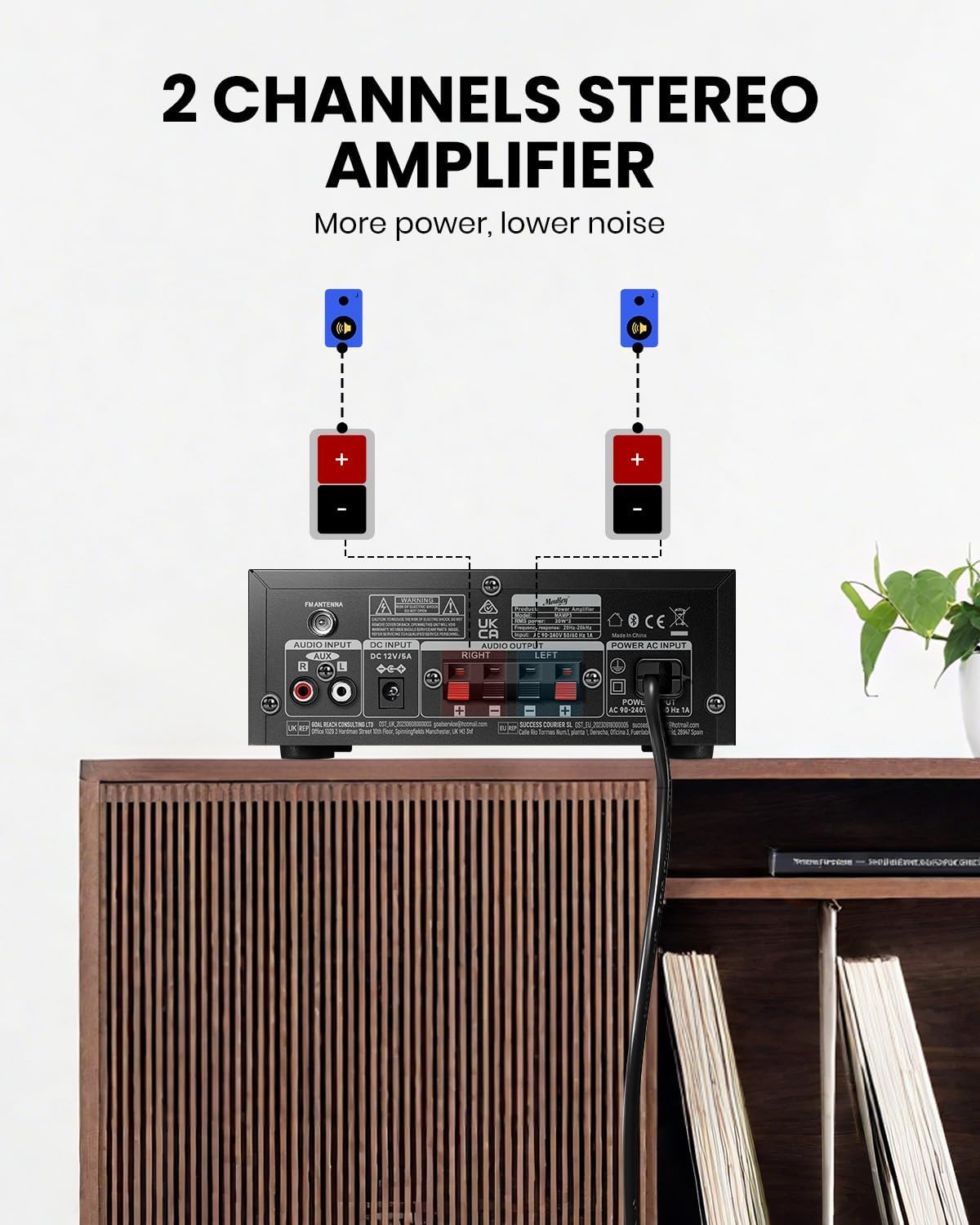
This image shows the proper way to connect two speakers to the back panel of the Moukey MAMP3 amplifier. It highlights the red (+) and black (-) terminals for each speaker, emphasizing correct polarity for optimal sound.
- ഉറപ്പാക്കുക ampഏതെങ്കിലും കണക്ഷനുകൾ ഉണ്ടാക്കുന്നതിന് മുമ്പ് ലൈഫയർ ഓഫാക്കിയിരിക്കുന്നു.
- Connect your passive speakers to the AUDIO OUTPUT terminals on the back panel.
- Match the red (+) terminal on the amplifier to the red (+) terminal on your speaker, and the black (-) terminal on the amplifier to the black (-) terminal on your speaker.
- Ensure all speaker wires are securely fastened and no stray strands are touching other terminals.
2. ഓഡിയോ ഇൻപുട്ട് കണക്ഷൻ

This image illustrates the various audio input options available on the Moukey MAMP3 amplifier, including FM radio, USB, microphone, CD/DVD (RCA), and Bluetooth 5.3. It provides a visual guide to the amplifier's versatility in connecting different audio sources.
- എഫ്എം ആന്റിന: Connect the included FM antenna to the FM ANTENNA port on the back panel for radio reception.
- RCA ഇൻപുട്ട്: Connect your CD player, DVD player, or other audio devices using RCA cables to the AUDIO INPUT (RCA) jacks on the back panel.
- യുഎസ്ബി ഇൻപുട്ട്: Insert a USB flash drive into the USB slot on the front panel for playing audio files.
- മൈക്രോഫോൺ ഇൻപുട്ട്: Connect up to two microphones to the MIC1/2 jacks on the front panel.
3. പവർ കണക്ഷൻ
- Connect the power adapter to the POWER AC INPUT on the back panel of the ampജീവൻ.
- Plug the other end of the power adapter into a suitable wall outlet.
പ്രവർത്തന നിർദ്ദേശങ്ങൾ
1. പവർ ഓൺ/ഓഫ്
- Press the Power Switch on the front panel to turn the ampലൈഫ് ഓൺ അല്ലെങ്കിൽ ഓഫ്.
2. ഇൻപുട്ട് തിരഞ്ഞെടുക്കൽ
- അമർത്തുക മോഡ് button on the front panel or the remote control to cycle through available input sources: Bluetooth (BT), Aux, CD, USB, FM.
3. ബ്ലൂടൂത്ത് മോഡ്
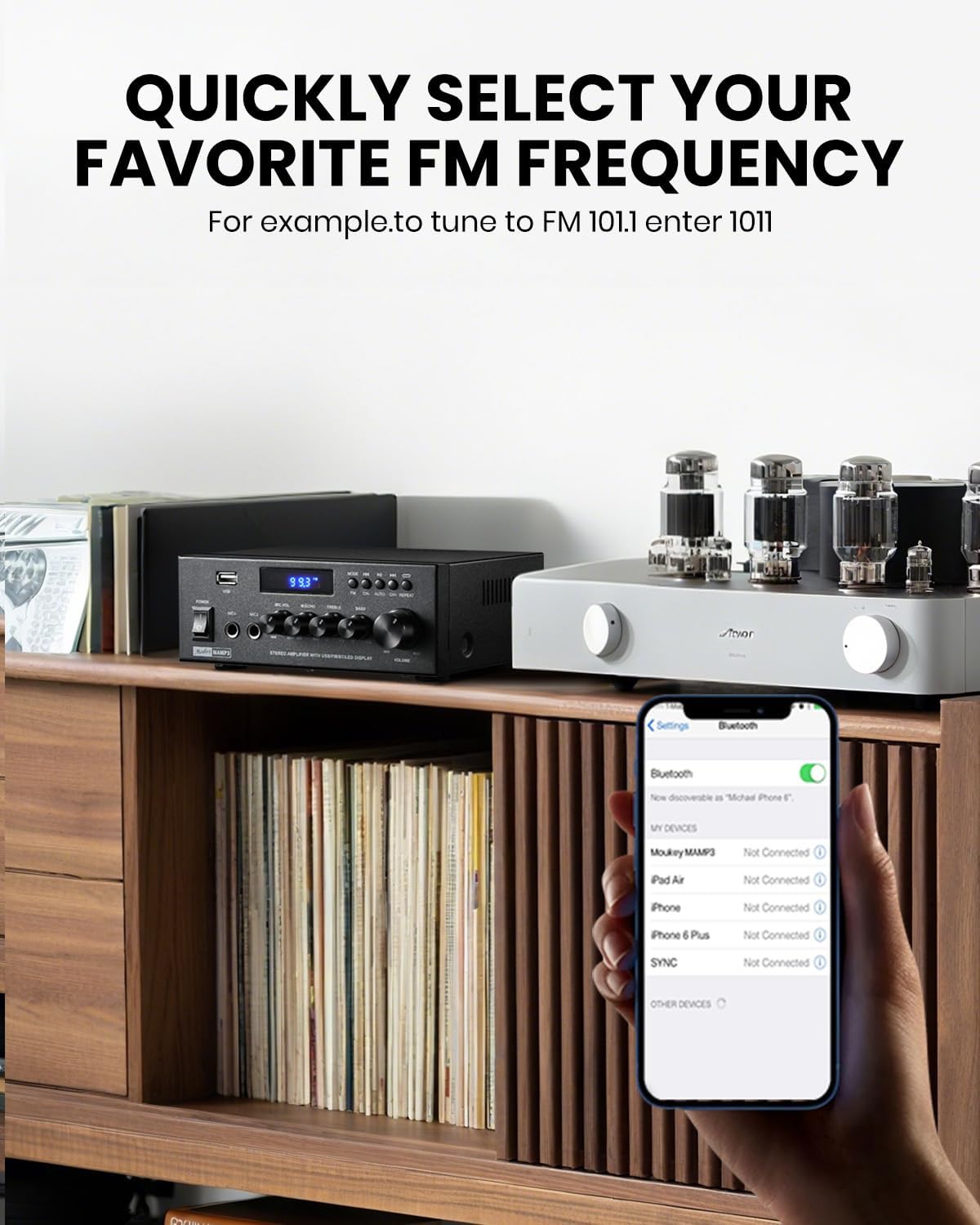
This image shows a smartphone displaying its Bluetooth settings, with the Moukey MAMP3 amplifier visible in the background. It visually represents the process of pairing a device with the amplifier via Bluetooth, indicating a successful connection.
- Select Bluetooth (BT) mode using the MODE button. The LED display will show "BT".
- നിങ്ങളുടെ മൊബൈൽ ഉപകരണത്തിൽ (സ്മാർട്ട്ഫോൺ, ടാബ്ലെറ്റ് മുതലായവ), ബ്ലൂടൂത്ത് പ്രവർത്തനക്ഷമമാക്കി ലഭ്യമായ ഉപകരണങ്ങൾക്കായി തിരയുക.
- Select "Moukey MAMP3" from the list of devices to pair.
- ജോടിയാക്കിക്കഴിഞ്ഞാൽ, നിങ്ങൾക്ക് വയർലെസ് ആയി ഓഡിയോ സ്ട്രീം ചെയ്യാൻ കഴിയും amplifier. The wireless range is approximately 40 ft / 12 m.
4. എഫ്എം റേഡിയോ
This image depicts the Moukey MAMP3 amplifier displaying an FM frequency on its LED screen, with a smartphone in the foreground showing Bluetooth settings. It highlights the amplifier's FM radio capability and the ability to quickly select frequencies.
- Select FM mode using the MODE button. The LED display will show the current FM frequency.
- ഓട്ടോ സ്കാൻ: ലഭ്യമായ എഫ്എം സ്റ്റേഷനുകൾ സ്വയമേവ സ്കാൻ ചെയ്ത് സംരക്ഷിക്കാൻ പ്ലേ/പോസ് ബട്ടൺ അമർത്തിപ്പിടിക്കുക.
- സ്വമേധയാലുള്ള ട്യൂണിംഗ്: Use the Previous/Next buttons to fine-tune the frequency.
- Direct Frequency Input (Remote Only): On the remote, you can directly enter the desired FM frequency using the number pad (e.g., for FM 101.1, enter 1011).
5. USB പ്ലേബാക്ക്
- Insert a USB flash drive into the USB slot. The amplifier will automatically switch to USB mode and begin playback.
- Use the Previous, Play/Pause, and Next buttons on the front panel or remote to control playback.
6. RCA/AUX Input
- Connect your external audio device to the RCA input jacks on the back panel.
- Select the appropriate input mode (Aux or CD, depending on the specific model's labeling) using the MODE button.
7. Microphone Input & Karaoke
- Connect microphones to the MIC1/2 jacks on the front panel.
- Adjust microphone volume using the Microphone Volume Knob.
- Use the Echo Knob to add an echo effect to your vocals.
- The remote control also offers a Talkover function for microphone priority.
8. EQ നിയന്ത്രണം
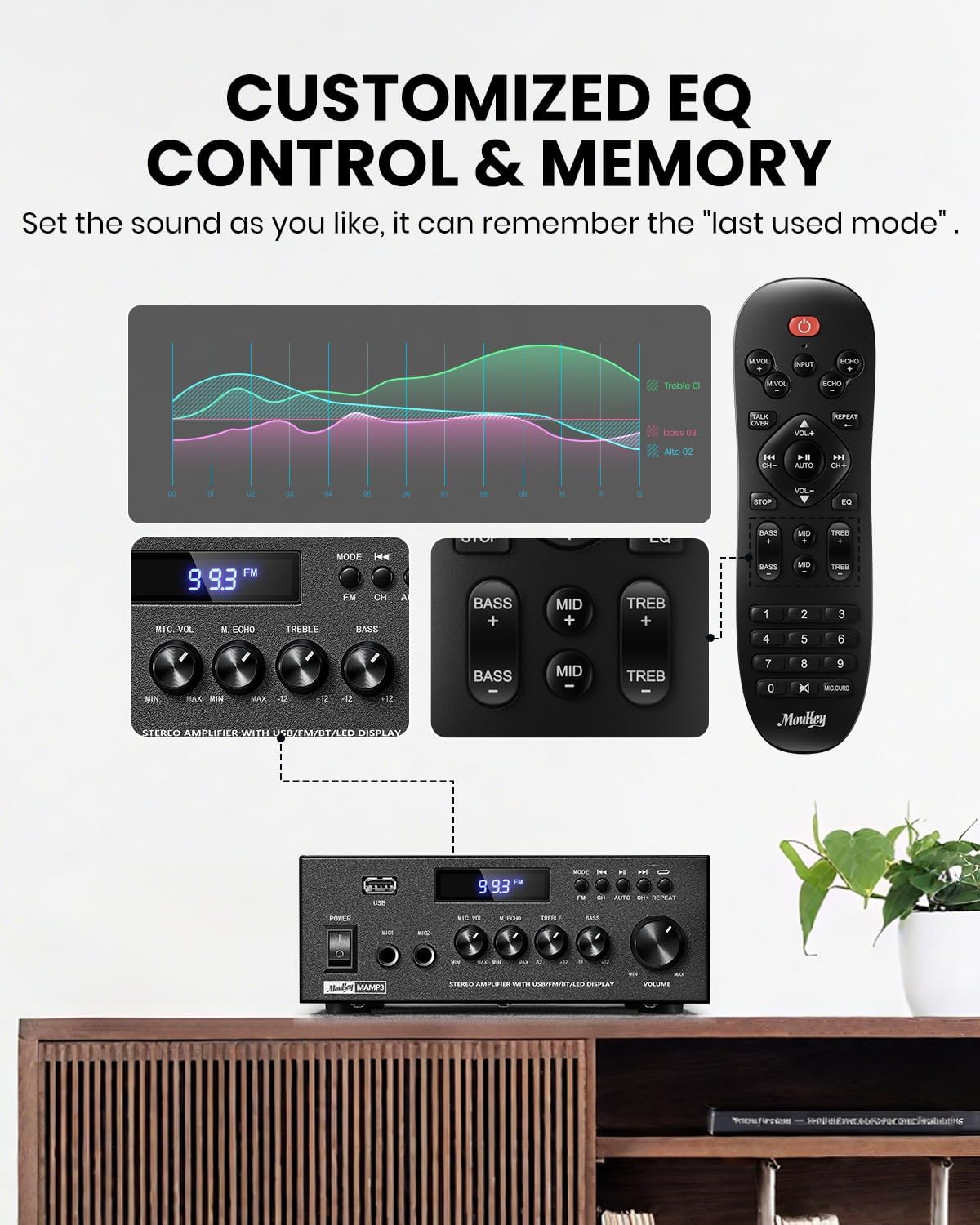
This image displays the various ways to control the equalizer settings on the Moukey MAMP3 amplifier, including the physical knobs on the unit and dedicated buttons on the remote control. It visually demonstrates how users can customize treble, midrange, and bass levels.
- Use the Treble and Bass knobs on the front panel to adjust the high and low frequencies of your music.
- The remote control provides more granular EQ adjustments, including Treble, Midrange, and Bass settings, which can be applied in any input mode.
- ദി amplifier automatically saves your last used mode, volume, and EQ settings for convenience.
9. റിമോട്ട് കൺട്രോൾ

This image compares different versions of remote controls, highlighting the upgraded full-function remote for the Moukey MAMP3 amplifier. It shows that the new remote offers comprehensive control over input selection, treble, midrange, bass, echo, and talkover functions, which were not fully available on older versions.
- The included full-function remote allows control over all amplifier features, including input selection, volume, EQ (treble, midrange, bass), echo, and Talkover.
- Insert two AAA batteries (not included) into the remote control before use.
മെയിൻ്റനൻസ്
- വൃത്തിയാക്കൽ: പുറംഭാഗം തുടയ്ക്കാൻ മൃദുവായതും ഉണങ്ങിയതുമായ തുണി ഉപയോഗിക്കുക ampലിഫയർ. ലിക്വിഡ് ക്ലീനറുകളോ എയറോസോളുകളോ ഉപയോഗിക്കരുത്.
- സംഭരണം: If not in use for an extended period, unplug the amplifier and store it in a cool, dry place away from direct sunlight and extreme temperatures.
- റിമോട്ട് കൺട്രോൾ ബാറ്ററികൾ: Replace the remote control batteries when its range decreases or it stops responding.
ട്രബിൾഷൂട്ടിംഗ്
| പ്രശ്നം | സാധ്യമായ കാരണം | പരിഹാരം |
|---|---|---|
| ശക്തിയില്ല | പവർ കേബിൾ ബന്ധിപ്പിച്ചിട്ടില്ല; പവർ ഔട്ട്ലെറ്റ് തകരാറിലായി; Ampലൈഫയർ സ്വിച്ച് ഓഫ്. | Ensure power cable is securely connected. Try a different power outlet. Turn on the power switch. |
| ശബ്ദ ഔട്ട്പുട്ട് ഇല്ല | Incorrect input selected; Volume too low; Speakers not connected properly; Speaker wires shorted. | Select the correct input source. Increase the volume. Check speaker connections and polarity. Inspect speaker wires for damage or shorts. |
| ബ്ലൂടൂത്ത് കണക്ഷൻ പരാജയപ്പെടുന്നു | Amplifier not in Bluetooth mode; Device too far; Interference; Device already connected to another ampജീവൻ. | ഉറപ്പാക്കുക amplifier is in BT mode. Move device closer to amplifier. Avoid obstacles. Disconnect from other devices and try again. |
| മോശം എഫ്എം സ്വീകരണം | FM antenna not connected or positioned incorrectly; Weak signal. | Connect the FM antenna securely. Adjust the position of the antenna for better reception. |
| റിമോട്ട് കൺട്രോൾ പ്രവർത്തിക്കുന്നില്ല | Batteries are dead or inserted incorrectly; Obstruction between remote and ampജീവൻ. | Replace batteries with new ones, ensuring correct polarity. Remove any obstructions. Point remote directly at the ampലൈഫയറിന്റെ സെൻസർ. |
സ്പെസിഫിക്കേഷനുകൾ
| ഫീച്ചർ | വിശദാംശങ്ങൾ |
|---|---|
| മോഡൽ | MAMP3 |
| ചാനലുകളുടെ എണ്ണം | 2.0 |
| ഔട്ട്പുട്ട് പവർ (പീക്ക്) | 300 വാട്ട്സ് |
| ഔട്ട്പുട്ട് പവർ (RMS) | 20W × 2 |
| ബ്ലൂടൂത്ത് പതിപ്പ് | 5.3 |
| ബ്ലൂടൂത്ത് ശ്രേണി | 40 അടി / 12 മീറ്റർ വരെ |
| ഇൻപുട്ടുകൾ | Bluetooth, FM, USB, RCA (Aux/CD), 2x Microphone (6.35mm) |
| ഇക്യു നിയന്ത്രണം | Treble, Midrange, Bass (via remote); Treble, Bass (via knobs) |
| ഇനത്തിന്റെ അളവുകൾ (L x W x H) | 6.1 x 7.09 x 2.76 ഇഞ്ച് |
| ഇനത്തിൻ്റെ ഭാരം | 1 കിലോഗ്രാം |
| ഉൾപ്പെടുത്തിയ ഘടകങ്ങൾ | Remote Controller, Power Adapter, FM Antenna |
വാറൻ്റി വിവരങ്ങൾ
The Moukey MAMP3 ampലൈഫയർ ഒരു കൂടെ വരുന്നു 1 വർഷത്തെ വാറൻ്റി from the date of purchase. This warranty covers manufacturing defects and workmanship under normal use. Please retain your proof of purchase for warranty claims. The warranty does not cover damage caused by misuse, accidents, unauthorized modifications, or improper installation.
പിന്തുണ
If you encounter any issues not covered in this manual or require further assistance, please contact Moukey customer support. Refer to the product packaging or the official Moukey webബന്ധപ്പെടാനുള്ള വിശദാംശങ്ങൾക്കുള്ള സൈറ്റ്.