
1. ആമുഖം
This manual provides detailed instructions for the VENTION 15-in-1 USB-C Docking Station. It covers product features, setup procedures, operational guidelines, and troubleshooting tips to ensure optimal performance and user experience. Please read this manual thoroughly before using the device.
2. ഉൽപ്പന്നം കഴിഞ്ഞുview
The VENTION 15-in-1 USB-C Docking Station is designed to expand the connectivity of your laptop, transforming a single USB-C port into multiple ports for various peripherals, external displays, and network connections. It features a robust aluminum alloy shell for optimal heat dissipation and a 360° rotatable, detachable base for flexible placement.
2.1. പോർട്ട് ലേഔട്ട്
The docking station offers a comprehensive array of ports to meet diverse connectivity needs:
- 2 x 4K@60Hz HDMI Ports
- 1 x 4K@60Hz DisplayPort (DP)
- 1 x 10Gbps USB-C Port (Data)
- 2 x 10Gbps USB-A Ports (USB 3.2 Gen 2)
- 1 x USB 3.0 Port (5Gbps)
- 2 x USB 2.0 Ports (480Mbps)
- 1 x 100W Power Delivery (PD) Port (Input)
- 1 x PC Host Port (USB-C connection to laptop)
- 1 x 3.5mm Audio Port (Microphone/Audio Jack)
- 1 x SD കാർഡ് റീഡർ
- 1 x TF കാർഡ് റീഡർ
- 1 x RJ45 Gigabit Ethernet Port

2.2. ഡിസൈൻ സവിശേഷതകൾ
- Optimal Heat Dissipation: Constructed with an aluminum alloy shell to efficiently dissipate heat, ensuring stable performance during extended use.
- Anti-slip Pads: Equipped with anti-slip pads for stability on various surfaces.
- Detachable and Rotatable U-shaped Stand: The docking station features a versatile stand that allows for 360° rotation for optimal viewing angles and can be detached for minimalist use or portability.

3. സജ്ജീകരണ ഗൈഡ്
Follow these steps to set up your VENTION 15-in-1 USB-C Docking Station:
- ലാപ്ടോപ്പ് അനുയോജ്യത പരിശോധിക്കുക: Ensure your laptop's USB-C port supports DisplayPort Alternate Mode (Alt Mode) for video output and Power Delivery for charging. Laptops with Thunderbolt 3/4 ports are also compatible.
- പവറുമായി ബന്ധിപ്പിക്കുക (ഓപ്ഷണൽ പക്ഷേ ശുപാർശ ചെയ്യുന്നു): For optimal performance and laptop charging, connect a 100W Power Delivery (PD) charger (not included) to the PD input port on the docking station.
- ലാപ്ടോപ്പിലേക്ക് കണക്റ്റുചെയ്യുക: Use the included USB-C 4.0 cable to connect the docking station's "PC HOST" port to your laptop's USB-C or Thunderbolt port.
- ബാഹ്യ ഡിസ്പ്ലേകൾ ബന്ധിപ്പിക്കുക: Connect your monitors to the HDMI and/or DisplayPort (DP) outputs on the docking station using appropriate cables (not included). Refer to Section 4.1 for display configuration details.
- പെരിഫറലുകൾ ബന്ധിപ്പിക്കുക: Plug in your USB devices (keyboard, mouse, external drives), Ethernet cable, audio devices, and SD/TF cards as needed.


4. പ്രവർത്തന നിർദ്ദേശങ്ങൾ
4.1. Display Configuration (Dual/Triple Monitors)
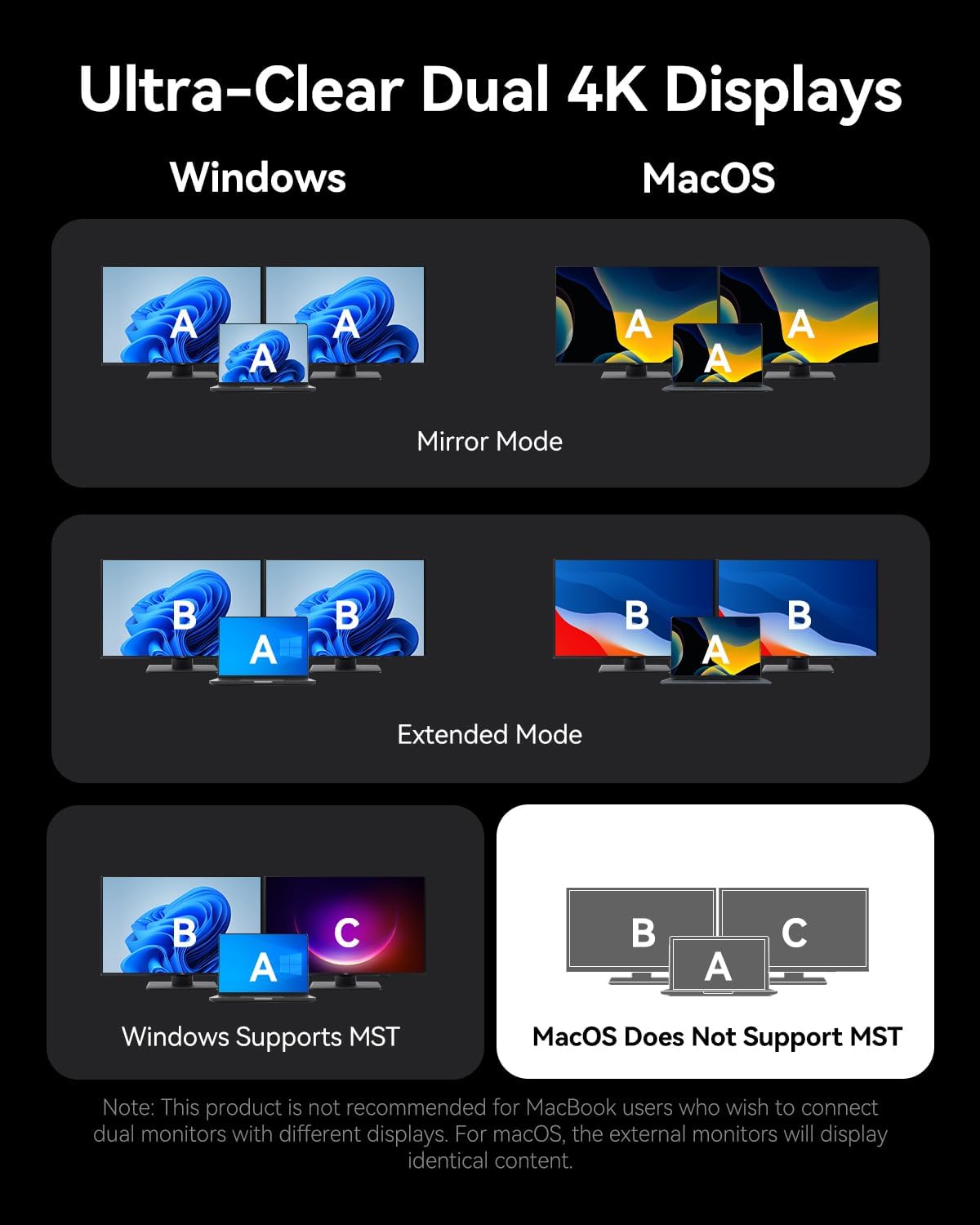
The docking station supports connecting up to three external monitors via its two HDMI ports and one DisplayPort. The display behavior varies depending on your operating system:
വിൻഡോസ് സിസ്റ്റങ്ങൾക്ക്:
- ഡ്യുവൽ മോണിറ്ററുകൾ: 4K@30Hz വരെ പിന്തുണയ്ക്കുന്നു.
- ട്രിപ്പിൾ മോണിറ്ററുകൾ: 1080P@60Hz വരെ പിന്തുണയ്ക്കുന്നു.
- Windows systems support Multi-Stream Transport (MST) mode, allowing for extended displays where each monitor shows different content (A-B-C or A-B-B).
മാകോസ് സിസ്റ്റങ്ങൾക്ക്:
- Single, Dual, or Triple Monitors: Supports up to 4K@60Hz for each display.
- macOS systems only support Single-Stream Transport (SST) mode. This means all external monitors will mirror the content of your laptop's display (A-A-A) or mirror each other while extending from the laptop (A-B-B). Extended displays with different content on each external monitor are not supported.
Note: For screen mirroring or extending, please use your own HDMI/DP cables. The included USB-C cable is for charging and data transfer, not video output.

4.2. ഡാറ്റ കൈമാറ്റം
ഡോക്കിംഗ് സ്റ്റേഷൻ അതിവേഗ ഡാറ്റാ കൈമാറ്റ ശേഷികൾ നൽകുന്നു:
- USB 3.2 Gen 2 Ports (USB-A & USB-C): Offers speeds up to 10Gbps for rapid file transfers with compatible devices.
- യുഎസ്ബി 3.0 പോർട്ട്: Provides speeds up to 5Gbps.
- USB 2.0 പോർട്ടുകൾ: Suitable for connecting peripherals like keyboards and mice with speeds up to 480Mbps.
- SD/TF കാർഡ് സ്ലോട്ടുകൾ: Supports simultaneous reading and writing of SD and TF cards, ideal for photographers and content creators.

4.3. Power Delivery (PD) Charging
The dedicated 100W PD input port allows you to charge your laptop while using the docking station. Connect a compatible 100W USB-C power adapter to this port. The docking station will pass through up to 85W to your laptop, reserving power for its own operation.
4.4. ജിഗാബിറ്റ് ഇഥർനെറ്റ്
Connect an Ethernet cable to the RJ45 port for a stable and high-speed wired network connection, supporting speeds of 10Mbps, 100Mbps, and 1000Mbps (1 Gigabit).
4.5. ഓഡിയോ കണക്റ്റിവിറ്റി
The 3.5mm audio port supports both microphone input and audio output, allowing you to connect headphones, speakers, or a headset for communication and multimedia.
5 അനുയോജ്യത
The VENTION 15-in-1 USB-C Docking Station is compatible with a wide range of devices that feature a full-featured USB-C port or Thunderbolt 3/4 port. This includes, but is not limited to:
- മാക്ബുക്ക് പ്രോ (2016-2021)
- മാക്ബുക്ക് എയർ (2018-2021)
- മാക്ബുക്ക് (2015-2021)
- Dell XPS 13/15
- HP Laptops
- Lenovo Laptops
- Surface Book 2 / Surface Go
- iPad Pro / iPad Air (with USB-C)
- Other laptops with full-featured USB-C or Thunderbolt 3/4 ports.
Important: Ensure your laptop's USB-C port supports DisplayPort Alternate Mode for video output and Power Delivery for charging functionality.

6. പ്രശ്നപരിഹാരം
നിങ്ങളുടെ ഡോക്കിംഗ് സ്റ്റേഷനിൽ പ്രശ്നങ്ങൾ നേരിടുകയാണെങ്കിൽ, ദയവായി ഇനിപ്പറയുന്ന പൊതുവായ പരിഹാരങ്ങൾ പരിശോധിക്കുക:
- ഡിസ്പ്ലേ ഔട്ട്പുട്ട് ഇല്ല:
- നിങ്ങളുടെ ലാപ്ടോപ്പിന്റെ USB-C പോർട്ട് DisplayPort Alternate Mode പിന്തുണയ്ക്കുന്നുണ്ടെന്ന് ഉറപ്പാക്കുക.
- Check all video cables (HDMI/DP) are securely connected and functional.
- നിങ്ങളുടെ മോണിറ്റർ ഇൻപുട്ട് ഉറവിടം ശരിയായി തിരഞ്ഞെടുത്തിട്ടുണ്ടെന്ന് ഉറപ്പാക്കുക.
- പ്രശ്നം ഒറ്റപ്പെടുത്താൻ ഒരു സമയം ഒരു മോണിറ്റർ മാത്രം കണക്റ്റ് ചെയ്യാൻ ശ്രമിക്കുക.
- നിങ്ങളുടെ ലാപ്ടോപ്പ് പുനരാരംഭിച്ച് ഡോക്കിംഗ് സ്റ്റേഷൻ വീണ്ടും ബന്ധിപ്പിക്കുക.
- ലാപ്ടോപ്പ് ചാർജ് ചെയ്യുന്നില്ല:
- Ensure a compatible 100W PD power adapter is connected to the docking station's PD input port.
- നിങ്ങളുടെ ലാപ്ടോപ്പിന്റെ USB-C പോർട്ട് പവർ ഡെലിവറിയെ പിന്തുണയ്ക്കുന്നുണ്ടെന്ന് ഉറപ്പാക്കുക.
- Check the USB-C cable connecting the docking station to your laptop is securely plugged in.
- തിരിച്ചറിയാത്ത USB ഉപകരണങ്ങൾ:
- ഡോക്കിംഗ് സ്റ്റേഷൻ നിങ്ങളുടെ ലാപ്ടോപ്പുമായി ശരിയായി ബന്ധിപ്പിച്ചിട്ടുണ്ടെന്ന് ഉറപ്പാക്കുക.
- ഡോക്കിംഗ് സ്റ്റേഷനിലെ മറ്റൊരു പോർട്ടിലേക്ക് USB ഉപകരണം ബന്ധിപ്പിക്കാൻ ശ്രമിക്കുക.
- യുഎസ്ബി ഉപകരണം പ്രവർത്തനക്ഷമമാണെന്ന് ഉറപ്പാക്കാൻ അത് നിങ്ങളുടെ ലാപ്ടോപ്പിലേക്ക് നേരിട്ട് ബന്ധിപ്പിക്കുക.
- ഇതർനെറ്റ് കണക്ഷൻ പ്രശ്നങ്ങൾ:
- ഡോക്കിംഗ് സ്റ്റേഷനിലേക്കും നിങ്ങളുടെ റൂട്ടറിലേക്കും/മോഡത്തിലേക്കുമുള്ള ഇതർനെറ്റ് കേബിൾ കണക്ഷൻ പരിശോധിക്കുക.
- Verify network settings on your laptop.
- സാധ്യമെങ്കിൽ മറ്റൊരു ഉപകരണം ഉപയോഗിച്ച് ഇതർനെറ്റ് കേബിൾ പരിശോധിക്കുക.
If problems persist, please contact VENTION customer support for further assistance.
7 സ്പെസിഫിക്കേഷനുകൾ
| ഫീച്ചർ | സ്പെസിഫിക്കേഷൻ |
|---|---|
| മോഡൽ | B0FX459ZTN |
| തുറമുഖങ്ങൾ | 2x HDMI (4K@60Hz), 1x DP (4K@60Hz), 1x USB-C (10Gbps), 2x USB-A (10Gbps), 1x USB 3.0 (5Gbps), 2x USB 2.0 (480Mbps), 1x PD (100W), 1x PC Host, 1x 3.5mm Audio, 1x SD, 1x TF, 1x RJ45 Gigabit Ethernet |
| പവർ ഡെലിവറി | 100W Input, up to 85W Output to Laptop |
| ഡാറ്റ ട്രാൻസ്ഫർ വേഗത | USB 3.2 Gen 2: 10Gbps, USB 3.0: 5Gbps, USB 2.0: 480Mbps |
| ഇഥർനെറ്റ് സ്പീഡ് | 10/100/1000Mbps |
| മെറ്റീരിയൽ | അലുമിനിയം അലോയ് |
| അളവുകൾ | 7.91 x 6.81 x 2.44 ഇഞ്ച് |
| ഭാരം | 1.78 പൗണ്ട് |
| നിറം | കറുപ്പ് |
8. പരിപാലനം
To ensure the longevity and optimal performance of your VENTION 15-in-1 USB-C Docking Station, follow these maintenance guidelines:
- വൃത്തിയാക്കൽ: Use a soft, dry, lint-free cloth to clean the exterior of the docking station. Avoid using liquid cleaners, aerosols, or solvents.
- സംഭരണം: നേരിട്ടുള്ള സൂര്യപ്രകാശത്തിൽ നിന്നും കടുത്ത താപനിലയിൽ നിന്നും അകന്ന് തണുത്തതും വരണ്ടതുമായ സ്ഥലത്ത് ഡോക്കിംഗ് സ്റ്റേഷൻ സൂക്ഷിക്കുക.
- കൈകാര്യം ചെയ്യൽ: ഉപകരണം താഴെയിടുകയോ ശക്തമായ ആഘാതങ്ങൾക്ക് വിധേയമാക്കുകയോ ചെയ്യുന്നത് ഒഴിവാക്കുക. ഡോക്കിംഗ് സ്റ്റേഷൻ ഡിസ്അസംബ്ലിംഗ് ചെയ്യാൻ ശ്രമിക്കരുത്, കാരണം ഇത് വാറന്റി അസാധുവാക്കും.
- കേബിൾ മാനേജുമെന്റ്: Organize cables to prevent tangling and strain on the ports.
9. വാറൻ്റിയും പിന്തുണയും
The VENTION 15-in-1 USB-C Docking Station comes with a 12 മാസ വാറൻ്റി വാങ്ങിയ തീയതി മുതൽ. സാധാരണ ഉപയോഗത്തിലുള്ള നിർമ്മാണ വൈകല്യങ്ങളും തകരാറുകളും ഈ വാറന്റി ഉൾക്കൊള്ളുന്നു.
പാക്കേജിൽ ഉൾപ്പെടുന്നു:
- 1 x USB-C Docking Station (15-in-1)
- 1 x 360-Degree Rotatable Base
- 1 x USB-C 4.0 കേബിൾ
- 1 x ഉപയോക്തൃ മാനുവൽ

For any questions, technical support, or warranty claims, please contact VENTION customer service. Refer to the contact information provided on the product packaging or the official VENTION webസൈറ്റ്.
10. ഔദ്യോഗിക ഉൽപ്പന്ന വീഡിയോ
Watch the official product video for a visual guide on the VENTION 15-in-1 USB-C Docking Station's features and usage: