
1. സജ്ജീകരണം
1.1 പാക്കേജ് ഉള്ളടക്കം
- AULA MINI60 HE PRO Keyboard
- യുഎസ്ബി-സി കേബിൾ
- കീക്യാപ് പുള്ളർ
- ഉപയോക്തൃ മാനുവൽ (ഈ പ്രമാണം)
1.2 കണക്റ്റിവിറ്റി ഓപ്ഷനുകൾ
The AULA MINI60 HE PRO supports three connection modes: Bluetooth 5.0, 2.4GHz wireless, and USB-C wired. Use the switch on the keyboard to select your preferred mode.

Image: Tri-mode connectivity options for the AULA MINI60 HE PRO keyboard.
USB-C വയർഡ് കണക്ഷൻ:
- നൽകിയിരിക്കുന്ന USB-C കേബിൾ കീബോർഡിന്റെ USB-C പോർട്ടുമായി ബന്ധിപ്പിക്കുക.
- നിങ്ങളുടെ കമ്പ്യൂട്ടറിൽ ലഭ്യമായ USB പോർട്ടിലേക്ക് കേബിളിന്റെ മറ്റേ അറ്റം ബന്ധിപ്പിക്കുക.
- Ensure the mode switch on the keyboard is set to 'Wired' or 'USB-C'.
2.4GHz വയർലെസ് കണക്ഷൻ:
- Insert the 2.4GHz USB dongle into an available USB port on your computer.
- Ensure the mode switch on the keyboard is set to '2.4G'.
- The keyboard should automatically connect. If not, refer to the troubleshooting section.
ബ്ലൂടൂത്ത് 5.0 കണക്ഷൻ:
- Ensure the mode switch on the keyboard is set to 'BT'.
- നിങ്ങളുടെ ഉപകരണത്തിൽ (പിസി, മാക്, ടാബ്ലെറ്റ്, സ്മാർട്ട്ഫോൺ), ബ്ലൂടൂത്ത് പ്രവർത്തനക്ഷമമാക്കി പുതിയ ഉപകരണങ്ങൾക്കായി തിരയുക.
- Select 'AULA MINI60 HE PRO' from the list of available devices to pair.
1.3 കീബോർഡ് ചാർജ് ചെയ്യുന്നു
The keyboard is equipped with a 4000mAh battery. Connect the USB-C cable to the keyboard and a power source (e.g., computer USB port, USB wall adapter) to charge. The RGB lighting may indicate charging status.
1.4 Web-Based Driver Setup
The AULA MINI60 HE PRO utilizes a web-based driver for customization. This eliminates the need for software downloads and ensures compatibility across various operating systems (Windows, macOS, Linux).
- എ തുറക്കുക web നിങ്ങളുടെ ബന്ധിപ്പിച്ച ഉപകരണത്തിലെ ബ്രൗസർ.
- Navigate to the official AULA web driver portal (refer to product packaging or official webകൃത്യമായ വിവരങ്ങൾക്ക് സൈറ്റ് URL).
- The interface allows for key remapping, macro creation, RGB lighting customization, and performance adjustments.
ചിത്രം: Web-based driver interface for keyboard customization.
2. പ്രവർത്തന നിർദ്ദേശങ്ങൾ
2.1 പ്രധാന സവിശേഷതകൾ
ഹാൾ ഇഫക്റ്റ് മാഗ്നറ്റിക് സ്വിച്ചുകൾ:
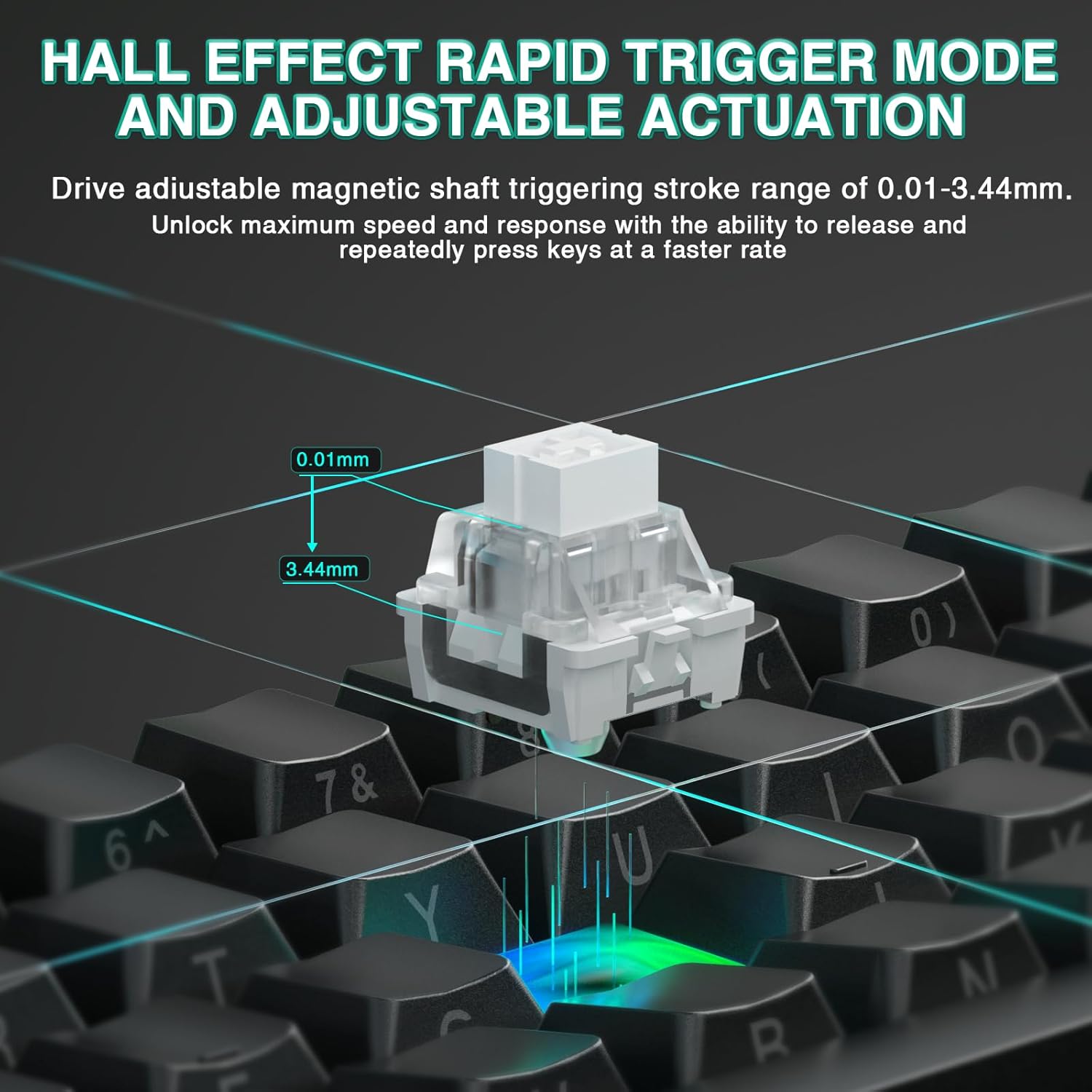
The keyboard features advanced Hall Effect magnetic switches, providing precise and consistent actuation. These switches offer adjustable actuation points and rapid trigger mode for enhanced responsiveness.
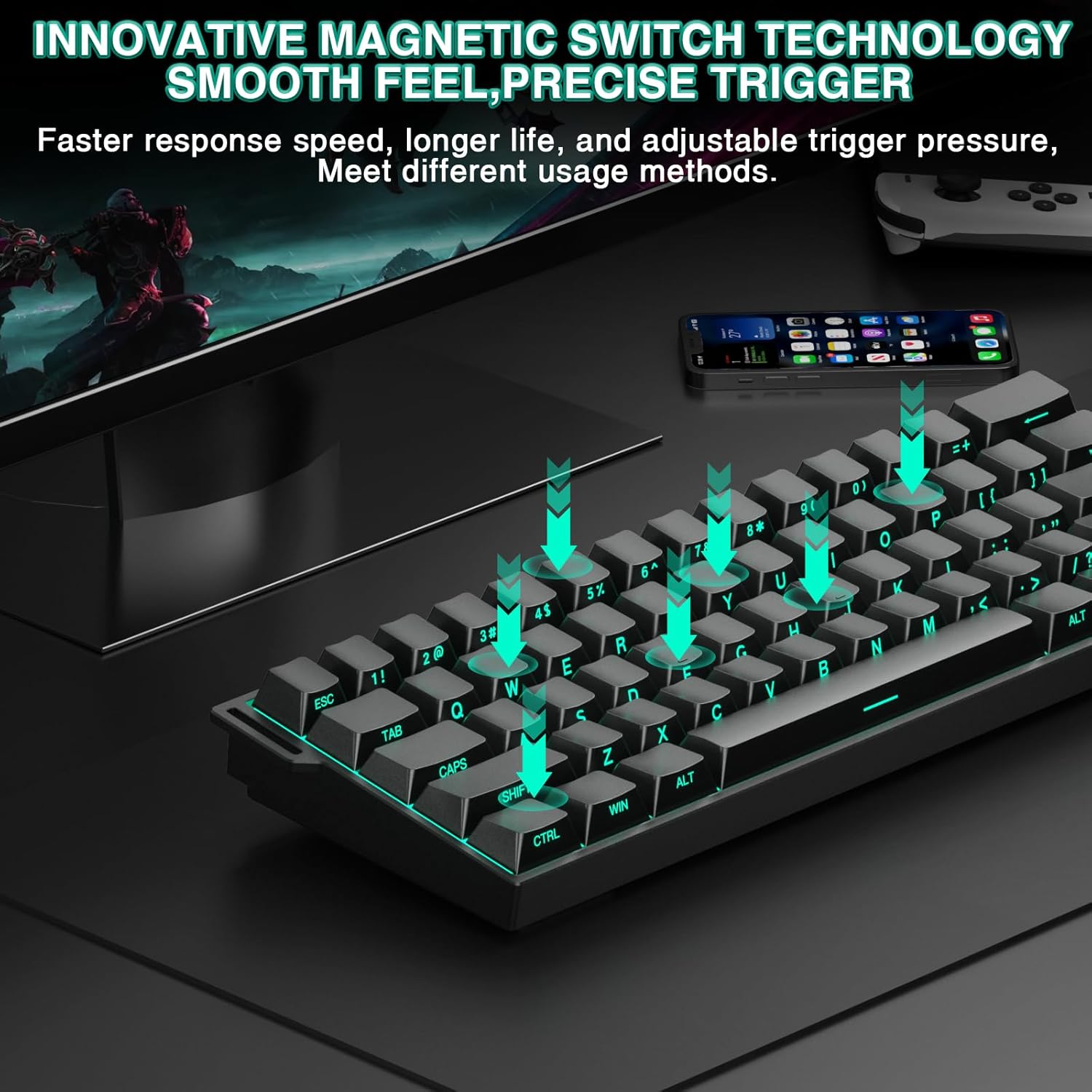
Image: Illustration of magnetic switch technology.
Adjustable Actuation & Rapid Trigger Mode:
Customize the actuation distance of each key from 0.01mm to 3.44mm using the web driver. Rapid Trigger mode allows keys to reactivate instantly upon reset, enabling faster repeated inputs. The ultra-low RT step distance of 0.01mm ensures quick response times.

Image: Hall Effect magnetic switch with adjustable actuation.
8000 Hz പോളിംഗ് നിരക്ക്:
The keyboard supports an 8000 Hz polling rate, providing ultra-fast response times and minimal input lag for competitive gaming.
60% ഒതുക്കമുള്ള ഡിസൈൻ:
The MINI60 HE PRO features a compact 60% layout, optimizing desk space while retaining essential functionality. This design is suitable for various uses, including gaming, work, and travel.

Image: The 60% compact design of the keyboard.
2.2 ഡൈനാമിക് RGB ലൈറ്റിംഗ്
The keyboard offers 19 RGB backlight effects and 16.8 million customizable colors. The lower light position design illuminates side-printed PBT keycaps.
RGB Control Shortcuts:
- FN + സ്പേസ്: Turn RGB lighting ON/OFF.
- എഫ്എൻ + [: ലൈറ്റിംഗ് വേഗത കുറയ്ക്കുക.
- എഫ്എൻ + ]: ലൈറ്റിംഗ് വേഗത വർദ്ധിപ്പിക്കുക.
- FN + Alt (Right): Switch lighting effect mode.
- FN + Ctrl (Right): Switch lighting effect color.
- FN + മുകളിലേക്കുള്ള അമ്പടയാളം: Increase light brightness.
- FN + താഴേക്കുള്ള അമ്പടയാളം: Decrease light brightness.
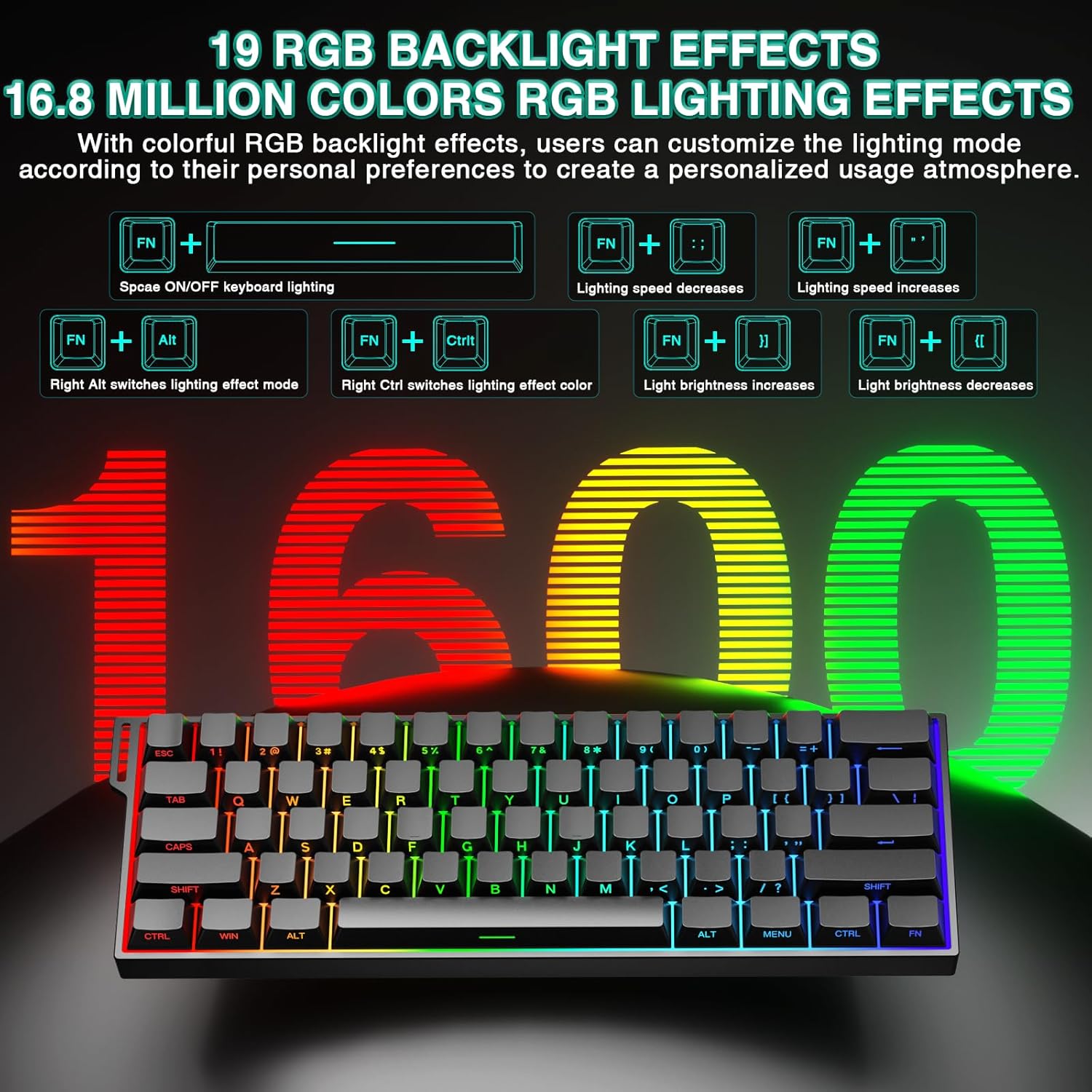
Image: RGB lighting effects and control shortcuts.
2.3 ഹോട്ട്-സ്വാപ്പബിൾ ഡിസൈൻ
The keyboard features full-key hot-swappable sockets, allowing for easy replacement of switches without soldering. This enables customization with most 2-pin magnetic switches on the market.
2.4 Sound-Dampening Padding
Internal sound-dampening foam and other layers are integrated to reduce switch noise and improve the acoustic profile കീബോർഡിന്റെ.
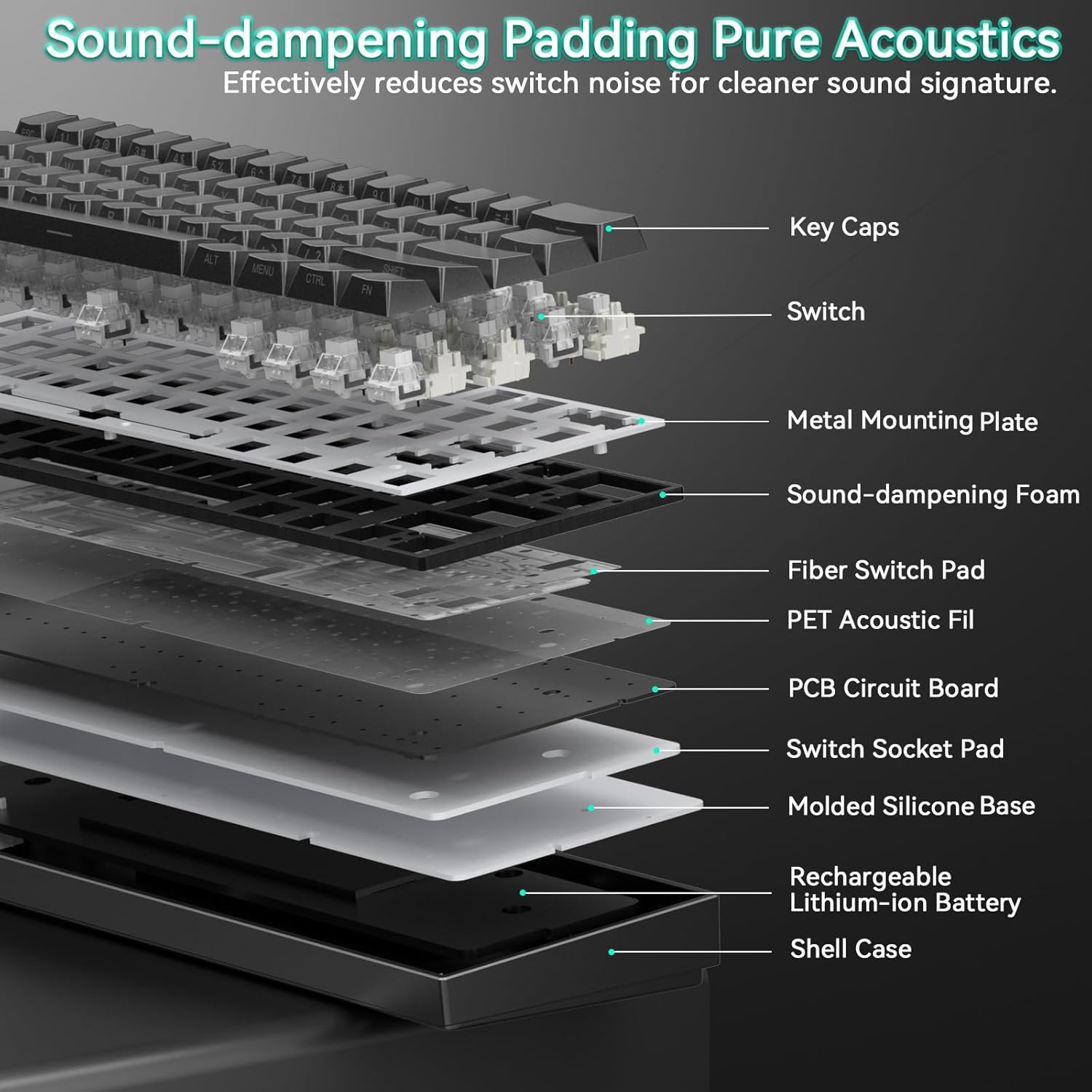
Image: Internal structure showing sound-dampപാളികൾ ശക്തിപ്പെടുത്തുന്നു.
2.5 ഉൽപ്പന്നം കഴിഞ്ഞുview വീഡിയോ
വീഡിയോ: ഒരു ഓവർview of the AULA Mini60 HE Gaming Keyboard, highlighting its Hall Effect Magnetic Switches and various features. This video is provided by CORBOBO Direct.
3. പരിപാലനം
3.1 കീബോർഡ് വൃത്തിയാക്കൽ
മികച്ച പ്രകടനവും രൂപഭംഗിയും നിലനിർത്താൻ, നിങ്ങളുടെ കീബോർഡ് പതിവായി വൃത്തിയാക്കുക:
- കീബോർഡ് വൃത്തിയാക്കുന്നതിന് മുമ്പ് എല്ലാ വൈദ്യുതി സ്രോതസ്സുകളിൽ നിന്നും വിച്ഛേദിക്കുക.
- മൃദുവായ, ലിൻ്റ് രഹിത തുണി ഉപയോഗിക്കുകampകീക്യാപ്പുകളും ഷാസികളും തുടയ്ക്കാൻ വെള്ളമോ നേരിയ ക്ലീനിംഗ് ലായനിയോ ഉപയോഗിച്ച് നനയ്ക്കുക. അമിതമായ ഈർപ്പം ഒഴിവാക്കുക.
- കീക്യാപ്പുകൾക്കിടയിലുള്ള പൊടിയും അവശിഷ്ടങ്ങളും ഉണ്ടെങ്കിൽ, കംപ്രസ് ചെയ്ത വായു ഉപയോഗിക്കുക.
- Do not use harsh chemicals, abrasives, or solvents, as these may damage the keyboard's finish or keycap legends.
3.2 കീക്യാപ്പും സ്വിച്ചും മാറ്റിസ്ഥാപിക്കൽ
The hot-swappable design allows for easy replacement of keycaps and switches.
- Use the provided keycap puller to gently remove keycaps. Grip the keycap firmly and pull straight up.
- Once the keycap is removed, use a switch puller (not included, but commonly available) to carefully extract the switch from its socket.
- Align the pins of the new switch with the holes in the PCB socket and press down gently until it clicks into place. Ensure the switch is seated correctly to avoid bending pins.
- Place the desired keycap onto the new switch stem and press down firmly.
4. പ്രശ്നപരിഹാരം
4.1 കീബോർഡ് പ്രതികരിക്കുന്നില്ല
- കണക്ഷൻ പരിശോധിക്കുക: Ensure the keyboard is properly connected via USB-C, 2.4GHz dongle, or Bluetooth. Verify the mode switch is set correctly.
- ബാറ്ററി നില: If using wireless modes, check the battery level. Connect the keyboard via USB-C to charge.
- ഉപകരണം പുനരാരംഭിക്കുക: നിങ്ങളുടെ കമ്പ്യൂട്ടറോ ഉപകരണമോ പുനരാരംഭിക്കാൻ ശ്രമിക്കുക.
- ഡ്രൈവർ/സോഫ്റ്റ്വെയർ: ആക്സസ് ചെയ്യുക web-based driver to ensure no conflicting settings or profileകൾ സജീവമാണ്.
4.2 RGB ലൈറ്റിംഗ് പ്രശ്നങ്ങൾ
- Brightness/Mode: Use the FN key combinations (FN + Space, FN + Up/Down Arrow, FN + Right Alt, FN + Right Ctrl) to adjust brightness and switch lighting modes/colors.
- Web ഡ്രൈവർ: Customize lighting effects and settings through the web-അധിഷ്ഠിത ഡ്രൈവർ.
4.3 കീകൾ രജിസ്റ്റർ ചെയ്യുന്നില്ല അല്ലെങ്കിൽ ഇരട്ട-ടൈപ്പിംഗ് ചെയ്യുന്നില്ല
- സ്വിച്ച് ചെക്ക്: If a specific key is affected, gently remove the keycap and inspect the switch for any visible damage or debris. Consider replacing the switch if it's faulty.
- Actuation Settings: ൽ web driver, check the actuation distance settings. Extremely low actuation points might cause unintended triggers.
- ഫേംവെയർ അപ്ഡേറ്റ്: പരിശോധിക്കുക web driver for any available firmware updates for the keyboard.
5 സ്പെസിഫിക്കേഷനുകൾ
| ഫീച്ചർ | വിശദാംശങ്ങൾ |
|---|---|
| മോഡൽ നമ്പർ | MINI60 HE |
| ബ്രാൻഡ് | കോർബോബോ |
| കണക്റ്റിവിറ്റി ടെക്നോളജി | 2.4G വയർലെസ്, ബ്ലൂടൂത്ത് 5.0, യുഎസ്ബി-സി വയേർഡ് |
| കീബോർഡ് വിവരണം | Hall Effect Keyboard, Magnetic Switch Rapid Trigger Mechanical Gaming Keyboard Wireless |
| പ്രത്യേക സവിശേഷതകൾ | Hall Effect Keyboard, Hot-Swappable, Magnetic Switch Keyboard, Rapid Trigger Keyboard, Side-Printed PBT Keycaps, RGB Backlit |
| അനുയോജ്യമായ ഉപകരണങ്ങൾ | ഗെയിമിംഗ് കൺസോൾ, ലാപ്ടോപ്പ്, പിസി, സ്മാർട്ട്ഫോൺ, ടാബ്ലെറ്റ് |
| കീബോർഡ് ബാക്ക്ലൈറ്റിംഗ് വർണ്ണ പിന്തുണ | ആർജിബി (16.8 ദശലക്ഷം നിറങ്ങൾ) |
| മെറ്റീരിയൽ | പ്ലാസ്റ്റിക് |
| ഇനത്തിൻ്റെ ഭാരം | 2.38 പൗണ്ട് |
| പാക്കേജ് അളവുകൾ | 13.54 x 6.69 x 2.24 ഇഞ്ച് |
| ബാറ്ററികൾ | 1 x 9V ബാറ്ററി (ഉൾപ്പെടുന്നു) |
| നിർമ്മാതാവ് | ഔല |
6. വാറണ്ടിയും പിന്തുണയും
6.1 വാറൻ്റി വിവരങ്ങൾ
Please refer to the product packaging or the official CORBOBO website for detailed warranty terms and conditions. Typically, products come with a limited manufacturer's warranty covering defects in materials and workmanship.
6.2 ഉപഭോക്തൃ പിന്തുണ
For technical assistance, troubleshooting, or warranty claims, please contact CORBOBO customer support through their official website or the retailer where the product was purchased. Keep your proof of purchase handy when contacting support.