
ആമുഖം
Welcome to the LIGE EF18-E Smartwatch user manual. This guide provides detailed instructions on how to set up, operate, and maintain your new smartwatch. Please read this manual thoroughly to ensure optimal performance and longevity of your device.
പാക്കേജ് ഉള്ളടക്കം
അൺപാക്ക് ചെയ്യുമ്പോൾ, ഇനിപ്പറയുന്ന എല്ലാ ഇനങ്ങളും ഉൾപ്പെടുത്തിയിട്ടുണ്ടെന്ന് ദയവായി ഉറപ്പാക്കുക:
- 1 x LIGE EF18-E Smartwatch
- 1 x Stainless Steel Strap
- 2 x Silicone Straps (AK75, AK85)
- 1 x USB ചാർജിംഗ് കേബിൾ
- 1 x ടൈപ്പ്-സി ചാർജിംഗ് കേബിൾ
- 1 x Strap Adjustment Tool (for stainless steel strap)
- 1 x ഉപയോക്തൃ മാനുവൽ (ഈ പ്രമാണം)

Image: LIGE EF18-E Smartwatch and its accessories, including three straps and two charging cables.
ഉൽപ്പന്നം കഴിഞ്ഞുview
The LIGE EF18-E Smartwatch features a robust design with a 1.7-inch Ultra HD display and a powerful LED flashlight. Familiarize yourself with the watch's components:
- ഡിസ്പ്ലേ: 1.7-inch IPS Ultra HD touch screen (360x360 resolution) for clear visuals.
- ബട്ടണുകൾ: Two physical buttons for navigation and function access.
- LED ഫ്ലാഷ്ലൈറ്റ്: Integrated on the side for illumination.
- സെൻസറുകൾ: Located on the rear for health monitoring (heart rate, blood oxygen, sleep).
- ചാർജിംഗ് പോർട്ടുകൾ: Magnetic charging contacts on the rear.

ചിത്രം: മുൻഭാഗം view of the LIGE EF18-E Smartwatch, showcasing its 1.7-inch Ultra HD display with vibrant colors and sharp details.
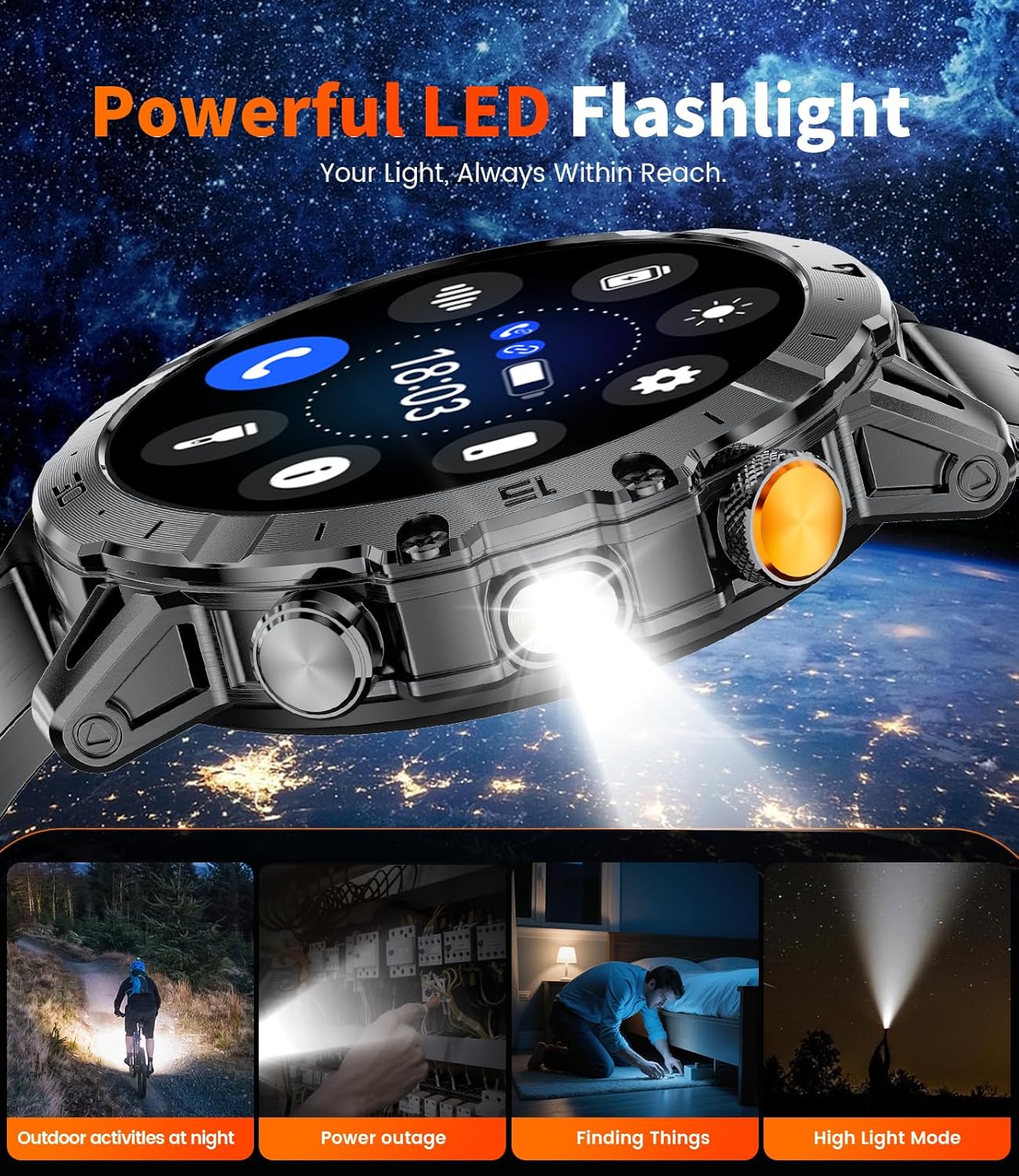
ചിത്രം: വശം view of the LIGE EF18-E Smartwatch, highlighting the powerful LED flashlight feature.
സജ്ജമാക്കുക
1. സ്മാർട്ട് വാച്ച് ചാർജ് ചെയ്യുന്നു
Before first use, fully charge your smartwatch. Connect one of the provided charging cables (USB or Type-C) to a power source and attach the magnetic end to the charging contacts on the back of the watch. The watch will display a charging indicator. A full charge typically takes approximately 2.5 hours.

Image: The LIGE EF18-E Smartwatch connected to its magnetic charging cable, illustrating the charging process.
2. ആപ്പ് ഇൻസ്റ്റാളേഷനും ഉപകരണ ജോടിയാക്കലും
To unlock all features, download the "Fitcloudpro" app on your smartphone (compatible with Android 5.1+ and iOS 9.0+).
- Download "Fitcloudpro" from the App Store (iOS) or Google Play (Android).
- നിങ്ങളുടെ ഫോണിൽ ബ്ലൂടൂത്ത് പ്രവർത്തനക്ഷമമാക്കുക.
- Open the "Fitcloudpro" app and follow the on-screen instructions to add your device.
- Select "EF18" from the list of available devices to pair.
- Confirm the pairing request on both your phone and smartwatch.
- Allow the smartwatch to display notifications when prompted by the app.
- Ensure Bluetooth call and app notifications are enabled within the app settings for full functionality.

Image: Visual guide demonstrating the pairing process between the LIGE EF18-E Smartwatch and a smartphone using the Fitcloudpro application.
3. Strap Installation and Adjustment
The smartwatch comes with three interchangeable straps. To change a strap, locate the quick-release pins on the underside of the strap where it connects to the watch body. Slide the pin to detach the strap. To attach a new strap, align the pin with the holes on the watch body and slide the pin into place until it clicks securely.
For the stainless steel strap, use the provided adjustment tool to remove or add links for a comfortable fit. Ensure the strap is snug but not too tight for accurate health monitoring.
പ്രവർത്തന നിർദ്ദേശങ്ങൾ
1. അടിസ്ഥാന നാവിഗേഷൻ
- ടച്ച് സ്ക്രീൻ: മെനുകളിലൂടെയും സവിശേഷതകളിലൂടെയും നാവിഗേറ്റ് ചെയ്യാൻ ഇടത്തേക്ക്/വലത്തേക്ക്, മുകളിലേക്കും താഴേക്കും സ്വൈപ്പ് ചെയ്യുക. തിരഞ്ഞെടുക്കാൻ ടാപ്പ് ചെയ്യുക.
- ടോപ്പ് ബട്ടൺ: Typically used to return to the home screen or activate/deactivate the display.
- താഴെയുള്ള ബട്ടൺ: Customizable shortcut button. By default, it may open a specific function like sports modes or health monitoring.
- ഉണർത്താൻ എഴുന്നേൽക്കുക: The display can be set to turn on automatically when you raise your wrist.
2. വാച്ച് ഫെയ്സുകൾ
The LIGE EF18-E offers over 200 watch faces. To change the watch face, long-press the current watch face on the screen, then swipe left or right to browse available options. Tap to select. You can also customize watch faces and upload images via the "Fitcloudpro" app.

Image: A selection of over 200 personalized watch faces available for the LIGE EF18-E Smartwatch, demonstrating customization options.
3. ബ്ലൂടൂത്ത് കോളിംഗും അറിയിപ്പുകളും
Once paired with your smartphone, you can manage calls and receive notifications directly on your watch.
- കോളുകൾ ചെയ്യൽ/ഉത്തരം നൽകൽ: Use the integrated speaker and microphone to make, answer, or end calls.
- സന്ദേശ അലേർട്ടുകൾ: Receive notifications from SMS, Facebook, WhatsApp, Twitter, TikTok, and other apps. You can enable or disable this feature in the "Fitcloudpro" app.

Image: The LIGE EF18-E Smartwatch showing its Bluetooth calling interface and various smart notifications from social media and messaging apps.
4. LED ഫ്ലാഷ്ലൈറ്റ്
Activate the powerful side-mounted LED flashlight for illumination in dark environments. This feature is useful for outdoor activities, power outages, or finding items in low light. The flashlight has a lighting range of 6-8 meters.

Image: The LIGE EF18-E Smartwatch with its integrated LED flashlight shining brightly, useful for various situations.
5. സ്പോർട്സ് മോഡുകൾ
The smartwatch supports over 100 sports modes, including running, cycling, walking, hiking, fitness, yoga, and HIIT. Select your desired activity to track steps, workout time, and calories burned. All fitness data is stored in the "Fitcloudpro" app, allowing you to monitor progress and set personalized goals.

Image: The LIGE EF18-E Smartwatch interface showing different sports modes and real-time exercise data, such as steps, calories, and heart rate.
6. ആരോഗ്യ നിരീക്ഷണം
The EF18-E smartwatch provides comprehensive health monitoring features:
- ഹൃദയമിടിപ്പ്: ദിവസം മുഴുവൻ നിങ്ങളുടെ ഹൃദയമിടിപ്പ് തുടർച്ചയായി നിരീക്ഷിക്കുന്നു.
- രക്ത ഓക്സിജൻ (SpO2): Automatically detects and records your blood oxygen saturation.
- ഉറക്ക ട്രാക്കിംഗ്: Monitors your sleep patterns, including deep sleep, light sleep, and awake times, to help improve sleep quality.

Image: The LIGE EF18-E Smartwatch showing its health monitoring capabilities, including heart rate, blood oxygen levels, and detailed sleep analysis.
7. മറ്റ് സവിശേഷതകൾ
The smartwatch includes several additional useful functions:
- വോയ്സ് അസിസ്റ്റന്റ്: വാച്ചിൽ നിന്ന് നേരിട്ട് നിങ്ങളുടെ ഫോണിന്റെ വോയ്സ് അസിസ്റ്റന്റിലേക്ക് ആക്സസ് നേടുക.
- സംഗീത നിയന്ത്രണം: നിങ്ങളുടെ സ്മാർട്ട്ഫോണിൽ സംഗീത പ്ലേബാക്ക് നിയന്ത്രിക്കുക.
- ക്യാമറ നിയന്ത്രണം: നിങ്ങളുടെ ഫോണിന്റെ ക്യാമറയ്ക്ക് റിമോട്ട് ഷട്ടറായി വാച്ച് ഉപയോഗിക്കുക.
- കാലാവസ്ഥാ പ്രവചനം: തത്സമയ കാലാവസ്ഥാ അപ്ഡേറ്റുകൾ നേടുക.
- Alarm Clock, Stopwatch, Timer: അത്യാവശ്യ സമയ മാനേജ്മെന്റ് ഉപകരണങ്ങൾ.
- Sedentary & Water Reminder: Prompts to move or drink water.
- ഫോൺ കണ്ടെത്തുക: നിങ്ങളുടെ പെയർ ചെയ്ത സ്മാർട്ട്ഫോൺ കണ്ടെത്താൻ സഹായിക്കുന്നു.
- കാൽക്കുലേറ്റർ: അടിസ്ഥാന ഗണിത പ്രവർത്തനങ്ങൾ.

Image: The LIGE EF18-E Smartwatch showcasing its diverse range of utility features, including weather updates, remote photography, and a calculator.
മെയിൻ്റനൻസ്
- വൃത്തിയാക്കൽ: Wipe the watch screen and body with a soft, dry cloth. For stubborn dirt, use a slightly damp തുണിയും വീര്യം കുറഞ്ഞ സോപ്പും ഉപയോഗിച്ച് നന്നായി ഉണക്കുക. കഠിനമായ രാസവസ്തുക്കൾ ഒഴിവാക്കുക.
- ജല പ്രതിരോധം: The smartwatch is 5ATM waterproof, suitable for swimming and showering. Avoid hot water, saunas, or diving, as extreme temperatures and high-pressure water can compromise the seal. Do not operate buttons underwater.
- ബാറ്ററി കെയർ: To prolong battery life, avoid fully discharging the watch frequently. Charge it regularly. Store the watch in a cool, dry place when not in use for extended periods.
- താപനില: The watch is designed to operate in extreme conditions from -40°C to 70°C. However, prolonged exposure to extreme temperatures can affect battery performance and device longevity.

Image: The LIGE EF18-E Smartwatch highlighting its robust, military-grade construction, including dustproof, anti-impact, and 5ATM waterproof features.
ട്രബിൾഷൂട്ടിംഗ്
| പ്രശ്നം | പരിഹാരം |
|---|---|
| വാച്ച് ഓണാകുന്നില്ല | വാച്ച് പൂർണ്ണമായും ചാർജ് ചെയ്തിട്ടുണ്ടെന്ന് ഉറപ്പാക്കുക. അത് ചാർജറുമായി ബന്ധിപ്പിച്ച് പവർ ഓൺ ചെയ്യാൻ ശ്രമിക്കുന്നതിന് മുമ്പ് കുറച്ച് മിനിറ്റ് കാത്തിരിക്കുക. |
| ഫോണുമായി ജോടിയാക്കാൻ കഴിയില്ല |
|
| അറിയിപ്പുകൾ ലഭിച്ചിട്ടില്ല |
|
| കൃത്യമല്ലാത്ത ആരോഗ്യ ഡാറ്റ | Ensure the watch is worn snugly on your wrist, not too loose or too tight. Clean the sensors regularly. Avoid excessive movement during measurements. Note that this device is not a medical instrument. |
| ചെറിയ ബാറ്ററി ലൈഫ് | Reduce screen brightness, shorten screen-on time, disable unnecessary notifications, and limit continuous health monitoring if not required. |
സ്പെസിഫിക്കേഷനുകൾ
| ഫീച്ചർ | വിശദാംശങ്ങൾ |
|---|---|
| മോഡൽ നമ്പർ | EF18-E |
| ഡിസ്പ്ലേ വലിപ്പം | 1.7 Inches Ultra HD IPS |
| റെസലൂഷൻ | 360x360 പിക്സലുകൾ |
| ബാറ്ററി ശേഷി | 1000 mAh ലിഥിയം പോളിമർ |
| ചാർജിംഗ് സമയം | ഏകദേശം 2.5 മണിക്കൂർ |
| ബാറ്ററി ലൈഫ് (സാധാരണ ഉപയോഗം) | Up to 30+ Days |
| സ്റ്റാൻഡ്ബൈ സമയം | Up to 50+ Days |
| ജല പ്രതിരോധം | 5എടിഎം |
| കണക്റ്റിവിറ്റി | ബ്ലൂടൂത്ത് 5.0 |
| ഓപ്പറേറ്റിംഗ് സിസ്റ്റം | OS 1.5 ധരിക്കുക |
| മെമ്മറി സ്റ്റോറേജ് കപ്പാസിറ്റി | 256 MB |
| അനുയോജ്യത | ആൻഡ്രോയിഡ് 5.1+ / ഐഒഎസ് 9.0+ |
| പ്രത്യേക സവിശേഷതകൾ | LED Flashlight, Bluetooth Call, 100+ Sports Modes, Heart Rate Monitor, Blood Oxygen Monitor, Sleep Tracker, Voice Assistant, Music/Camera Control, Weather, Alarm, Stopwatch, Timer, Sedentary/Water Reminder, Find Phone, Calculator. |
| ഇനത്തിൻ്റെ ഭാരം | 1 Grams (0.035 ounces) - Note: This seems unusually low and might be a data error, but it's from the source. |
| പ്രവർത്തന താപനില | -40°C to 70°C (Military-Grade Quality) |
വാറൻ്റിയും പിന്തുണയും
LIGE provides a 365-day after-sales service for the EF18-E Smartwatch. If you encounter any issues or have questions regarding your device, please contact LIGE customer support. They aim to provide a satisfactory response within 24 hours.
For further assistance, refer to the "Service Support" section within the "Fitcloudpro" application.