
ആമുഖം
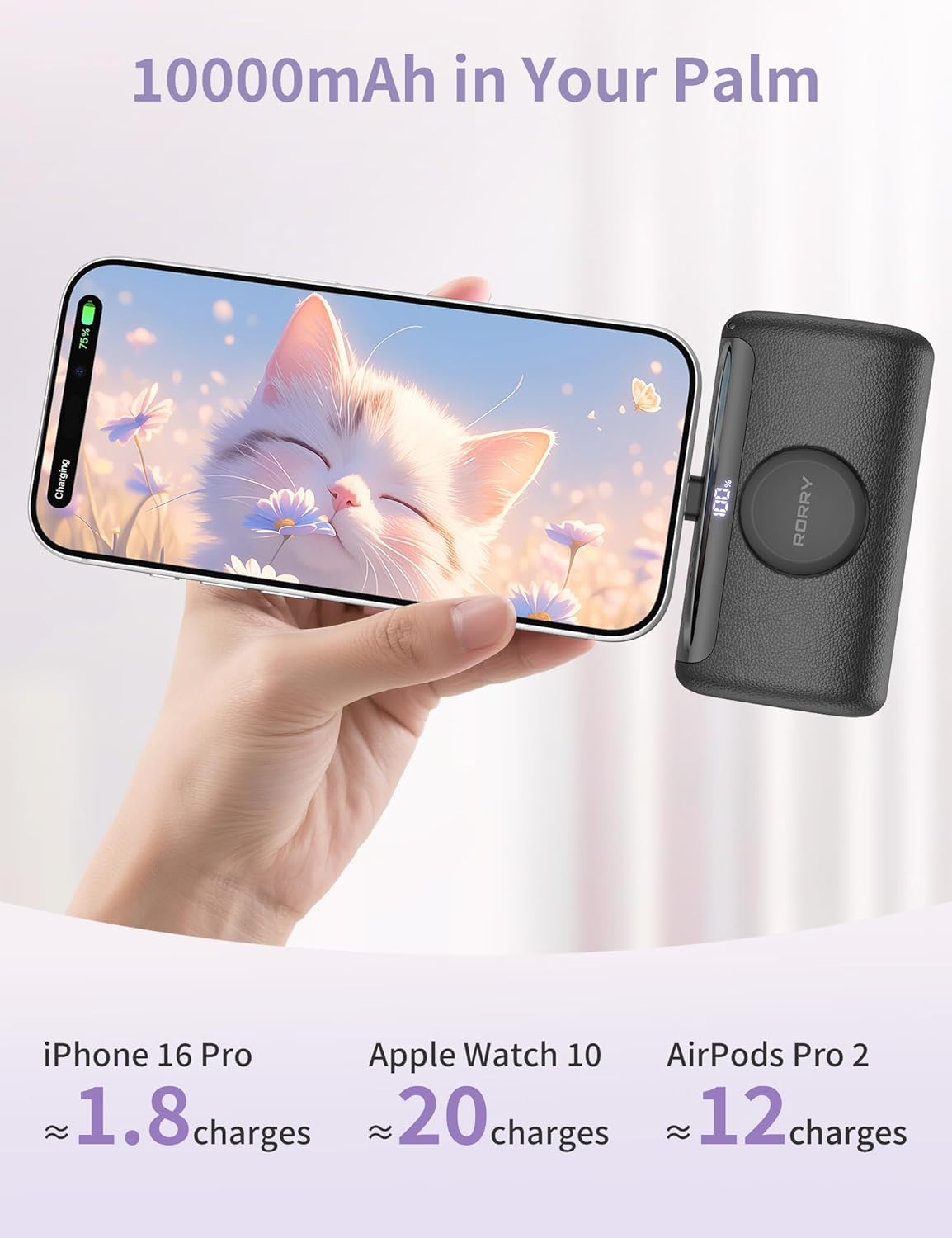
The RORRY Mini Portable Charger D5-10000 is a compact and versatile power bank designed to keep your devices charged on the go. With a 10,000mAh capacity and 22.5W fast charging, it offers convenient power for a wide range of devices, including iPhones, Apple Watches, and iPads. Its integrated USB-C connector and magnetic wireless charger provide a cable-free charging experience, while its portable design makes it an ideal travel companion.
ബോക്സിൽ എന്താണുള്ളത്
- 1* RORRY Mini Portable Charger D5-10000
- 1* ഉപയോക്തൃ മാനുവൽ
- 2* Lanyard cables (USB-C to USB-C and USB-C to Lightning)
ഉൽപ്പന്നം കഴിഞ്ഞുview


പ്രബോധന വീഡിയോകൾ
Video: Small Power Bank for iPhone 15 - This video demonstrates the RORRY Mini Portable Charger's ability to charge an iPhone 15, highlighting its compact size and ease of use.
Video: RORRY Small Portable Charger for iPhone 15 and Apple Watch - A quick demonstration of how the RORRY charger simultaneously charges both an iPhone 15 and an Apple Watch.
Video: RORRY Mini Portable Charger 3 in 1 - This video showcases the 3-in-1 charging capabilities of the RORRY power bank, including its built-in connectors and wireless charging.
സജ്ജമാക്കുക
1. പവർ ബാങ്കിന്റെ പ്രാരംഭ ചാർജിംഗ്
- Before first use, fully charge your RORRY Mini Portable Charger.
- Extend the built-in AC plug (if available on your model) or use a USB-C cable to connect the power bank to a wall adapter or computer.
- The digital display will show the charging progress. Charge until it reaches 100%.
2. ഡിജിറ്റൽ ഡിസ്പ്ലേ മനസ്സിലാക്കൽ
ഇന്റഗ്രേറ്റഡ് ഡിജിറ്റൽ ഡിസ്പ്ലേ ശേഷിക്കുന്ന ബാറ്ററി ശതമാനം കാണിക്കുന്നു.tage of the power bank. This allows you to monitor the charge level and know when to recharge the unit.
പ്രവർത്തന നിർദ്ദേശങ്ങൾ
1. Charging Devices via Built-in USB-C Connector
- Locate the built-in USB-C connector on the power bank.
- Carefully plug the USB-C connector directly into your compatible device (e.g., iPhone 15/16/17 series, iPad Pro/Air, Android phones).
- The device should begin charging automatically. The power bank supports up to 22.5W fast charging for compatible devices.
2. Charging Apple Watch Wirelessly
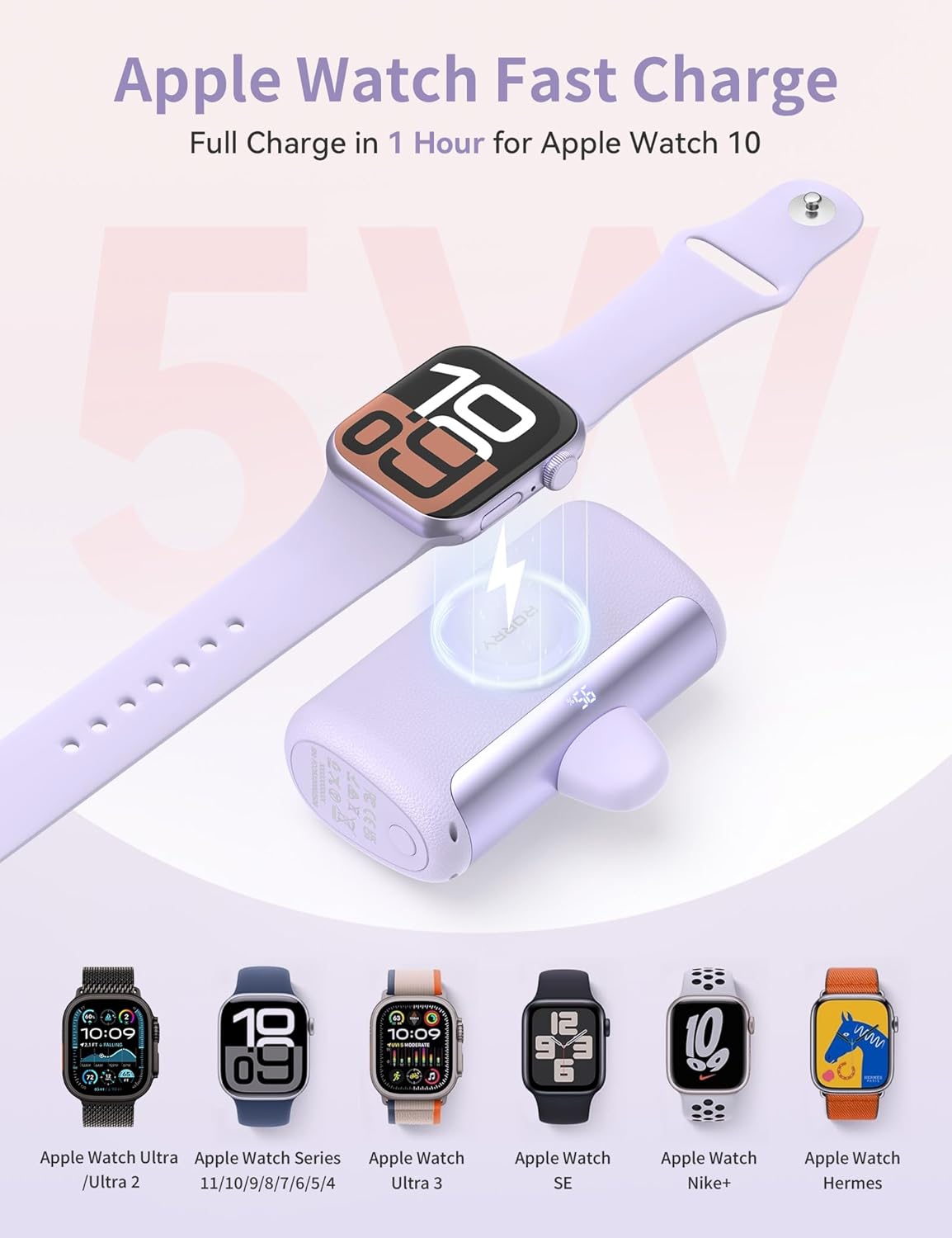
- Place your Apple Watch (Ultra/1/2/3/4/5/6/7/8/9/10/11/SE) onto the magnetic wireless charging pad on the power bank.
- Ensure the watch is properly aligned for optimal charging. The watch display will indicate charging status.
- The magnetic charger provides 5W charging, fully charging an Apple Watch Series 10 in approximately 1 hour.
3. Using External Cables with USB-C Port
- For devices requiring a different connection or for simultaneous charging, use the provided lanyard cables or your own USB-C cables.
- Connect one end of the cable to the USB-C port on the power bank and the other end to your device.
- The power bank can charge multiple devices concurrently, distributing power as needed.
മെയിൻ്റനൻസ്
- പവർ ബാങ്ക് കടുത്ത താപനില, നേരിട്ടുള്ള സൂര്യപ്രകാശം, ഈർപ്പം എന്നിവയിൽ നിന്ന് അകറ്റി നിർത്തുക.
- മൃദുവായതും ഉണങ്ങിയതുമായ തുണി ഉപയോഗിച്ച് ഉപകരണം വൃത്തിയാക്കുക. കഠിനമായ രാസവസ്തുക്കളോ ഉരച്ചിലുകളോ ഉപയോഗിക്കുന്നത് ഒഴിവാക്കുക.
- Store the power bank in a cool, dry place when not in use. For long-term storage, ensure it has at least a 50% charge to preserve battery health.
- ശക്തമായ ആഘാതങ്ങൾക്ക് ഉപകരണം ഇടുകയോ ഇടുകയോ ചെയ്യുന്നത് ഒഴിവാക്കുക.
ട്രബിൾഷൂട്ടിംഗ്
1. Device Not Charging
- Ensure the power bank is sufficiently charged (check the digital display).
- Verify that the built-in USB-C connector or external cable is securely connected to both the power bank and your device.
- For Apple Watch, ensure it is correctly placed on the magnetic charging pad.
- Try using a different cable or port to rule out a faulty connection.
2. Slow Charging
- Confirm your device supports 22.5W fast charging. Older devices may charge at a slower rate.
- വേഗത്തിലുള്ള ചാർജിംഗിനെ പിന്തുണയ്ക്കുന്ന ഉയർന്ന നിലവാരമുള്ള കേബിൾ ആണ് നിങ്ങൾ ഉപയോഗിക്കുന്നതെന്ന് ഉറപ്പാക്കുക.
- Charging multiple devices simultaneously may reduce the charging speed for each individual device.
3. Digital Display Not Working
- ഡിസ്പ്ലേ സജീവമാക്കാൻ പവർ ബട്ടൺ അമർത്തുക.
- If the display remains off, the power bank might be completely drained. Try charging the power bank.
സ്പെസിഫിക്കേഷനുകൾ
| ഉൽപ്പന്ന അളവുകൾ | 3.3 x 2.1 x 1.3 ഇഞ്ച് |
| ഇനത്തിൻ്റെ ഭാരം | 3.53 ഔൺസ് |
| ഇനം മോഡൽ നമ്പർ | D5-10000 |
| ബാറ്ററി തരം | 1 ലിഥിയം പോളിമർ ബാറ്ററികൾ ആവശ്യമാണ് (ഉൾപ്പെടുത്തിയിരിക്കുന്നു) |
| ബാറ്ററി ശേഷി | 10000 മില്ലിamp മണിക്കൂറുകൾ |
| കണക്റ്റർ തരം | IN/OUT: USB Type C*2 |
| പ്രത്യേക സവിശേഷതകൾ | Fast Charging, Digital Display, Built-In USB-C Connector, Lightweight, Pocket Size, Short Circuit Protection, Airline Approved Travel Charger, Scratch Resistant |
വാറൻ്റിയും പിന്തുണയും
RORRY is committed to providing excellent customer service. Your RORRY Mini Portable Charger D5-10000 comes with the following support:
- 7x24H വിൽപ്പനാനന്തര സേവനം: ഏതെങ്കിലും അന്വേഷണങ്ങൾക്കോ പ്രശ്നങ്ങൾക്കോ സമർപ്പിത പിന്തുണ മുഴുവൻ സമയവും ലഭ്യമാണ്.
- 30 ദിവസത്തെ എക്സ്ചേഞ്ച് സേവനം: If you encounter any problems within 30 days of purchase, you are eligible for an exchange.
- 12 മാസത്തെ പരിചരണ പദ്ധതി: Enjoy peace of mind with a 12-month care plan covering potential defects or malfunctions.
For further assistance, please refer to the contact information provided on the product packaging or visit the official RORRY webസൈറ്റ്.