
ആമുഖം
This manual provides detailed instructions for the setup, operation, and maintenance of your LONPOO 128b-EU Micro HiFi Compact Stereo System. Please read this manual thoroughly before using the product to ensure proper function and to maximize your listening experience.
ഉൽപ്പന്ന സവിശേഷതകൾ
- Top-loading CD Player compatible with CD/CD-R/CD-RW discs.
- വയർലെസ് ഓഡിയോ സ്ട്രീമിംഗിനായി ബ്ലൂടൂത്ത് കണക്റ്റിവിറ്റി.
- FM Radio (87.5 - 108 MHz) with auto scan and 30 preset stations.
- USB port for MP3/WMA playback.
- 3.5mm AUX-in for connecting external audio devices.
- 30W (2 x 15W RMS) / 50W max audio output with DSP technology.
- Memory function and 3 repeat modes (One/All/Random).
- 5 Equalizer modes (Flat, Classic, Rock, Pop, Jazz).
- Compact design with included remote control.
ബോക്സിൽ എന്താണുള്ളത്
- 1x LONPOO 128b-EU Micro HiFi Compact Stereo System
- 2x Stereo Speakers
- 1x Remote Control (2 AAA batteries not included)
- 1x ഉപയോക്തൃ മാനുവൽ
സജ്ജീകരണ നിർദ്ദേശങ്ങൾ
Follow these steps to set up your stereo system:
- സ്പീക്കർ കണക്ഷൻ: Connect the speaker wires from the two stereo speakers to the 'Speakers Output' terminals on the back of the main unit. Ensure correct polarity (red to red, black to black).
- പവർ കണക്ഷൻ: Insert the power cord into the 'AC IN' jack on the back of the unit, then plug the other end into a standard wall outlet.
- എഫ്എം ആന്റിന: Connect the FM antenna to the 'FM Antenna' port on the back. For optimal reception, extend the antenna fully and position it away from other electronic devices.
- പ്രാരംഭ പവർ ഓൺ: Press the 'Power' button on the unit or the remote control to turn on the system.

Figure 1: Rear panel connections for easy setup. (1) Speakers Output, (2) AC IN, (3) Power on/off, (4) FM Antenna, (5) AUX in.

Figure 2: Detailed diagram of the front and back panels, highlighting controls and connection points.
പ്രവർത്തന നിർദ്ദേശങ്ങൾ
പൊതു നിയന്ത്രണങ്ങൾ
The system can be operated using the buttons on the front panel or the included remote control. The main controls include:
- പവർ ബട്ടൺ: യൂണിറ്റ് ഓണാക്കുകയോ ഓഫാക്കുകയോ ചെയ്യുന്നു.
- MODE/EQ Button: Switches between input sources (CD, Bluetooth, FM, USB, AUX) and cycles through equalizer presets.
- Play/Pause/Scan Button: Starts/pauses playback or initiates FM auto-scan.
- Stop/Repeat/Program Button: Stops playback, cycles through repeat modes (One/All/Random), or programs CD tracks.
- Previous/Fast Backward Button: Skips to the previous track or fast rewinds.
- Next/Fast Forward Button: അടുത്ത ട്രാക്കിലേക്ക് പോകുക അല്ലെങ്കിൽ വേഗത്തിൽ മുന്നോട്ട് പോകുക.
- വോളിയം നോബ്: മാസ്റ്റർ വോളിയം ക്രമീകരിക്കുന്നു.
- USB പോർട്ട്: USB സംഭരണ ഉപകരണങ്ങൾ ബന്ധിപ്പിക്കുന്നതിന്.
- ഹെഡ്ഫോൺ ജാക്ക്: 3.5mm ഹെഡ്ഫോണുകൾ ഉപയോഗിച്ച് സ്വകാര്യ ശ്രവണത്തിനായി.

Figure 3: The Micro HiFi System's display and controls, showing equalizer, repeat, and memory functions.
സിഡി പ്ലേബാക്ക്
- Press the 'MODE' button to select CD mode.
- Open the top-loading CD door.
- Place a CD (CD/CD-R/CD-RW) onto the spindle with the label side facing up.
- Close the CD door. The system will read the disc, and the track number and playback time will appear on the display.
- Press the 'Play/Pause' button to start playback.
- Use the 'Previous' and 'Next' buttons to skip tracks.
- Press the 'Repeat' button to cycle through repeat modes: Repeat One, Repeat All, or Random Play.

Figure 4: Top-loading CD player in operation, supporting CD/CD-R/CD-RW discs.
ബ്ലൂടൂത്ത് മോഡ്
- Press the 'MODE' button to select Bluetooth mode. The display will show "BT" and flash, indicating it's ready for pairing.
- നിങ്ങളുടെ സ്മാർട്ട്ഫോണിലോ, ടാബ്ലെറ്റിലോ, മറ്റ് ബ്ലൂടൂത്ത് പ്രവർത്തനക്ഷമമാക്കിയ ഉപകരണത്തിലോ, ബ്ലൂടൂത്ത് പ്രവർത്തനക്ഷമമാക്കി ലഭ്യമായ ഉപകരണങ്ങൾക്കായി തിരയുക.
- Select "LONPOO 128b-EU" from the list of devices.
- Once paired, the display will stop flashing, and you can stream audio from your device to the stereo system.

Figure 5: Bluetooth connectivity, allowing wireless audio streaming from compatible devices.
എഫ്എം റേഡിയോ
- Press the 'MODE' button to select FM Radio mode.
- To auto-scan and save stations: Press and hold the 'Play/Pause/Scan' button. The system will automatically scan for and save up to 30 available FM stations.
- To manually tune: Use the 'Previous' and 'Next' buttons for fine-tuning or to navigate through saved presets.

Figure 6: FM Radio function, showing a frequency display and indicating good reception.
USB പ്ലേബാക്ക്
- MP3 അല്ലെങ്കിൽ WMA ഓഡിയോ അടങ്ങിയ യുഎസ്ബി ഫ്ലാഷ് ഡ്രൈവ് ചേർക്കുക fileമുൻ പാനലിലെ USB പോർട്ടിലേക്ക് s.
- Press the 'MODE' button to select USB mode. The system will automatically begin playing the audio files.
- Use the 'Previous', 'Next', 'Play/Pause', and 'Stop/Repeat' buttons to control playback.
AUX-in മോഡ്
- Connect an external audio device (e.g., smartphone, MP3 player) to the 'AUX-in' port on the back of the unit using a 3.5mm audio cable (not included).
- Press the 'MODE' button to select AUX mode.
- Control playback directly from your connected external device. Adjust the volume using the system's volume knob.
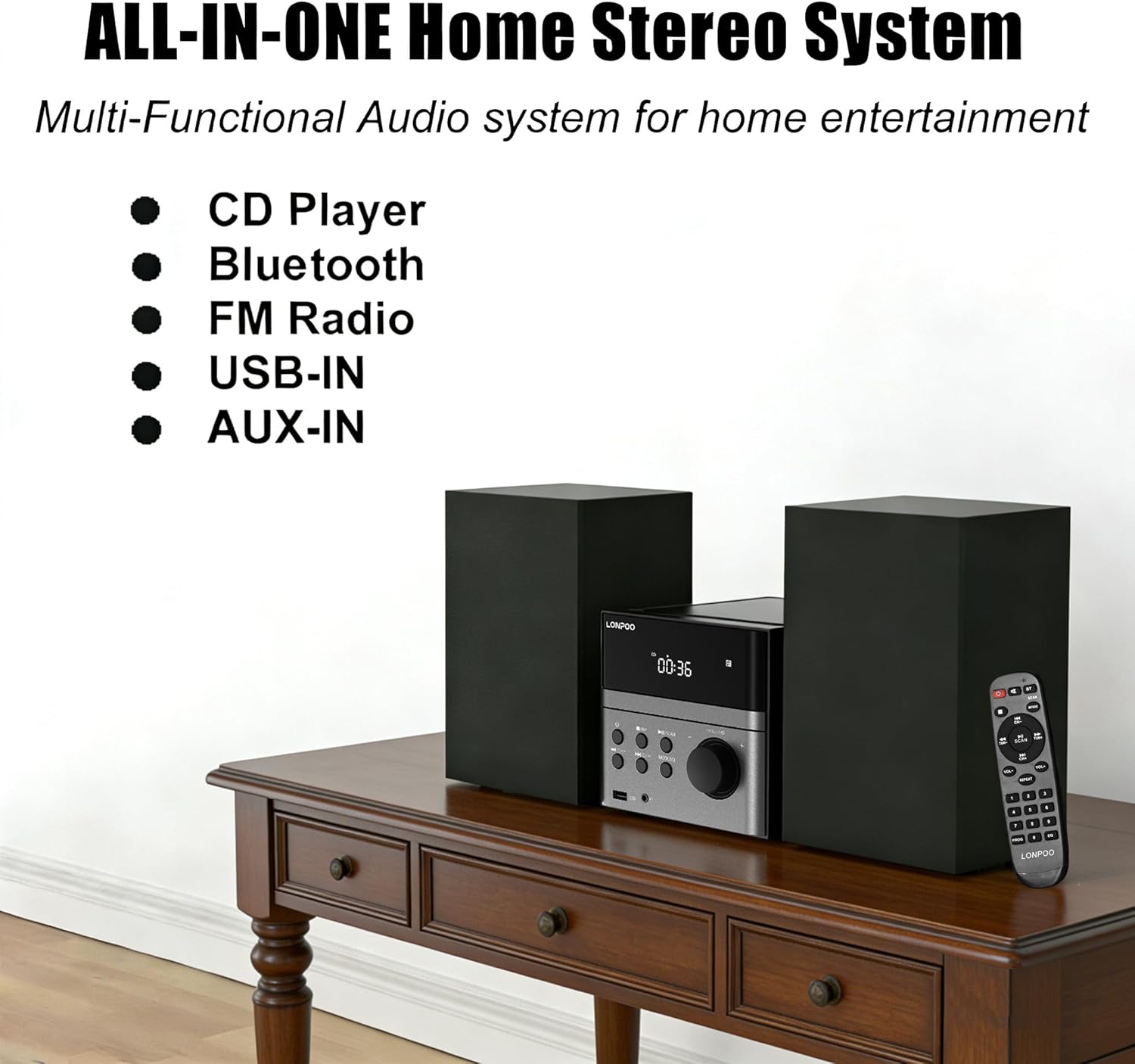
Figure 7: All-in-one home stereo system, illustrating its multi-functional audio capabilities.
ഇക്വലൈസർ ക്രമീകരണങ്ങൾ
Press the 'EQ' button (part of the MODE/EQ button) repeatedly to cycle through the available equalizer presets: Flat, Classic, Rock, Pop, and Jazz. Select the setting that best suits your audio preference.
മെയിൻ്റനൻസ്
To ensure the longevity and optimal performance of your LONPOO 128b-EU stereo system, follow these maintenance guidelines:
- വൃത്തിയാക്കൽ: Use a soft, dry cloth to clean the exterior surfaces of the unit and speakers. Do not use abrasive cleaners, waxes, or solvents as they may damage the finish.
- CD Player Care: Keep the CD compartment clean. If the lens is dirty, use a specialized CD lens cleaner disc. Avoid touching the lens directly.
- വെൻ്റിലേഷൻ: യൂണിറ്റിന് ആവശ്യത്തിന് വായുസഞ്ചാരം ഉണ്ടെന്ന് ഉറപ്പാക്കുക. വെന്റിലേഷൻ ദ്വാരങ്ങളൊന്നും തടയരുത്.
- പ്ലേസ്മെൻ്റ്: Place the unit on a stable, flat surface away from direct sunlight, heat sources, excessive dust, moisture, or strong magnetic fields.
- പവർ ഓഫ്: Always turn off the system and unplug it from the power outlet before cleaning or when not in use for extended periods.
ട്രബിൾഷൂട്ടിംഗ്
If you encounter any issues with your stereo system, refer to the following common problems and solutions:
| പ്രശ്നം | സാധ്യമായ കാരണം | പരിഹാരം |
|---|---|---|
| ശക്തിയില്ല | പവർ കോർഡ് ബന്ധിപ്പിച്ചിട്ടില്ല; പവർ ഔട്ട്ലെറ്റ് സജീവമല്ല. | പവർ കോർഡ് യൂണിറ്റിലേക്കും പ്രവർത്തിക്കുന്ന ഒരു ഔട്ട്ലെറ്റിലേക്കും സുരക്ഷിതമായി പ്ലഗ് ചെയ്തിട്ടുണ്ടെന്ന് ഉറപ്പാക്കുക. |
| ശബ്ദമില്ല | Volume too low; Incorrect input mode; Speakers not connected | Increase volume; Select correct input mode (CD, BT, FM, USB, AUX); Check speaker connections. |
| സിഡി പ്ലേ ചെയ്യുന്നില്ല | Disc inserted incorrectly; Disc is dirty or scratched; Disc format not supported | Insert disc correctly (label side up); Clean or replace disc; Ensure disc is CD/CD-R/CD-RW format. |
| ബ്ലൂടൂത്ത് കണക്റ്റ് ചെയ്യുന്നില്ല | Device not in pairing mode; Stereo system not in Bluetooth mode; Device too far | Ensure both devices are in pairing mode; Select Bluetooth mode on stereo; Move devices closer. |
| മോശം എഫ്എം സ്വീകരണം | Antenna not extended or positioned correctly; Interference | Extend and reposition the FM antenna; Move away from other electronic devices. |
| USB പ്ലേബാക്ക് പ്രശ്നങ്ങൾ | USB drive not formatted correctly; Unsupported file ഫോർമാറ്റ് | Ensure USB drive is FAT32 formatted; Check if fileകൾ MP3/WMA ആണ്. |
സ്പെസിഫിക്കേഷനുകൾ
| ഫീച്ചർ | വിശദാംശങ്ങൾ |
|---|---|
| മോഡൽ നമ്പർ | 128b-EU |
| പവർ ഔട്ട്പുട്ട് | 30W (2 x 15W RMS) / 50W Max |
| കണക്റ്റിവിറ്റി | Bluetooth, USB, AUX-in |
| സിഡി അനുയോജ്യത | CD, CD-R, CD-RW |
| USB ഓഡിയോ ഫോർമാറ്റുകൾ | MP3, WMA |
| എഫ്എം ഫ്രീക്വൻസി റേഞ്ച് | 87.5 - 108 മെഗാഹെട്സ് |
| ഫ്രീക്വൻസി പ്രതികരണം | 20Hz - 20KHz |
| സ്പീക്കറുകളുടെ എണ്ണം | 2 (സ്റ്റീരിയോ) |
| പവർ ഉറവിടം | AC Cable (110-240V/50-60Hz) |
| ഉൽപ്പന്ന അളവുകൾ (L x W x H) | 42 x 27.9 x 16.5 സെ.മീ (16.5 x 11 x 6.5 ഇഞ്ച്) |
| ഉൽപ്പന്ന ഭാരം | 1.1 കി.ഗ്രാം (2.4 പൗണ്ട്) |
| നിർമ്മാതാവ് | ലോൺപൂ |
| മാതൃരാജ്യം | ചൈന |
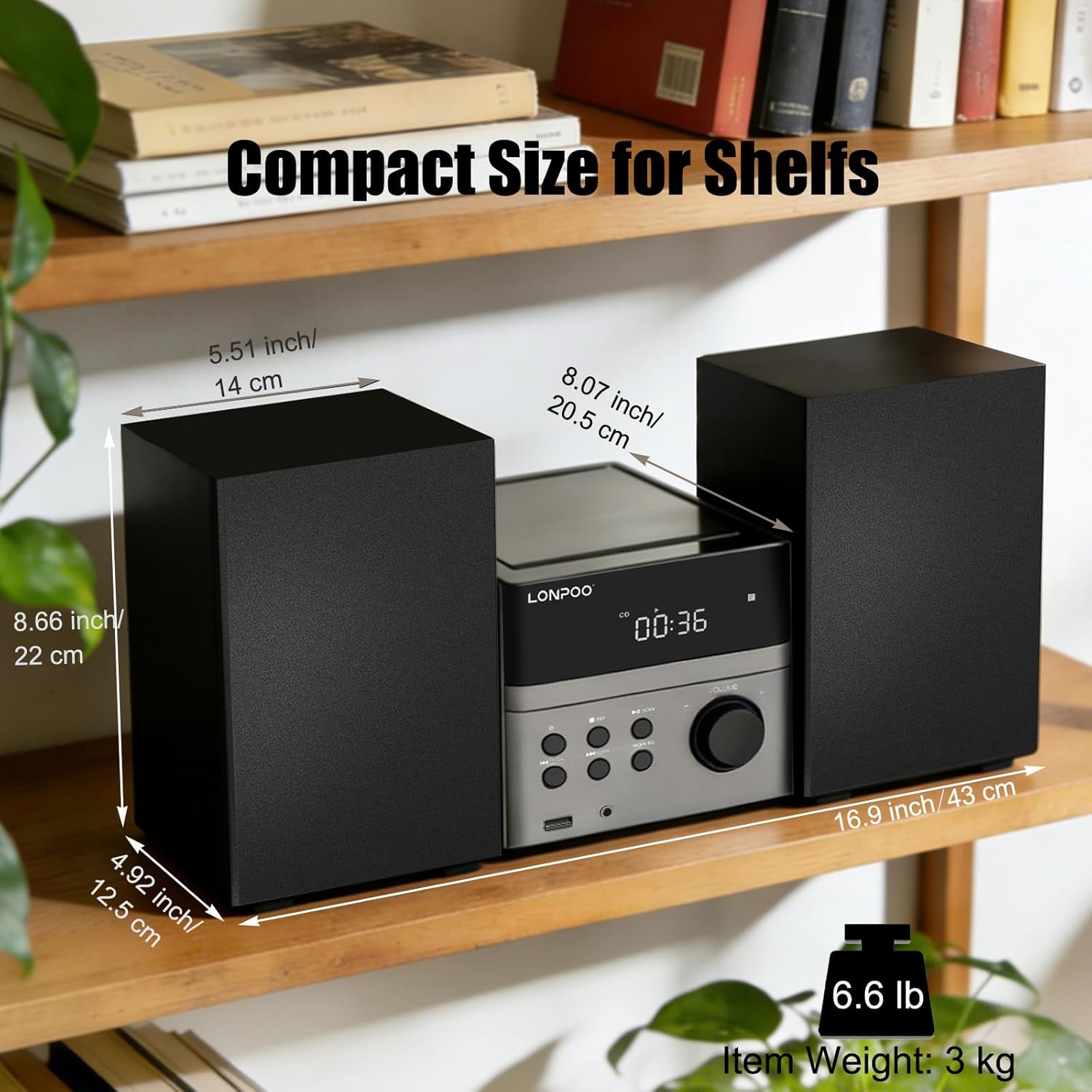
Figure 8: Dimensions of the compact stereo system, suitable for various shelf placements.
വാറൻ്റി വിവരങ്ങൾ
The LONPOO 128b-EU Micro HiFi Compact Stereo System comes with a 1 വർഷത്തെ വാറൻ്റി വാങ്ങിയ തീയതി മുതൽ. സാധാരണ ഉപയോഗത്തിലുള്ള നിർമ്മാണ വൈകല്യങ്ങളും പ്രവർത്തനക്ഷമതയും ഈ വാറന്റി ഉൾക്കൊള്ളുന്നു. ദുരുപയോഗം, അപകടങ്ങൾ, അനധികൃത പരിഷ്കാരങ്ങൾ, അല്ലെങ്കിൽ സാധാരണ തേയ്മാനം എന്നിവ മൂലമുണ്ടാകുന്ന നാശനഷ്ടങ്ങൾക്ക് ഇത് പരിരക്ഷ നൽകുന്നില്ല.
Please retain your proof of purchase for warranty claims. For warranty service, please contact customer support as detailed in the Support section.
ഉപഭോക്തൃ പിന്തുണ
If you require further assistance, have questions not covered in this manual, or need to make a warranty claim, please contact LONPOO customer support.
For the most up-to-date support information, including contact details and FAQs, please visit the official LONPOO webസൈറ്റ് അല്ലെങ്കിൽ നിങ്ങളുടെ വാങ്ങൽ ഡോക്യുമെന്റേഷനോടൊപ്പം നൽകിയിരിക്കുന്ന കോൺടാക്റ്റ് വിവരങ്ങൾ റഫർ ചെയ്യുക.