
1. ആമുഖം
The Rapoo VT0 MAX is a high-performance wireless gaming mouse engineered for competitive players. It features an ultra-lightweight design and an ergonomic right-handed shape, providing comfort and precision during extended gaming sessions. With dual-mode connectivity (2.4G wireless and USB-C wired) and 8K polling rate support, the mouse ensures instant click registration with minimal latency. The advanced PAW3950 Ultimate optical sensor offers up to 45,000 DPI, flawless tracking, and esports-level accuracy. An 800mAh rechargeable battery delivers up to 750 hours of continuous use, and programmable buttons with cross-platform software allow for extensive customization.
2. പാക്കേജ് ഉള്ളടക്കം
നിങ്ങളുടെ പാക്കേജിൽ എല്ലാ ഇനങ്ങളും ഉണ്ടെന്ന് ഉറപ്പാക്കുക:
- Rapoo VT0 MAX Wireless Gaming Mouse
- 2.4G USB Receiver (Dongle)
- USB-C മുതൽ USB-A ചാർജിംഗ്/ഡാറ്റ കേബിൾ വരെ
- USB-A to USB-C Adapter (Dongle Extender)
- Mouse Grip Tape / Anti-slip Stickers
- ഉപയോക്തൃ മാനുവൽ (ഈ പ്രമാണം)
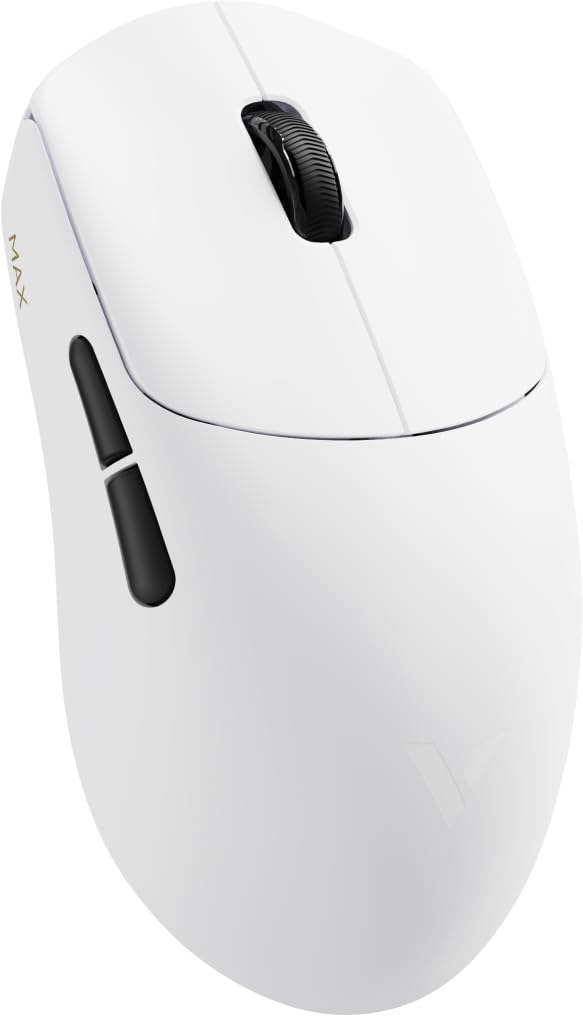
Image: Rapoo VT0 MAX Wireless Gaming Mouse with its included accessories, including the USB-C cable and 2.4G receiver.
3. സജ്ജീകരണം
3.1 പ്രാരംഭ ചാർജിംഗ്
Before first use, fully charge the mouse using the provided USB-C cable. Connect the USB-C end to the mouse and the USB-A end to a powered USB port on your computer or a USB charger. The LED indicator on the mouse will show charging status.
3.2 2.4G വയർലെസ് കണക്ഷൻ
- Locate the 2.4G USB receiver. It may be stored in a compartment on the underside of the mouse.
- Plug the USB receiver directly into an available USB-A port on your computer. For optimal signal, use the provided USB-A to USB-C adapter and cable to position the receiver closer to the mouse.
- താഴെയുള്ള പവർ സ്വിച്ച് ഉപയോഗിച്ച് മൗസ് ഓണാക്കുക.
- മൗസ് നിങ്ങളുടെ കമ്പ്യൂട്ടറിലേക്ക് യാന്ത്രികമായി കണക്റ്റുചെയ്യണം.
3.3 USB-C വയർഡ് കണക്ഷൻ
To use the mouse in wired mode, simply connect the USB-C cable from the mouse to a USB-C port on your computer. The mouse will function as a wired device and charge simultaneously.
3.4 Software Installation (A Hub)
For full customization, including DPI settings, button remapping, and lighting control, download and install the A Hub software from the official Rapoo webസൈറ്റ്. ഈ സോഫ്റ്റ്വെയർ വിൻഡോസിലും മാകോസിലും പൊരുത്തപ്പെടുന്നു.
4. പ്രവർത്തന നിർദ്ദേശങ്ങൾ
4.1 പവർ ഓൺ/ഓഫ്
Use the switch on the bottom of the mouse to turn it on or off. Turning off the mouse when not in use helps conserve battery life.
4.2 കണക്റ്റിവിറ്റി മോഡുകൾ മാറൽ
The mouse automatically switches to wired mode when connected via USB-C cable. Disconnect the cable to revert to 2.4G wireless mode (ensure the USB receiver is plugged in and the mouse is powered on).
4.3 ഡിപിഐ അഡ്ജസ്റ്റ്മെന്റ്
The Rapoo VT0 MAX features a PAW3950 Ultimate optical sensor with a DPI range of 100 to 45,000. Use the dedicated DPI button (usually located behind the scroll wheel) to cycle through preset DPI levels. Customize these levels and add more through the A Hub software.
4.4 പ്രോഗ്രാം ചെയ്യാവുന്ന ബട്ടണുകൾ
The mouse has 7 buttons that can be programmed using the A Hub software. Assign macros, keyboard functions, or multimedia controls to enhance your gaming and productivity.
4.5 ബാറ്ററി നില
The mouse is equipped with an 800mAh rechargeable battery. Battery status can be monitored via the A Hub software or through an indicator light on the mouse (refer to the software manual for specific light patterns).
5. സവിശേഷതകളും സവിശേഷതകളും

ചിത്രം: ദൃശ്യപരതview of Rapoo VT0 MAX features including dimensions, weight, sensor, polling rate, switches, and battery capacity.
5.1 പ്രധാന സവിശേഷതകൾ
- PAW3950 Ultimate Optical Sensor: Delivers 100–45,000 DPI, 750 IPS, and 50G acceleration. Tracks flawlessly on glass and adapts to various gaming surfaces.
- 800mAh Long-Lasting Battery: Provides up to 750 hours of continuous use on a single charge. Designed for extended gaming sessions without interruptions.
- ഡ്യുവൽ-മോഡ് കണക്റ്റിവിറ്റി: Offers flexibility with USB-C wired play or advanced 2.4G wireless. Powered by V+Wireless 2.0 for 8K polling, long-range stability, strong anti-interference, and low latency.
- Optimized PCB Design: Compact and balanced circuit layout enhances signal stability and responsiveness for smoother tracking and faster reactions.
- Nordic MCU: Built with a Nordic 54L15 MCU for efficient processing, low power consumption, and stable wireless transmission.
- Customizable Driver: Full support through A Hub software for profile management, key remapping, and lighting control. Compatible with Windows & macOS, with onboard and cloud storage for personalized settings.
5.2 സാങ്കേതിക സവിശേഷതകൾ
| സ്പെസിഫിക്കേഷൻ | വിശദാംശങ്ങൾ |
|---|---|
| ബ്രാൻഡ് | റാപൂ |
| മോഡലിൻ്റെ പേര് | VT0 MAX |
| നിറം | വെള്ള |
| കണക്റ്റിവിറ്റി ടെക്നോളജി | 2.4G വയർലെസ്സ്, USB-C വയേർഡ് |
| മൂവ്മെന്റ് ഡിറ്റക്ഷൻ ടെക്നോളജി | Optical (PAW3950 Ultimate Sensor) |
| ഡിപിഐ ശ്രേണി | 100-45,000 ഡിപിഐ |
| പോളിംഗ് നിരക്ക് | 8000Hz വരെ |
| ത്വരണം | 50G |
| ഐപിഎസ് (ട്രാക്കിംഗ് വേഗത) | 750 ഐ.പി.എസ് |
| ബാറ്ററി ശേഷി | 800mAh |
| ബാറ്ററി ലൈഫ് | 750 മണിക്കൂർ വരെ |
| ബട്ടണുകളുടെ എണ്ണം | 7 (പ്രോഗ്രാം ചെയ്യാവുന്നത്) |
| കൈ ഓറിയൻ്റേഷൻ | ശരിയാണ് |
| അനുയോജ്യമായ ഉപകരണങ്ങൾ | Personal Computer (Windows, macOS) |
| യു.പി.സി | 840096102376 |
6. പരിപാലനം
6.1 മൗസ് വൃത്തിയാക്കൽ
To maintain optimal performance and hygiene, regularly clean your mouse. Use a soft, dry cloth to wipe the surface. For stubborn dirt, slightly dampവെള്ളം അല്ലെങ്കിൽ നേരിയ ക്ലീനിംഗ് ലായനി ഉപയോഗിച്ച് തുണി തുടയ്ക്കുക. കഠിനമായ രാസവസ്തുക്കളോ ഉരച്ചിലുകളോ ഉള്ള വസ്തുക്കൾ ഉപയോഗിക്കുന്നത് ഒഴിവാക്കുക.
6.2 ബാറ്ററി കെയർ
The 800mAh rechargeable battery is designed for long life. To prolong its lifespan:
- ബാറ്ററി ഇടയ്ക്കിടെ പൂർണ്ണമായും ഡിസ്ചാർജ് ചെയ്യുന്നത് ഒഴിവാക്കുക.
- ദീർഘനേരം ഉപയോഗിക്കാത്തപ്പോൾ തണുത്തതും വരണ്ടതുമായ സ്ഥലത്ത് മൗസ് സൂക്ഷിക്കുക.
- ചാർജ് ചെയ്യുന്നതിന് നൽകിയിരിക്കുന്ന USB-C കേബിൾ മാത്രം ഉപയോഗിക്കുക.
6.3 സെൻസർ ക്ലീനിംഗ്
Occasionally, dust or debris may accumulate around the optical sensor on the underside of the mouse, affecting tracking performance. Use a can of compressed air to gently blow away any particles.
7. പ്രശ്നപരിഹാരം
7.1 മൗസ് പ്രതികരിക്കുന്നില്ല
- പവർ പരിശോധിക്കുക: മൗസ് ഓണാണെന്ന് ഉറപ്പാക്കുക.
- ബാറ്ററി നില: ബാറ്ററി കുറവാണെങ്കിൽ മൗസ് ചാർജ് ചെയ്യുക.
- വയർലെസ് കണക്ഷൻ: For 2.4G wireless, ensure the USB receiver is securely plugged into a working USB port and is within range. Try a different USB port.
- വയർഡ് കണക്ഷൻ: For USB-C wired, ensure the cable is securely connected to both the mouse and the computer. Try a different USB-C port or cable.
- വീണ്ടും ജോടി: If using wireless, try re-pairing the mouse with the receiver (refer to A Hub software for specific instructions if needed).
7.2 Inconsistent Tracking or Lag
- ഉപരിതലം: Ensure you are using the mouse on a suitable surface. The PAW3950 sensor tracks on glass, but a good quality mouse pad is recommended for optimal performance.
- സെൻസർ ശുചിത്വം: മെയിന്റനൻസ് വിഭാഗത്തിൽ വിവരിച്ചിരിക്കുന്നതുപോലെ ഒപ്റ്റിക്കൽ സെൻസർ വൃത്തിയാക്കുക.
- ഇടപെടൽ: In wireless mode, other wireless devices or strong electromagnetic fields can cause interference. Try moving the USB receiver closer to the mouse using the extender cable.
- DPI ക്രമീകരണങ്ങൾ: Adjust DPI settings via the mouse button or A Hub software.
7.3 A Hub Software Not Detecting Mouse
- കണക്ഷൻ: Ensure the mouse is connected to the computer (either wired or wirelessly with the receiver).
- സോഫ്റ്റ്വെയർ പതിപ്പ്: Make sure you have the latest version of the A Hub software installed.
- പുനരാരംഭിക്കുക: നിങ്ങളുടെ കമ്പ്യൂട്ടർ പുനരാരംഭിച്ച് വീണ്ടും ശ്രമിക്കുക.
8. വാറൻ്റിയും പിന്തുണയും
8.1 വാറൻ്റി വിവരങ്ങൾ
This Rapoo VT0 MAX Wireless Gaming Mouse comes with a 14 ദിവസത്തെ വാറൻ്റി from the date of purchase. Please retain your proof of purchase for any warranty claims. The warranty covers manufacturing defects but does not cover damage caused by misuse, accidents, or unauthorized modifications.
8.2 ഉപഭോക്തൃ പിന്തുണ
For further assistance, technical support, or to download the latest A Hub software, please visit the official Rapoo webസൈറ്റ് അല്ലെങ്കിൽ Rapoo Store on Amazon.
9. ഉൽപ്പന്ന വീഡിയോകൾ
Rapoo VT0 MAX Gaming Mouse Overview
വീഡിയോ: ഒരു ഔദ്യോഗിക വിൽപ്പനക്കാരന്റെ വീഡിയോ ഷോasing the Rapoo VT0 MAX Gaming Mouse, highlighting its design and features.
RAPOO VT7 MAX Gaming Mouse True 8K Wireless Polling Rate
Video: An official seller video demonstrating the 8K wireless polling rate feature, relevant to the VT0 MAX's performance capabilities.