
1. ആമുഖം
The llano S850 Wireless HDMI Transmitter and Receiver provides a convenient solution for wirelessly extending or mirroring your device's screen to a larger display. This device supports Ultra 4K decode input and 1080P@60Hz output, utilizing dual-band 5G+2.4G technology for stable and smooth transmission. It offers plug-and-play functionality, eliminating the need for complex setups, Wi-Fi, apps, or Bluetooth for primary operation.
2. ബോക്സിൽ എന്താണുള്ളത്?
- 1 x llano S850 Wireless HDMI Transmitter (TX)
- 1 x llano S850 Wireless HDMI Receiver (RX)
- 1 x HDMI Extension Cable
- 1 x USB Power Cable (for Receiver)
- 1 x ഉപയോക്തൃ മാനുവൽ
3. ഉൽപ്പന്ന സവിശേഷതകൾ
- Dual Connection Modes: Supports traditional Transmitter/Receiver mode for automatic connection and a Receiver-only mode for direct mirroring from compatible devices.
- പ്ലഗ് ആൻഡ് പ്ലേ: No need for messy cables, Wi-Fi, apps, Bluetooth, or complicated setup. Connects in seconds.
- Ultra HD Quality: Dual-band chip (5G + 2.4G) supports 1080P@60Hz Ultra HD output for a clear visual experience.
- Extended Wireless Transmission: Up to 165 ft (50M) transmission distance with strong and stable signal, even through obstacles.
- ഉപയോഗിക്കുമ്പോൾ ചാർജ് ചെയ്യുക: The Type-C charging port on the transmitter allows charging of smartphones and laptops while mirroring.
- Mirroring and Extended Display: Easily mirror or extend your screen from laptops, cameras, or TV set-top boxes to HDTVs, projectors, or monitors.
- പോർട്ടബിൾ ഡിസൈൻ: Lightweight (48.9 grams) with a patented metallic plastic finish and included strap for easy portability.
4. സജ്ജീകരണവും ഇൻസ്റ്റാളേഷനും
4.1 Connection Method 1: Transmitter + Receiver (Plug & Play)
- Step 1: Power the Receiver (RX).
Connect the Receiver (RX) to a 5V adapter or a USB port on your monitor/TV using the provided USB power cable.

Image: The llano S850 Receiver (RX) is plugged into a TV's HDMI port and powered via a USB cable connected to the TV's USB port.
- Step 2: Connect the Receiver (RX) to Display.
Plug the Receiver (RX) into an HDMI input port on your monitor, TV, or projector. If needed, use the provided HDMI extension cable.

Image: A hand plugging the llano S850 Receiver into an HDMI port on the back of a television.
- Step 3: Connect the Transmitter (TX) to Source Device.
Plug the Transmitter (TX) into the USB-C port of your phone, tablet, or laptop. The indicator light on the TX will flash, then become solid when connected.
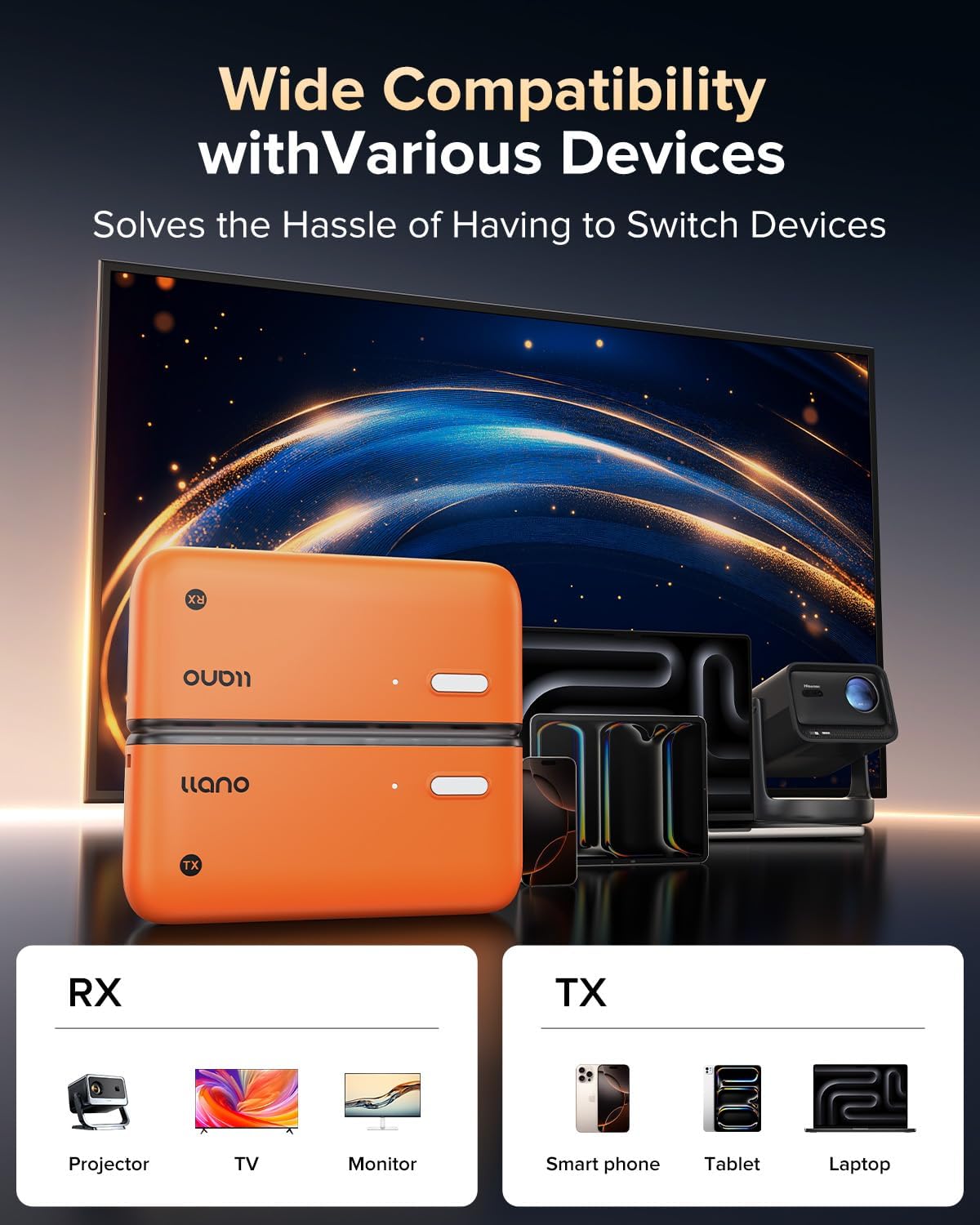
Image: The llano S850 Transmitter (TX) is plugged into the USB-C port of a laptop.
- Step 4: Automatic Connection.
The Transmitter and Receiver will automatically pair within 5-10 seconds. Your device's screen will then be mirrored to the display.
Video: A demonstration of connecting the llano S850 Wireless HDMI Transmitter and Receiver, showing the automatic pairing process and screen mirroring from a tablet to a large TV.
4.2 Connection Method 2: Receiver Only (Wireless Mirroring)
This method is for devices that support native screen mirroring (e.g., Apple AirPlay, Android Wireless Projection) and do not require the Transmitter (TX).
- Step 1: Power and Connect the Receiver (RX).
Connect the Receiver (RX) to your display's HDMI port and provide power via USB, as described in Method 1, Step 1 and 2.
- Step 2: Switch Display Input.
Switch your display's input to the HDMI port where the Receiver is connected. You will see the llano S850 startup screen.
- Step 3: Initiate Screen Mirroring from your Device.
- Android ഫോൺ: Pull down the notification bar, click the "Wireless Projection" icon, and select "LLANO-S850".
- ആപ്പിൾ ഫോൺ: Click the floating circle, swipe down the menu, select "Screen Mirroring", find "LLANO-S850", and enter the "Pin code" displayed on the TV (e.g., "1538").
- AppleMac: Click the floating circle, swipe down the menu, select "Screen Mirroring", find "LLANO-S850", and enter the "Pin code" displayed on the TV (e.g., "1538").
- Windows 10 above: Press "Windows key + K", select the device, and find "LLANO-S850".

Image: Visual guide for connecting the llano S850 Receiver in wireless mirroring mode for Android, Apple iPhone, Apple Mac, and Windows devices.
4.3 അനുയോജ്യത
The llano S850 is compatible with a wide range of devices. Ensure your device has a USB-C port that supports DisplayPort Alternate Mode (DP Alt Mode) for transmitter functionality.
- Transmitter (TX) Compatible Devices: Smartphones (iPhone 15/16/17 Series, Samsung Galaxy S/Note/Z Series, Motorola Edge/Razr/Moto G), Tablets (iPad Pro/Air/Mini 6, Surface Pro/Go/Book), Laptops (MacBook Pro/Air, Dell XPS, Lenovo ThinkPad).
- Receiver (RX) Compatible Displays: Monitors, TVs, Projectors with HDMI input.

Image: A diagram illustrating the compatibility of the llano S850 Transmitter and Receiver with various devices like smartphones, tablets, laptops, monitors, TVs, and projectors.
5. പ്രവർത്തന നിർദ്ദേശങ്ങൾ
5.1 അടിസ്ഥാന ഉപയോഗം
- Once connected, the content from your source device will automatically appear on the connected display.
- To pause or resume casting in Transmitter/Receiver mode, press the button on the Transmitter (TX).
- To switch between landscape and portrait mode on the display (when mirroring a phone/tablet), press the button on the Receiver (RX).
Video: A short demonstration of the llano S850 Wireless HDMI Transmitter and Receiver in action, showing quick setup and screen mirroring.
5.2 Display Modes (for Laptops/PCs)
When using a laptop or PC, you can choose between two display modes:
- Copy Mode (Duplicate): The external display shows the exact same content as your laptop screen.
- വിപുലീകരിച്ച മോഡ്: The external display acts as an extension of your laptop screen, providing more desktop space.

Image: A visual comparison of Copy Mode and Extended Mode when using the llano S850 to connect a laptop to an external monitor.
5.3 Charging While Using
The Transmitter (TX) features a Type-C charging port. If your source device (e.g., smartphone, laptop) is low on power or unable to power the TX, you can connect an external 5V/2A power adapter to the TX's Type-C port to charge your device while mirroring.

Image: The llano S850 Transmitter connected to a Type-C phone, with a note indicating it supports charging for Type-C phones but not tablets or laptops.
6. പ്രശ്നപരിഹാരം
- സിഗ്നൽ ഇല്ല/കറുത്ത സ്ക്രീൻ:
- Ensure both Transmitter (TX) and Receiver (RX) are properly powered.
- Verify that the HDMI cable is securely connected to the Receiver and the display.
- Check that the display input is set to the correct HDMI port.
- Confirm your source device's USB-C port supports DisplayPort Alternate Mode (for TX connection).
- Try restarting both the source device and the display.
- Intermittent Connection/Lagging:
- Reduce the distance between the Transmitter and Receiver.
- Remove any obstacles (walls, large furniture) between the devices.
- Ensure there are no strong Wi-Fi or other wireless interference sources nearby.
- Check if the source device is adequately powered.
- Product Heating Up:
- It is normal for the product to generate some heat during use. This does not indicate a malfunction.
- Ensure adequate ventilation around the devices.
- Cannot Mirror Streaming Apps (Netflix, Hulu, etc.):
- Some streaming services may have content protection (HDCP) that prevents mirroring to external displays. This is a limitation of the content provider, not the llano S850.
7 സ്പെസിഫിക്കേഷനുകൾ
| ബ്രാൻഡ് | ലാനോ |
| മോഡൽ നമ്പർ | എസ് 850 |
| കണക്റ്റിവിറ്റി ടെക്നോളജി | HDMI |
| വയർലെസ് ടെക്നോളജി | 5G, 2.4G |
| വീഡിയോ put ട്ട്പുട്ട് മിഴിവ് | 1080P@60Hz (Ultra 4K Decode Input) |
| വീഡിയോ എൻകോഡിംഗ് | എച്ച്.264, എച്ച്.265/എച്ച്ഇവിസി |
| ട്രാൻസ്മിഷൻ ദൂരം | 165 അടി (50M) വരെ |
| ആകെ HDMI പോർട്ടുകൾ | 2 (1 on RX, 1 on TX for pass-through/power) |
| ഓഡിയോ put ട്ട്പുട്ട് മോഡ് | ചുറ്റുക |
| ഇനത്തിൻ്റെ ഭാരം | 180 ഗ്രാം |
| നിറം | ഓറഞ്ച് |
8. പരിപാലനം
- ഉപകരണം വൃത്തിയായും പൊടിയില്ലാതെയും സൂക്ഷിക്കുക. വൃത്തിയാക്കാൻ മൃദുവായതും ഉണങ്ങിയതുമായ തുണി ഉപയോഗിക്കുക.
- തീവ്രമായ ഊഷ്മാവ്, ഈർപ്പം അല്ലെങ്കിൽ നേരിട്ടുള്ള സൂര്യപ്രകാശം എന്നിവയിലേക്ക് ഉപകരണം എക്സ്പോഷർ ചെയ്യുന്നത് ഒഴിവാക്കുക.
- ഉപകരണം സ്വയം ഡിസ്അസംബ്ലിംഗ് ചെയ്യാനോ നന്നാക്കാനോ ശ്രമിക്കരുത്. സഹായത്തിന് ഉപഭോക്തൃ പിന്തുണയുമായി ബന്ധപ്പെടുക.
- ഉപയോഗത്തിലില്ലാത്തപ്പോൾ തണുത്തതും ഉണങ്ങിയതുമായ സ്ഥലത്ത് ഉപകരണം സൂക്ഷിക്കുക.
9. വാറൻ്റിയും പിന്തുണയും
llano provides a 24-month warranty coverage for the S850 Wireless HDMI Transmitter and Receiver. This includes:
- 7-Days Hassle-Free Returns: For any reason.
- 15-Days Free Replacement: For defective products.
- 18-Months Quality Issue Replacement: For manufacturing defects.
- 24/7 ഉപഭോക്തൃ പിന്തുണ: For any inquiries or assistance.
For warranty claims or technical support, please refer to the contact information provided in your product packaging or visit the official llano webസൈറ്റ്.


