1. ആമുഖം
This manual provides detailed instructions for the installation, operation, maintenance, and troubleshooting of the Generic N.H352.818 Quad-core WiFi TV Motherboard. Please read this manual thoroughly before attempting any installation or operation to ensure proper function and safety. Keep this manual for future reference.
2 സുരക്ഷാ വിവരങ്ങൾ
മദർബോർഡിന് കേടുപാടുകൾ സംഭവിക്കാതിരിക്കാനോ സ്വയം പരിക്കേൽക്കാതിരിക്കാനോ ഇനിപ്പറയുന്ന സുരക്ഷാ മുൻകരുതലുകൾ എപ്പോഴും പാലിക്കുക:
- സ്റ്റാറ്റിക് ഇലക്ട്രിസിറ്റി: Electronic components are sensitive to electrostatic discharge (ESD). Always wear an anti-static wrist strap or discharge static electricity by touching a grounded metal object before handling the motherboard.
- വൈദ്യുതി വിച്ഛേദിക്കൽ: Ensure all power sources are disconnected from the TV and motherboard before installation, removal, or maintenance.
- പ്രൊഫഷണൽ ഇൻസ്റ്റാളേഷൻ: Installation of TV motherboards often requires technical expertise. If you are unsure about any step, consult a qualified technician.
- വെൻ്റിലേഷൻ: Ensure adequate ventilation around the motherboard once installed to prevent overheating.
- ദ്രാവകവും ഈർപ്പവും: Keep the motherboard away from liquids and excessive moisture.
- വാല്യംtagഇ, കറന്റ്: This motherboard operates at 33-93V and 600mA, with a maximum power consumption of 48W. Ensure your power supply meets these specifications.
3. പാക്കേജ് ഉള്ളടക്കം
പാക്കേജ് തുറക്കുമ്പോൾ എല്ലാ ഇനങ്ങളും നിലവിലുണ്ടെന്നും നല്ല നിലയിലാണെന്നും ഉറപ്പാക്കുക:
- N.H352.818 Quad-core WiFi TV Motherboard
- (Optional, depending on retailer) വൈഫൈ ആൻ്റിന
- (Optional, depending on retailer) മൗണ്ടിംഗ് സ്ക്രൂകൾ
- ഉപയോക്തൃ മാനുവൽ (ഈ പ്രമാണം)
4. സജ്ജീകരണം
4.1 ഫിസിക്കൽ ഇൻസ്റ്റലേഷൻ
Follow these steps for the physical installation of the motherboard:
- ടിവി തയ്യാറാക്കുക: Disconnect the TV from all power sources. Carefully open the TV casing according to its service manual.
- പഴയ മദർബോർഡ് നീക്കം ചെയ്യുക: Disconnect all cables (power, display, speakers, control panel, etc.) from the existing motherboard. Carefully unmount the old motherboard.
- പുതിയ മദർബോർഡ് ഇൻസ്റ്റാൾ ചെയ്യുക: Align the N.H352.818 motherboard with the mounting holes in the TV chassis. Secure it with appropriate screws. Ensure no components are touching the metal chassis directly without insulation.
- കേബിളുകൾ ബന്ധിപ്പിക്കുക: Reconnect all necessary cables to the new motherboard. This typically includes the power supply, LVDS cable (for display), backlight cable, speaker cables, and control panel cables. Ensure all connections are firm and correctly oriented.
- വൈഫൈ ആന്റിന ഇൻസ്റ്റാൾ ചെയ്യുക: If applicable, connect the WiFi antenna to the designated connector on the motherboard.
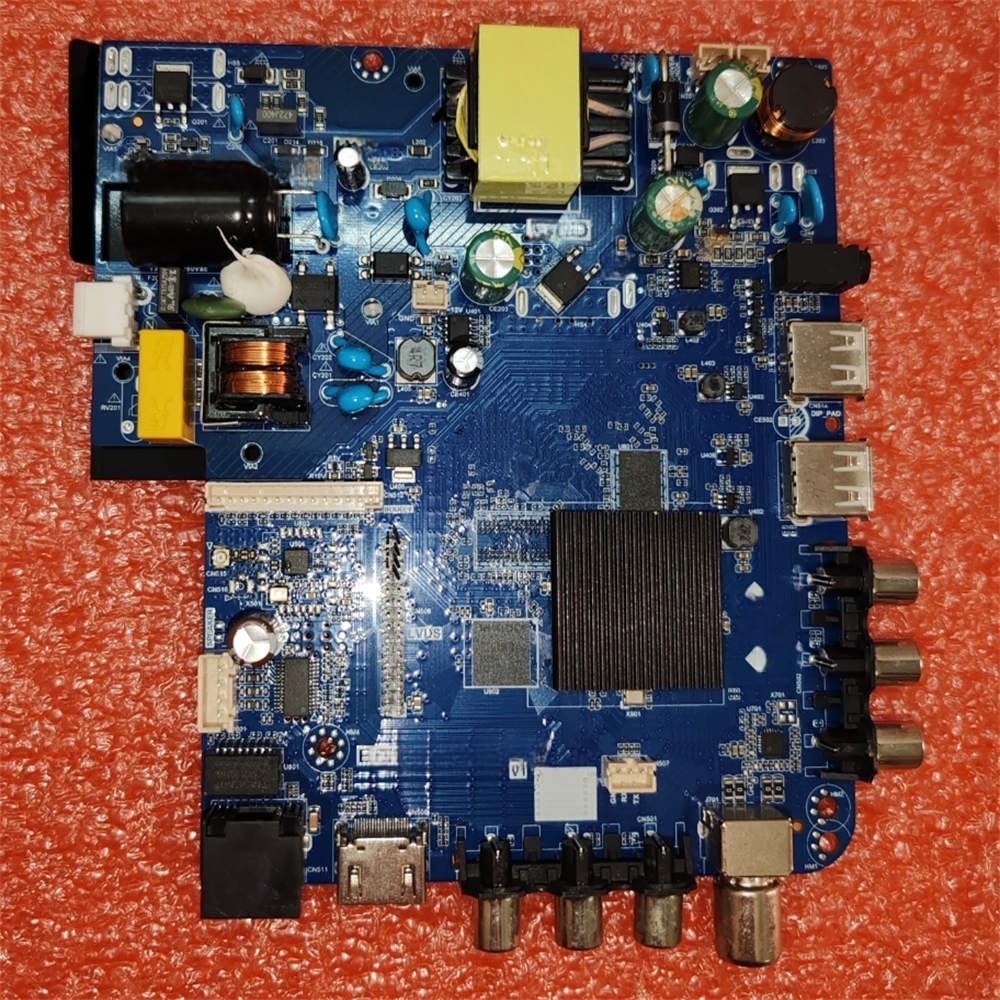
Image 1: The N.H352.818 Quad-core WiFi TV Motherboard, showing its various ports and integrated components. This image illustrates the general layout for connection reference.
4.2 പ്രാരംഭ പവർ-അപ്പ്
ഭൗതിക ഇൻസ്റ്റാളേഷന് ശേഷം:
- Close TV Casing: Carefully close the TV casing, ensuring no cables are pinched.
- പവർ ബന്ധിപ്പിക്കുക: Plug the TV's power cord into an electrical outlet.
- പവർ ഓൺ: Turn on the TV using the power button on the TV or remote control.
- പ്രാരംഭ കോൺഫിഗറേഷൻ: The TV may boot into an initial setup wizard. Follow the on-screen prompts to configure language, region, and other basic settings.
5. പ്രവർത്തിക്കുന്നു
5.1 Operating System and Features
The N.H352.818 motherboard is designed for smart TV applications, featuring a quad-core processor and integrated WiFi. The specific operating system (e.g., Android TV, Linux-based OS) will depend on the firmware loaded onto the motherboard. Refer to your TV's specific user interface guide for detailed operation of the installed OS.
5.2 Network Connectivity (WiFi)
ഒരു വയർലെസ് നെറ്റ്വർക്കിലേക്ക് കണക്റ്റുചെയ്യാൻ:
- Navigate to the TV's settings menu.
- Select 'Network' or 'WiFi Settings'.
- Enable WiFi and select your desired network from the list of available networks.
- ആവശ്യപ്പെടുകയാണെങ്കിൽ നെറ്റ്വർക്ക് പാസ്വേഡ് നൽകുക.
5.3 ഡ്രൈവർ ഇൻസ്റ്റലേഷൻ
In most TV applications, drivers are pre-installed with the firmware. However, if you are using a custom firmware or experiencing issues, ensure all necessary drivers for the motherboard's components (e.g., display, audio, WiFi) are correctly installed. Consult the firmware provider's documentation for driver management.
6. പരിപാലനം
Proper maintenance ensures the longevity and optimal performance of your motherboard:
- വൃത്തിയാക്കൽ: Periodically clean the TV's interior (with power disconnected) to remove dust buildup from the motherboard and cooling components. Use compressed air or a soft brush.
- ഫേംവെയർ അപ്ഡേറ്റുകൾ: Check for and install official firmware updates for your TV model. Firmware updates can improve performance, add features, and fix bugs.
- പരിസ്ഥിതി വ്യവസ്ഥകൾ: Operate the TV within recommended temperature and humidity ranges to prevent component degradation.
7. പ്രശ്നപരിഹാരം
നിങ്ങൾ നേരിട്ടേക്കാവുന്ന പൊതുവായ പ്രശ്നങ്ങളെ ഈ വിഭാഗം അഭിസംബോധന ചെയ്യുന്നു:
| പ്രശ്നം | സാധ്യമായ കാരണം | പരിഹാരം |
|---|---|---|
| ഡിസ്പ്ലേ ഇല്ല | Loose LVDS cable, incorrect backlight connection, faulty panel. | Check LVDS cable connection. Verify backlight cable is secure. Test with a known good panel if possible. |
| പവർ ഇല്ല | Power cable disconnected, faulty power supply, motherboard issue. | Ensure power cable is fully inserted. Test power supply output. Verify motherboard connections. |
| WiFi Not Working | Antenna not connected, WiFi module disabled, driver issue. | Check WiFi antenna connection. Ensure WiFi is enabled in settings. Update or reinstall WiFi drivers if necessary. |
| TV Freezes/Crashes | Overheating, software bug, faulty RAM. | Ensure adequate ventilation. Check for firmware updates. Perform a factory reset if software related. |
8 സ്പെസിഫിക്കേഷനുകൾ
Key technical specifications for the N.H352.818 Quad-core WiFi TV Motherboard:
- മോഡൽ: N.H352.818 (Item model number: 9524286415057)
- പ്രോസസ്സർ: ക്വാഡ് കോർ
- കണക്റ്റിവിറ്റി: ഇൻ്റഗ്രേറ്റഡ് വൈഫൈ
- ഇൻപുട്ട് വോളിയംtage: 33-93V
- നിലവിലുള്ളത്: 600mA
- വൈദ്യുതി ഉപഭോഗം: 48W (പരമാവധി)
- ASIN: B0FXZKJ4B1
9. വാറൻ്റിയും പിന്തുണയും
This product is covered by a limited warranty provided by the manufacturer. Please refer to the warranty card included with your purchase or contact your retailer for specific warranty terms and conditions. For technical support or further assistance, please contact the vendor or manufacturer through their official support channels.