
1. ആമുഖം
This manual provides essential instructions for the installation, operation, and maintenance of your CINMOORE CM-BC22U Wireless Magnetic Home Security Camera. Please read this manual thoroughly before using the product to ensure proper function and safety. Keep this manual for future reference.
2 സുരക്ഷാ വിവരങ്ങൾ
- വീഴാതിരിക്കാൻ ക്യാമറ ഒരു സ്ഥിരതയുള്ള സ്ഥലത്ത് സ്ഥാപിച്ചിട്ടുണ്ടെന്ന് ഉറപ്പാക്കുക.
- Do not expose the camera to extreme temperatures, direct sunlight for prolonged periods, or corrosive environments.
- Use only the specified charging cable and adapter to prevent damage or fire.
- കുട്ടികളിൽ നിന്നും വളർത്തുമൃഗങ്ങളിൽ നിന്നും ക്യാമറ അകറ്റി നിർത്തുക.
- ക്യാമറ സ്വയം വേർപെടുത്താനോ നന്നാക്കാനോ ശ്രമിക്കരുത്. സഹായത്തിനായി ഉപഭോക്തൃ പിന്തുണയുമായി ബന്ധപ്പെടുക.
- Ensure your Wi-Fi network is secure to protect your privacy.
3. പാക്കേജ് ഉള്ളടക്കം
നിങ്ങളുടെ പാക്കേജിൽ എല്ലാ ഇനങ്ങളും ഉണ്ടെന്ന് ഉറപ്പാക്കുക:
- CINMOORE CM-BC22U Wireless Magnetic Home Security Camera
- കാന്തിക മൗണ്ടിംഗ് ബേസ്
- മൗണ്ടിംഗ് സ്ക്രൂകളും വാൾ ആങ്കറുകളും
- യുഎസ്ബി ചാർജിംഗ് കേബിൾ
- ഉപയോക്തൃ മാനുവൽ (ഈ പ്രമാണം)
4. ഉൽപ്പന്നം കഴിഞ്ഞുview
The CINMOORE CM-BC22U is a 2.5K wireless magnetic home security camera designed for outdoor use, featuring AI person detection, 4MP color night vision, and two-way audio. It is battery-powered and IP66 waterproof.
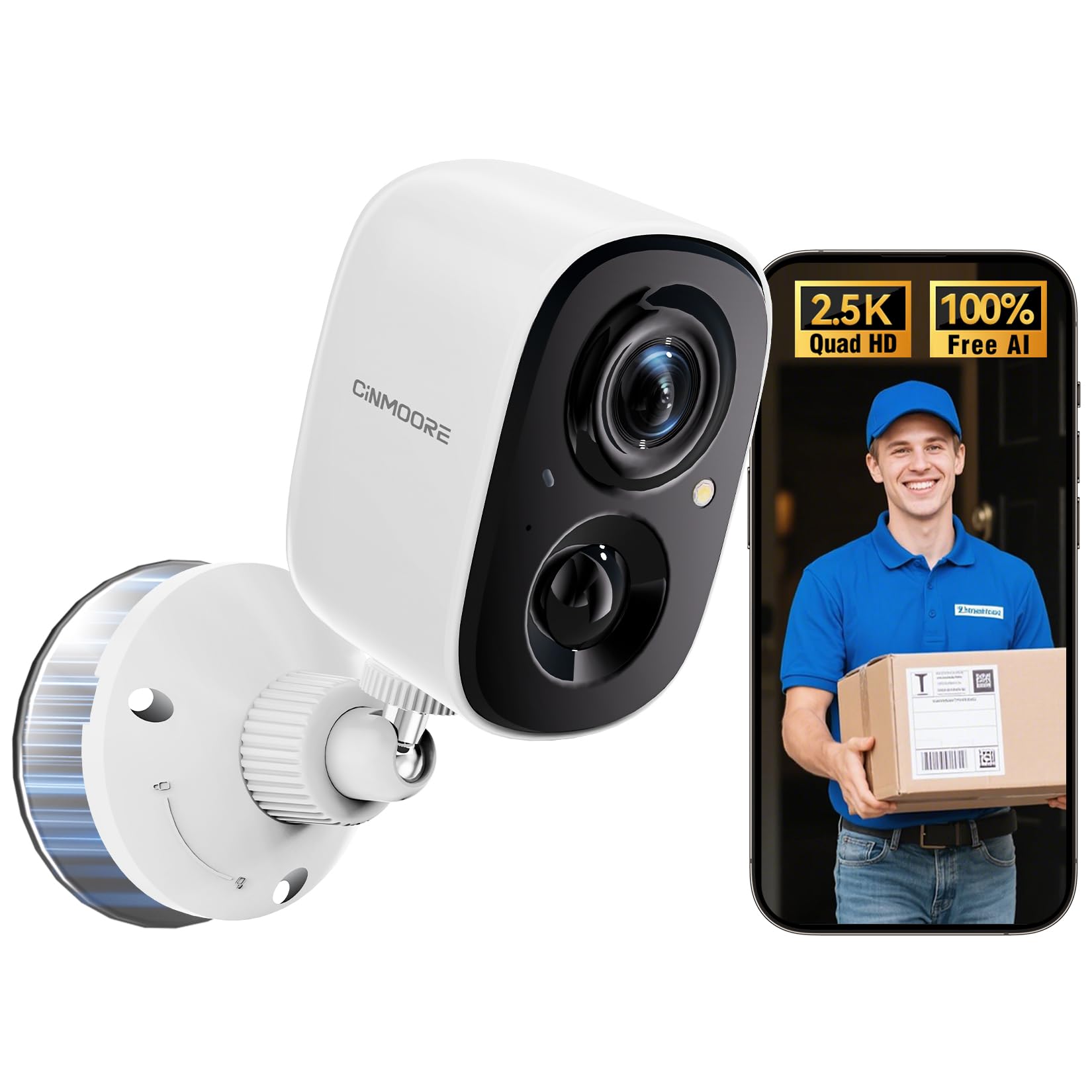
Image: CINMOORE CM-BC22U Wireless Magnetic Home Security Camera. This image shows the front and side view of the white camera unit with its magnetic base.

Image: Key features of CINMOORE CM-BC22U camera. This graphic highlights features such as 2.5K QHD resolution, sound & light siren, color night vision, built-in 5200mAh battery, wire-free installation, free person detection, and full duplex two-way audio.
5. സജ്ജീകരണം
5.1 ക്യാമറ ചാർജ് ചെയ്യുന്നു
Before initial use, fully charge the camera using the provided USB cable and a 5V/1A or 5V/2A power adapter. The charging indicator light will show the charging status. A full charge typically takes several hours.
5.2 അപ്ലിക്കേഷൻ ഇൻസ്റ്റാളേഷൻ
Download the official CINMOORE app from your smartphone's app store (iOS App Store or Google Play Store). ഇതിനായി തിരയുക "CINMOORE" and install the application.
5.3 ക്യാമറ ജോടിയാക്കൽ
- Open the CINMOORE app and create an account or log in.
- ഒരു പുതിയ ഉപകരണം ചേർക്കാൻ "+" ഐക്കണിൽ ടാപ്പ് ചെയ്യുക.
- നിങ്ങളുടെ ക്യാമറ മോഡൽ തിരഞ്ഞെടുക്കാൻ ഓൺ-സ്ക്രീൻ നിർദ്ദേശങ്ങൾ പാലിക്കുക.
- Power on the camera. The camera will enter pairing mode, indicated by a flashing LED light.
- Connect your smartphone to a 2.4GHz Wi-Fi network. The camera does not support 5GHz Wi-Fi.
- നിങ്ങളുടെ ഫോൺ സ്ക്രീനിൽ പ്രദർശിപ്പിച്ചിരിക്കുന്ന QR കോഡ് ക്യാമറ ലെൻസ് ഉപയോഗിച്ച് സ്കാൻ ചെയ്യുക. ക്യാമറയിൽ നിന്ന് ഏകദേശം 15-20 സെന്റീമീറ്റർ (6-8 ഇഞ്ച്) അകലെ ഫോൺ പിടിക്കുക.
- Once connected, the camera will confirm with an audible prompt, and the LED light will turn solid.
5.4 ക്യാമറ മൗണ്ടിംഗ്
The camera offers flexible installation options due to its magnetic base and wire-free design.
- കാന്തിക മൗണ്ടിംഗ്: Attach the camera directly to any metallic surface using its strong magnetic base. Ensure the surface is clean and provides a secure hold.
- സ്ക്രൂ മൗണ്ടിംഗ്: For non-metallic surfaces or enhanced security, use the provided mounting screws and wall anchors.
- ഒപ്റ്റിമലിന് അനുയോജ്യമായ ഒരു സ്ഥലം തിരഞ്ഞെടുക്കുക viewing angle and Wi-Fi signal strength.
- Mark the positions for drilling holes using the mounting base as a template.
- ഡ്രൈവ്വാളിലോ മേസൺറിയിലോ ഘടിപ്പിക്കുകയാണെങ്കിൽ ദ്വാരങ്ങൾ തുരന്ന് വാൾ ആങ്കറുകൾ ഇടുക.
- Secure the magnetic mounting base to the wall with screws.
- Attach the camera to the magnetic base and adjust the angle as needed.

Image: Magnetic mounting of CINMOORE camera. This image illustrates how the camera attaches to its magnetic base, which is then secured to a wall.
6. ക്യാമറ പ്രവർത്തിപ്പിക്കുക
6.1 തത്സമയം View
Open the CINMOORE app and select your camera from the device list to access the live video feed. You can view തത്സമയ footagഇന്റർനെറ്റ് കണക്ഷനുള്ള എവിടെ നിന്നും ഇ.
6.2 ടു-വേ ഓഡിയോ
ലൈവിൽ ആയിരിക്കുമ്പോൾ view, tap the microphone icon in the app to speak through the camera's built-in speaker. Tap the speaker icon to listen to audio from the camera's microphone. This feature allows for real-time communication.
6.3 മോഷൻ ഡിറ്റക്ഷനും അലേർട്ടുകളും
The camera features free AI person detection to reduce false alarms. Configure detection settings in the app:
- സംവേദനക്ഷമത: Adjust the motion detection sensitivity to suit your environment.
- കണ്ടെത്തൽ മേഖലകൾ: Set specific areas within the camera's view ചലനം കണ്ടെത്തുന്നതിന്.
- അലേർട്ടുകൾ: Enable push notifications to receive instant alerts on your smartphone when motion or a person is detected. The camera can also activate a built-in siren and spotlight upon detection.

Image: AI Person Detection feature. This image shows a person walking towards a door, with the camera detecting them and sending a notification to a smartphone, highlighting the AI person detection capability with spotlight, notification, and siren options.

Image: Smart AI Person Detection. This image shows a person walking a dog in front of a house, with a blue box highlighting the detected 'Person' by the camera, emphasizing the smart AI detection feature.
6.4 റെക്കോർഡിംഗും പ്ലേബാക്കും
The camera supports both local storage via a microSD card (up to 256GB, not included) and optional cloud storage. Recorded events can be accessed and played back through the CINMOORE app.

Image: Secure Video Storage Options. This graphic illustrates the camera's support for both SD local storage (expandable up to 256GB) and AWS cloud storage (with a 30-day free trial), emphasizing encrypted storage.

Image: Secure Local & Cloud Storage. This image displays various scenarios captured by the camera, such as a car, packages, a person with a dog, and a person attempting to break in, all protected by a shield icon representing secure local and cloud storage.
6.5 നൈറ്റ് വിഷൻ
The camera provides 4MP full-color night vision, ensuring clear and detailed footage even in low-light conditions. It automatically switches between day and night modes.

Image: Full-Color Night Vision. This split image compares normal night vision (monochrome) with full-color night vision, demonstrating the camera's ability to capture clear, colored images in darkness.

Image: IR Night Vision vs Color Night Vision. This split image compares traditional IR night vision (black and white) with the camera's color night vision, showing a car in a driveway with much greater detail and color in the latter.

Image: 2.5K QHD Resolution Comparison. This split image compares 2.5K QHD resolution with 2K FHD, showing a car in a driveway with significantly sharper detail in the 2.5K QHD view.

Image: 2K HD vs 2.5K QHD Image Quality. This split image compares the visual clarity between 2K HD and 2.5K QHD, showing a dog running on grass with noticeably finer detail and sharpness in the 2.5K QHD image.
7. പരിപാലനം
7.1 ബാറ്ററി മാനേജ്മെൻ്റ്
- Recharge the camera when the battery level is low, as indicated by the app.
- Battery life varies based on usage frequency, recording duration, and environmental conditions.
- ബാറ്ററിയുടെ ആയുസ്സ് വർദ്ധിപ്പിക്കുന്നതിന് പതിവായി ബാറ്ററി പൂർണ്ണമായും കളയുന്നത് ഒഴിവാക്കുക.
7.2 വൃത്തിയാക്കൽ
Wipe the camera lens and body with a soft, dry cloth. Do not use harsh chemicals or abrasive cleaners, as they may damage the camera's finish or lens coating.
7.3 ഫേംവെയർ അപ്ഡേറ്റുകൾ
Periodically check the CINMOORE app for available firmware updates. Keeping your camera's firmware updated ensures optimal performance, security, and access to new features. Follow the in-app instructions for updating.
8. പ്രശ്നപരിഹാരം
| ഇഷ്യൂ | സാധ്യമായ കാരണം | പരിഹാരം |
|---|---|---|
| Camera frequently goes offline | Weak Wi-Fi signal; Router issues; Battery low | Ensure camera is within Wi-Fi range. Restart your router. Fully charge the camera. If issues persist, consider a Wi-Fi extender. |
| Difficulty connecting to 2.4GHz Wi-Fi | Incorrect Wi-Fi password; Connecting to 5GHz network; Router settings | Verify Wi-Fi password. Ensure your phone is connected to a 2.4GHz network during setup. Check router settings to ensure 2.4GHz band is enabled. |
| Unreliable motion detection or image capturing | Incorrect sensitivity settings; Obstructions in view; Camera placement | Adjust motion detection sensitivity in the app. Ensure the camera's view is clear. Reposition the camera for optimal coverage of the desired area. |
| SD card not recording or recognized | SD card not inserted correctly; Corrupted SD card; SD card full | Ensure the SD card is inserted correctly. Format the SD card via the app. Replace the SD card if corrupted. Ensure the SD card is not removed while the camera is operating. |
| ടു-വേ ഓഡിയോ പ്രവർത്തിക്കുന്നില്ല | Microphone/speaker muted in app; Low volume on phone; Network issues | Check app settings to ensure microphone and speaker are enabled. Adjust volume on your smartphone. Ensure a stable internet connection. |
9 സ്പെസിഫിക്കേഷനുകൾ
| ഫീച്ചർ | വിശദാംശങ്ങൾ |
|---|---|
| മോഡലിൻ്റെ പേര് | CM-BC22U |
| വീഡിയോ ക്യാപ്ചർ റെസല്യൂഷൻ | 2.5K (1440P) Quad HD |
| കണക്റ്റിവിറ്റി ടെക്നോളജി | വയർലെസ്സ് (2.4GHz വൈ-ഫൈ) |
| പവർ ഉറവിടം | Battery Powered (5200mAh rechargeable battery) |
| നൈറ്റ് വിഷൻ | പൂർണ്ണ വർണ്ണ നൈറ്റ് വിഷൻ |
| പ്രത്യേക സവിശേഷതകൾ | 2-Way Audio, Built-In Light, HD Resolution, Motion Sensor, AI Person Detection |
| ഇൻഡോർ/ഔട്ട്ഡോർ ഉപയോഗം | ഔട്ട്ഡോർ (IP66 വാട്ടർപ്രൂഫ്) |
| സ്റ്റോറേജ് ഓപ്ഷനുകൾ | MicroSD Card (up to 256GB, not included), Cloud Storage (optional) |
| അനുയോജ്യമായ ഉപകരണങ്ങൾ | സ്മാർട്ട്ഫോൺ (ആൻഡ്രോയിഡ്, iOS) |
| മൌണ്ട് തരം | Magnetic, Ceiling Mount, Tabletop Mount, Wall Mount |
| ഇനത്തിൻ്റെ അളവുകൾ | 7.6 x 5.1 x 5.1 സെന്റീമീറ്റർ |
10. വാറൻ്റി വിവരങ്ങൾ
The CINMOORE CM-BC22U Wireless Magnetic Home Security Camera comes with a 2 വർഷത്തെ നിർമ്മാതാവിന്റെ വാറന്റി from the date of purchase. This warranty covers defects in materials and workmanship under normal use. It does not cover damage caused by misuse, accidents, unauthorized modifications, or natural disasters. Please retain your proof of purchase for warranty claims.
11. പിന്തുണ
For technical assistance, troubleshooting, or warranty inquiries, please contact CINMOORE customer support:
- ഇമെയിൽ: Refer to your product packaging or the CINMOORE official webഏറ്റവും പുതിയ കോൺടാക്റ്റ് ഇമെയിലിനുള്ള സൈറ്റ്.
- ഹോട്ട്ലൈൻ: A free hotline is available on weekdays for product issues. Refer to your product packaging or the CINMOORE official website for the hotline number.
- ഓൺലൈൻ ഉറവിടങ്ങൾ: Visit the CINMOORE official website for FAQs, updated manuals, and support articles.