
1. ആമുഖം
The IK Multimedia TONEX Plug is a portable AI-powered headphone amplifier designed for guitar and bass players. It provides access to a vast library of tone models, functions as a USB-C audio interface, and supports Bluetooth audio streaming for practice and recording. This manual provides essential information for setting up, operating, and maintaining your TONEX Plug.

Image: The TONEX Plug connected to a guitar, ready for use with headphones.
2 പ്രധാനപ്പെട്ട സുരക്ഷാ വിവരങ്ങൾ
- ഉപയോഗിക്കുന്നതിന് മുമ്പ് ഈ നിർദ്ദേശങ്ങൾ നന്നായി വായിക്കുക.
- ഭാവി റഫറൻസിനായി ഈ മാനുവൽ സൂക്ഷിക്കുക.
- വെള്ളം അല്ലെങ്കിൽ ഈർപ്പം ഉപകരണം തുറന്നുകാട്ടരുത്.
- ഉയർന്ന താപനിലയും നേരിട്ടുള്ള സൂര്യപ്രകാശവും ഒഴിവാക്കുക.
- നിർദ്ദിഷ്ട അറ്റാച്ച്മെന്റുകൾ/ആക്സസറികൾ മാത്രം ഉപയോഗിക്കുക.
- യൂണിറ്റ് ഡിസ്അസംബ്ലിംഗ് ചെയ്യാനോ പരിഷ്ക്കരിക്കാനോ ശ്രമിക്കരുത്. എല്ലാ സേവനങ്ങളും യോഗ്യതയുള്ള ഉദ്യോഗസ്ഥർക്ക് റഫർ ചെയ്യുക.
- Prolonged listening at high volume levels can cause permanent hearing damage. Always set the volume to a comfortable level.
3. പാക്കേജ് ഉള്ളടക്കം
നിങ്ങളുടെ പാക്കേജിൽ എല്ലാ ഇനങ്ങളും ഉണ്ടെന്ന് ഉറപ്പാക്കുക:
- TONEX Plug Ampജീവപര്യന്തം
- USB-C ചാർജിംഗ് കേബിൾ

Image: The TONEX Plug and its included USB-C charging cable.
4. സജ്ജീകരണം
4.1 ഉപകരണം ചാർജ് ചെയ്യുന്നു
Before first use, fully charge your TONEX Plug. Connect the included USB-C cable to the USB-C port on the device and the other end to a compatible USB power adapter (not included) or a computer's USB port. The LED indicator will show charging status.

Image: The TONEX Plug connected to a smartphone via USB-C, demonstrating its charging and audio interface capabilities.
4.2 നിങ്ങളുടെ ഉപകരണവുമായി ബന്ധിപ്പിക്കുന്നു
The TONEX Plug features a flexible 1/4-inch jack. Plug this directly into the output jack of your electric guitar or bass. The flexible design allows it to fit various instrument body shapes.

Image: The TONEX Plug inserted into the output jack of an electric guitar, with headphones connected for silent practice.
4.3 ഹെഡ്ഫോണുകൾ ബന്ധിപ്പിക്കുന്നു
Plug your headphones into the 3.5mm headphone output jack located on the side of the TONEX Plug. Ensure the volume is set to a low level before putting on headphones.
5. പ്രവർത്തന നിർദ്ദേശങ്ങൾ
5.1 പവർ ഓൺ/ഓഫ്
അമർത്തിപ്പിടിക്കുക പവർ button for a few seconds to turn the device on or off. The LED indicators will illuminate upon power-on.
5.2 വോളിയം ക്രമീകരിക്കൽ
ഉപയോഗിക്കുക വോളിയം + ഒപ്പം വോളിയം - buttons on the side of the device to adjust the headphone output level.
5.3 Navigating Presets and Tuner
The TONEX Plug allows you to store and recall up to 30 user presets across 10 color-coded banks. Use the പ്രീസെറ്റ് buttons to cycle through your saved tones. Press the ട്യൂണർ button to activate the built-in chromatic LED tuner for accurate instrument tuning.
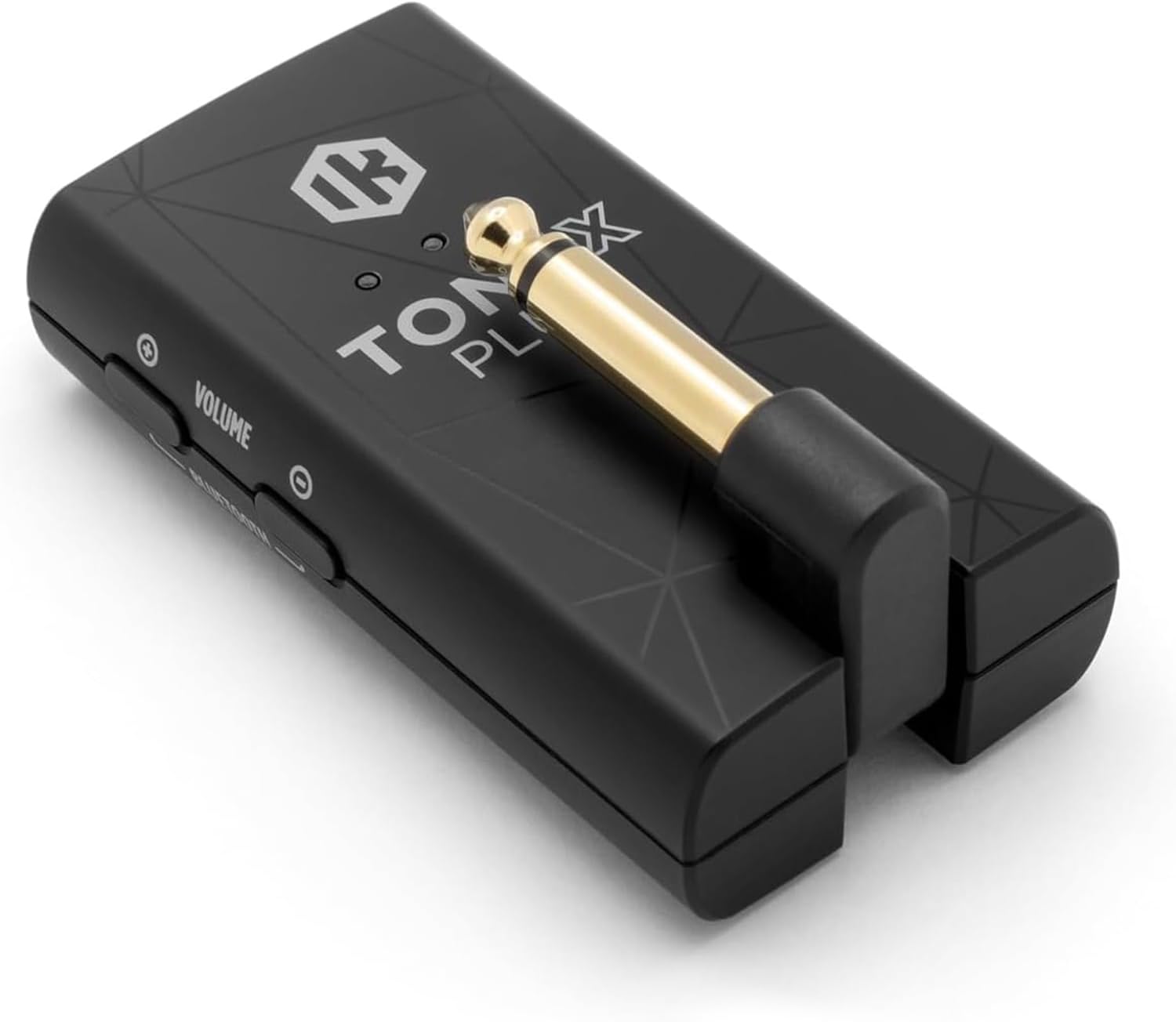
ചിത്രം: വിശദമായത് view of the TONEX Plug's controls, including Power, Preset, Tuner, Volume, and Bluetooth buttons.
5.4 Bluetooth Streaming and TONEX Control App
The TONEX Plug supports Bluetooth audio streaming, allowing you to play along with music from your mobile device. It also connects wirelessly to the TONEX Control App (iOS/Android) for advanced tone management.
- നിങ്ങളുടെ മൊബൈൽ ഉപകരണത്തിൽ ബ്ലൂടൂത്ത് സജീവമാക്കുക.
- അമർത്തിപ്പിടിക്കുക ബ്ലൂടൂത്ത് button on the TONEX Plug to enter pairing mode.
- Select "TONEX Plug" from your device's Bluetooth settings.
- Open the TONEX Control App to browse ToneNET, load new sounds, edit presets, and access a full signal chain with six essential effects (noise gate, compressor, delay, modulation, reverb) and comprehensive EQ controls.
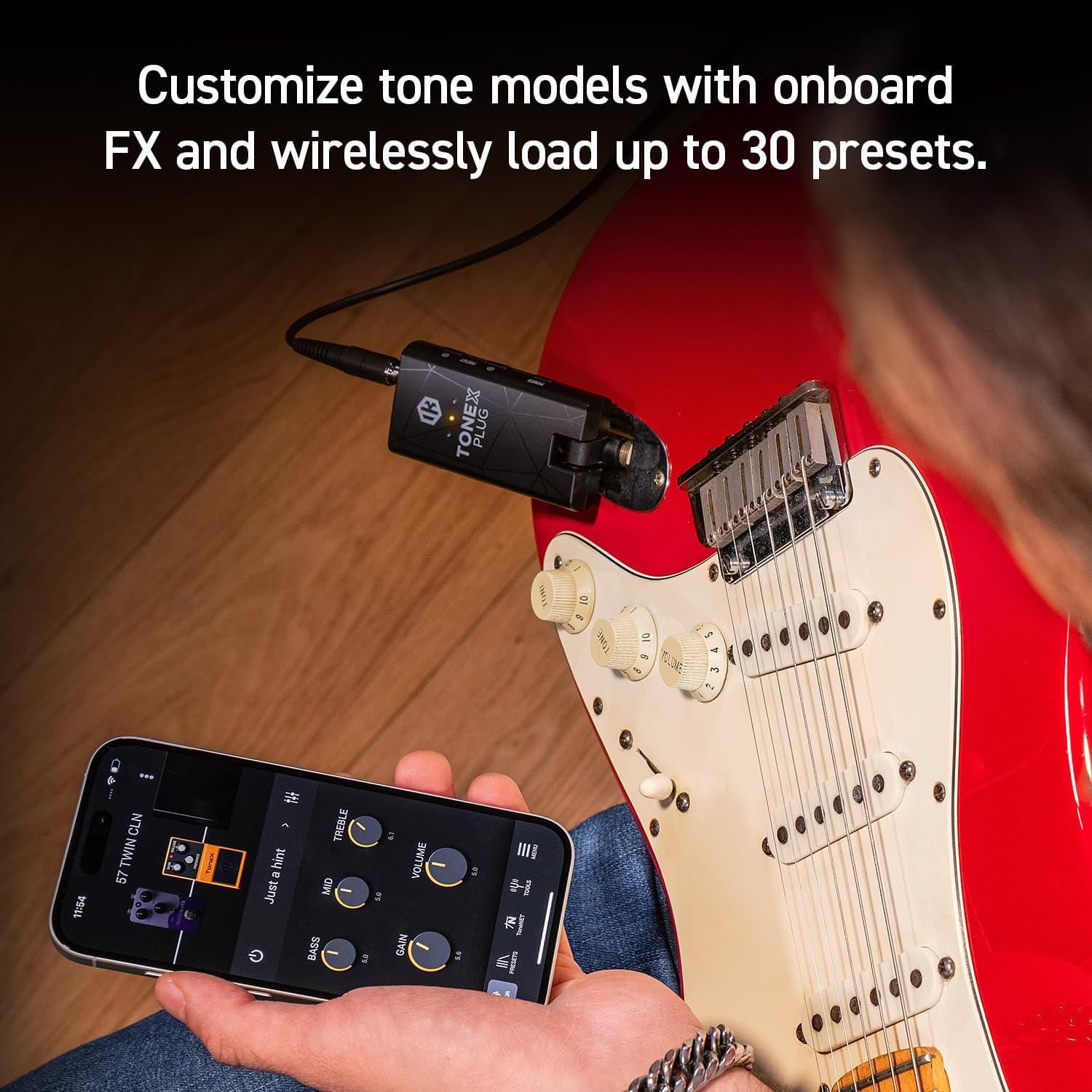
Image: The TONEX Control App interface on a smartphone, demonstrating real-time tone customization while connected to the TONEX Plug.
5.5 USB-C Audio Interface Functionality
The TONEX Plug can function as a premium USB-C audio interface. Connect the device to your computer or mobile device using the USB-C cable to record high-fidelity digital audio directly. This allows you to use the TONEX Plug's tone models and effects within your digital audio workstation (DAW).
5.6 ഉൽപ്പന്നം കഴിഞ്ഞുview വീഡിയോ
വീഡിയോ: ഒരു ഔദ്യോഗിക ഉൽപ്പന്നം അവസാനിച്ചുview of the IK Multimedia TONEX Plug, demonstrating its features and connectivity.
6. പരിപാലനം
- വൃത്തിയാക്കൽ: Use a soft, dry cloth to clean the exterior of the TONEX Plug. Do not use abrasive cleaners or solvents.
- ബാറ്ററി കെയർ: The internal rechargeable battery provides up to 6 hours of continuous playtime. For optimal battery life, avoid fully discharging the unit frequently and store it in a cool, dry place when not in use for extended periods.
- സംഭരണം: Store the device in a protective case or pouch (if applicable) to prevent damage from dust or impacts.
7. പ്രശ്നപരിഹാരം
| പ്രശ്നം | സാധ്യമായ കാരണം | പരിഹാരം |
|---|---|---|
| ഹെഡ്ഫോണുകളിൽ നിന്ന് ശബ്ദമില്ല. | Volume too low, headphones not fully plugged in, TONEX Plug not powered on, instrument not connected. | Increase volume, ensure headphones are securely connected, power on the device, check instrument connection. |
| ബ്ലൂടൂത്ത് വഴി ബന്ധിപ്പിക്കാൻ കഴിയില്ല. | TONEX Plug not in pairing mode, Bluetooth off on mobile device, interference. | Ensure TONEX Plug is in pairing mode (hold Bluetooth button), enable Bluetooth on your device, try pairing in a different location. |
| Device not recognized as audio interface. | Incorrect USB-C cable, driver issues (for computer), device not powered on. | Use the provided USB-C cable, ensure device is powered on, check your computer's audio settings or install necessary drivers from IK Multimedia's webസൈറ്റ്. |
| ചെറിയ ബാറ്ററി ലൈഫ്. | ബാറ്ററി പൂർണ്ണമായും ചാർജ് ചെയ്തിട്ടില്ല, പഴയ ബാറ്ററി. | Ensure full charge before use. Battery performance may degrade over time. |
If you encounter issues not listed here, please refer to the official IK Multimedia support resources.
8 സ്പെസിഫിക്കേഷനുകൾ
- മോഡൽ: TONEX Plug
- ബ്രാൻഡ്: ഐകെ മൾട്ടിമീഡിയ
- ഇനത്തിൻ്റെ ഭാരം: 2.89 ഔൺസ്
- ഉൽപ്പന്ന അളവുകൾ: 0.79"D x 1.57"W x 2.95"H
- Output Channel Quantity: 1
- ബാറ്ററി ലൈഫ്: 6 മണിക്കൂർ വരെ (റീചാർജ് ചെയ്യാവുന്നതാണ്)
- കണക്റ്റിവിറ്റി: 1/4" instrument input, 3.5mm headphone output, USB-C (charging/audio interface), Bluetooth
- Tone Models: Access to 40,000+ AI Machine Modeling Tone Models
- ഇഫക്റ്റുകൾ: Noise gate, compressor, delay, modulation, reverb, EQ
9. വാറൻ്റിയും പിന്തുണയും
The IK Multimedia TONEX Plug comes with a manufacturer's warranty. For detailed warranty information, product registration, and technical support, please visit the official IK Multimedia webസൈറ്റിൽ ബന്ധപ്പെടുക അല്ലെങ്കിൽ അവരുടെ ഉപഭോക്തൃ സേവനവുമായി ബന്ധപ്പെടുക. വാറന്റി ക്ലെയിമുകൾക്കായി നിങ്ങളുടെ വാങ്ങിയതിന്റെ തെളിവ് സൂക്ഷിക്കുക.
ഉദ്യോഗസ്ഥൻ Webസൈറ്റ്: www.ikmultimedia.com