
ടെക്നെറ്റ് ടികെ-എച്ച്എസ്023
TECKNET TK-HS023 V5.4 Bluetooth Trucker Headset
ഉപയോക്തൃ മാനുവൽ
1. ആമുഖം
This manual provides detailed instructions for the proper use, setup, and maintenance of your TECKNET TK-HS023 V5.4 Bluetooth Trucker Headset. Please read this manual thoroughly before using the product to ensure optimal performance and longevity.
പാക്കേജ് ഉള്ളടക്കം
- TECKNET TK-HS023 ബ്ലൂടൂത്ത് ഹെഡ്സെറ്റ്
- യുഎസ്ബി ചാർജിംഗ് കേബിൾ
- ഉപയോക്തൃ മാനുവൽ
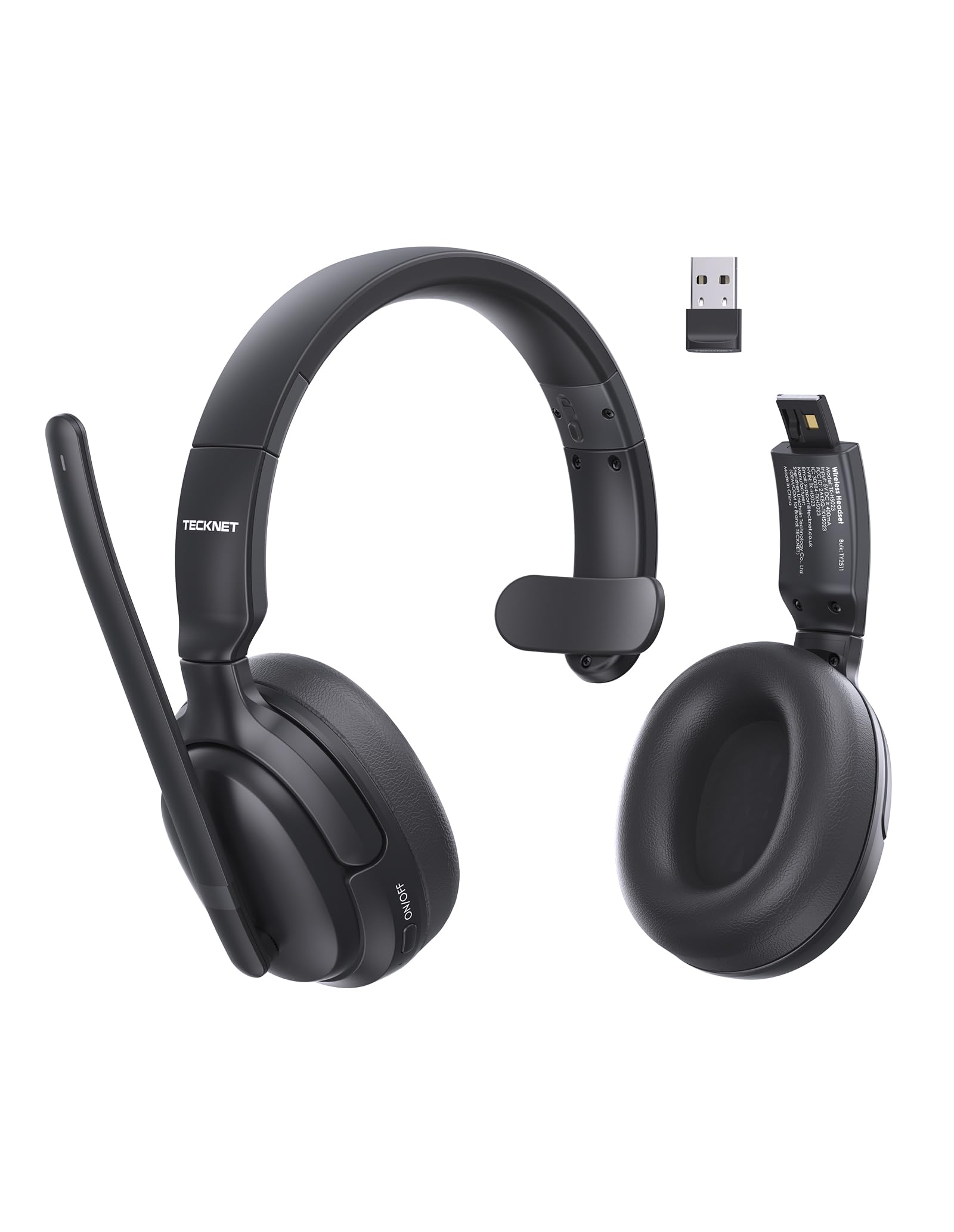
Image 1.1: TECKNET TK-HS023 Bluetooth Trucker Headset. This image displays the headset with its adjustable headband and microphone boom.
2. ഉൽപ്പന്ന സവിശേഷതകൾ
- AI Noise-Canceling Microphone: Designed to filter out background noise, ensuring clear voice transmission in noisy environments.
- Single-Ear Design: Allows users to remain aware of their surroundings while using the headset.
- Dual-Device Seamless Connectivity: Connects to two Bluetooth devices simultaneously, enabling easy switching between calls and audio.
- ദീർഘകാല ബാറ്ററി: Provides extended usage time on a single charge.
- Stable Bluetooth V5.4 Connection: Offers reliable wireless connectivity with a range of up to 15 meters.
- Easy Call & Audio Controls: Intuitive buttons for managing calls, adjusting volume, and controlling media playback.
- ക്രമീകരിക്കാവുന്ന ഹെഡ്ബാൻഡ്: Ensures a comfortable fit for various head sizes.
3. സജ്ജീകരണം
3.1 ഹെഡ്സെറ്റ് ചാർജ് ചെയ്യുന്നു
Before initial use, fully charge the headset. A full charge takes approximately 2 hours and provides up to 65 hours of battery life.
- യുഎസ്ബി ചാർജിംഗ് കേബിളിന്റെ ചെറിയ അറ്റം ഹെഡ്സെറ്റിലെ ചാർജിംഗ് പോർട്ടുമായി ബന്ധിപ്പിക്കുക.
- Connect the large end of the USB charging cable to a USB power source (e.g., computer USB port, wall adapter).
- The LED indicator on the headset will show the charging status. It typically turns red during charging and blue or off when fully charged.
3.2 ബ്ലൂടൂത്ത് ജോടിയാക്കൽ
To connect your headset to a device via Bluetooth:
- ഹെഡ്സെറ്റ് പൂർണ്ണമായി ചാർജ്ജ് ചെയ്തിട്ടുണ്ടെന്ന് ഉറപ്പാക്കുക.
- Power on the headset by pressing and holding the Multi-Function Button (MFB) until the LED indicator flashes blue and red alternately, indicating pairing mode.
- നിങ്ങളുടെ ഉപകരണത്തിൽ (സ്മാർട്ട്ഫോൺ, ടാബ്ലെറ്റ്, ലാപ്ടോപ്പ്), ബ്ലൂടൂത്ത് പ്രവർത്തനക്ഷമമാക്കി ലഭ്യമായ ഉപകരണങ്ങൾക്കായി തിരയുക.
- Select "TECKNET TK-HS023" from the list of found devices.
- Once connected, the LED indicator on the headset will flash blue slowly or turn solid blue.
Dual-Device Connectivity: After pairing with the first device, disable Bluetooth on the first device, then put the headset back into pairing mode to connect to a second device. Once the second device is paired, re-enable Bluetooth on the first device. The headset should automatically connect to both devices, allowing seamless switching.
4. പ്രവർത്തന നിർദ്ദേശങ്ങൾ
4.1 ഹെഡ്സെറ്റ് നിയന്ത്രണങ്ങൾ
- മൾട്ടി-ഫംഗ്ഷൻ ബട്ടൺ (MFB): Power on/off, Play/Pause, Answer/End Call, Reject Call, Redial.
- വോളിയം കൂട്ടുക (+): Increase volume, Next track (long press).
- വോളിയം ഡൗൺ (-): Decrease volume, Previous track (long press).
- നിശബ്ദ ബട്ടൺ: Mute/unmute microphone during a call.
4.2 കോൾ മാനേജ്മെന്റ്
- മറുപടി കോൾ: MFB ഒരിക്കൽ അമർത്തുക.
- കോൾ അവസാനിപ്പിക്കുക: Press the MFB once during a call.
- കോൾ നിരസിക്കുക: MFB 2 സെക്കൻഡ് അമർത്തിപ്പിടിക്കുക.
- അവസാന നമ്പർ വീണ്ടും ഡയൽ ചെയ്യുക: Double-press the MFB when not on a call.
- മൈക്രോഫോൺ നിശബ്ദമാക്കുക: Press the Mute button during a call. Press again to unmute.
4.3 ഓഡിയോ പ്ലേബാക്ക്
- പ്ലേ/താൽക്കാലികമായി നിർത്തുക: MFB ഒരിക്കൽ അമർത്തുക.
- അടുത്ത ട്രാക്ക്: വോളിയം അപ്പ് (+) ബട്ടൺ ദീർഘനേരം അമർത്തുക.
- മുമ്പത്തെ ട്രാക്ക്: വോളിയം ഡൗൺ (-) ബട്ടൺ ദീർഘനേരം അമർത്തുക.
4.4 AI നോയ്സ് ക്യാൻസലിംഗ് മൈക്രോഫോൺ
The integrated AI Noise Cancelling Microphone actively reduces ambient noise, such as engine sounds or office chatter, to ensure your voice is transmitted clearly to the other party during calls. Position the microphone boom approximately 1-2 inches from your mouth for best performance.
5. പരിപാലനം
5.1 വൃത്തിയാക്കൽ
- ഹെഡ്സെറ്റ് മൃദുവായതോ, ഉണങ്ങിയതോ, അല്ലെങ്കിൽ ചെറുതായി ഡി-ടാപ്പിംഗ് മെഷീനോ ഉപയോഗിച്ച് തുടയ്ക്കുക.amp തുണി.
- കഠിനമായ രാസവസ്തുക്കൾ, ക്ലീനിംഗ് ലായകങ്ങൾ അല്ലെങ്കിൽ ശക്തമായ ഡിറ്റർജന്റുകൾ ഉപയോഗിക്കരുത്.
- ഏതെങ്കിലും ദ്വാരങ്ങളിൽ ഈർപ്പം കയറുന്നത് ഒഴിവാക്കുക.
5.2 സംഭരണം
- ഉയർന്ന താപനിലയിൽ നിന്ന് മാറി തണുത്തതും വരണ്ടതുമായ സ്ഥലത്ത് ഹെഡ്സെറ്റ് സൂക്ഷിക്കുക.
- Avoid prolonged exposure to direct sunlight or moisture.
6. പ്രശ്നപരിഹാരം
പൊതുവായ പ്രശ്നങ്ങളും പരിഹാരങ്ങളും
- ഹെഡ്സെറ്റ് പവർ ഓൺ ചെയ്യുന്നില്ല: ഹെഡ്സെറ്റ് പൂർണ്ണമായി ചാർജ്ജ് ചെയ്തിട്ടുണ്ടെന്ന് ഉറപ്പാക്കുക.
- ഉപകരണവുമായി ജോടിയാക്കാൻ കഴിയില്ല:
- Ensure the headset is in pairing mode (LED flashing blue and red).
- നിങ്ങളുടെ ഉപകരണത്തിൽ ബ്ലൂടൂത്ത് പ്രവർത്തനക്ഷമമാക്കിയിട്ടുണ്ടെന്ന് ഉറപ്പാക്കുക.
- നിങ്ങളുടെ ഉപകരണത്തിന് അടുത്തേക്ക് ഹെഡ്സെറ്റ് നീക്കുക.
- ഹെഡ്സെറ്റും നിങ്ങളുടെ ഉപകരണവും പുനരാരംഭിക്കുക.
- ശബ്ദമില്ല അല്ലെങ്കിൽ മോശം ഓഡിയോ നിലവാരം:
- ഹെഡ്സെറ്റിലും കണക്റ്റുചെയ്ത ഉപകരണത്തിലും വോളിയം ലെവലുകൾ പരിശോധിക്കുക.
- Ensure the headset is within the 15-meter Bluetooth range.
- Disconnect and reconnect the headset to your device.
- മറ്റ് വയർലെസ് ഉപകരണങ്ങളിൽ നിന്നുള്ള ഇടപെടൽ പരിശോധിക്കുക.
- മൈക്രോഫോൺ പ്രവർത്തിക്കുന്നില്ല:
- മൈക്രോഫോൺ നിശബ്ദമാക്കിയിട്ടില്ലെന്ന് ഉറപ്പാക്കുക.
- നിങ്ങളുടെ കണക്റ്റ് ചെയ്ത ഉപകരണത്തിലെ മൈക്രോഫോൺ ക്രമീകരണം പരിശോധിക്കുക.
7 സ്പെസിഫിക്കേഷനുകൾ
| ഫീച്ചർ | സ്പെസിഫിക്കേഷൻ |
|---|---|
| ബ്രാൻഡ് | ടെക്നെറ്റ് |
| മോഡലിൻ്റെ പേര് | TK-HS023 |
| കണക്റ്റിവിറ്റി ടെക്നോളജി | വയർലെസ്സ് (ബ്ലൂടൂത്ത് V5.4) |
| ബ്ലൂടൂത്ത് ശ്രേണി | 15 മീറ്റർ വരെ |
| ചെവി പ്ലേസ്മെൻ്റ് | Over Ear (Single-ear design) |
| മൈക്രോഫോൺ | AI നോയ്സ് റദ്ദാക്കൽ |
| ബാറ്ററി ചാർജ് സമയം | ഏകദേശം 2 മണിക്കൂർ |
| ബാറ്ററി ശരാശരി ആയുസ്സ് | 65 മണിക്കൂർ വരെ |
| അനുയോജ്യമായ ഉപകരണങ്ങൾ | സെൽഫോണുകൾ, ഡെസ്ക്ടോപ്പുകൾ, ലാപ്ടോപ്പുകൾ, ടാബ്ലെറ്റുകൾ |
| അധിക സവിശേഷതകൾ | Adjustable Headband, Volume Control, Dual-Device Connectivity |
| നിറം | കറുപ്പ് |
8. വാറൻ്റിയും പിന്തുണയും
8.1 വാറൻ്റി വിവരങ്ങൾ
The TECKNET TK-HS023 Bluetooth Trucker Headset comes with a 3 വർഷത്തെ വാറൻ്റി വാങ്ങിയ തീയതി മുതൽ. ഈ വാറന്റി നിർമ്മാണ വൈകല്യങ്ങൾ ഉൾക്കൊള്ളുന്നു, കൂടാതെ സാധാരണ ഉപയോഗത്തിൽ ഉൽപ്പന്നത്തിന്റെ മെറ്റീരിയലിലും വർക്ക്മാൻഷിപ്പിലും വൈകല്യങ്ങളില്ലെന്ന് ഉറപ്പാക്കുന്നു.
The warranty does not cover damage caused by misuse, accident, unauthorized modification, or external causes such as drops or liquid damage.
8.2 ഉപഭോക്തൃ പിന്തുണ
For technical support, warranty claims, or any questions regarding your TECKNET TK-HS023 headset, please refer to the contact information provided on the TECKNET official website or your purchase documentation. Please have your model number (TK-HS023) and proof of purchase ready when contacting support.
Ask a question about this manual
Ask about setup, troubleshooting, compatibility, parts, safety, or missing instructions. Manuals+ will review the question and use this page’s manual context to help answer it.