
1. ഉൽപ്പന്നം കഴിഞ്ഞുview
The ANYFAR D7C is a compact 2-in-1 wireless adapter designed to convert your vehicle's factory-installed wired CarPlay or Android Auto system into a wireless connection. This device allows seamless access to navigation, music, Spotify, audiobooks, and calendar functions directly on your car's display without the need for cables.
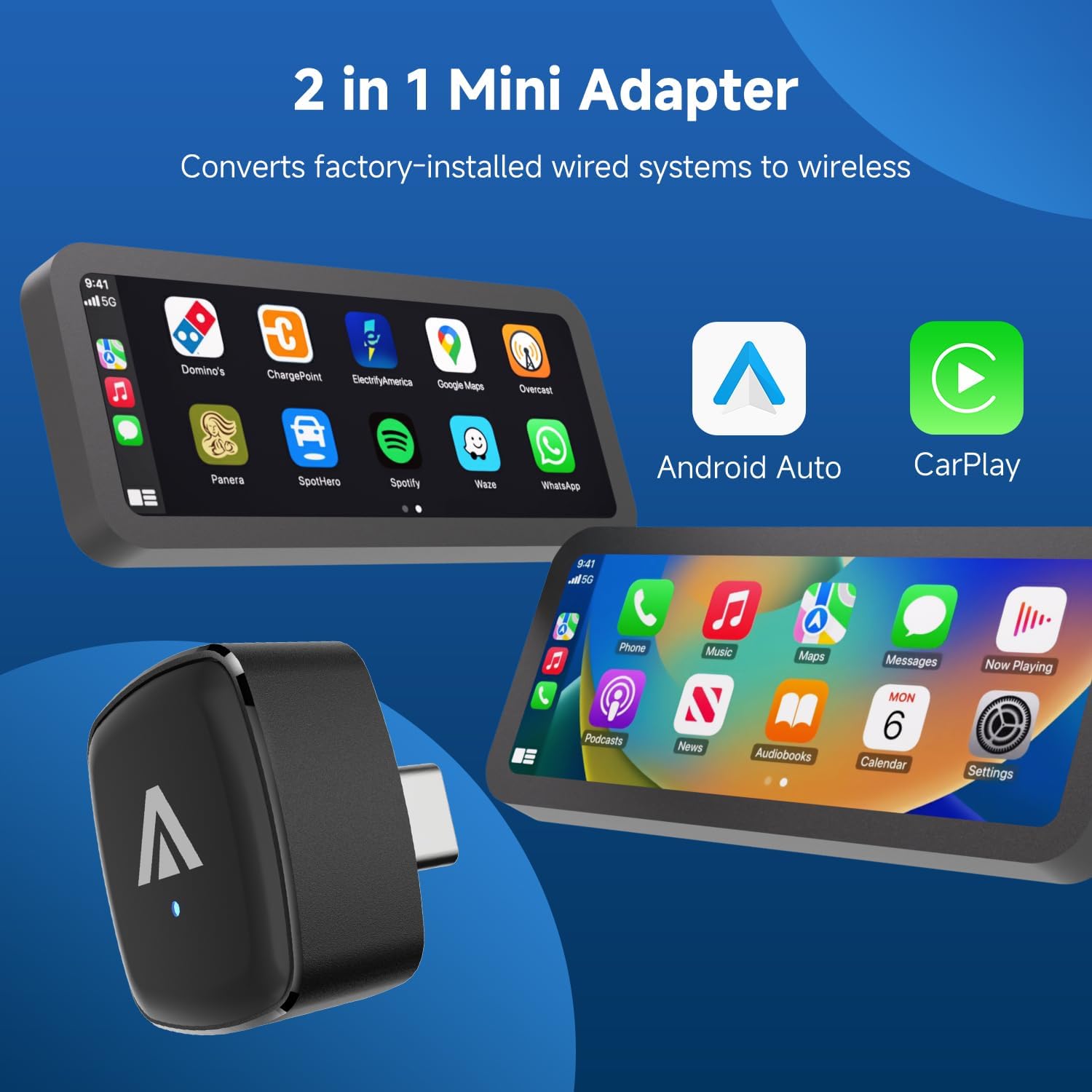
Image: The ANYFAR D7C adapter, illustrating its function to convert wired CarPlay and Android Auto to wireless.
Engineered with a robust chipset and premium components, the D7C offers enhanced connection speeds and stability. Its durable alloy shell and tempered glass top provide a sophisticated, clutter-free design that integrates well with your car's interior.
2. അനുയോജ്യതാ ആവശ്യകതകൾ
2.1 വാഹന അനുയോജ്യത
This adapter is compatible with vehicles manufactured in 2016 or later that are equipped with factory-installed wired CarPlay or Android Auto. It converts an existing wired system to wireless; it cannot add CarPlay or Android Auto functionality to a vehicle that does not already possess it.
കുറിപ്പ്: ഈ മോഡൽ അല്ല compatible with BMW or Tesla vehicles.
For a detailed list of compatible vehicles, please refer to the official compatibility pages:
2.2 ഫോൺ അനുയോജ്യത
- വയർലെസ് കാർപ്ലേയ്ക്ക്: iOS 10+ ൽ പ്രവർത്തിക്കുന്ന iPhone
- വയർലെസ് ആൻഡ്രോയിഡ് ഓട്ടോയ്ക്ക്: Android smartphone running Android 11+

Image: Visual guide to phone and car compatibility requirements for the D7C adapter.
3. പാക്കേജ് ഉള്ളടക്കം
പാക്കേജ് തുറക്കുമ്പോൾ, താഴെ പറയുന്ന എല്ലാ ഇനങ്ങളും ഉണ്ടെന്ന് ഉറപ്പാക്കുക:
- 1 x ANYFAR D7C Mini Wireless CarPlay Android Auto Adapter
- 1 x ഉപയോക്തൃ മാനുവൽ (ഈ പ്രമാണം)

Image: The D7C adapter and user manual as included in the product package.
4. സജ്ജീകരണ നിർദ്ദേശങ്ങൾ
Follow these steps for initial setup to enable wireless CarPlay or Android Auto:
- പ്ലഗ് ഇൻ: Connect the D7C adapter into your car's USB-C data port. Ensure it is a data port, not just a charging port.
- Enable Connectivity: On your smartphone, turn on both Bluetooth and Wi-Fi (WLAN).
- ബ്ലൂടൂത്ത് ജോടിയാക്കുക: ഇതിനായി തിരയുക the adapter's Bluetooth signal on your phone and pair with it. The adapter will typically appear as 'ANYFAR-XXXX' or similar.
- സമന്വയം: Once paired, your phone will prompt you to connect to CarPlay or Android Auto. Confirm the connection. The system will then synchronize, and your wireless interface will appear on the car's display.

Image: Visual representation of the simple three-step setup process for the D7C adapter.
After the initial setup, the adapter is designed to automatically connect to your phone each time you start your car, provided your phone's Bluetooth and Wi-Fi are enabled.
5. പ്രവർത്തന നിർദ്ദേശങ്ങൾ
The D7C adapter allows you to use your car's original controls for a safe and hands-free driving experience. This includes:
- സ്റ്റിയറിംഗ് വീൽ ബട്ടണുകൾ: Control audio playback, answer calls, and activate voice assistants.
- Knobs and Dials: Navigate menus and adjust settings on your car's display.
- ടച്ച്സ്ക്രീൻ പ്രവർത്തനങ്ങൾ: Interact directly with the CarPlay or Android Auto interface on compatible touchscreens.
- ശബ്ദ സഹായികൾ: Utilize Siri (for CarPlay) or Google Voice Assistant (for Android Auto) to make calls, send messages, get directions, and control music without diverting your attention from the road.

Image: Demonstrating how the D7C adapter integrates with existing car controls for touch, voice, and knob input.
6. പരിപാലനം
To ensure the longevity and optimal performance of your ANYFAR D7C adapter, follow these simple maintenance guidelines:
- വൃത്തിയായി സൂക്ഷിക്കു: പൊടിയും അവശിഷ്ടങ്ങളും നീക്കം ചെയ്യുന്നതിനായി മൃദുവായതും ഉണങ്ങിയതുമായ തുണി ഉപയോഗിച്ച് അഡാപ്റ്റർ പതിവായി തുടയ്ക്കുക. ലിക്വിഡ് ക്ലീനറുകളോ ഉരച്ചിലുകളുള്ള വസ്തുക്കളോ ഉപയോഗിക്കുന്നത് ഒഴിവാക്കുക.
- തീവ്രമായ താപനില ഒഴിവാക്കുക: While designed for various climates, prolonged exposure to extreme heat or cold can affect performance. Store the device in a moderate environment when not in use.
- സുരക്ഷിത കണക്ഷൻ: Ensure the adapter is securely plugged into the USB-C port to prevent accidental disconnections or physical damage. The compact design helps prevent bouncing or shaking on rough roads.
- സോഫ്റ്റ്വെയർ അപ്ഡേറ്റുകൾ: Periodically check for and install software updates to ensure the best compatibility and performance. Refer to the 'Online Update' section for instructions.
7. പ്രശ്നപരിഹാരം
If you encounter issues with your D7C adapter, please refer to the following common solutions:
- No Connection/Failure to Connect:
- Ensure your vehicle has factory-installed wired CarPlay/Android Auto (Model Year 2016+).
- Verify your phone's operating system meets the minimum requirements (iOS 10+ or Android 11+).
- Confirm Bluetooth and Wi-Fi are enabled on your phone.
- Unplug the adapter, wait 10 seconds, and plug it back in. Restart your phone and car's infotainment system if necessary.
- Forget the adapter's Bluetooth connection on your phone and re-pair.
- ഇടവിട്ടുള്ള കണക്ഷൻ/കാലതാമസം:
- Ensure there are no other devices interfering with Bluetooth or Wi-Fi signals in the car.
- Check for and install any available software updates for the adapter.
- Ensure your phone is not running too many background applications that might consume resources.
- അഡാപ്റ്റർ അമിത ചൂടാക്കൽ:
- While the alloy shell is designed for heat dissipation, some warmth during operation is normal. If the device feels excessively hot, disconnect it and allow it to cool.
- Ensure the adapter is not obstructed, allowing for proper airflow.
- Online Update Issues:
- Ensure the adapter is plugged into a stable power source (e.g., a wall charger or computer USB port, not the car stereo) during updates.
- Verify the Wi-Fi password (12345678) is entered correctly.
- Confirm the IP address (192.168.200.1) is typed accurately into your phone's browser.
7.1 Online Update Procedure
Regularly updating the adapter's firmware can resolve bugs and improve performance. The update process differs slightly between iPhone and Android devices.

Image: Visual guide for updating the D7C adapter firmware, specifically for iPhone users.
iPhone-ന്:
- Plug the adapter into a stable power supply source (e.g., phone charger or computer USB port). Do not plug it into the car stereo for updates.
- Connect to the adapter's Wi-Fi network on your phone. The default password is 12345678.
- നിങ്ങളുടെ ഫോൺ തുറക്കുക web ബ്രൗസർ ചെയ്ത് IP വിലാസം നൽകുക 192.168.200.1.
- Scroll down the page to find the update button and follow the on-screen prompts to install the new version.
Android-നായി: The steps may vary. Please refer to the specific instructions provided with your adapter or contact customer support for detailed guidance.
8 സ്പെസിഫിക്കേഷനുകൾ
| ബ്രാൻഡ് | എത്ര ദൂരെ |
| മോഡൽ നമ്പർ | D7C |
| അനുയോജ്യമായ ഉപകരണങ്ങൾ | Cellular Phones (iOS 10+, Android 11+) |
| ഉൽപ്പന്നത്തിൻ്റെ പ്രത്യേക ഉപയോഗങ്ങൾ | Car Audio & Video (Wireless CarPlay/Android Auto) |
| കണക്റ്റർ തരം | യുഎസ്ബി ടൈപ്പ് സി |
| നിറം | കറുപ്പ് |
| ഇനത്തിന്റെ അളവുകൾ (L x W x H) | 35 x 75 x 45 മില്ലിമീറ്റർ |
| തുറമുഖങ്ങളുടെ എണ്ണം | 2 (Internal for functionality) |
| പവർ പ്ലഗ് തരം | ടൈപ്പ് സി |
| മാതൃരാജ്യം | ചൈന |
9. വാറൻ്റിയും പിന്തുണയും
9.1 വാറൻ്റി വിവരങ്ങൾ
The ANYFAR D7C adapter comes with a 1 വർഷത്തെ വാറൻ്റി വാങ്ങിയ തീയതി മുതൽ. ഈ വാറന്റി നിർമ്മാണ വൈകല്യങ്ങൾ ഉൾക്കൊള്ളുകയും സാധാരണ ഉപയോഗത്തിൽ ഉൽപ്പന്നം ഉദ്ദേശിച്ച രീതിയിൽ പ്രവർത്തിക്കുന്നുവെന്ന് ഉറപ്പാക്കുകയും ചെയ്യുന്നു. വാറന്റി ക്ലെയിമുകൾക്കായി നിങ്ങളുടെ വാങ്ങിയതിന്റെ തെളിവ് സൂക്ഷിക്കുക.
9.2 ഉപഭോക്തൃ പിന്തുണ
For any questions, technical assistance, or warranty claims, please contact ANYFAR customer support. You can typically find contact information on the product packaging, the official ANYFAR webസൈറ്റ്, അല്ലെങ്കിൽ നിങ്ങളുടെ റീട്ടെയിലർ വഴി.

Image: ANYFAR customer support is available to provide assistance and ensure customer satisfaction.