
1. ആമുഖം
This manual provides detailed instructions for the ECHTPower EP05 Wireless PC Gaming Controller. This multi-platform controller features a TFT screen for on-the-fly adjustments, Hall-Effect joysticks for precision, dual Hall triggers, a 1000Hz polling rate, and customizable RGB lighting. It is compatible with Windows PC, Nintendo Switch, Android, and iOS devices.
Video: ECHTPower PC Controller with Intelligent Screen. This official video provides an overview of the controller's features and design.
2 പ്രധാന സവിശേഷതകൾ
- Smart TFT Screen Control: Adjust vibration, RGB lighting, turbo settings, trigger travel, and button mapping directly on the integrated screen without external software.
- Hall-Effect Joysticks: Designed to prevent joystick drift, providing stable and smooth control for various game genres.
- Dual Hall Triggers: Offers adjustable trigger travel (2mm for rapid fire, 6mm for precise control) for an optimized gaming experience.
- 1000Hz പോളിംഗ് നിരക്ക്: Ensures ultra-fast input and responsiveness in 2.4GHz wireless or wired modes.
- മൾട്ടി-പ്ലാറ്റ്ഫോം പിന്തുണ: Connects via Bluetooth, 2.4G wireless, or USB-C wired to Windows PC, Switch, Android, and iOS devices. (Note: Not compatible with Xbox or PlayStation.)
- Conductive Gel Buttons: Provides sharp feedback and durability, rated for 3 million presses.
3. പാക്കേജ് ഉള്ളടക്കം
പായ്ക്ക് അൺപാക്ക് ചെയ്യുമ്പോൾ, എല്ലാ ഇനങ്ങളും ഉണ്ടെന്ന് ഉറപ്പാക്കുക:
- ECHTPower EP05 Wireless PC Gaming Controller
- USB-C ചാർജിംഗ് കേബിൾ
- 2.4G വയർലെസ് റിസീവർ (USB ഡോംഗിൾ)
- ഉപയോക്തൃ മാനുവൽ
4. സജ്ജീകരണവും കണക്റ്റിവിറ്റിയും
4.1 കൺട്രോളർ ചാർജ് ചെയ്യുന്നു
Before first use, fully charge the controller using the provided USB-C cable. Connect the USB-C end to the controller and the USB-A end to a power source (e.g., PC, USB wall adapter).
4.2 പവർ ഓൺ/ഓഫ്
To power on the controller, press and hold the ഓഫ്/ഓൺ button located on the front of the controller until the RGB lights illuminate and the TFT screen activates. To power off, press and hold the same button until the lights turn off.
4.3 ഉപകരണങ്ങളിലേക്ക് ബന്ധിപ്പിക്കുന്നു
The controller supports three connection modes: Bluetooth, 2.4G Wireless, and Wired USB-C.
- Bluetooth Connection (for Switch, Android, iOS):
- കൺട്രോളർ ഓഫാണെന്ന് ഉറപ്പാക്കുക.
- Switch the rear mode selector to the appropriate platform (e.g., "SW" for Switch, "PHONE" for Android/iOS).
- Press and hold the pairing button (often indicated by a Bluetooth icon or a dedicated pairing button) until the RGB lights flash rapidly.
- On your device, go to Bluetooth settings and select "ECHTPower EP05" to pair.
- 2.4G Wireless Connection (for PC):
- കൺട്രോളർ ഓഫാണെന്ന് ഉറപ്പാക്കുക.
- Switch the rear mode selector to "PC" or "Receiver".
- Insert the 2.4G wireless receiver into an available USB port on your PC.
- Power on the controller. It should automatically connect to the receiver. The TFT screen will indicate connection status.
- Wired USB-C Connection (for PC):
- Connect the USB-C cable to the controller and the USB-A end to your PC.
- കൺട്രോളർ സ്വയമേവ വയേർഡ് മോഡിലേക്ക് മാറുകയും നിങ്ങളുടെ പിസി അത് തിരിച്ചറിയുകയും ചെയ്യും.
Important: Always switch the rear mode selector to the correct platform before attempting to pair or connect.

Image: The ECHTPower EP05 controller shown with its 2.4G wireless dongle and USB-C cable, highlighting the various connection methods available.
5. കൺട്രോളർ പ്രവർത്തിപ്പിക്കൽ
5.1 Using the TFT Screen
The integrated TFT screen allows for direct customization of controller settings. Navigate the menu using the D-pad and action buttons (A, B, X, Y).

ചിത്രം: വിശദമായ ഒരു ചിത്രം view of the controller's TFT screen, showing options for adjusting settings such as light brightness, vibration, and volume.
5.2 Adjusting RGB Lighting
Access the RGB lighting settings via the TFT screen. You can adjust brightness, choose from various lighting effects (e.g., marquee, flow, gradient), and select specific colors.

Image: The ECHTPower EP05 controller showcasing its adjustable RGB lights, with the TFT screen displaying lighting options.
5.3 Customizing Vibration
The controller offers four levels of adjustable vibration intensity. Use the TFT screen to select your preferred feedback level (0%, 30%, 60%, 100%).

Image: The controller displaying its four-level adjustable vibration settings on the TFT screen, ranging from 0% to 100%.
5.4 Dual Hall Triggers
The dual Hall triggers can be switched between two modes:
- Short-travel (2mm): Ideal for rapid-fire actions in shooter games.
- Long-travel (6mm): Provides precise control for racing games or other applications requiring nuanced input.

Image: An illustration of the ECHTPower EP05's dual Hall triggers, demonstrating the 2mm short-travel for quick shooting and 6mm long-travel for precise control in racing games.
5.5 പ്രോഗ്രാം ചെയ്യാവുന്ന ബാക്ക് ബട്ടണുകൾ
The controller features mappable back buttons (M1, M2) for enhanced customization. These can be programmed via the TFT screen to replicate other button inputs or execute macros.
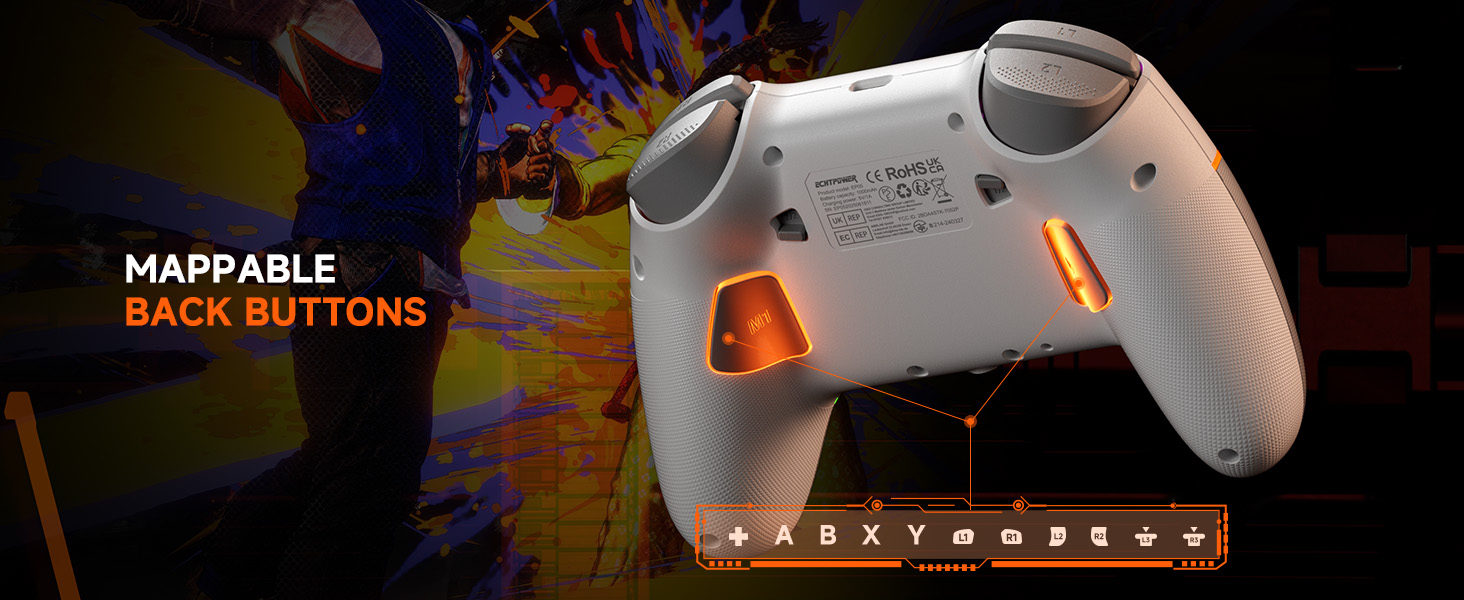
Image: The underside of the ECHTPower EP05 controller, highlighting the mappable back buttons (M1, M2) for custom assignments.
6. പരിപാലനം
- വൃത്തിയാക്കൽ: കൺട്രോളർ വൃത്തിയാക്കാൻ മൃദുവായതും ഉണങ്ങിയതുമായ തുണി ഉപയോഗിക്കുക. അബ്രസിവ് ക്ലീനറുകളോ ലായകങ്ങളോ ഉപയോഗിക്കുന്നത് ഒഴിവാക്കുക.
- സംഭരണം: കൺട്രോളർ നേരിട്ട് സൂര്യപ്രകാശം ഏൽക്കാത്തതും തീവ്രമായ താപനില ഏൽക്കാത്തതുമായ ഒരു തണുത്ത വരണ്ട സ്ഥലത്ത് സൂക്ഷിക്കുക.
- ബാറ്ററി കെയർ: മികച്ച ബാറ്ററി ലൈഫിന്, കൺട്രോളർ ഇടയ്ക്കിടെ പൂർണ്ണമായും ഡിസ്ചാർജ് ചെയ്യുന്നത് ഒഴിവാക്കുക. പതിവായി ചാർജ് ചെയ്യുക.
7. പ്രശ്നപരിഹാരം
- കൺട്രോളർ കണക്റ്റുചെയ്യുന്നില്ല:
- കൺട്രോളർ ചാർജ്ജ് ചെയ്തിട്ടുണ്ടെന്ന് ഉറപ്പാക്കുക.
- Verify the rear mode selector is set to the correct platform (PC, SW, PHONE).
- For 2.4G, ensure the receiver is properly inserted and the controller is in 2.4G mode.
- For Bluetooth, ensure your device's Bluetooth is on and the controller is in pairing mode.
- കൺട്രോളറും ഉപകരണവും പുനരാരംഭിക്കാൻ ശ്രമിക്കുക.
- Joystick drift:
- The Hall-Effect joysticks are designed to prevent drift. If you experience issues, ensure the controller's firmware is up to date (check the manufacturer's webസൈറ്റ്).
- Perform a calibration if available through the controller's TFT screen settings.
- RGB ലൈറ്റുകൾ പ്രവർത്തിക്കുന്നില്ല:
- Check the RGB settings on the TFT screen to ensure they are enabled and configured correctly.
- തെളിച്ച നില ക്രമീകരിക്കുക.
- ഹ്രസ്വ ബാറ്ററി ലൈഫ്:
- ഉപയോഗിക്കുന്നതിന് മുമ്പ് കൺട്രോളർ പൂർണ്ണമായും ചാർജ്ജ് ചെയ്തിട്ടുണ്ടെന്ന് ഉറപ്പാക്കുക.
- Reduce RGB lighting brightness or turn off lighting effects to conserve battery.
- Disable vibration if not needed.
8 സ്പെസിഫിക്കേഷനുകൾ
| ഫീച്ചർ | വിശദാംശങ്ങൾ |
|---|---|
| മോഡൽ | EP05 |
| കണക്റ്റിവിറ്റി | ബ്ലൂടൂത്ത്, 2.4G വയർലെസ്, യുഎസ്ബി-സി വയർഡ് |
| പോളിംഗ് നിരക്ക് | 1000Hz (2.4G/Wired) |
| ജോയിസ്റ്റിക്കുകൾ | Hall-Effect (No Drift) |
| ട്രിഗറുകൾ | Dual Hall-Effect (Adjustable 2mm/6mm) |
| സ്ക്രീൻ തരം | ടി.എഫ്.ടി |
| ബാറ്ററി ശേഷി | 1000mAh |
| അനുയോജ്യമായ പ്ലാറ്റ്ഫോമുകൾ | Windows PC, Nintendo Switch, Android, iOS |
| നിറം | വെള്ള |
9. വാറൻ്റിയും പിന്തുണയും
9.1 വാറൻ്റി വിവരങ്ങൾ
This ECHTPower EP05 controller comes with a 2-വർഷ പരിമിത വാറൻ്റി. Please retain your proof of purchase for warranty claims. The warranty covers manufacturing defects and malfunctions under normal use. It does not cover damage caused by misuse, accidents, unauthorized modifications, or normal wear and tear.
9.2 ഉപഭോക്തൃ പിന്തുണ
For technical support, warranty claims, or general inquiries, please contact ECHTPower customer service:
- ഇമെയിൽ: service@echtpower.com
- Webസൈറ്റ്: www.echtpower.com
Please provide your product model (EP05) and a detailed description of your issue when contacting support.