
1. ആമുഖം
This manual provides instructions for the installation, operation, and maintenance of your Surakey Android 15 Car Stereo Radio. This unit is designed to enhance your driving experience with advanced features such as Apple CarPlay, Android Auto, GPS navigation, Bluetooth connectivity, and a 7-inch IPS touchscreen. Please read this manual thoroughly before installation and use to ensure proper functionality and safety.
അനുയോജ്യത: This car stereo is compatible with RAM 1500, 2500, and 3500 models from 2009-2012. For specific fitment details, refer to the compatibility section.
2. ഉൽപ്പന്ന സവിശേഷതകൾ
- ആൻഡ്രോയിഡ് 15 ഓപ്പറേറ്റിംഗ് സിസ്റ്റം: Equipped with 4GB RAM and 64GB ROM for smooth performance.
- 7-inch IPS Touchscreen: High-definition 2.5D display for clear visuals and responsive touch control.
- Apple CarPlay & Wireless Android Auto: Supports both wired USB and wireless Bluetooth/WiFi connections for seamless smartphone integration, allowing access to navigation, music, calls, and messages via voice control.
- Mirror Link & Split Screen: Enables screen mirroring from iOS and Android smartphones. Supports displaying two applications simultaneously, such as navigation and music.
- GPS നാവിഗേഷൻ: Offers both offline and online navigation options. Includes a GPS module for offline use and supports online navigation apps via WiFi/WLAN.
- സ്റ്റിയറിംഗ് വീൽ നിയന്ത്രണം (SWC): Allows control of calls, music, and volume directly from your vehicle's steering wheel buttons.
- Multimedia Receiver: Features a Quad/4-core processor, 4G/WiFi support, external microphone input, app download capability, FM/RDS radio, DSP, Bluetooth, HD 1024P/IPS 1280P video playback, rearview camera support, MP3/AUX/USB, and compatibility with extended equipment like TPMS, OBD2, and DAB+.
3 സ്പെസിഫിക്കേഷനുകൾ
| ഉൽപ്പന്നത്തിൻ്റെ പേര് | Car Navigation Player |
| മെറ്റീരിയൽ | ലോഹവും പ്ലാസ്റ്റിക്കും |
| സ്ക്രീൻ വലിപ്പം | 7 ഇഞ്ച് |
| മെമ്മറി (റാം + റോം) | 4 ജിബി റാം + 64 ജിബി റോം |
| സിസ്റ്റം | ആൻഡ്രോയിഡ് 15 |
| സിപിയു | 4 കോർ |
| കണക്റ്റിവിറ്റി | WiFi, Bluetooth 4.0, GPS |
| ഓഡിയോ ഫോർമാറ്റുകൾ | MP3/WMA/MP2/OGG/AAC/M4A/MA4/FLAC/APE/3GP/WAV |
| വീഡിയോ ഫോർമാറ്റുകൾ | Mpeg1/Mpeg2/Mpeg4/SP/ASP/GMC/XVID/H.263/H.264 |
| ചിത്ര ഫോർമാറ്റ് | BMP/JPG/GIF/PNG |
| വാല്യംtage | DC12V |
| ഇനത്തിൻ്റെ ഭാരം | 1.6 ഔൺസ് |
| പാക്കേജ് അളവുകൾ | 1.97 x 1.18 x 1.18 ഇഞ്ച് |
4. വാഹന അനുയോജ്യത
This car stereo is designed for specific vehicle models and years. Please verify your vehicle's compatibility before installation.
അനുയോജ്യമായ മോഡലുകൾ:
- For DODGE RAM 1500 2500 3500 2009-2012
- For Chrysler Town & Country 2011-2016
- For Chrysler 200 2011-2014
- For Chrysler 2008 2009 2010
- For Chrysler 300 300C 2007-2010
- For Chrysler Cirrus 2007-2012
- For Chrysler Voyager 2008-2016
- For Chrysler Sebring 2007-2010
- For Chrysler Aspen 2008-2010
- For Jeep Wrangler JK 2007-2017
- For Jeep Wrangler JK 2011-2014
- For Jeep Grand Cherokee 2008-2010
- For Jeep Grand Cherokee 2011 2012 2013
- For Jeep Compass 2009-2017
- For Jeep Patriot 2009-2017
- For Jeep Liberty 2008-2012
- For Jeep Commander 2008-2010
- For Dodge Grand Caravan 2011-2020
- For Dodge Grand Caravan 2008-2020
- For Dodge Grand Caravan 2008-2010
- For Dodge Challenger 2008-2014
- For Dodge Durango 2011 2012 2013
- For Dodge Dakota 2005-2011
- For Dodge Charger 2008 2009 2010
- For Dodge Nitro 2007-2011
- For Dodge Avenger 2008-2014
- For Dodge Caliber 2009-2012
- For Dodge Journey 2009-2010
പൊരുത്തപ്പെടാത്ത മോഡലുകൾ:
- Not fit for Jeep Grand Cherokee 2008-2013
- Not fit for Dodge Durango 2008-2018
പ്രധാന കുറിപ്പ്: Before ordering, please check your car model, year, and model number. It is recommended to send a complete image of the plugs on the back of the center console and the on-board main unit to the seller to confirm compatibility and identify any additional wiring harnesses or adapters required.
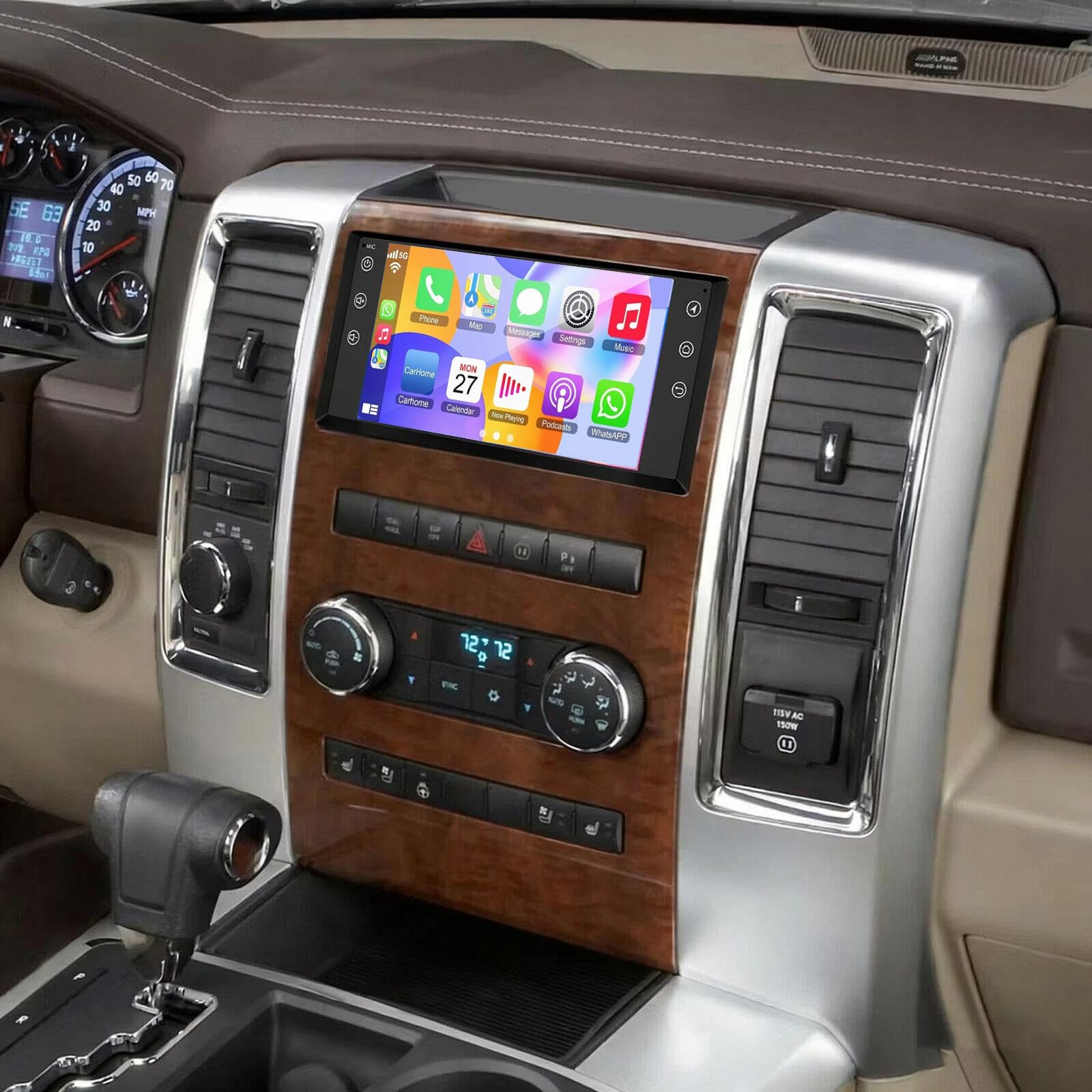
Image: The Surakey Android 15 Car Stereo Radio unit, a general view ഉൽപ്പന്നത്തിൻ്റെ.
5. സജ്ജീകരണവും ഇൻസ്റ്റാളേഷനും
Installation of this car stereo requires technical knowledge and experience with car audio systems. It is highly recommended to seek professional installation to avoid damage to the unit or your vehicle's electrical system.
പൊതുവായ ഇൻസ്റ്റലേഷൻ ഘട്ടങ്ങൾ (പ്രൊഫഷണൽ ഇൻസ്റ്റലേഷൻ ശുപാർശ ചെയ്യുന്നു):
- തയ്യാറാക്കൽ: വൈദ്യുതി ഷോർട്ട് ആകുന്നത് തടയാൻ വാഹനത്തിന്റെ ബാറ്ററി വിച്ഛേദിക്കുക.
- Remove Factory Unit: നിലവിലുള്ള കാർ സ്റ്റീരിയോയും ഡാഷ്ബോർഡ് ട്രിമ്മും ശ്രദ്ധാപൂർവ്വം നീക്കം ചെയ്യുക.
- വയറിംഗ് കണക്ഷനുകൾ: Connect the provided wiring harness to the vehicle's existing wiring. Ensure all connections are secure and correctly matched (power, ground, speakers, antenna, etc.).
- അനുബന്ധ കണക്ഷനുകൾ: Connect the GPS antenna, external microphone, USB cables, and any optional accessories like a backup camera.
- മൗണ്ടിംഗ്: Securely mount the new car stereo into the dashboard opening.
- പരിശോധന: Reconnect the battery and perform initial tests to ensure all functions (power, audio, touchscreen, GPS, Bluetooth, etc.) are working correctly before reassembling the dashboard.
- പുനഃസംയോജനം: Reinstall dashboard trim and ensure all components are properly seated.

ചിത്രം: പിൻഭാഗം view of the car stereo unit with connected wiring harnesses and accessories, illustrating the complexity of connections.
6. പ്രവർത്തന നിർദ്ദേശങ്ങൾ
This section covers the basic operation of your car stereo's key features.
6.1. പവർ ഓൺ/ഓഫ്, അടിസ്ഥാന നാവിഗേഷൻ
- ശക്തി: The unit typically powers on with the vehicle's ignition. A power button (often labeled RST or with a power icon) may be available for manual control.
- ടച്ച്സ്ക്രീൻ ഇന്റർഫേസ്: Navigate through menus and applications by tapping and swiping on the 7-inch IPS touchscreen.
- ഹോം സ്ക്രീൻ: The main screen provides quick access to frequently used functions like music, video player, equalizer, YouTube, settings, and Car Link.
Video: A brief demonstration of the car stereo's user interface, showing navigation between different applications and settings on the home screen.
6.2. ആപ്പിൾ കാർപ്ലേയും ആൻഡ്രോയിഡ് ഓട്ടോയും
- കണക്ഷൻ: Connect your iOS or Android smartphone via a USB cable or wirelessly via Bluetooth and WiFi.
- പ്രവേശനം: Once connected, the CarPlay or Android Auto interface will appear on the stereo screen, allowing access to phone functions like navigation, calls, messages, and music.
- ശബ്ദ നിയന്ത്രണം: Use voice commands (e.g., "Hey Siri" or "Ok Google") for hands-free operation.

Image: Visual representation of the Apple CarPlay and Android Auto interfaces on the car stereo screen.
6.3. മിറർ ലിങ്ക്
- പ്രവർത്തനം: Mirror Link allows you to display your smartphone's screen directly onto the car stereo.
- കണക്ഷൻ: Connect your smartphone using a USB data cable or via WiFi.
- ഉപയോഗം: Once mirrored, you can interact with your phone's apps through the car stereo's touchscreen.

Image: The car stereo display showing a mirrored smartphone screen via Mirror Link.
6.4. ജിപിഎസ് നാവിഗേഷൻ
- ഓഫ്ലൈൻ നാവിഗേഷൻ: Use the included GPS module for navigation without an internet connection. Pre-loaded maps may be available, or you may need to download them.
- ഓൺലൈൻ നാവിഗേഷൻ: Connect to WiFi/WLAN to use online navigation applications (e.g., Google Maps, Waze) downloaded from the app store.
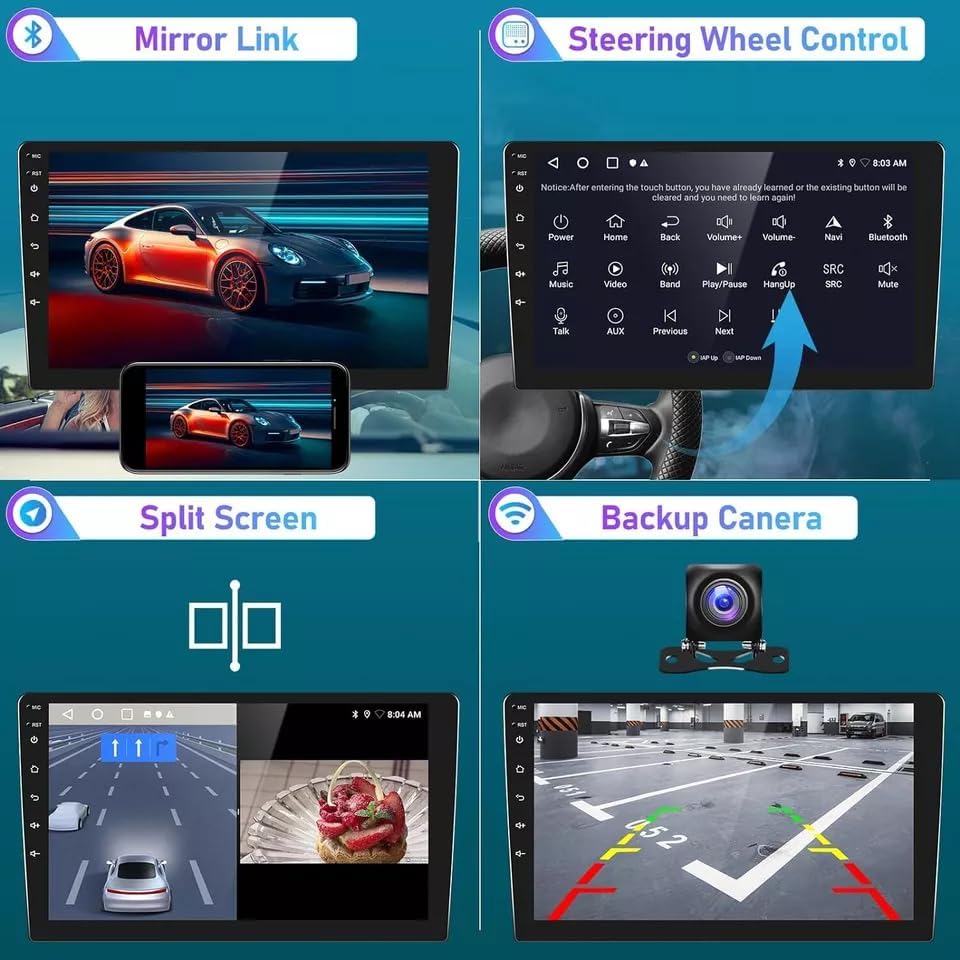
Image: The car stereo displaying GPS navigation, along with other features like Bluetooth, FM RDS, and WiFi.
6.5. ബ്ലൂടൂത്ത് കണക്റ്റിവിറ്റി
- ജോടിയാക്കൽ: Enable Bluetooth on your smartphone and search for the car stereo. Select the stereo from the list of available devices and pair them.
- ഹാൻഡ്സ് ഫ്രീ കോളിംഗ്: Make and receive calls directly through the car stereo, using the built-in or external microphone and vehicle speakers.
- ഓഡിയോ സ്ട്രീമിംഗ്: Stream music and other audio from your smartphone to the car stereo.
6.6. സ്റ്റിയറിംഗ് വീൽ നിയന്ത്രണം (SWC)
- കോൺഫിഗറേഷൻ: After installation, you may need to configure the steering wheel controls in the stereo's settings menu to match your vehicle's buttons.
- പ്രവർത്തനങ്ങൾ: Control volume, change tracks, answer/end calls, and switch modes without taking your hands off the steering wheel.
6.7. ബാക്കപ്പ് ക്യാമറ
- ഓട്ടോമാറ്റിക് ഡിസ്പ്ലേ: When a compatible backup camera is connected and the vehicle is shifted into reverse, the stereo screen will automatically display the camera feed.
- പാർക്കിംഗ് സഹായം: Many backup cameras provide guidelines on the screen to assist with parking.

Image: A multi-panel view demonstrating Mirror Link, Steering Wheel Control, Split Screen, and Backup Camera functionalities.

Image: Diagram illustrating the integration of a factory rear camera with the car stereo for parking assistance.
7. പരിപാലനം
ശരിയായ അറ്റകുറ്റപ്പണി നിങ്ങളുടെ കാർ സ്റ്റീരിയോയുടെ ദീർഘായുസ്സും മികച്ച പ്രകടനവും ഉറപ്പാക്കുന്നു.
- സ്ക്രീൻ ക്ലീനിംഗ്: ടച്ച്സ്ക്രീൻ മൃദുവായി തുടയ്ക്കാൻ മൃദുവായ, ലിന്റ് രഹിത തുണി ഉപയോഗിക്കുക. കഠിനമായ പാടുകൾക്ക്, ചെറുതായി dampതുണിയിൽ വെള്ളം അല്ലെങ്കിൽ സ്ക്രീൻ-സേഫ് ക്ലീനർ ഉപയോഗിക്കുക. കഠിനമായ രാസവസ്തുക്കളോ ഉരച്ചിലുകളോ ഉള്ള വസ്തുക്കൾ ഒഴിവാക്കുക.
- സോഫ്റ്റ്വെയർ അപ്ഡേറ്റുകൾ: Periodically check for software updates from the manufacturer to ensure you have the latest features and bug fixes. Updates can typically be performed via WiFi.
- പരിസ്ഥിതി സംരക്ഷണം: യൂണിറ്റിന് തീവ്രമായ താപനില, ദീർഘനേരം നേരിട്ടുള്ള സൂര്യപ്രകാശം, അല്ലെങ്കിൽ അമിതമായ ഈർപ്പം എന്നിവ ഏൽക്കുന്നത് ഒഴിവാക്കുക.
- കണക്ഷൻ പരിശോധനകൾ: Occasionally check all wiring connections to ensure they are secure, especially after driving on rough terrain.
8. പ്രശ്നപരിഹാരം
നിങ്ങളുടെ കാർ സ്റ്റീരിയോയിൽ പ്രശ്നങ്ങൾ നേരിടുകയാണെങ്കിൽ, താഴെ പറയുന്ന പൊതുവായ ട്രബിൾഷൂട്ടിംഗ് ഘട്ടങ്ങൾ പരിശോധിക്കുക:
- ശക്തിയില്ല:
- Check vehicle's fuse box for blown fuses.
- Ensure all power connections to the stereo are secure.
- Verify the vehicle's battery is charged.
- ശബ്ദമില്ല:
- Check volume levels on the stereo and any connected devices.
- Ensure speaker wires are correctly connected and not shorted.
- Verify the audio source is selected correctly.
- ടച്ച്സ്ക്രീൻ പ്രതികരിക്കുന്നില്ല:
- ഒരു നേർത്ത വസ്തു ഉപയോഗിച്ച് RST ബട്ടൺ (ലഭ്യമെങ്കിൽ) അമർത്തി ഒരു സോഫ്റ്റ് റീസെറ്റ് നടത്തുക.
- Restart the vehicle to power cycle the unit.
- GPS പ്രവർത്തിക്കുന്നില്ല/കൃത്യമല്ല:
- ജിപിഎസ് ആന്റിന ശരിയായി ബന്ധിപ്പിച്ചിട്ടുണ്ടെന്നും വ്യക്തമായ ഒരു ലൈൻ ഉണ്ടെന്നും ഉറപ്പാക്കുക. view ആകാശത്തിൻ്റെ.
- Check GPS settings in the stereo menu.
- Verify map data is up-to-date for offline navigation.
- ബ്ലൂടൂത്ത് കണക്ഷൻ പ്രശ്നങ്ങൾ:
- സ്റ്റീരിയോയിലും സ്മാർട്ട്ഫോണിലും ബ്ലൂടൂത്ത് പ്രവർത്തനക്ഷമമാക്കിയിട്ടുണ്ടെന്ന് ഉറപ്പാക്കുക.
- മുമ്പത്തെ ജോടിയാക്കലുകൾ ഇല്ലാതാക്കി ഉപകരണങ്ങൾ വീണ്ടും ജോടിയാക്കാൻ ശ്രമിക്കുക.
- Move the smartphone closer to the stereo.
- കാർപ്ലേ/ആൻഡ്രോയിഡ് ഓട്ടോ കണക്റ്റ് ചെയ്യുന്നില്ല:
- Ensure your smartphone's operating system is up-to-date.
- Try a different USB cable (for wired connections).
- Check app permissions on your smartphone for CarPlay/Android Auto.
If these steps do not resolve the issue, please contact the seller or a qualified service technician for further assistance.
9. വാറൻ്റിയും പിന്തുണയും
വാറന്റി വിവരങ്ങൾക്കും സാങ്കേതിക പിന്തുണയ്ക്കും, നിങ്ങളുടെ വാങ്ങലിനൊപ്പം നൽകിയിരിക്കുന്ന ഡോക്യുമെന്റേഷൻ പരിശോധിക്കുകയോ വിൽപ്പനക്കാരനെ നേരിട്ട് ബന്ധപ്പെടുകയോ ചെയ്യുക. വാറന്റി ക്ലെയിമുകൾക്കായി നിങ്ങളുടെ വാങ്ങിയതിന്റെ തെളിവ് സൂക്ഷിക്കുക.
വിൽപ്പനക്കാരന്റെ കോൺടാക്റ്റ്: Fuyatong-US (via Amazon)
ഉൽപ്പന്നം ASIN: B0G2M5ZL4V