
1. ഉൽപ്പന്നം കഴിഞ്ഞുview
The BN-LINK WiFi Smart Plug (Model CP-J31WT) allows you to control your home appliances remotely, set schedules, and use voice commands for a smarter, more convenient lifestyle. This compact plug is designed for ease of use and integrates seamlessly with popular smart home platforms.

Image: BN-LINK WiFi Smart Plug overview with icons for WiFi, timer, app control, voice control, remote operation, and group control.
പ്രധാന സവിശേഷതകൾ:
- റിമോട്ട് കൺട്രോൾ: Turn appliances ON/OFF from anywhere using your smartphone.
- ശബ്ദ നിയന്ത്രണം: ഹാൻഡ്സ്-ഫ്രീ പ്രവർത്തനത്തിനായി അലക്സ, ഗൂഗിൾ ഹോം എന്നിവയുമായി പൊരുത്തപ്പെടുന്നു.
- ടൈമർ പ്രവർത്തനം: Schedule appliances to turn ON/OFF automatically, saving energy and preventing overcharging.
- കോംപാക്റ്റ് ഡിസൈൻ: Small size ensures it doesn't block adjacent outlets.
- സുരക്ഷാ സവിശേഷതകൾ: Equipped with high-temperature flame-retardant material, overload protection, electric shock prevention, and anti-tracking design.

Image: Diagram highlighting the smart plug's features: LED indicator, ON/OFF button, WiFi connection, timer function, remote operation, and voice control.
2 സുരക്ഷാ വിവരങ്ങൾ
ഈ ഉൽപ്പന്നം ഉപയോഗിക്കുന്നതിന് മുമ്പ് എല്ലാ സുരക്ഷാ നിർദ്ദേശങ്ങളും വായിച്ച് മനസ്സിലാക്കുക. ഈ നിർദ്ദേശങ്ങൾ പാലിക്കുന്നതിൽ പരാജയപ്പെടുന്നത് വൈദ്യുതാഘാതം, തീപിടുത്തം അല്ലെങ്കിൽ ഗുരുതരമായ പരിക്കിന് കാരണമായേക്കാം.
- ഉപകരണം ഡിസ്അസംബ്ലിംഗ് ചെയ്യുകയോ പരിഷ്കരിക്കുകയോ ചെയ്യരുത്.
- നനഞ്ഞ അന്തരീക്ഷത്തിലോ വെള്ളത്തിനടുത്തോ ഉപയോഗിക്കരുത്.
- ഔട്ട്ലെറ്റിലേക്ക് പ്ലഗ് പൂർണ്ണമായി ചേർത്തിട്ടുണ്ടെന്ന് ഉറപ്പാക്കുക.
- Do not exceed the maximum load rating of 15A / 1500W.
- കുട്ടികൾക്ക് ലഭ്യമാകാതെ സൂക്ഷിക്കുക.
- Unplug the device from the outlet before cleaning.
- ഈ ഉൽപ്പന്നം ഇൻഡോർ ഉപയോഗത്തിനായി മാത്രം രൂപകൽപ്പന ചെയ്തിട്ടുള്ളതാണ്.
അന്തർനിർമ്മിത സുരക്ഷാ സവിശേഷതകൾ:
- High-Temperature Flame-Retardant Material: Reduces fire risk.
- ഓവർലോഡ് സംരക്ഷണം: അമിതമായ വൈദ്യുത പ്രവാഹം മൂലമുള്ള കേടുപാടുകൾ തടയാൻ യാന്ത്രികമായി വൈദ്യുതി വിച്ഛേദിക്കുന്നു.
- Electric Shock Prevention Design: Enhanced safety against accidental contact.
- Anti-Tracking Design: Prevents dust accumulation and potential short circuits.
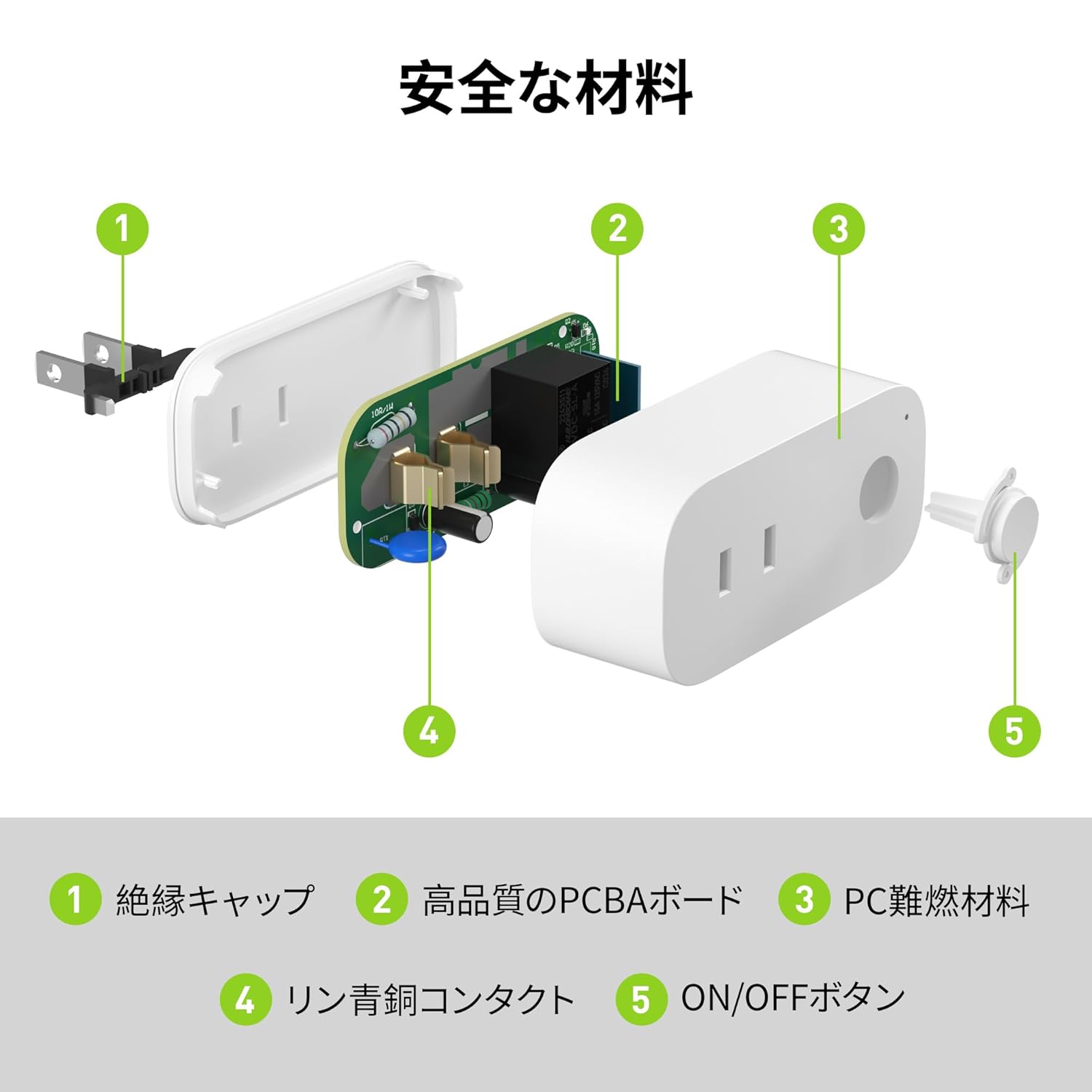
Image: Internal components of the smart plug, highlighting safety features such as the insulation cap, high-quality PCBA board, PC flame-retardant material, phosphor bronze contacts, and the ON/OFF button.
3. സജ്ജീകരണ നിർദ്ദേശങ്ങൾ
3.1. പ്രാരംഭ സജ്ജീകരണം
- Unpack the BN-LINK Smart Plug from its packaging.
- Plug the smart plug into a standard wall outlet.
- Observe the indicator light on the plug. It should start blinking. If it does not blink, press and hold the ON/OFF button for approximately 5 seconds until it starts blinking rapidly.
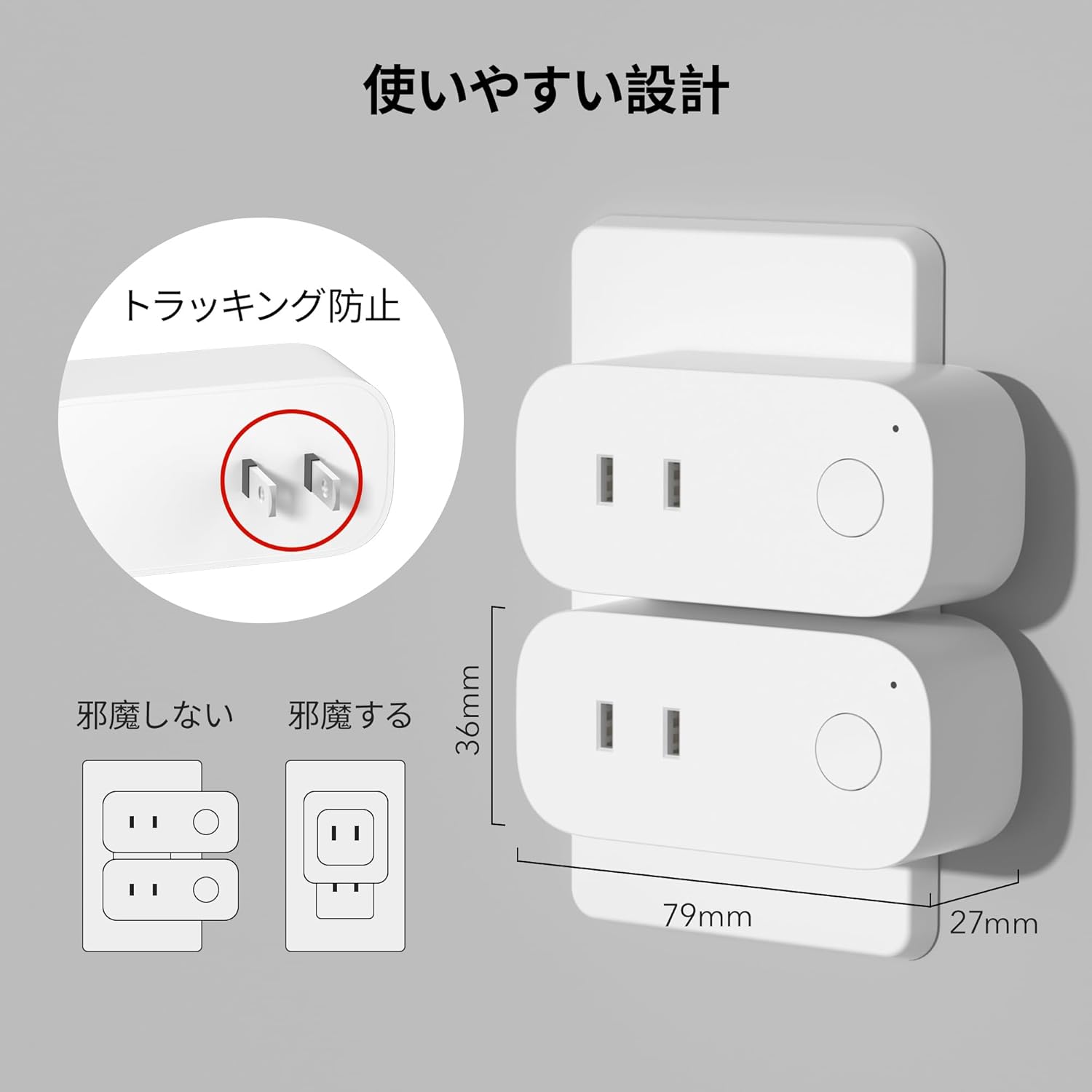
Image: The compact design of the smart plug, illustrating how it fits into an outlet without obstructing the adjacent one. Dimensions are also shown.
3.2. ആപ്പ് ഇൻസ്റ്റാളേഷനും വൈഫൈ കണക്ഷനും
To utilize all smart features, you need to install the BN-LINK app and connect the plug to your 2.4GHz Wi-Fi network. This device only supports 2.4GHz Wi-Fi.
- Download the "BN-LINK" app from your smartphone's app store (Google Play Store for Android or Apple App Store for iOS).
- ആപ്പ് തുറന്ന് ഒരു അക്കൗണ്ട് സൃഷ്ടിക്കുക അല്ലെങ്കിൽ നിങ്ങൾക്ക് ഇതിനകം ഒന്ന് ഉണ്ടെങ്കിൽ ലോഗിൻ ചെയ്യുക.
- Tap the "+" icon or "Add Device" to begin the pairing process.
- Select "Smart Plug" from the device list.
- Follow the on-screen instructions to connect the smart plug to your 2.4GHz Wi-Fi network. Ensure your phone is also connected to the 2.4GHz network during setup.
- Once connected, you can rename your smart plug for easy identification (e.g., "Living Room Lamp," "Coffee Maker").
Video: This video demonstrates the process of connecting the smart plug to the BN-LINK app and your Wi-Fi network, including resetting the device and confirming indicator light status.
Video: This video provides a step-by-step guide on setting up the ePlugBT and connecting it to Wi-Fi, which is similar to the BN-LINK Smart Plug setup process.
4. പ്രവർത്തന നിർദ്ദേശങ്ങൾ
4.1. ആപ്പ് വഴി റിമോട്ട് കൺട്രോൾ
Once connected to Wi-Fi, you can control your appliances from anywhere with an internet connection.
- Open the BN-LINK app.
- Tap on the device name you wish to control.
- Use the ON/OFF toggle button within the app to switch your appliance on or off.

Image: Remote operation of the smart plug via the BN-LINK app on a smartphone. The image shows the app's ON/OFF control for a device connected to the smart plug, with a WiFi router in the background.

Image: A user controlling a smart plug remotely with their smartphone in a modern kitchen environment.
4.2. ശബ്ദ നിയന്ത്രണം
Integrate your smart plug with Amazon Alexa or Google Home for convenient voice commands.
- Ensure your smart plug is successfully connected to the BN-LINK app and your Wi-Fi network.
- Alexa അല്ലെങ്കിൽ Google Home ആപ്പ് തുറക്കുക.
- Follow the app's instructions to add a new device or skill, searching for "BN-LINK" or "Smart Plug."
- ലിങ്ക് ചെയ്തുകഴിഞ്ഞാൽ, നിങ്ങൾക്ക് ഇനിപ്പറയുന്നതുപോലുള്ള വോയ്സ് കമാൻഡുകൾ ഉപയോഗിക്കാം:
- "അലക്സാ, [ഉപകരണ നാമം] ഓണാക്കുക."
- "ഹേ ഗൂഗിൾ, [ഉപകരണത്തിന്റെ പേര്] ഓഫാക്കൂ."

Image: A user in a living room controlling a lamp connected to a smart plug using voice commands with an Alexa device. The image also indicates Google Home compatibility.

Image: A smart plug connected to an outlet, being controlled by a Google Home device. A person is shown in bed, illustrating hands-free operation.
4.3. Timer Function and Scheduling
Set custom schedules to automate your appliances and manage energy consumption.
- In the BN-LINK app, select your smart plug.
- Navigate to the "Timer" or "Schedule" section.
- Set specific ON/OFF times for your appliances. You can create daily, weekly, or one-time schedules.
- Use the countdown timer for temporary automation, such as turning off a charger after a set period to prevent overcharging.

Image: The BN-LINK app displaying timer and scheduling features. Examples show a coffee maker turning on at 7:15 AM and a lamp turning off at 10:00 PM, demonstrating automated control.

Image: A smart plug connected to a microwave, with the app interface showing a timer set to turn the device ON at 7:00.
5. പരിപാലനം
To ensure optimal performance and longevity of your BN-LINK Smart Plug, follow these maintenance guidelines:
- വൃത്തിയാക്കൽ: വൃത്തിയാക്കുന്നതിന് മുമ്പ് പവർ ഔട്ട്ലെറ്റിൽ നിന്ന് സ്മാർട്ട് പ്ലഗ് വിച്ഛേദിക്കുക. ഉപരിതലം തുടയ്ക്കാൻ ഉണങ്ങിയതും മൃദുവായതുമായ തുണി ഉപയോഗിക്കുക. ലിക്വിഡ് ക്ലീനറുകളോ സ്പ്രേകളോ ഉപയോഗിക്കരുത്.
- സംഭരണം: If not in use for an extended period, unplug the device and store it in a cool, dry place away from direct sunlight and moisture.
- പരിശോധന: Periodically check the plug and outlet for any signs of damage, wear, or overheating. If any issues are found, discontinue use and contact customer support.
6. പ്രശ്നപരിഹാരം
If you encounter issues with your BN-LINK Smart Plug, refer to the following common problems and solutions:
| പ്രശ്നം | സാധ്യമായ കാരണം | പരിഹാരം |
|---|---|---|
| Device cannot connect to Wi-Fi. | Incorrect Wi-Fi password, 5GHz Wi-Fi network, weak signal, or device not in pairing mode. |
|
| റിമോട്ട് കൺട്രോൾ പ്രവർത്തിക്കുന്നില്ല. | No internet connection on phone or smart plug, or app issue. |
|
| ശബ്ദ നിയന്ത്രണം പ്രതികരിക്കുന്നില്ല. | Incorrect device name, smart assistant not linked, or internet connection issue. |
|
| പ്ലഗ് പ്രതികരിക്കുന്നില്ല. | പവർ യൂtage, device malfunction, or firmware issue. |
|
7 സ്പെസിഫിക്കേഷനുകൾ
| ഫീച്ചർ | വിശദാംശങ്ങൾ |
|---|---|
| ബ്രാൻഡ് | ബിഎൻ-ലിങ്ക് |
| മോഡൽ നമ്പർ | CP-J31WT |
| ഇനത്തിൻ്റെ ഭാരം | 70 ഗ്രാം |
| പാക്കേജ് അളവുകൾ | 8.2 x 4.7 x 4.3 സെ.മീ |
| വലിപ്പം | 1 പായ്ക്ക് |
| സ്വിച്ച് തരം | 1-വഴി |
| ഉൾപ്പെടുത്തിയ ഘടകങ്ങൾ | Smart Plug body, Instruction Manual |
| Batteries Used | ഇല്ല |
| ഓപ്പറേറ്റിംഗ് മോഡ് | ഓൺ-ഓഫ് |
| നിലവിലെ റേറ്റിംഗ് | 15 Amps |
| ഓപ്പറേറ്റിംഗ് വോളിയംtage | 100 വോൾട്ട് |
| കണക്റ്റർ തരം | പ്ലഗ്-ഇൻ |
| മെറ്റീരിയൽ | പ്ലാസ്റ്റിക് |
| സർക്യൂട്ട് തരം | 1-വഴി |
8. വാറൻ്റിയും പിന്തുണയും
BN-LINK products are designed for quality and reliability. For warranty information and customer support, please refer to the contact details provided in the product packaging or visit the official BN-LINK webസൈറ്റ്.
For further assistance, you may also contact the seller directly through the Amazon platform.
ഓൺലൈൻ ഉറവിടങ്ങൾ:
- Official BN-LINK Webസൈറ്റ്: www.bn-link.com (ദയവായി ശ്രദ്ധിക്കുക: ഇതൊരു പ്ലെയ്സ്ഹോൾഡറാണ് URL, replace with actual if available)
- ആമസോൺ ഉൽപ്പന്ന പേജ്: Amazon.co.jp Product Page