
1. ആമുഖം
Welcome to the user manual for your LOKLNEYK H610 S4 Motherboard. This guide provides detailed instructions for installation, operation, maintenance, and troubleshooting to ensure optimal performance and longevity of your system. Please read this manual thoroughly before beginning installation.
2. സജ്ജീകരണം
2.1. പാക്കേജ് ഉള്ളടക്കം
Verify that all components are present in your motherboard package:
- LOKLNEYK H610 S4 Motherboard
- ഐ / ഒ ഷീൽഡ്
- SATA ഡാറ്റ കേബിളുകൾ (അളവിൽ വ്യത്യാസമുണ്ടാകാം)
- ഉപയോക്തൃ മാനുവൽ (ഈ പ്രമാണം)
- ഡ്രൈവർ സിഡി/യുഎസ്ബി (അല്ലെങ്കിൽ ഡൗൺലോഡ് നിർദ്ദേശങ്ങൾ)
2.2. മദർബോർഡ് ലേഔട്ട്
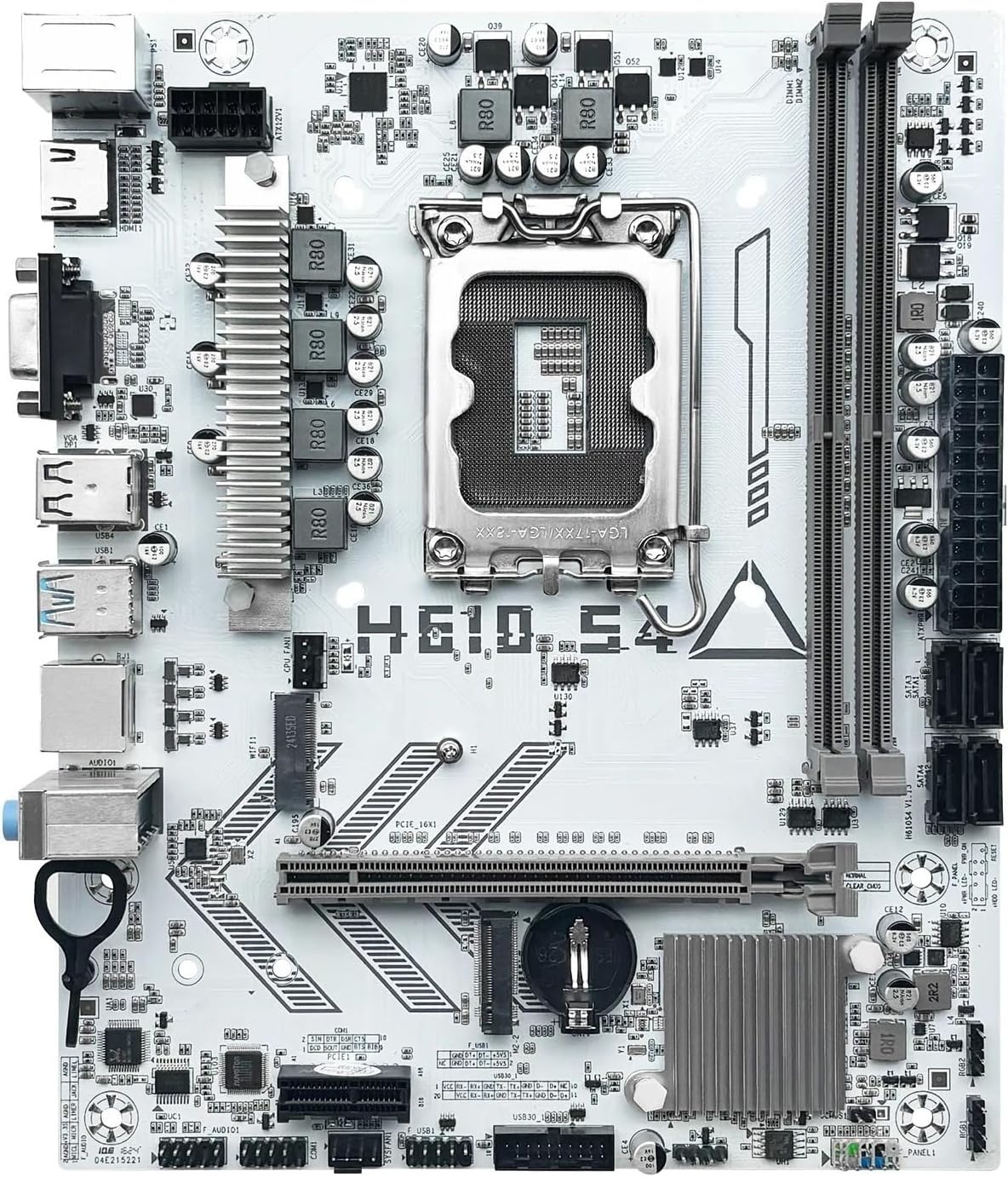
Familiarize yourself with the various components and connectors on the motherboard. Refer to the diagram below for a detailed overview of the H610 S4 motherboard's key areas.

Figure 1: Labeled diagram of the LOKLNEYK H610 S4 Motherboard, highlighting CPU socket, RAM slots, PCIe slots, M.2 slots, SATA ports, and various headers.
2.3 ഇൻസ്റ്റലേഷൻ ഘട്ടങ്ങൾ
നിങ്ങളുടെ മദർബോർഡും ഘടകങ്ങളും ശരിയായി ഇൻസ്റ്റാൾ ചെയ്യുന്നതിന് ഈ ഘട്ടങ്ങൾ പാലിക്കുക:
- ചേസിസ് തയ്യാറാക്കുക: നിങ്ങളുടെ കമ്പ്യൂട്ടർ കേസിന്റെ പിൻഭാഗത്ത് I/O ഷീൽഡ് ഇൻസ്റ്റാൾ ചെയ്യുക.
- മദർബോർഡ് ഇൻസ്റ്റാൾ ചെയ്യുക: Carefully place the motherboard into the chassis, aligning it with the standoffs. Secure it with screws.
- CPU Installation (LGA 1700):
- Open the CPU socket lever and protective cover.
- Align the CPU's triangular mark with the mark on the socket.
- സോക്കറ്റിൽ സൌമ്യമായി CPU വയ്ക്കുക. ബലം പ്രയോഗിച്ച് ഞെക്കരുത്.
- സിപിയു സുരക്ഷിതമാക്കാൻ ലിവർ അടയ്ക്കുക.
- സിപിയു കൂളർ ഇൻസ്റ്റാളേഷൻ: Install your CPU cooler according to its manufacturer's instructions, ensuring proper thermal paste application.
- RAM Installation (DDR4):
- DDR4 മെമ്മറി സ്ലോട്ടുകളുടെ രണ്ടറ്റത്തുമുള്ള ക്ലിപ്പുകൾ തുറക്കുക.
- Align the memory module's notch with the slot's key.
- ക്ലിപ്പുകൾ ശരിയായ സ്ഥാനത്ത് വരുന്നത് വരെ മൊഡ്യൂളിന്റെ രണ്ട് അറ്റങ്ങളിലും ദൃഢമായി അമർത്തുക.
- Storage Installation (NVMe M.2 / SATA):
- For M.2 SSDs, insert the drive into the M.2 slot and secure it with the provided screw.
- For SATA drives, connect SATA data cables to the motherboard's SATA ports and to your drives. Connect power cables from your power supply to the drives.
- PCIe കാർഡ് ഇൻസ്റ്റാളേഷൻ: Insert your graphics card or other PCIe expansion cards into the appropriate PCIe slots and secure them.
- പവർ സപ്ലൈ കണക്ഷനുകൾ: നിങ്ങളുടെ പവർ സപ്ലൈയിൽ നിന്ന് മദർബോർഡിലേക്ക് 24-പിൻ ATX പവർ കണക്ടറും 8-പിൻ CPU പവർ കണക്ടറും ബന്ധിപ്പിക്കുക.
- ഫ്രണ്ട് പാനൽ കണക്ഷനുകൾ: Connect the front panel headers (power button, reset button, USB ports, audio jacks, LED indicators) to the corresponding pins on the motherboard. Refer to the motherboard layout diagram (Figure 1) for pin locations.
ചിത്രം 2: ഓവർview of the LOKLNEYK H610 S4 Motherboard, showing the general layout of components.
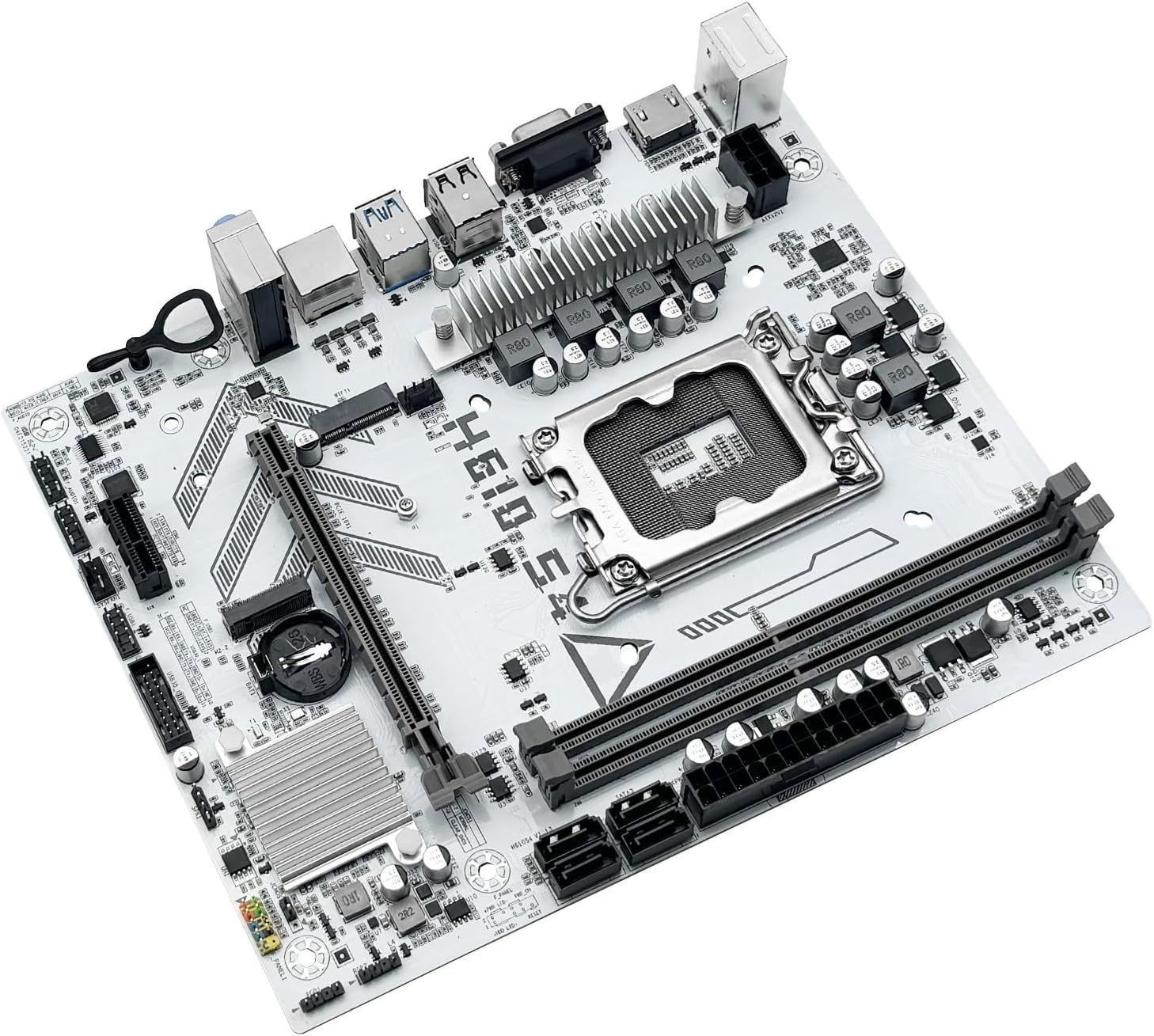
Figure 3: Rear I/O panel connectors and typical accessories like the I/O shield and SATA cables.
3. പ്രവർത്തന നിർദ്ദേശങ്ങൾ
3.1. ആദ്യ ബൂട്ട്
After completing all hardware installations, connect your monitor, keyboard, and mouse. Power on your system. The system should display the BIOS/UEFI splash screen. If not, check all power connections and component seating.
3.2. ബയോസ്/യുഇഎഫ്ഐ കോൺഫിഗറേഷൻ
BIOS/UEFI സജ്ജീകരണ യൂട്ടിലിറ്റിയിൽ പ്രവേശിക്കാൻ, DEL or F2 key during the initial boot sequence. Here you can configure:
- Boot order for your operating system drive.
- തീയതിയും സമയവും ക്രമീകരണം.
- Memory profiles (e.g., XMP for DDR4).
- Fan speed controls.
- SATA mode (AHCI/RAID).
3.3. ഡ്രൈവർ ഇൻസ്റ്റാളേഷൻ
After installing your operating system, it is crucial to install the latest drivers for your motherboard components. These include:
- ചിപ്സെറ്റ് ഡ്രൈവറുകൾ
- ലാൻ (ഇഥർനെറ്റ്) ഡ്രൈവറുകൾ
- ഓഡിയോ ഡ്രൈവറുകൾ
- Graphics drivers (for integrated graphics or discrete GPU)
Drivers can typically be found on the LOKLNEYK official website or on the provided driver media.
4. പരിപാലനം
4.1. വൃത്തിയാക്കൽ
Regular cleaning helps maintain optimal performance and extends the lifespan of your motherboard. Use compressed air to remove dust from heatsinks, fans, and other components. Ensure the system is powered off and unplugged before cleaning.
4.2. ബയോസ്/യുഇഎഫ്ഐ അപ്ഡേറ്റുകൾ
Periodically check the LOKLNEYK website for updated BIOS/UEFI versions. Updates can provide improved compatibility, stability, and new features. Follow the specific instructions provided by LOKLNEYK for updating the BIOS/UEFI to avoid system damage.
5. പ്രശ്നപരിഹാരം
നിങ്ങൾ നേരിട്ടേക്കാവുന്ന പൊതുവായ പ്രശ്നങ്ങൾക്കുള്ള പരിഹാരങ്ങൾ ഈ വിഭാഗം നൽകുന്നു.
5.1. പൊതുവായ പ്രശ്നങ്ങളും പരിഹാരങ്ങളും
- ശക്തിയില്ല:
- Check if the power supply is connected correctly to the motherboard (24-pin ATX and 8-pin CPU).
- പവർ സപ്ലൈ സ്വിച്ച് 'ഓൺ' സ്ഥാനത്താണെന്ന് ഉറപ്പാക്കുക.
- ഫ്രണ്ട് പാനൽ പവർ ബട്ടൺ കണക്ഷൻ പരിശോധിക്കുക.
- ഡിസ്പ്ലേ ഇല്ല:
- Ensure the monitor cable is securely connected to the graphics card or motherboard (if using integrated graphics).
- ഗ്രാഫിക്സ് കാർഡും റാം മൊഡ്യൂളുകളും വീണ്ടും ഇൻസ്റ്റാൾ ചെയ്യുക.
- ഒരു റാം സ്റ്റിക്ക് മാത്രം ഉപയോഗിച്ച് ബൂട്ട് ചെയ്യാൻ ശ്രമിക്കുക.
- സിസ്റ്റം അസ്ഥിരത/ക്രാഷുകൾ:
- സിപിയു, ജിപിയു താപനിലകൾ പരിശോധിക്കുക.
- എല്ലാ ഡ്രൈവർമാരും കാലികമാണെന്ന് ഉറപ്പാക്കുക.
- പിശകുകൾക്കായി RAM മൊഡ്യൂളുകൾ പരിശോധിക്കുക.
- ബൂട്ട് ഉപകരണം കണ്ടെത്തിയില്ല:
- Verify that your storage drive (SSD/HDD) is properly connected.
- Check BIOS/UEFI settings for correct boot order and SATA mode.
- ഡ്രൈവിൽ ഓപ്പറേറ്റിംഗ് സിസ്റ്റം ശരിയായി ഇൻസ്റ്റാൾ ചെയ്തിട്ടുണ്ടെന്ന് ഉറപ്പാക്കുക.
For more complex issues, consult the LOKLNEYK support webസൈറ്റ് അല്ലെങ്കിൽ യോഗ്യതയുള്ള ഒരു ടെക്നീഷ്യൻ.
6 സ്പെസിഫിക്കേഷനുകൾ
Below are the technical specifications for the LOKLNEYK H610 S4 Motherboard:
| ഫീച്ചർ | സ്പെസിഫിക്കേഷൻ |
|---|---|
| സിപിയു സോക്കറ്റ് | LGA 1700 |
| അനുയോജ്യമായ CPU-കൾ | Intel Core 12th, 13th, 14th Generation i3, i5 Processors |
| ചിപ്സെറ്റ് | ഇൻ്റൽ H610 |
| മെമ്മറി സ്ലോട്ടുകൾ | 2 x DDR4 DIMM |
| പരമാവധി മെമ്മറി ശേഷി | 64 ജിബി |
| സംഭരണ ഇന്റർഫേസുകൾ | 2 x M.2 (NVMe 2280), 4 x SATA 3.0 |
| PCIe സ്ലോട്ടുകൾ | 1 x PCIe 4.0 x16, 1 x PCIe x1 |
| ലാൻ | 1 x RJ45 ഗിഗാബൈറ്റ് ഇഥർനെറ്റ് |
| USB പോർട്ടുകൾ | USB 3.0, USB 3.1 Gen1, USB 2.0 (Front & Rear) |
| വീഡിയോ ഔട്ട്പുട്ടുകൾ | എച്ച്ഡിഎംഐ, വിജിഎ |
| ഓഡിയോ | ഓൺബോർഡ് ഓഡിയോ |
| ഫോം ഫാക്ടർ | ഒതുക്കം (180mm x 220mm) |

Figure 4: LOKLNEYK H610 S4 Motherboard showing its physical dimensions.
7. വാറൻ്റിയും പിന്തുണയും
7.1. വാറൻ്റി വിവരങ്ങൾ
Please refer to the warranty card included with your product or visit the official LOKLNEYK webവിശദമായ വാറന്റി നിബന്ധനകൾക്കും വ്യവസ്ഥകൾക്കും സൈറ്റ് സന്ദർശിക്കുക. വാറന്റി ക്ലെയിമുകൾക്കായി നിങ്ങളുടെ വാങ്ങലിന്റെ തെളിവ് സൂക്ഷിക്കുക.
7.2. സാങ്കേതിക പിന്തുണ
If you encounter any issues that cannot be resolved using this manual, please visit the LOKLNEYK support webപതിവുചോദ്യങ്ങൾ, ഡ്രൈവർ ഡൗൺലോഡുകൾ, സാങ്കേതിക സഹായത്തിനായുള്ള ബന്ധപ്പെടാനുള്ള വിവരങ്ങൾ എന്നിവയ്ക്കുള്ള സൈറ്റ്.